新版本:1.3e

Redstone++ 是一个在保持原版 Minecraft 平衡性与手感的同时,扩展红石可能性的模组。所有更改均可在配置文件中启用或禁用。
对于刚接触 Minecraft 模组制作、整合包制作或不熟悉如何编辑配置文件的新手,请阅读此处:。
Minecraft 兼容性
Redstone++ ver1.3 仅支持 MC1.12.2!它无法在 1.12.1 或任何其他版本上运行。Redstone++ ver1.2d 使用同一个 jar 文件支持所有 1.11.x 和 1.12.x 版本。没有理由去运行其他版本。没有任何版本可以在其他版本的 Minecraft 上运行,无论那些非法分发此模组或带有此模组名称的病毒网站怎么说。不要相信他们,他们在撒谎。你的电脑会感谢你的。
对其他 Minecraft 版本的支持
目前我忙于其他事情,所以暂时没有时间更新这个模组。我可能永远不会进行向后移植;然而,我最终会将其更新到某个未来的版本。基本上会跳跃到比如 1.15 或更高版本。因此 MC1.13、MC1.14;大概不会发生。MC1.10 大概也不会发生。MC1.7.10 及更早版本,永远、绝对不会发生。当我开始更新到 1.15 时,半蜂蜜块将会包含在内。
模组兼容性问题
本模组大量使用了注册表覆盖(在 1.11.x 中为替换别名),并会因与其他修改相同方块的模组冲突而崩溃。对这些方块应用 ASM 转换器的模组将静默失败。你可能需要禁用本模组或其他模组的部分功能才能使它们正常工作。这是不可避免的(是的,我本可以用其他方式编写,但你会遇到相同类型的问题,只是错误信息不同)。虽然我已经修复了一些冲突,但不可能解决所有问题。
在 1.12.x 版本中,Liteloader 对于使用注册表覆盖(Registry Overriding)的模组存在严重问题。在该问题修复之前,它与所有使用注册表覆盖的模组不兼容,包括 Redstone++。鉴于自上次更新以来已超过两年,我认为这种情况不太可能得到解决。我无法对此进行修复;任何关于与 Liteloader 兼容性问题的反馈都将被关闭。或者,您可以回退到 MC1.11.x 版本,因为 Liteloader 在 Substitution Aliases 方面没有此类问题。
活塞推动 TileEntity(方块实体)的能力可能会在某些方块上导致奇怪的问题或崩溃。所有原版方块的问题均已修复,但我无法控制其他模组添加的方块所引发的问题。如果遇到这种情况,您可以编辑本模组的配置文件,以防止活塞推动这些方块;要么使其不可移动,要么允许活塞将其破坏。
应要求,ver1.3 在不可移动列表和销毁列表中添加了通配符 *。因此,您现在可以通过例如将 modname:* 添加到不可移动列表中来黑名单整个模组。现在还有一个选项可以完全禁用活塞移动 TileEntity(最初启用活塞替换的唯一原因,但现在有很多理由需要它)。
Redstone++ ver1.3b 添加了一个新的配置选项,用于指定在移动 TileEntity 时要清除的标签列表。如果您有一个由活塞移动时在地面上掉落重复物品的方块,您需要将该方块的 "Items" 标签添加到此列表中。要做到这一点,请获取一个调试方块并将其放置在该方块上方。调试方块会将它的 TileEntity 数据打印到控制台。识别该方块用于存储物品的标签的确切名称,并将其添加到配置文件中的 clearTag 列表中。
许可协议
除非满足以下条件,否则请勿在任何其他地方重新上传此模组:
如果您有权将 Redstone++ 包含在整合包中,前提是您的整合包至少包含另外 5 个模组,并且您提供一个页面,其中:
1) 列出您整合包中的所有模组,
2) 证明您拥有分发这些模组的必要权利,
3) 提供每个模组的首页/论坛主题的链接,以及
4) 正确注明这些模组的作者。
注意:如果您将此整合包用于整合包中,我请求(但不强制要求)您要么提供一个显眼且加粗的链接指向此页面,要么提供一个说明本模组所做更改的维基页面(至少列出您的整合包启用的那些更改)。原因是:这些更改非常微妙但意义重大。玩家可能会希望使用这些功能,却甚至不知道它们的存在。
当然,您可以毫无限制地制作关于本模组的评测/教程视频。
特性

 旋转器与粘性旋转器
- 可以旋转方块和黏液结构。同时也适用于方块实体(TileEntities)。
- 右键点击该方块以设置旋转方向。
- 旋转器可以旋转活塞和其他旋转器,活塞也可以推或拉它们。
- 放置在旋转器顶部的红石在激活时不会被破坏。
- 注意:目前尚不支持实体碰撞检测。此功能将在稍后版本中添加。

 改进型活塞与粘性活塞
- 现在可以推动方块实体(箱子、漏斗、发射器、投掷器等)。
- 可配置选项用于更改推动上限(默认值:12)
- 放置在活塞顶部的红石在活塞伸出或缩回时将不再被破坏。
 改进型发射器
- 现在可以种植种子和树苗。
- 可以使用桶和瓶子填充及清空炼药锅。
- 可以洗掉皮革盔甲上的染料(前方需要有水的炼药锅)。
- 可以在物品展示框上放置和移除物品(例如地图)。
- 可以使用剪刀(作用于羊、藤蔓、蜘蛛网等)。
- 可以喂食动物(仅用于繁殖;不适用于马,但适用于其他所有动物)。
- 可以挤牛奶并获取蘑菇汤(针对牛和哞菇)。
- 可以在唱片机上放置和移除唱片。
- 可以放置蛋糕。
- 可以将有效的方块放入空矿车中(如箱子矿车、熔炉矿车、漏斗矿车等)。
- 将不再把矿车堆叠在另一个矿车上,从而避免它们发生重叠故障。
- 可以拾取和放置海绵/湿海绵。
- 可以放置受重力影响的方块(如沙子、沙砾等)。
 改进型合成台
- 现在是一个方块实体,因此它会保留其中的物品而不是掉落出来。
- 由于活塞现在可以推动方块实体,它仍然可以被活塞推动。
- 现在可以通过 Shift+点击将物品移入合成网格。
- 可与漏斗和发射器配合使用。其工作方式取决于合成台是否通电。
- 如果未通电:漏斗只会将物品插入到已经包含该物品的合成网格槽位中,并且只会从结果栏中抽取物品。
- 如果已通电:漏斗只会将物品插入到完全空的合成网格槽位中,并且只会从合成网格中抽取物品。
- 上述更改使得构建自动工作台成为可能,甚至是那些可以改变配方的工作台,但你必须稍微思考一下红石电路的设计才能使其正常工作。请记住:现在你可以用活塞推动漏斗。
 改进的熔炉矿车
- 不再存在严重的故障。它们可以推动多个矿车,载有玩家的矿车上坡时,可以在转弯时不停车,等等。
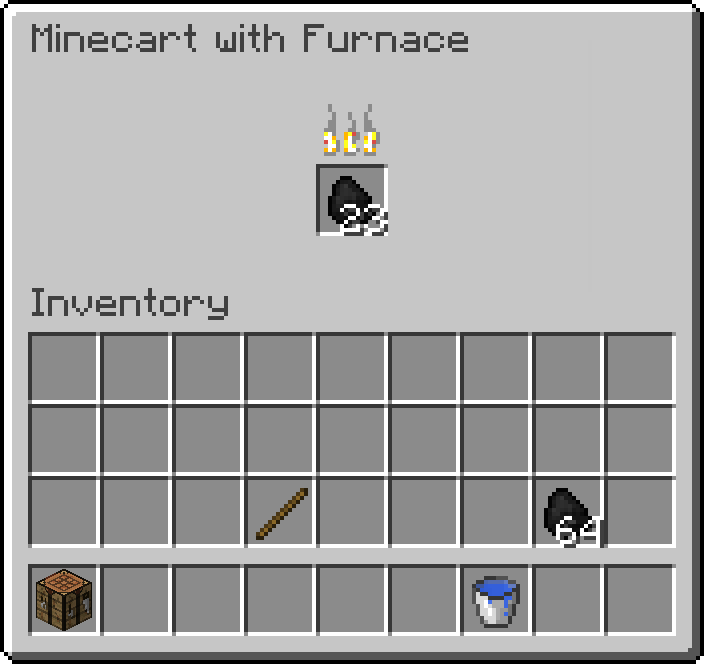
- 现在拥有一个 GUI,其中有一个燃料槽位。它可以接受任何熔炉可用的燃料,并具有相同的燃烧时间。按住 Shift-Click 可启动/停止它,正常右键点击可打开 GUI。
- 你可以手持燃料并 Shift-Click 来为矿车添加燃料并启动它,而无需打开 GUI。
- 现在与漏斗和激活铁轨兼容。漏斗/发射器可以将燃料放入其库存中,只要还有燃料,通电的激活铁轨就会启动它。未通电的激活铁轨会使其停止。
- 下方的漏斗可以从燃料槽位中移除物品。由于该槽位只接受燃料,这可以被利用来构建一个燃料分类器。
- 在通电时会加载 3x3 区域的区块;允许矿车无限距离行驶(也可以被用作固定的区块加载器)。
 半 slime 块
- 在一侧表现得像 slime 块,而在另一侧表现得像普通方块。其余四个侧面是“半”粘性的。
- 当被活塞推动时,方块会粘附在所有都是 slime 的一侧,但不会粘附在所有都是石头的一侧。只有 slime 块和半 slime 块会粘附在半粘性侧面。
- 可以以任何方向放置。
 半红石块
- 工作原理类似于红石块,除了只有一个侧面提供动力。(全红石侧面)
- 可以以任何方向放置。
 半黑曜石块
- 与黑曜石类似,它具有防爆性且需要钻石镐才能挖掘;然而,它可以被活塞/旋转器从除全黑曜石面以外的任何方向移动。
- 适用于制作黑曜石活塞门。可以以任何方向放置。

 黑曜石台阶与楼梯
- 由于活塞现在可以推动 TileEntities(方块实体),添加这些方块是为了保留“不可移动的透明方块”。
 压缩圆石
- 基本上结合了 Quark 的 Sturdy Stone 和 Extra Utils 的 Compressed Cobblestone。
- 由 9 个圆石合成,放入合成格可还原为圆石。
- 无法被活塞推拉。
 优化的海晶灯
 优化的告示牌
- 放置后可以通过右键点击进行编辑。
- 放置告示牌时按住 Shift 点击将不再打开 GUI 界面。
- 提供配置选项以在放置期间完全禁用 GUI 界面的打开。
 优化的头颅
- 重命名后的头颅即使放置在地板上也会保留其名称。
- 我知道这与红石无关;但当我尝试在我的服务器上添加自定义头颅时,这真的让我很困扰。
 新的创造模式指令
- 启用/禁用
- Nightfall(完全禁用昼夜循环,直到重新启用)
- Weather(完全禁用天气循环,直到重新启用)
- Mob Spawning(完全禁用所有生物生成,直到重新启用)
- All(快捷方式,用于禁用 Nightfall、Weather 和 Mob Spawning,直到重新启用。)
- Killall <mobs/players/items/entities>(快捷方式,用于瞬间移除大量实体)
 调试方块
- 仅创造模式下可用的方块,用于调试其他方块的问题。
- 每当它被放置、右键点击或收到方块更新时,它会将下方方块的注册名、位置、方块状态和 TileEntity 数据打印到控制台。
配置
本模组高度可配置。所有内容均可启用/禁用。还有一些其他参数可以进行调整。更多信息请参阅生成的默认配置文件:
# 配置文件
~CONFIG_VERSION: 1.2b
##########################################################################################################
# crafting_table
#--------------------------------------------------------------------------------------------------------#
# 工作台设置
##########################################################################################################
crafting_table {
# 允许漏斗与工作台配合使用 [默认: true]
B:enableAutoCrafting=true
}
##########################################################################################################
# dispensers
#--------------------------------------------------------------------------------------------------------#
# 发射器设置
##########################################################################################################
dispensers {
# 允许发射器种植种子和树苗。[默认: true]
B:canPlantSeeds=true
# 允许发射器放置蛋糕。[默认: true]
B:canPlaceCake=true
# 允许发射器用桶和瓶子填充或清空熔炉。[默认: true]
B:canFillCauldron=true
# 允许发射器在物品展示框上放置和取下物品。[默认: true]
B:canUseItemFrames=true
# 允许发射器在唱片机中放置和取出唱片。[默认: true]
B:canUseJukeBoxes=true
# 允许发射器给牛和蘑菇牛挤奶 [默认: true]
B:canMilkCows=true
# 允许发射器给绵羊、蘑菇牛等剪毛。[默认: true]
B:canUseShears=true
# 允许发射器为动物(除马以外)喂食以进行繁殖。[默认: true]
B:canFeedAnimals=true
# 允许发射器放置和拾取海绵。[默认: true]
B:canPlaceSponge=true
& # 允许发射器将兼容的方块放入空矿车中。(仅适用于原版矿车)[默认: true]
B:canPlaceBlockInMinecarts=true
# 修复原版漏洞,防止发射器导致多个矿车堆叠时的故障。[默认: true]
B:fixMinecartGlitch=true
}
##########################################################################################################
# mc1_12
#--------------------------------------------------------------------------------------------------------#
# Minecraft 1.12 相关设置
##########################################################################################################
mc1_12 {
# 阻止指南针和时钟在配方书中工作 [默认: true]
B:breakRecipeBookCompass=true
# 启用进度(Advancements)弹窗提示 [默认: true]
B:enableAdvancementsToast=true
# 启用原版默认的配方书。[默认: true]
B:enableRecipeBook=true
# 启用合成配方的弹窗提示 [默认: false]
B:enableRecipieToast=false
# 启用解说员(Narrator)[默认: false]
B:enableSystemToast=false
# 启用教程弹窗提示。[默认: false]
B:enableTutorialsToast=false
# 解锁原版配方书中的所有配方。[默认: true]
B:unlockAllRecipes=true
}
##########################################################################################################
# minecart
#--------------------------------------------------------------------------------------------------------#
# 矿车设置
##########################################################################################################
minecart {
# 允许动力矿车与漏斗/激活铁轨配合使用,并在转弯时不会失去动力。[默认: true]
B:enableFurnaceMinecart=true
# 合成普通铁轨时将提供 32 个铁轨,而非 16 个。[默认: true]
B:enableCheaperRails=true
}
##########################################################################################################
# misc
#--------------------------------------------------------------------------------------------------------#
# 杂项设置
##########################################################################################################
misc {
# [默认: true]
B:canEditSigns=true
# [默认: true]
B:disableSignGuiWhileSneaking=true
# [默认: false]
B:disableSignGuiDuringPlacement=false
# 允许海晶灯在被红石信号激活时关闭。[默认: true]
B:enableSeaLanterns=true
# 启用黑曜石台阶和楼梯 [默认: true]
B:enableObsidianSlabsStairs=true
# 启用创造模式命令 Enable, Disable, 和 Killall [默认: true]
B:enableRedCommands=true
# 将命令方块添加到 CreativeTab.REDSTONE [默认: true]
B:addCommandBlock=true
# 将黏液块移动到 CreativeTabs.REDSTONE [默认: true]
B:moveSlimeBlock=true
# 启用仅限创造模式的调试方块。[默认: true]
B:enableDebug=true
# 启用压缩圆石 [默认: true]
B:enableCompressedCobblestone=true
}
##########################################################################################################
# pistons
#--------------------------------------------------------------------------------------------------------#
# 活塞设置
##########################################################################################################
pistons {
# 启用活塞替代方案。警告:禁用此选项将禁用大量功能。仅在运行 Quark 模组时才应禁用此项。[默认: true]
B:enablePistons=true
# 活塞和粘性活塞可推动的最大方块数量。[范围: 1 ~ 1024, 默认: 12]
I:push_limit=12
# 列出活塞和粘性活塞无法推动的方块的注册名。如果遇到其他模组的方块出现问题,请将其添加到此列表中。[默认: [minecraft:beacon], [minecraft:enchanting_table], [minecraft:ender_chest]]
S:immovable <
minecraft:beacon
minecraft:enchanting_table
minecraft:ender_chest
>
# 列出活塞和粘性活塞在推动时会破坏的方块的注册名。如果遇到其他模组的方块出现问题,请将其添加到此列表中。[默认: ]
S:destroyable <
>
# 允许末影棒在被活塞推动时破坏方块。出于与 Quark 兼容性考虑而添加。[默认: false]
B:endRodBreaker=false
# 启用半格黏液块 [默认: true]
B:halfSlimeBlock=true
# 启用半格红石块 [默认: true]
B:halfRedstoneBlock=true
}
当前计划
计划中的功能
- 允许骑在矿车上的实体穿过末地传送门
- 附魔台可与漏斗配合使用
- 添加摄像机方块
- 放置在净冰上方的铁轨将使矿车速度提升三倍;这可能会导致矿车在转弯时脱轨(与 1.8 快照中的效果完全相同)。请谨慎铺设轨道,或不要将其放置在净冰上。
- 为旋转器方块添加实体碰撞检测。
更新日志
ver1.3e
修复了水/岩浆/桶在使用发射器时无法正确工作的问题
ver1.3d
- 修复了在合成台中按住 Shift 点击无效的问题
- 修复了安装 Redstone++ 后 Quark 的彩色黏液块无法正常工作的问题。
- Quark 的彩色黏液块现在可与旋转器配合使用,并新增了彩色半截黏液块。
ver1.3c
- 修复了通配符字符无法正确工作的问题
- 添加了仅推送列表 (PushOnly list)
- 修复了所有实现 ISidedInventory 接口的方块(即那些可使用漏斗的方块)导致的物品复制问题(您可能仍需在配置文件中添加其他方块的条目)
ver1.3b
- 为不可移动列表和销毁列表添加了通配符字符
- 添加了 ClearTag 列表以修复物品复制问题
- 添加了改进型头颅
ver1.3a
- 修复了禁用平滑光照时黑曜石台阶和楼梯的光照 bug
ver1.3
- 添加了旋转器和粘性旋转器。
- 添加了半截黑曜石方块。
- 动力矿车现在可作为区块加载器运行。
- 修复了大量 bug。
ver1.2d
- 修复了在 MC1.12.1 中配方书崩溃的 bug
- 修复了当被活塞推动时,半截黏液块无法将实体弹射出去的 bug
- 修复了 ver1.2c 引入的合成配方缺失的 bug
- 修复了在非主世界维度加载/卸载区块时导致合成台“卡死”的 bug。
ver1.2c
ver1.2b
- 添加了 JEI 支持
- 为 Iron Chests 添加了活塞渲染支持
- 为 MC1.12 的配方书添加了多项配置选项
- 能够解锁所有配方
- 能够抑制提示消息 (Toast Messages)
- 能够防止指南针和时钟在未合成前正常工作
- 能够完全禁用配方书
- 添加了压缩圆石
- 添加了调试方块
- 我*可能*还修复了一些 bug……记不太清了……反正肯定修了些东西。
ver1.2a
修复了与 Bookshelf API 冲突导致的崩溃
改进了对 Quark 的支持
铁杆现在可与 Redstone++ 的活塞配合使用
添加了末影杆作为方块破坏器的配置选项(最初为 Quark 添加,但无需安装 Quark)
Quark 的额外箱子现在在机械层面上可与 Redstone++ 的活塞配合使用(仍存在少量图形显示问题)
ver1.2
- 实现了补丁加载器 (Patch Loader);允许 Redstone++ 在多个 Minecraft 版本上运行(这使得我能够在保持易用性的同时维护对多个 Minecraft 版本的支持)
- 修复了几个小 bug。
- 告示牌现在可以编辑;(在旧版本中存在一个阻止其被更改的 bug,直到目前才未被发现)。
- 服务器上的合成台中,结果栏的物品不再闪烁。
- 配置选项现在采用注册表名称,而非未本地化名称。
- 方块/物品/实体的注册 ID 现已正确设置为模组 ID "redstoneplusplus",而非 "sandro" —— 这将导致世界损坏:请参阅上方关于升级的注意事项。
旧版更新日志 [1.12]
ver1.1c BETA-2
- 添加改进型合成台
- 注意:此版本可能存在较多 bug。如果遇到 bug,请禁用改进型合成台,或回退至 ver1.1b BETA-1 并报告该问题。
ver1.1b BETA-1
- 开始将 [1.11.2] ver1.1b 更新至 Minecraft 1.12
- 此版本缺少改进型合成台,但其他功能均正常
- 已在 Forge 14.21.0.2373 下测试;由于 Forge 仍处于 beta 阶段,更新后的新版本可能会破坏兼容性。
旧版更新日志 [1.11.2]
ver1.1c
- 添加了与 Crafting Tweaks Mod 的兼容性 (
ver1.1b
- 修复了罕见情况下熔炉矿车 GUI 无法显示的奇怪 bug。
- 修复了原版的一个 bug,该 bug 导致非熔炉矿车无法推动无动力的熔炉矿车
ver1.1a
- 修复了运行专用服务器时的崩溃问题
- 修复了告示牌的合成配方替换不正确的问题
- 由于这些问题较为严重,ver1.1 现已归档。
ver1.1
- 改进型带熔炉矿车
- 改进型海晶灯
- 改进型告示牌
- 添加了半截红石块
- 添加了创造模式命令:启用、禁用和全部杀死
- 添加了更多的发射器行为
- 改进了工作台,现在支持 Shift-Click 功能
ver1.0a
- 应 ecutruin 的要求,添加了一个配置选项以禁用活塞替代功能;以便至少与 Quark 保持一定的兼容性。
ver1.0
- 改进了活塞、工作台和发射器
- 添加了半层史莱姆块
- 添加了黑曜石台阶和楼梯
New Version: 1.3e
Redstone++ is a mod that expands what is possible, while keeping the balance and feel of vanilla Minecraft. All changes can be enabled/disabled in the Config.
For those who are new to modding Minecraft, or making Mod Packs, or are unsure of how to edit config files, please read here: .
Minecraft Compatibility
Redstone++ ver1.3 supports MC1.12.2 only! It will not run on 1.12.1 or any other version. Redstone++ ver1.2d supports all 1.11.x and 1.12.x versions with the same jar. There is no reason to run any other version. No version will run on any other version of Minecraft, no matter what any of those sites that are illegally distributing this mod or some virus with this mod's name may say. Don't trust them, their lying. Your computer will thank you.
Support for Other Minecraft Versions
At this point I pretty busy with other things, so I don't really have time to update this right now. It is unlikely I'll ever backport it; however, I will eventually update it, to some future version. It will basically be a jump to, lets say, 1.15 or later. So MC1.13, MC1.14; probably not going to happen. MC1.10 probably not going to happen. MC1.7.10 and older, will never, ever happen, ever. When I do get around to updating to 1.15, Half Honey Blocks will be included.
Mod Compatibility Issues
This mod makes extensive use of Registry Overriding (Substitution Alias in 1.11.x), and will crash with other mods that override the same blocks. Mods that apply ASM Transformers to said blocks will fail silently. You may need to disable part of this mod or the other to get things to work. This is unavoidable (Yes, there are other ways I could have written it, but you'll get the same kinds of problems, just with different errors). While I have fixed a few conflicts, I can't possibly fix them all.
Liteloader has serious issues with mods that use Registry Overriding in 1.12.x. Until that is fixed, it is incompatible with all mods that use Registry Overriding, including Redstone++. Seeing as it's been over 2 years since it had an update, I see that as unlikely. There is nothing I can do to fix this; any issues regarding compatibility with Liteloader will be closed. Alternatively, you could roll back to MC1.11.x, as Liteloader has no such issues with Substitution Aliases.
The ability for Pistons to push TileEnties can cause strange problems or crashes with some blocks. All issues with vanilla blocks have been fixes, but I cannot control issues of blocks added by other mods. If this is the case, you can edit the config of this mod to prevent pistons from pushing those blocks; either by making the immovable, or by allowing pistons to destroy them.
As requested, ver1.3 added a wildcard character * to the immovable, and destroy lists. So you can now blacklist and entire mod by adding modname:* to the immovable list for example. There is also now an option to disable pistons moving TileEntities entirely (Originally that was the only reason to enable Piston substitution, but now there are quite a few reason for it)
Redstone++ ver1.3b adds a new config option to specify a list of tags to clear when moving TileEntities. If you have a block, that when moved by pistons, drops duplicated items on the ground you need to add it's "Items" tag to this list. To do this, grab a debug block and place it over that block. The debug block will print it's TileEntity data to the Console. Identify the exact name of the tag which that block is using to store items, and add it to the clearTag list in the config file.
Licensing
Do not reupload this mod anywhere except under the following circumstance:
You have my permission to include Redstone++ in a Mod Pack, provided that you pack includes at least 5 other mods, and you provide a page that:
1) lists ALL of the mods in your pack,
2) proves that you have necessary rights to distribute those mods,
3) provides a link to the home page/forum topic of each of those mods, and
4) provides proper credit to the authors of those mods.
Note: If you do use this in a modpack, I ask, but don't require, that you either make an abundantly visible, bold link to this page, or provide a wiki page explaining the changes this mod makes (at least the ones your modpack has enabled). Reason being: The changes made are very subtle, but significant. Players may want to use these features, but not even know there there.
You may of course make review/tutorial videos of this mod without restrictions.
Features
Rotators and Sticky Rotators
- Can rotate blocks and slime structures. Also works with TileEntities.
- Right-Click on the block to set the direction of rotation.
- Rotators can rotate both pistons and others rotators, and pistons can push and pull them.
- Redstone placed ontop of rotators will not break when they are activated.
- Note: Does not currently support Entity Collision. This will be added later, at some point.
Improved Pistons and Sticky Pistons
- Can now push TileEntities (Chests, Hoppers, Droppers, Dispensers, ect.)
- Config option to change the Push Limit (Default: 12)
- Redstone placed ontop of pistons will no longer break when pistons extend/retract.
Improved Dispensers
- Can now plant seeds and saplings.
- Can fill and empty Cauldrons using buckets and bottles.
- Can wash dye off Leather Armor (Require Cauldron with water in front).
- Can place and remove items from Item Frames (Think Maps)
- Can use Sheers (on Sheep, Vines, Cob Webs, ect.)
- Can Feed Animals (For breeding only; Does not work with Horses, but works for everything else)
- Can Milk Cows and Mooshrooms. Can also get Mushroom Stew from Mooshrooms.
- Can Place and Remove Records from Jukeboxes
- Can Place Cake
- Can Place valid blocks into empty Minecarts. (Chests, Furnance, Hopper, ect.)
- Will no longer Place Minecarts onto of Minecarts, causing them to glitch togeather.
- Can Pickup and Place Sponges/Wet Sponges.
- Can Place Gravity Affected Blocks. (Sand, Gravel, ect.)
Improved Crafting Tables
- Is now a TileEntity, so it will keep items rather then dropping them.
- Can still be pushed by pistons since pistons can now push TileEntities
- Items can now be shift-clicked into the Crafting Grid.
- Works with Hopper and Droppers. This works differently depending on weather or not the Crafting Table is powered.
- If Unpowered: Hoppers will only insert items into the Crafting Grid on slots that already contain that item and will only pull items from the Results slot
- If Powered: Hoppers will only insert items into the Crafting Grid on slots that are completely empty and will pull items only from the crafting grid.
- The above changes make it possible to build automatic crafting tables, and even ones that can change their recipe, but you will have to think a bit about your redstone to get it to work right. Remember: you can now push Hoppers with pistons.
Improved Minecart with Furnace
- Are no longer horribly glitched. They can push many carts, and players in carts uphill, can go around corners without stopping, ect.
- They now have a GUI with one slot for fuel. They can accept any fuel a Furnace could and will have the same burn time. Hold Shift-Click to start/stop it, Right Click normally to open GUI.
- You can Shift-Click with fuel in hand to fuel and start it without opening the GUI.
- Now works with Hoppers and Activator Rails. Hopper/Droppers can put fuel into its inventory and a Powered Activator rail will start it as long as theirs fuel. An unpowered activator rail will stop it.
- A hopper under it can remove items from the fuel slot. Since that slot only accepts fuel, this can be exploited to build a fuel sorter.
- Will chunk load a 3x3 area when powered; allowing minecarts to travel an unlimited distance (Could also be exploited as a stationary chunk loader).
Half Slime Blocks
- Behaves like a Slime Block on one side, and like a normal Block on the other. The remaining 4 side are "sorta" sticky.
- When pushed by a piston, blocks will stick to the all-slime side, but not the all-stone side. Only Slime Blocks and Half Slime Blocks will stick to the sorta sticky sides.
- Can be placed in any direction.
Half Redstone Blocks
- Works like Redstone Block, except only one side provides power. (The All Redstone side)
- Can be placed in any direction.
Half Obsidian Blocks
- Like Obsidian, it's Blast Proof and requires a Diamond Pick to mine; however, it can be moved by pistons/rotators from any direction except the all obsidian side.
- Useful for making Obsidian Piston doors. Can be placed in any direction.
Obsidian Slabs and Stairs
- Since Pistons can now push TileEntities, these were add so there are still Immovable Transparent Blocks.
Compressed Cobblestone
- Basically a cross between Quark's Sturdy Stone and Extra Util's Compressed Cobblestone
- Crafted from 9 cobblestone, can be placed in crafting grid to get cobblestone back
- Can't be pushed or pulled by pistons
Improved Sea Lanterns
- Can now be powered off using redstone.
Improved Signs
- Can now be edited after placement by right clicking.
- Shift-Clicking while placing signs will no longer open GUI.
- Config Option to completely disable opening GUI during placement.
Improved Skulls
- Renamed Skulls will keep their name even if placed on the ground.
- I know this has nothing to do with redstone; but it was really bugging me when I was trying to add custom heads to my server.
New Creative Commands
- Enable/Disable
- Nightfall (Completely Disable Day/Night Cycle until Enabled)
- Weather (Completely Disable Weather Cycle until Enabled)
- Mob Spawning (Completely Disable the ability for any mob to spawn until Enabled)
- All (Shortcut to Disable Nightfall, Weather, and Mob Spawning until enabled.
- Killall <mobs/players/items/entities> (Shortcut to instantly remove large numbers of entities)
Debug Block
- A creative mode only block used to debug problems in other blocks.
- Whenever it's placed, right clicked, or is given a block update it will print out the registry name, position, block state, and tile entity date of the block beneath it to the console.
Configuration
This mod is highly configurable. Everything in can be enabled/disabled. And there are a few other things that can be tweaked. For more info here is the default config file that is generated:
# Configuration file
~CONFIG_VERSION: 1.2b
##########################################################################################################
# crafting_table
#--------------------------------------------------------------------------------------------------------#
# Crafting Table Settings
##########################################################################################################
crafting_table {
# Allow Crafting Tables to work with Hoppers [default: true]
B:enableAutoCrafting=true
}
##########################################################################################################
# dispensers
#--------------------------------------------------------------------------------------------------------#
# Dispenser Setting
##########################################################################################################
dispensers {
# Allow Dispensers to plant Seeds and Saprolings. [default: true]
B:canPlantSeeds=true
# Allow Dispensers to place Cake. [default: true]
B:canPlaceCake=true
# Allow Dispensers to fill and empty Cauldrons with buckets and bottles. [default: true]
B:canFillCauldron=true
# Allow Dispensers to place and remove items from Item Frames. [default: true]
B:canUseItemFrames=true
# Allow Dispensers to place and remove records from Juke Bokes. [default: true]
B:canUseJukeBoxes=true
# Allow Dispensers to Milk Cows and Mooshrooms [default: true]
B:canMilkCows=true
# Allow Dispensers to Shear Sheep, Mooshrooms, ect. [default: true]
B:canUseShears=true
# Allow Dispensers to Feed Animals(Except Horses) for breeding. [default: true]
B:canFeedAnimals=true
# Allow Dispensers to place and pickup Sponges. [default: true]
B:canPlaceSponge=true
# Allow Dispensers to place compatable blocks into empty minecarts. (Only works for vanella minecarts) [default: true]
B:canPlaceBlockInMinecarts=true
# Fix Vanella Bug allowing Dispensers to glitch multiple minecarts ontop of each other. [default: true]
B:fixMinecartGlitch=true
}
##########################################################################################################
# mc1_12
#--------------------------------------------------------------------------------------------------------#
# Settings for Minecraft 1.12
##########################################################################################################
mc1_12 {
# Stops the Compass and Clock from working in the Recipe Book [default: true]
B:breakRecipeBookCompass=true
# Enable the popup messages for Advancements [default: true]
B:enableAdvancementsToast=true
# Enable the default vanilla recipe book. [default: true]
B:enableRecipeBook=true
# Enable the popup messages for Crafting Recipies [default: false]
B:enableRecipieToast=false
# Enable the narriator [default: false]
B:enableSystemToast=false
# Enable the popup tutorial messages. [default: false]
B:enableTutorialsToast=false
# Unlock all recipes for the default vanilla recipe book. [default: true]
B:unlockAllRecipes=true
}
##########################################################################################################
# minecart
#--------------------------------------------------------------------------------------------------------#
# Minecart Settings
##########################################################################################################
minecart {
# Allow Furnace Minecarts to work with Hoppers/Activator Rails, and go around turns without losing power. [default: true]
B:enableFurnaceMinecart=true
# Crafting normal Tracks will provide 32 Tracks, rather then 16. [default: true]
B:enableCheaperRails=true
}
##########################################################################################################
# misc
#--------------------------------------------------------------------------------------------------------#
# Miscellaneous Settings
##########################################################################################################
misc {
# [default: true]
B:canEditSigns=true
# [default: true]
B:disableSignGuiWhileSneaking=true
# [default: false]
B:disableSignGuiDuringPlacement=false
# Allow Sea Lanterns to be switch off when powered with redstone. [default: true]
B:enableSeaLanterns=true
# Enable Obsidian Slabs and Stairs [default: true]
B:enableObsidianSlabsStairs=true
# Enable Creative mode commands Enable, Disable, and Killall [default: true]
B:enableRedCommands=true
# Add Command Blocks to CreativeTab.REDSTONE [default: true]
B:addCommandBlock=true
# Move Slime Blocks to CreativeTabs.REDSTONE [default: true]
B:moveSlimeBlock=true
# Enable the creative mode only debugging block. [default: true]
B:enableDebug=true
# Enable Compressed Cobblestone [default: true]
B:enableCompressedCobblestone=true
}
##########################################################################################################
# pistons
#--------------------------------------------------------------------------------------------------------#
# Piston Settings
##########################################################################################################
pistons {
# Enable Pistin Subsution. WARNING: Disabling this will disable alot of functionallity. Should only be disabled if running with Quark. [default: true]
B:enablePistons=true
# Max number of blocks Pistons & Sticky Pistons can push. [range: 1 ~ 1024, default: 12]
I:push_limit=12
# List of registry names of blocks Pistons & Sticky Pistons can not push. If you encounter problems with another mod's block, add it to this list. [default: [minecraft:beacon], [minecraft:enchanting_table], [minecraft:ender_chest]]
S:immovable <
minecraft:beacon
minecraft:enchanting_table
minecraft:ender_chest
>
# List of registry names of blocks Pistons & Sticky Pistons will destroy when pushed. If you encounter problems with another mod's block, add it to this list. [default: ]
S:destroyable <
>
# Allow End Rods to break blocks when being pushed by pistons. Added for compatibility with Quark. [default: false]
B:endRodBreaker=false
# Enable Half Slime Blocks [default: true]
B:halfSlimeBlock=true
# Enable Half Redstone Blocks [default: true]
B:halfRedstoneBlock=true
}
Current Plans
Planed Features
- Allow Entities Riding Minecarts to Pass through Neither Portals
- Allow Enchantment Tables to work with Hoppers
- Add a Camera Block
- Rails placed on top of packed ice will allow Minecarts to travel at triple speed; possibly causing the to derail around corners (Exactly like the 1.8 snapshots). Either build your rail carefully or don't place them on packed ice.
- Add Entity Collision for Rotator Blocks.
Change Log
ver1.3e
Patched Water/Lava/cct buckets not working correctly with Dispensers
ver1.3d
- Patched Shift-Click not working in Crafting Tables
- Patched Quark's Colored Slime Blocks not working if Redstone++ was installed.
- Quark's Colored Slime Blocks now work with Rotators, and Colored Half Slime Blocks are now available.
ver1.3c
- Fixed wildcard characters not working correctly
- Added a PushOnly list
- Fixed Item Duplication with all blocks implementing ISidedInventory (Those that use hoppers; you may still need to add others to the config)
ver1.3b
- Added wildcard characters to Immovable & Destroy Lists
- Added a ClearTag list to fix issues with item duplication
- Added Improved Skulls
ver1.3a
- Fixed a Lighting bug, involving Obsidian Slabs & Stairs with smooth lighting disabled
ver1.3
- Added Rotators and Sticky Rotators.
- Added Half Obsidian Blocks.
- Powered Minecarts now act as chunk loaders.
- Fixed a great many bugs.
ver1.2d
- Fixed a bug causing the recipe book to crash on MC1.12.1
- Fixed a bug preventing Half Slime Blocks from launching entities when being pushed by pistons
- Fixed the missing crafting recipes bug introduced in ver1.2c
- Fixed a bug causing Crafting Tables to "freeze" when chunked are loaded/unloaded in dimensions other then the overworld.
ver1.2c
- Fix compatibility with MC1.12.1
ver1.2b
- Added support for JEI
- Added Piston rendering for Iron Chests
- Add several config options for MC1.12's Recipe Books
- Ability to unlock all recipies
- Ability to suppress Toast Messages
- Ability to prevent Compasses and Clock from working unless crafted
- Ability to disable Recipe Book completely
- Added Compressed Cobblestone
- Added Debug Block
- I *may* have also fixed some bugs...can't remember...probably fixed something.
ver1.2a
Fixed crash with Bookshelf API
Better Support for Quark
Iron Rods now work with Redstone++'s Pistons
Config option for Ender Rods to work as block breaker (Added for Quark, tho Quark is not required)
Quarks extra chests now mechanically work with Redstone++'s Pistons (There are still some minor graphical issues)
ver1.2
- Implemented Patch Loader; allowing Redstone++ to run on multiple minecraft versions (This allows me to maintain support for multiple Minecraft versions, while keeping things easy)
- Fixed a few minor bugs.
- Sign can now be edited; (In older versions there was a bug the prevented them from being changed, that somehow went unnoticed until now).
- Crafting Tables no longer have flickering items in the results slot on servers.
- Config Options now take registry names, rather then unlocalized names.
- Blocks/Items/Entities are now correctly registered under the ModID "redstoneplusplus" rather than "sandro" -- This will cause world corruption: see notice above about upgrading.
Old Change Log [1.12]
ver1.1c BETA-2
- Add Improved Crafting Tables
- Note: This version is likely to be buggy. If bugs are encountered either disable Improved Crafting Tables or roll back to ver1.1b BETA-1 and report the issue.
ver1.1b BETA-1
- Began Updating [1.11.2] ver1.1b to Minecraft 1.12
- Improved Crafting Tables are missing from this version, but everything else works
- Tested against Forge 14.21.0.2373; since Forge is still in beta, newer versions may break it.
Old Change Log [1.11.2]
ver1.1c
- Added compatibility with Crafting Tweaks Mod (
ver1.1b
- Fixed a strange bug preventing Furnace Minecart GUI from displaying in rare cases.
- Fixed a Vanilla bug preventing Not Furnace Minecarts from pushing Unpowered Furnace Minecarts
ver1.1a
- Fixed crash when running dedicated server
- Fixed Crafting Recipe for Signs not correctly replaced
- Since these issues were serious ver1.1 is now archived.
ver1.1
- Improved Minecart with Furnace
- Improved Sea Lanterns
- Improved Signs
- Added Half Redstone Block
- Added Creative Commands: Enable, Disable, and Killall
- Added additional Dispenser Behaviors
- Improved Crafting Tables now have Shift-Click function
ver1.0a
- Added a config option to disable Piston Substitution at the request of ecutruin; for at least some compatibility with Quark.
ver1.0
- Improved Pistons, Crafting Tables, and Dispensers
- Added Half Slime Blocks
- Added Obsidian Slabs and Stairs


 模组

 模组
 模组
 模组

 模组
 模组

评论 0
登录后参与评分
还没有评论,来抢沙发吧