
Reliable EMI
Reliable EMI (REMI) 是 EMI 的一个插件,添加了各种有用的功能、改进和自定义选项,以提升你的配方查看体验!
功能
REMI 提供了大量的增强功能,包括:
- 堆叠分组: 通过将与物品相关的项归为一组来清理 EMI 的物品列表(例如,将所有有色羊毛保留在一个可展开的条目中)。
- 创意模式标签页集成到 EMI: 在 EMI 界面中直接显示原版和模组的创意模式标签页,方便浏览。
- 创意模式标签页的外观会根据 EMI 主题(原版或现代)而变化。
- 与自定义的 Recreative 标签页配合效果极佳!
- 工作台标签页: 显示当前打开的工作台的所有有效配方(例如,在熔炉中显示所有可熔炼的物品,在切石机中显示切石机的输出等)。完全集成到 EMI 的侧边栏中!
- 自定义标签页: 为 物品标签、方块标签、流体标签 和 实体标签 添加新的 EMI 标签页。
- 右键点击刷怪蛋可查看实体标签,并使用
#tag_id搜索实体和流体标签。
- 右键点击刷怪蛋可查看实体标签,并使用
配置
REMI 提供了广泛的配置选项,以便根据你的需求调整界面。你可以安装 YACL 后通过 游戏内配置界面 配置该模组,或者直接编辑配置文件。
自定义堆叠分组
你可以使用标准的 JSON 文件 定义新的自定义堆叠分组或修改现有的分组。
REMI 从 config/remi/stack_groups 目录加载堆叠分组。例如,要创建一个自定义分组,请在 config/remi/stack_groups/my_group.json 中创建一个 JSON 文件。
JSON 结构:
| 字段 | 类型 | 描述 |
|---|---|---|
id |
String | 唯一标识符(例如 "mypack:currency")。 |
name |
String (可选) | 分组的名称的翻译键或字符串(例如 "mypack.group.currency" 或 "Currency")。 |
type |
String | 决定如何构建分组。可以是 "remi:group"、"remi:tag" 或 "remi:regex"。 |
enabled |
Boolean (可选) | 设置为 false 以禁用此分组。 |
priority |
Integer (可选) | 控制当物品可能属于多个分组时的匹配顺序。值越高越先检查(默认 0)。 |
contents |
List | (适用于 remi:group) 包含的物品或标签列表。 |
exclusions |
List | (适用于 remi:group/remi:regex) 要从分组中移除的物品(在使用宽泛的标签或正则表达式时很有用)。 |
regex |
String | (适用于 remi:group/remi:regex) 用于动态匹配物品 ID 的正则表达式模式。 |
regexes |
List (可选) | (适用于 remi:group) 类似于 regex,但接受多个模式的列表。 |
示例:创建一个“闪亮物品”分组(标准列表)
{
  "id": "mypack:shiny_things",
  "type": "remi:group",
  "contents": [
    "minecraft:diamond",
    "minecraft:emerald",
    "minecraft:gold_ingot",
    "#c:glass_blocks"
  ],
  "exclusions": [
    "minecraft:purple_stained_glass"
  ]
}
示例:使用正则表达式创建分组
你可以使用 "remi:regex" 类型根据命名模式动态分组物品。下面的示例将后缀为 _sword 的所有物品(来自任何命名空间)归为一组:
{
  "id": "mypack:swords",
  "type": "remi:regex",
  "regex": ".*:.*_sword",
  "name": "Swords"
}
虚拟对象(流体、修饰符等):
Reliable EMI 还支持对非物品对象进行分组,例如流体、JEED 效果等。为此,请使用 <type>:<namespace>:<path> 格式在条目前加上其 EMI 注册表类型。
示例:创建一个特殊分组
{
  "id": "mypack:basic_fluids",
  "name": "mypack.stack_group.basic_fluids",
  "type": "remi:group",
  "contents": [
    "fluid:minecraft:water",
    "fluid:minecraft:lava",
    "jeed:effect:minecraft:speed"
  ]
}
禁用默认分组
所有堆叠分组都可以通过游戏内配置界面的“堆叠分组”类别轻松切换。
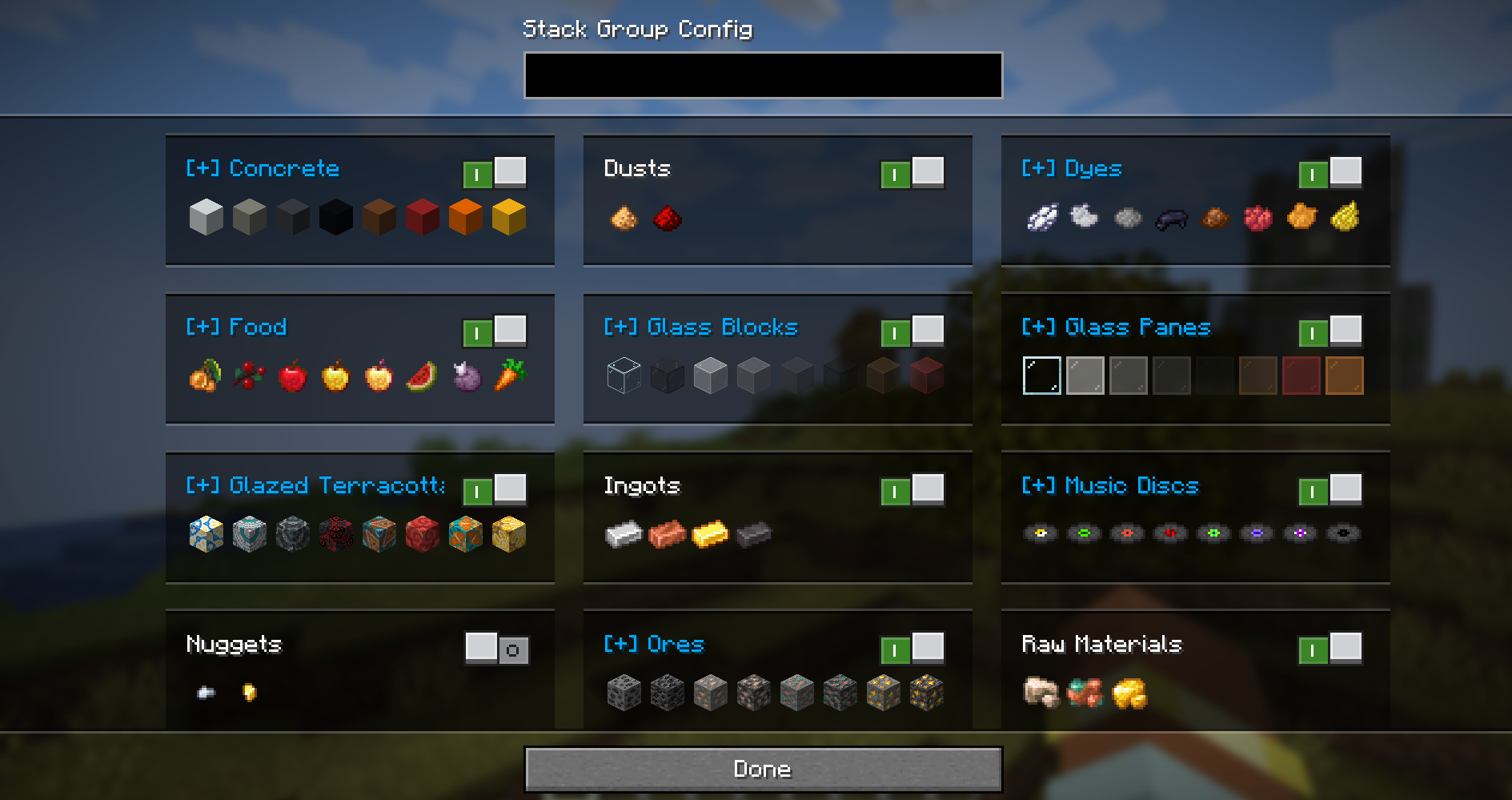
要禁用默认的堆叠分组,你也可以覆盖其定义。创建一个与默认分组具有相同路径/ID 的文件,并设置 "enabled": false。
示例:禁用刷怪蛋分组
文件:config/remi/stack_groups/spawn_eggs.json
{
  "enabled": false
}
许可证
Reliable EMI
Reliable EMI (REMI) is an addon for EMI, adding a variety of useful features, improvements, and customization options to enhance your recipe viewing experience!
Features
REMI provides a ton of enhancements, including:
- Stack Grouping: Cleans up the EMI item list by grouping related items together (e.g., keeping all colored wools in one expandable entry).
- Creative Tabs in EMI: Displays vanilla and modded Creative Mode tabs directly in the EMI interface for easy
browsing.
- The appearance of the creative tabs change, dependent on the EMI theme (vanilla or modern).
- Works especially well with custom Recreative tabs!
- Workstation Tab: Displays all valid recipes for the workstation currently open (e.g. showing everything smeltable in a furnace, stonecutter outputs in a stonecutter, etc.). Fully integrated with EMI's sidebar!
- Custom Tag Pages: Adds new EMI tag tabs for Item Tags, Block Tags, Fluid Tags, and Entity
Tags.
- Right-click spawn eggs to view entity tags, and search entity & fluid tags using
#tag_id.
- Right-click spawn eggs to view entity tags, and search entity & fluid tags using
Configuration
REMI offers extensive configuration options to tweak the interface to your needs. You can configure the mod via the in-game config screen with YACL installed or by editing the configuration file directly.
Customizing Stack Groups
You can define new custom stack groups or modify existing ones using standard JSON files.
REMI loads stack groups from the config/remi/stack_groups directory. For example, to create a custom group, create a
JSON file in config/remi/stack_groups/my_group.json.
JSON Structure:
| Field | Type | Description |
|---|---|---|
id |
String | A unique identifier (e.g., "mypack:currency"). |
name |
String (Optional) | A translation key or string for the group's name (e.g., "mypack.group.currency" or "Currency"). |
type |
String | Determines how the group is built. Can be "remi:group", "remi:tag", or "remi:regex". |
enabled |
Boolean (Optional) | Set to false to disable this group. |
priority |
Integer (Optional) | Controls match order when an item could belong to multiple groups. Higher values are checked first (default 0). |
contents |
List | (For remi:group) A list of items or tags to include. |
exclusions |
List | (For remi:group/remi:regex) Items to remove from the group (useful when using broad tags or regexes). |
regex |
String | (For remi:group/remi:regex) A regular expression pattern used to match item IDs dynamically. |
regexes |
List (Optional) | (For remi:group) Like regex, but accepts a list of multiple patterns. |
Example: Creating a shiny things group (standard list)
{
  "id": "mypack:shiny_things",
  "type": "remi:group",
  "contents": [
    "minecraft:diamond",
    "minecraft:emerald",
    "minecraft:gold_ingot",
    "#c:glass_blocks"
  ],
  "exclusions": [
    "minecraft:purple_stained_glass"
  ]
}
Example: Creating a group using Regex
You can use the "remi:regex" type to dynamically group items based on their naming patterns. The example below groups
all items that end in _sword (from any namespace):
{
  "id": "mypack:swords",
  "type": "remi:regex",
  "regex": ".*:.*_sword",
  "name": "Swords"
}
Virtual Objects (Fluids, Modifiers, etc.):
Reliable EMI also supports grouping non-item objects such as Fluids, JEED effects, etc. To do this,
prefix the entry with its EMI registry type using the format <type>:<namespace>:<path>.
Example: Creating a special group
{
  "id": "mypack:basic_fluids",
  "name": "mypack.stack_group.basic_fluids",
  "type": "remi:group",
  "contents": [
    "fluid:minecraft:water",
    "fluid:minecraft:lava",
    "jeed:effect:minecraft:speed"
  ]
}
Disabling Default Groups
All stack groups are easily togglable using the in-game config screen, in the Stack Groups category.
To disable a default stack group, you can also override its definition. Create a file with the same
path/ID as the default group and set "enabled": false.
Example: Disabling the spawn eggs group
File: config/remi/stack_groups/spawn_eggs.json
{
  "enabled": false
}
License

下载 Reliable EMI (REMI)
需要联机服务器吗?
稳定流畅、一键部署,几分钟即可和朋友联机开服
最低仅需 8 元/月 即可畅快联机
下载 Reliable EMI (REMI)
需要联机服务器吗?
稳定流畅、一键部署,几分钟即可和朋友联机开服
最低仅需 8 元/月 即可畅快联机
下载 Reliable EMI (REMI)
下载 Reliable EMI (REMI)
需要联机服务器吗?
稳定流畅、一键部署,几分钟即可和朋友联机开服
最低仅需 8 元/月 即可畅快联机
下载 Reliable EMI (REMI)
需要联机服务器吗?
稳定流畅、一键部署,几分钟即可和朋友联机开服
最低仅需 8 元/月 即可畅快联机
下载 Reliable EMI (REMI)
需要联机服务器吗?
稳定流畅、一键部署,几分钟即可和朋友联机开服
最低仅需 8 元/月 即可畅快联机
下载 Reliable EMI (REMI)
下载 Reliable EMI (REMI)
需要联机服务器吗?
稳定流畅、一键部署,几分钟即可和朋友联机开服
最低仅需 8 元/月 即可畅快联机
下载 Reliable EMI (REMI)
需要联机服务器吗?
稳定流畅、一键部署,几分钟即可和朋友联机开服
最低仅需 8 元/月 即可畅快联机
下载 Reliable EMI (REMI)
需要联机服务器吗?
稳定流畅、一键部署,几分钟即可和朋友联机开服
最低仅需 8 元/月 即可畅快联机
新增
- 添加了记住创造模式标签页位置的功能(默认开启)
- 关闭并重新打开屏幕时,创造模式的标签栏会保持其滚动位置,就像原版创造模式物品栏一样。
修复
- 修复了 EMI 重载后没有高亮显示创造模式标签页的问题。
- 修复了“搜索时切换到搜索标签页”默认未开启的问题。
修复
- 修复了在启用 Better Cheat Mode 时,热键(1-9)和副手交换键会将悬停的库存物品替换为完整堆叠的问题。
- 修复了控制器作弊模式复制悬停的库存物品而非拾取它的问题。
- 修复了搜索或清除搜索后索引更新需要几秒的问题,尤其是在配合 Reliable Remover 使用时。
修复
- 修复了与 EMI Discovery 的崩溃问题。
新增
- 开启 Better Cheat Mode 后,将鼠标悬停在侧边栏堆叠上并按住快捷栏键(1-9)或副手交换键,即可将该槽位放入一个完整堆叠,如同原版创造模式物品栏一样。
修复
- 修复了在大型整合包中清除或编辑搜索后,索引需要几秒钟才能更新的问题。
新增
- 在使用控制器(Controlify)的作弊模式时,点击侧边栏堆叠中的 A 键可将一个物品放入光标位置,Shift+点击则会将整个堆叠放入光标,类似于原版创造模式背包的操作。
修复
- 修复了将作弊获得的堆叠拖拽到玩家背包外部槽位的问题。
新增
- 堆叠组
name现在可以是文本组件,而不仅仅是翻译键。
更改
- 使用堆叠组按钮创建的堆叠组文件现在会按标签命名空间保存到子文件夹中。
修复
- 性能优化。
- 修复了堆叠组指示器的半透明像素渲染为实心深色像素的问题。
- 修复了 Controlify 将光标吸附到隐藏的创意模式标签页小部件、标签页滚动箭头以及标签栏中间位置的问题。
关于这个资源的讨论、问题反馈与使用心得
还没有讨论,来发第一帖吧
你是这个资源的作者?登录后可认领此资源。
相似资源
 模组

显示你正在注视的方块的信息。(适用于 Minecraft 1.16+ 的 Hwyla/Waila 分支)
 模组
在游戏画面角落显示附近世界地形、玩家、生物和实体的地图。可创建路径点,帮助你找到标记过的位置。
 模组
使用 JavaScript 编辑配方、添加自定义物品、编写世界事件!
 模组

查看物品与配方
 模组
AE2:一款流行的自动化与存储模组
 模组
那是什么?一个 Waila/Hwyla 的分支。
评论 0
登录后参与评分
还没有评论,来抢沙发吧