记住资源包 URL 哈希值
功能说明
此模组可帮助你在已拥有服务器资源包时,避免重复下载。
为什么需要此模组?
- Minecraft 原版尝试避免重复下载资源包,但如果服务器未提供哈希值(hash),则每次都会下载文件。(因为它无法将其与缓存副本进行对比)
- 此模组会根据资源包的 URL 记住其上一次使用的哈希代码。(因为 URL 显然始终存在)
- 如果资源包更新后文件的 URL 发生了变化,你也不会错过任何更新。
在那些要求使用资源包但未提供哈希值的服务器上,重新加入游戏时可以为你节省大量时间,因为某些资源包体积相当庞大。
命令
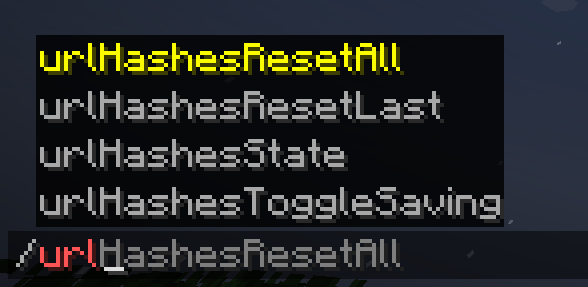
或者,如果在资源包更新之间链接保持不变,或者你认为自己拥有过期的资源包,你可以直接使用以下命令:
/urlHashesResetAll 重置所有已保存的哈希值
/urlHashesResetLast 重置最近加载的资源包的哈希值。

此外,你还可以使用:
/urlHashesToggleSaving 切换在游戏会话之间保存哈希值的功能。默认关闭。
/urlHashesState 查看模组“哈希存储”中保存的内容。如果你感到困惑,这有助于查明情况。

如果你禁用了数据保存功能(默认情况下),所有内容仅在当前会话内存储;如果你启用了保存功能,你将在多个游戏会话中保持所有设置就绪,从而最大程度地减少资源包加载时的停机时间。

注意事项
幸运的是,Fabric 允许同一个文件作为模组在多个版本中运行,因此该模组支持 1.21.1 - 1.21.8 版本范围。
你随时可以检查 源代码 并尝试自行更新。我很快会在 Github 的 "Readme" 中添加一份详细的指南,以便你能够顺利更新模组或进行类似操作。如果某些非核心功能出现问题,请将其移除 :D
替代方案
如果你是一名服务器管理员,可以在你的服务器上实现相同的行为。
为此,请使用我的 Paper 服务端插件:Provide Pack Hashes
Remember Url Hashes
What It Does
This mod helps you avoid re-downloading server resource packs when you already have them.
Why Is This Mod Needed?
- Vanilla Minecraft tries to avoid re-downloading packs, but if the server doesn't provide a hash, it downloads the file every time. (Because it can't compare it with a cached copy)
- This mod remembers the last hash code of a resource pack based on its URL. (Because the URL is is obviously always present)
- If the file's URL differs between the pack updates, you won't miss any updates.
On servers with required resourcepacks with no hash code provided this can save you a lot of time when rejoining, because some packs are quite heavy.
Commands

Alternatively, for cases, where the link stays the same between pack updates, or if you suppose that you have an outdated resource pack, you can simply use:
/urlHashesResetAll to reset all saved hashes
/urlHashesResetLast to reset the hash for the last loaded pack.

Additionally, you can use:
/urlHashesToggleSaving to toggle saving the hashes between game sessions. It's off by default.
/urlHashesState to see what's stored in the mod's "hash storage". Useful to figure out what's going on if you're confused.

If you have data saving disabled (by default), everything is stored within the same session, and if you have saving enabled, you'll have everything ready across multiple game sessions, fully minimizing the pack loading downtime.

Notes
Fortunately, Fabric allows to have mod working for multiple versions as the same file, so the mod supports the range of 1.21.1 - 1.21.8.
You can always check the source code and try to update it yourself. I'll soon try to add a good guide for that in the Github "Readme", so you have a good chance of updating the mod or doing something like that. If something non-essential breaks, remove it :D
Alternative approach
You can have the same behaviour on your server where you are an an administrator.
For this, use my Paper server-side plugin: Provide Pack Hashes
评论 0
登录后参与评分
还没有评论,来抢沙发吧

