记住 URL 哈希值
它的作用
此插件帮助你的玩家避免在你已经拥有资源包时重复下载服务器资源包。
为什么需要这个插件?
- Minecraft 原版已经尝试过这样做,但如果 server.properties 中未手动指定 SHA1 哈希值,客户端每次都会下载该资源包
- 该插件存储先前的哈希值及其他资源包数据(基于 URL),以便服务器向玩家发送该哈希值
- 如果你的资源包 URL 在更新之间保持不变,你可以轻松运行一条命令来更新哈希值
- 你甚至可以从控制台设置新的资源包 URL 并自动准备其哈希值!
命令
该插件会跟踪你的服务器资源包的 ID、URL 和 SHA-1 哈希值:
你可以使用 /urlhashesstate 进行检查:

更新哈希值或更改 URL
如果你更新了资源包的 URL,插件会自动更新哈希值,因为 URL 发生了变化。
但如果你的链接始终相同,你可以随时运行一条命令来更新哈希值:
/urlHashesUpdateHash 用于更新 SHA-1 哈希值
或者让插件完全将链接更改为新版本并更新哈希值:
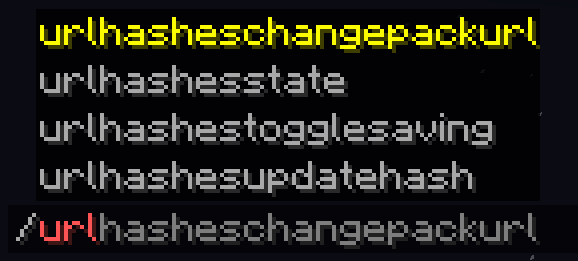
/urlHashesChangePackUrl 用于更改资源包链接并更新哈希值
注意:出于安全原因,默认情况下此命令只能从控制台执行
两者都会告诉你它已开始下载资源包以确定其哈希值:

并且所有内容在控制台中也始终可见:

你可以让插件在重启之间保存数据:
/urlhashestogglesaving 用于切换数据保存功能

因此,当服务器重启或重载时,它将不会再次下载资源包:

请注意,如果使用保存功能且链接始终相同,则需要你自己运行 /urlHashesUpdateHash。同样,仅当你的链接在更新之间保持不变时才需要这样做。
配置选项
你可以在配置文件(plugins/config/ProvidePackHashes)中编辑插件的设置。
目前唯一的专属选项是是否允许玩家(具有相应权限)更改资源包 URL,还是仅允许控制台(默认情况)。
支持的环境
Paper 服务器(1.21 - 1.21.8)
替代方案
如果你在一台存在此问题的服务器上游玩且不是管理员,你可以在客户端实现相同的行为。
为此,请使用我的 Fabric 客户端模组:Remember Url Hashes
Remember Url Hashes
What It Does
This plugin helps your players avoid re-downloading server resource packs when you already have them.
Why Is This Plugin Needed?
- Vanilla Minecraft already tries to do this, but if the server doesn't have SHA1 hash manually specified in server.properties, the client downloads the pack every time
- The plugin stores the previous hash and other resource pack data (based on the url), so the server can send that hash to players
- If your pack url stays the same between updates, you can easily run a command to update the hash
- You can even set a new pack URL from console and automatically prepare its hash!
Commands
The plugin keeps track of your server resource pack's Id, URL and SHA-1 hash:
You can check that with /urlhashesstate:
Updating the hash or changing the URL
If you updated the pack's url, the plugin will update the hash automatically, because the URL changed.
But if your link is always the same, you can easily run a command to update the hash whenever you want:
/urlHashesUpdateHash to update the SHA-1 hash
Or even tell the plugin to completely change the link to a new version and update the hash:
/urlHashesChangePackUrl to change the resource pack link and update hashes
Note: this command can only be executed from console by default for security reasons
Both will tell you that it started to download the pack to determine it's hash:
And everything will always be visible in your console too:
You can tell the plugin to save the data between restarts:
/urlhashestogglesaving to toggle data saving
So when the server restarts or reloads, it won't download the pack again:
Note, that with saving and the same link all the time, you'll need to run /urlHashesUpdateHash yourself. Again, only if your link stays the same between updates.
Config Options
You can edit plugin's settings in the config (plugins/config/ProvidePackHashes)
The only exclusive option there at the moment is whether you allow players (with permissions) to change the pack URL, or just console (by default).
Supported Environment
Paper servers (1.21 - 1.21.8)
Alternative approach
You can have the same behaviour on your client, if you play on a server with this issue and you aren't an administrator.
For this, use my Fabric client-side mod: Remember Url Hashes


 插件

 插件
 插件
 插件
 插件
 插件
评论 0
登录后参与评分
还没有评论,来抢沙发吧