
Retouch Brush
一款服务端 Minecraft 模组,让你可以使用画笔切换画作!
? 这个模组是什么?
这是一款服务端模组,允许用户通过画笔切换画作。
厌倦了为了客厅里那幅合适的画而不断打破和重新放置吗?
这款服务端模组让你轻松切换画作。
只需右键点击任何画作即可更换它。
你甚至可以用发射器制作一台功能齐全的电视!
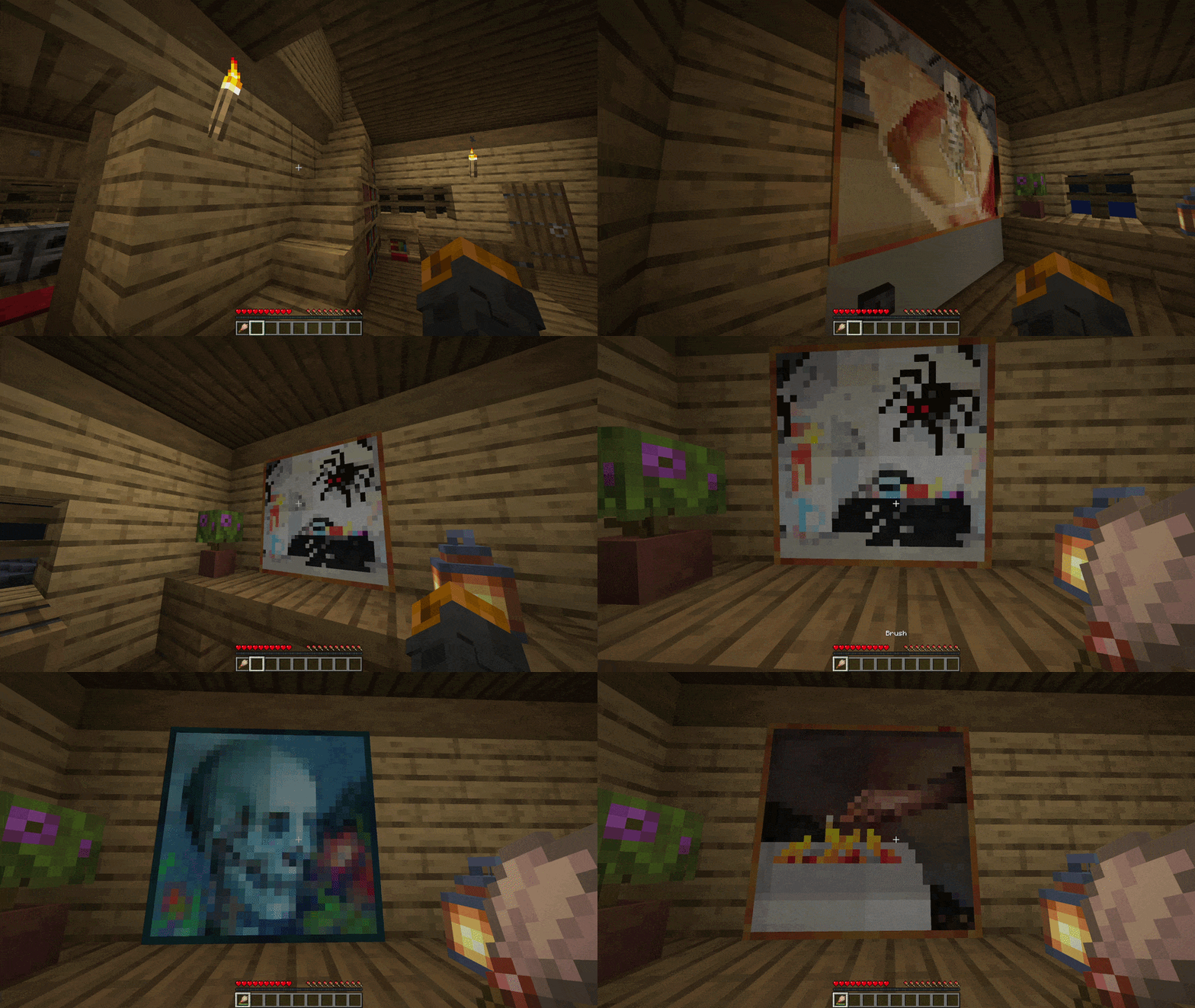
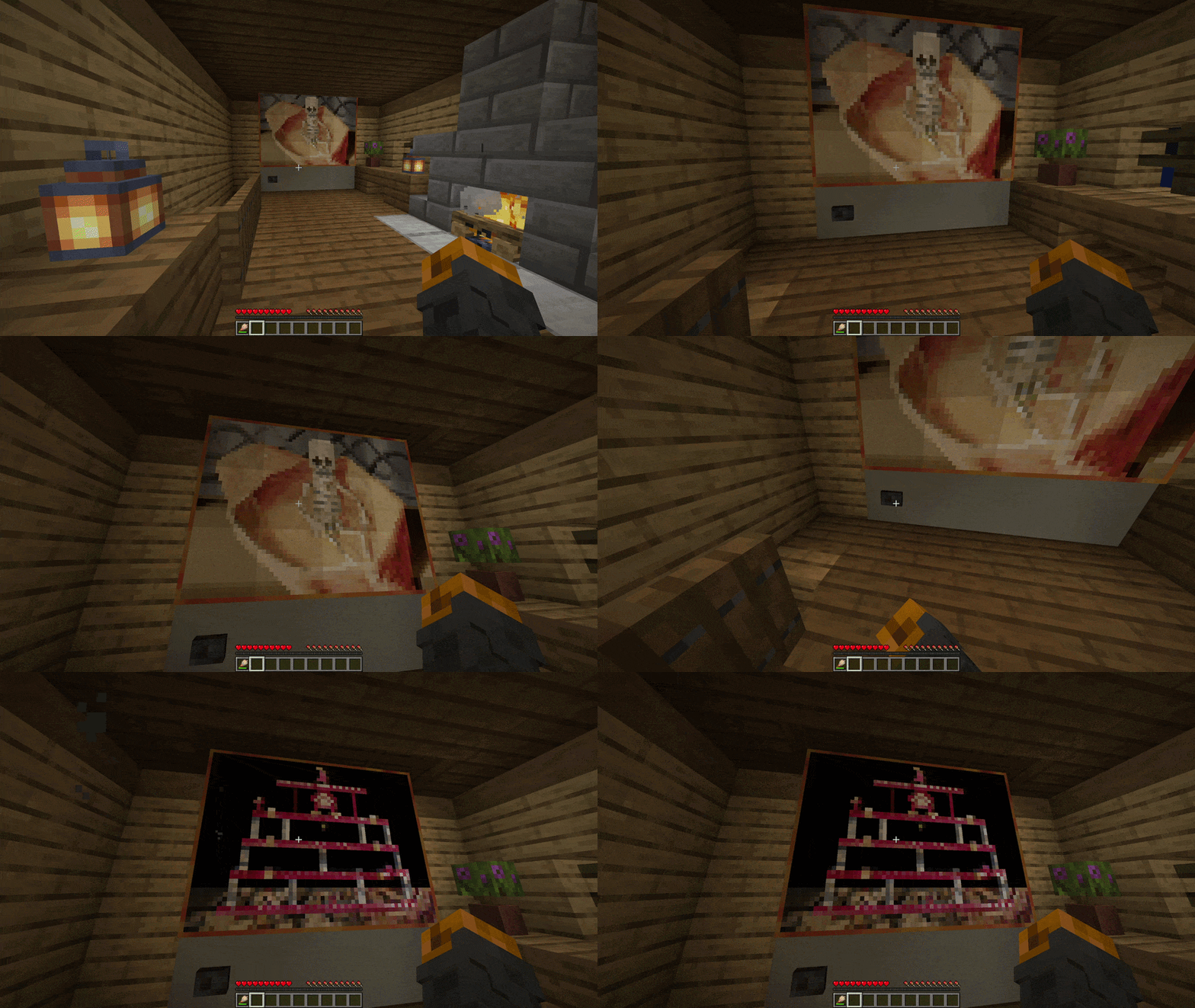
这里有一个小展示!
✅ 特性
- 多加载器支持: 完全兼容 Fabric、Quilt、Forge 和 NeoForge
- 轻松切换画作: 使用画笔右键点击任何画作即可循环浏览可用的艺术变体
- 发射器支持: 装入画笔的发射器可用于切换画作
- 仅服务端: 只需安装在服务器上;原版客户端无需下载任何内容即可连接
- 服务端权威: 通过在服务器端强制执行所有逻辑来防止客户端篡改
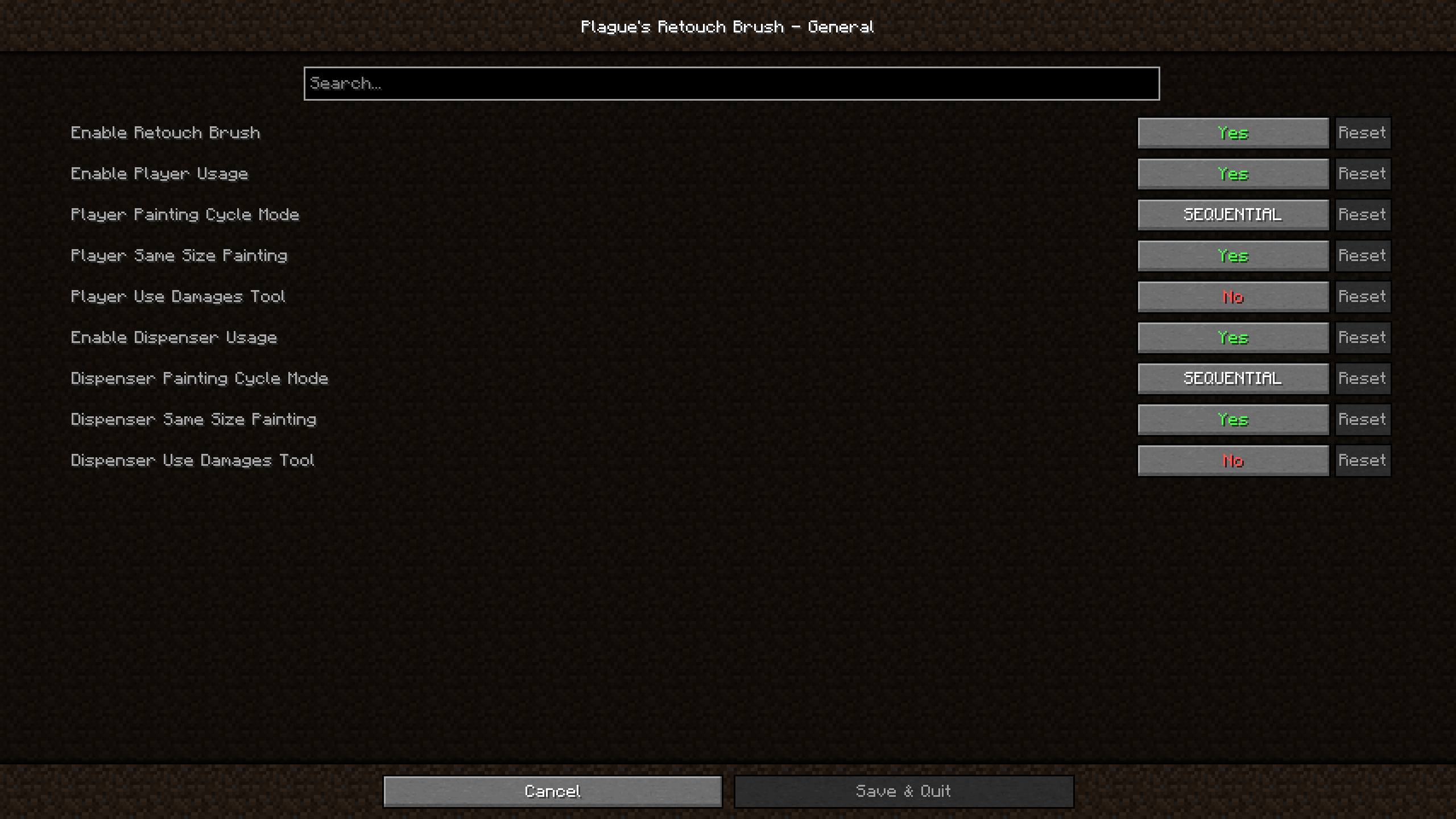
- 游戏内配置: 直接使用游戏内的配置屏幕调整模组行为
? 使用方法
使用此模组非常简单!
将 jar 文件放入你的 mods 文件夹即可!
对于 Fabric 和 Quilt 版本,如果你希望能够在游戏中访问模组的设置;你还必须将 ModMenu 和 Cloth Config API 放入你的 mods 文件夹。
对于 Forge 和 NeoForge 版本,如果你希望能够在游戏中访问模组的设置;你还必须将 Cloth Config API 放入你的 mods 文件夹。
你也可以手动编辑 config 文件夹中的配置文件(如果愿意的话)。
? 兼容性
此模组应与所有模组兼容。
它与添加更多原版画作的模组和资源包配合良好。
? 支持版本
| Minecraft | Fabric | Quilt | Forge | NeoForge |
|---|---|---|---|---|
| 26.3 | ✅(1.0.3) | ✅(1.0.3)⁶ | ❌ | ✅(1.0.3) |
| 26.2 | ✅(1.0.3) | ✅(1.0.3)⁵ | ❌ | ✅(1.0.3) |
| 26.1.2 | ✅(1.0.3) | ✅(1.0.3)⁴ | ❌ | ✅(1.0.3) |
| 26.1.1 | ✅(1.0.3) | ✅(1.0.3)⁴ | ❌ | ✅(1.0.3) |
| 26.1 | ✅(1.0.3) | ✅(1.0.3)⁴ | ❌ | ✅(1.0.3) |
| 1.21.11 | ✅(1.0.3) | ✅(1.0.3)³ | ❌ | ✅(1.0.3) |
| 1.21.10 | ✅(1.0.2) | ✅(1.0.2) | ❌ | ✅(1.0.2) |
| 1.21.9 | ✅(1.0.2) | ✅(1.0.2) | ❌ | ✅(1.0.2)² |
| 1.21.8 | ✅(1.0.2) | ✅(1.0.2) | ❌ | ✅(1.0.2) |
| 1.21.7 | ✅(1.0.2) | ✅(1.0.2) | ❌ | ✅(1.0.2) |
| 1.21.6 | ✅(1.0.2) | ✅(1.0.2) | ❌ | ✅(1.0.2) |
| 1.21.5 | ✅(1.0.2) | ✅(1.0.2) | ❌ | ✅(1.0.2) |
| 1.21.4 | ✅(1.0.2) | ✅(1.0.2) | ✅(1.0.2)¹ | ✅(1.0.2) |
| 1.21.3 | ✅(1.0.2) | ✅(1.0.2) | ✅(1.0.2) | ✅(1.0.2) |
| 1.21.2 | ✅(1.0.2) | ✅(1.0.2) | ❌ | ✅(1.0.2) |
| 1.21.1 | ✅(1.0.2) | ✅(1.0.2) | ✅(1.0.2) | ✅(1.0.2) |
| 1.21 | ✅(1.0.2) | ✅(1.0.2) | ✅(1.0.2) | ✅(1.0.2) |
| 1.20.6 | ✅(1.0.2) | ✅(1.0.2) | ✅(1.0.2) | ✅(1.0.2) |
| 1.20.5 | ✅(1.0.2) | ✅(1.0.2) | ❌ | ✅(1.0.2) |
| 1.20.4 | ✅(1.0.2) | ✅(1.0.2) | ✅(1.0.2) | ✅(1.0.2) |
| 1.20.3 | ❌ | ❌ | ❌ | ❌ |
| 1.20.2 | ✅(1.0.2) | ✅(1.0.2) | ✅(1.0.2) | ✅(1.0.2) |
| 1.20.1 | ✅(1.0.2) | ✅(1.0.2) | ✅(1.0.2) | ❌ |
| 1.20 | ✅(1.0.2) | ✅(1.0.2) | ✅(1.0.2) | ❌ |
✅ - 支持 ⏳ - 计划中 ❌ - 不支持
注释:
- 最新版本写在括号中
- ¹: 1.21.4 Forge 用户可以使用 cloth config for 1.21.3,因为没有针对 1.21.4 Forge 的 cloth config 构建版本
- ²: 1.21.9 NeoForge 用户应使用 NeoForge 21.9.15-beta 或更低版本,因为在打开模组列表时,cloth config 会导致 NeoForge 21.9.16-beta 崩溃
- ³: 1.21.11 Quilt 用户应使用 Quilt 0.29.3-beta.1 或更高版本,因为 mod menu 现在需要 Fabric 0.17.3
- ⁴: 从 26.1 到 26.1.2 Quilt 用户应使用 Quilt 0.30.0-beta.4 或更高版本,因为 mod menu 现在需要 Fabric 0.18.4
- ⁵: 从 26.2 Quilt 用户应使用 Quilt 0.30.0-beta.8 或更高版本才能使 mod menu 正常工作
- ⁶: 从 26.3 Quilt 用户应使用 Quilt 0.30.2-beta.1 或更高版本以使模组正常工作
Retouch Brush
A server-side Minecraft mod that lets you cycle through paintings using the brush!
? What is this mod?
This is a server-side mod that allows users to cycle through paintings using the brush.
Tired of breaking and replacing paintings just to get the right piece for your living room?
This server-side mod lets you effortlessly cycle through paintings.
Simply right-click any painting with a brush to change it.
You can even make a functioning TV using dispensers
Here is a little showcase!
✅ Features
- Multi-Loader Support: Fully compatible with Fabric, Quilt, Forge and NeoForge
- Easy Painting Cycling: Right-click any painting with a brush to cycle through available art variants
- Dispenser Support: Use a dispenser loaded with a brush to cycle through paintings
- Server-Side Only: Install only on the server; Vanilla clients can connect without downloading anything
- Server Authoritative: Prevents client-side manipulation by enforcing all logic securely on the server
- In-Game Configuration: Adjust the mod's behavior directly using in-game configuration screen
? Usage
Using this mod is very simple!
Put the jar file in your mods folder and you're good to go!
For Fabric and Quilt version, if you wish to be able to access the settings of the mod within the game; you will also need to put ModMenu and Cloth Config API in your mods folder.
For Forge and NeoForge version, if you wish to be able to access the settings of the mod within the game; you will also need to put Cloth Config API in your mods folder.
You can also edit the configuration file found in config folder manually if you wish to do so.
? Compatibility
This mod should be compatible with every mod.
It works with mods and resource packs that add more vanilla paintings.
? Supported Versions
| Minecraft | Fabric | Quilt | Forge | NeoForge |
|---|---|---|---|---|
| 26.3 | ✅(1.0.3) | ✅(1.0.3)⁶ | ❌ | ✅(1.0.3) |
| 26.2 | ✅(1.0.3) | ✅(1.0.3)⁵ | ❌ | ✅(1.0.3) |
| 26.1.2 | ✅(1.0.3) | ✅(1.0.3)⁴ | ❌ | ✅(1.0.3) |
| 26.1.1 | ✅(1.0.3) | ✅(1.0.3)⁴ | ❌ | ✅(1.0.3) |
| 26.1 | ✅(1.0.3) | ✅(1.0.3)⁴ | ❌ | ✅(1.0.3) |
| 1.21.11 | ✅(1.0.3) | ✅(1.0.3)³ | ❌ | ✅(1.0.3) |
| 1.21.10 | ✅(1.0.2) | ✅(1.0.2) | ❌ | ✅(1.0.2) |
| 1.21.9 | ✅(1.0.2) | ✅(1.0.2) | ❌ | ✅(1.0.2)² |
| 1.21.8 | ✅(1.0.2) | ✅(1.0.2) | ❌ | ✅(1.0.2) |
| 1.21.7 | ✅(1.0.2) | ✅(1.0.2) | ❌ | ✅(1.0.2) |
| 1.21.6 | ✅(1.0.2) | ✅(1.0.2) | ❌ | ✅(1.0.2) |
| 1.21.5 | ✅(1.0.2) | ✅(1.0.2) | ❌ | ✅(1.0.2) |
| 1.21.4 | ✅(1.0.2) | ✅(1.0.2) | ✅(1.0.2)¹ | ✅(1.0.2) |
| 1.21.3 | ✅(1.0.2) | ✅(1.0.2) | ✅(1.0.2) | ✅(1.0.2) |
| 1.21.2 | ✅(1.0.2) | ✅(1.0.2) | ❌ | ✅(1.0.2) |
| 1.21.1 | ✅(1.0.2) | ✅(1.0.2) | ✅(1.0.2) | ✅(1.0.2) |
| 1.21 | ✅(1.0.2) | ✅(1.0.2) | ✅(1.0.2) | ✅(1.0.2) |
| 1.20.6 | ✅(1.0.2) | ✅(1.0.2) | ✅(1.0.2) | ✅(1.0.2) |
| 1.20.5 | ✅(1.0.2) | ✅(1.0.2) | ❌ | ✅(1.0.2) |
| 1.20.4 | ✅(1.0.2) | ✅(1.0.2) | ✅(1.0.2) | ✅(1.0.2) |
| 1.20.3 | ❌ | ❌ | ❌ | ❌ |
| 1.20.2 | ✅(1.0.2) | ✅(1.0.2) | ✅(1.0.2) | ✅(1.0.2) |
| 1.20.1 | ✅(1.0.2) | ✅(1.0.2) | ✅(1.0.2) | ❌ |
| 1.20 | ✅(1.0.2) | ✅(1.0.2) | ✅(1.0.2) | ❌ |
✅ - Supported ⏳ - Planned ❌ - Not supported
Notes:
- Latest mod version is written in parentheses
- ¹: 1.21.4 Forge users can use cloth config for 1.21.3 since there is no build of cloth config for 1.21.4 Forge
- ²: 1.21.9 NeoForge users should use NeoForge 21.9.15-beta or below since cloth config causes a crash on NeoForge 21.9.16-beta upon opening the mods list
- ³: 1.21.11 Quilt users should use Quilt 0.29.3-beta.1 or above since mod menu now requires Fabric 0.17.3
- ⁴: From 26.1 to 26.1.2 Quilt users should use Quilt 0.30.0-beta.4 or above since mod menu now requires Fabric 0.18.4
- ⁵: From 26.2 Quilt users should use Quilt 0.30.0-beta.8 or above for mod menu to work
- ⁶: From 26.3 Quilt users should use Quilt 0.30.2-beta.1 or above for the mod to work
下载 Retouch Brush
需要联机服务器吗?
稳定流畅、一键部署,几分钟即可和朋友联机开服
最低仅需 8 元/月 即可畅快联机
下载 Retouch Brush
需要联机服务器吗?
稳定流畅、一键部署,几分钟即可和朋友联机开服
最低仅需 8 元/月 即可畅快联机
下载 Retouch Brush
需要联机服务器吗?
稳定流畅、一键部署,几分钟即可和朋友联机开服
最低仅需 8 元/月 即可畅快联机
下载 Retouch Brush
需要联机服务器吗?
稳定流畅、一键部署,几分钟即可和朋友联机开服
最低仅需 8 元/月 即可畅快联机
下载 Retouch Brush
需要联机服务器吗?
稳定流畅、一键部署,几分钟即可和朋友联机开服
最低仅需 8 元/月 即可畅快联机
下载 Retouch Brush
需要联机服务器吗?
稳定流畅、一键部署,几分钟即可和朋友联机开服
最低仅需 8 元/月 即可畅快联机
下载 Retouch Brush
需要联机服务器吗?
稳定流畅、一键部署,几分钟即可和朋友联机开服
最低仅需 8 元/月 即可畅快联机
下载 Retouch Brush
需要联机服务器吗?
稳定流畅、一键部署,几分钟即可和朋友联机开服
最低仅需 8 元/月 即可畅快联机
下载 Retouch Brush
需要联机服务器吗?
稳定流畅、一键部署,几分钟即可和朋友联机开服
最低仅需 8 元/月 即可畅快联机
下载 Retouch Brush
需要联机服务器吗?
稳定流畅、一键部署,几分钟即可和朋友联机开服
最低仅需 8 元/月 即可畅快联机
- 支持 Minecraft 26.2
- Quilt 用户需使用 Quilt 0.30.0-beta.8 或更高版本,模组菜单才能正常工作
关于这个资源的讨论、问题反馈与使用心得
还没有讨论,来发第一帖吧
你是这个资源的作者?登录后可认领此资源。
相似资源
 模组

可定制的鞘翅模组,支持装饰纹饰、旗帜图案等更多功能!
 模组

显示你正在注视的方块的信息。(适用于 Minecraft 1.16+ 的 Hwyla/Waila 分支)
 模组
使用 JavaScript 编辑配方、添加自定义物品、编写世界事件!
 模组

查看物品与配方
 模组
在游戏画面角落显示附近世界地形、玩家、生物和实体的地图。可创建路径点,帮助你找到标记过的位置。
 模组
AE2:一款流行的自动化与存储模组
评论 0
登录后参与评分
还没有评论,来抢沙发吧