Rewind — 逆转时间本身
消除混乱。
Rewind 是一款功能强大的服务端 Minecraft 时间操控模组,它每刻(tick)记录世界状态,并允许你实时逆转时间。爆炸、方块破坏、飞行的箭矢、生物移动、掉落的物品、玩家状态、末影水晶,甚至昼夜循环都可以完全按照发生时的状态倒流。
基于全局帧级回溯系统构建,Rewind 以平滑且精确的反向播放恢复世界,同时让你完全控制哪些内容会被影响。
✨ 特性
• 真正的刻级回溯 — 每刻记录世界,实现精确的反向播放
• 方块回溯 — 按逆序恢复被破坏、放置或修改的方块
• 生物回溯 — 回溯生物的移动、位置、状态及存在性
• 投射物回溯 — 逆转箭矢、三叉戟、雪球等所有投射物的运动
• 物品回溯 — 恢复掉落的物品并逆转物品移动
• 玩家回溯 — 回溯玩家位置、背包状态及操作行为
• 末影水晶回溯 — 恢复被破坏的末影水晶及其状态
• 时间回溯 — 在回溯过程中逆转太阳和月亮的运行
• 实时回溯倒计时 — 时间逆转激活时,可选地在动作栏显示回溯计时器
• 选择性分类 — 启用或禁用需要回溯的具体类别
• 即时预设 — 快速切换不同的回溯配置方案
• 自定义回溯时长 — 配置从几秒到长时间会话的回溯历史记录长度
• 全局帧系统 — 跨实体、方块和世界事件的同步回溯
• 回溯控制器 — 一个可合成的控制物品,用于管理时间操控
? 工作原理
每个服务器刻,Rewind 都会存储世界状态的完整帧。
其中包括:
• 方块变化
• 实体快照
• 投射物位置
• 物品状态
• 玩家数据
• 末影水晶
• 时间进度
当开始回溯时,帧会按照精心优化的顺序逐个反向恢复:
玩家 → 末影水晶 → 投射物 → 物品 → 生物 → 方块 → 时间
这确保了视觉播放的流畅性,并防止实体与世界变化之间的不同步。
? 命令
/rewind
• 开启/关闭回溯功能
/rewind status
• 显示当前回溯信息
/rewind limit <seconds>
• 设置最大回溯历史时长
/rewind give
• 给予回溯控制器物品
/rewind details <true|false>
• 启用或禁用回溯倒计时/动作栏详情
⚙ 分类控制
启用或禁用单独的回溯系统:
/rewind category blocks <true|false>
/rewind category mobs <true|false>
/rewind category projectiles <true|false>
/rewind category items <true|false>
/rewind category players <true|false>
/rewind category endcrystals <true|false>
/rewind category time <true|false>
? 预设
快速应用现成的回溯配置:
• all(全部)
• no_players(无玩家)
• blocks_only(仅方块)
• mobs_only(仅生物)
• projectiles_only(仅投射物)
• items_only(仅物品)
• endcrystals_only(仅末影水晶)
• time_only(仅时间)
• none(无)
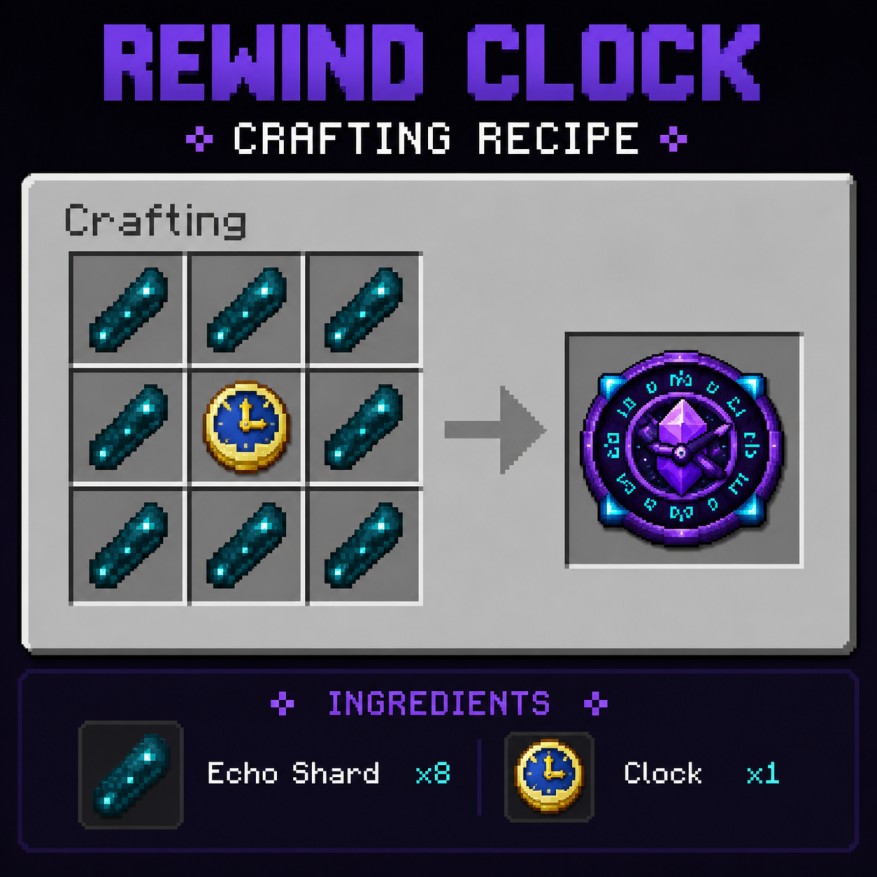
? 回溯时钟
合成神秘的“回溯时钟”以获得时间操控权限。
合成配方:
• 1 个时钟被 8 个回响碎片环绕
⚠️ 重要提示
• Rewind 完全在服务端运行
• 最佳体验场景为单人游戏或安装了该模组的服务端专用服务器
• 较大的回溯历史记录可能会根据世界活动增加内存占用
• Rewind 会恢复已不存在的实体,并移除在“未来”创建的实体
? 兼容性
• Minecraft 1.21.10, 26.1.2
• Fabric
• 服务端模组
• 无需额外依赖
安装方法
-
下载最新的 .jar 文件
-
将其放入 mods 文件夹
-
启动 Minecraft
-
使用 /rewind give 获取回溯控制器
适用于:
• 电影化玩法
• PvP 回滚时刻
• Boss 战恢复
• 冒险地图
• 基于时间的机制
• 实验性生存玩法
• 任何曾经说过“等等……我能撤销那个吗?”的人
Rewind — Reverse Time Itself
Undo the chaos.
Rewind is a powerful server-side Minecraft time manipulation mod that records the world every tick and lets you reverse it in real time. Explosions, block destruction, flying arrows, mob movement, dropped items, player states, End Crystals, and even the day/night cycle can all be pulled backward exactly as they happened.
Built around a global frame-based rewind system, Rewind restores the world with smooth and accurate reverse playback while giving you full control over what gets affected.
✨ Features
• True Tick-Based Rewind — records the world every tick for accurate reverse playback
• Block Rewind — restores destroyed, placed, or modified blocks in reverse order
• Mob Rewind — rewinds mob movement, position, state, and existence
• Projectile Rewind — reverses arrows, tridents, snowballs, and all projectile motion
• Item Rewind — restores dropped items and reverses item movement
• Player Rewind — rewinds player position, inventory state, and actions
• End Crystal Rewind — restores destroyed End Crystals and their states
• Time Rewind — reverses the sun and moon while rewinding
• Live Rewind Countdown — optional action-bar rewind timer while time reversal is active
• Selective Categories — enable or disable exactly what gets rewound
• Instant Presets — quickly switch between different rewind setups
• Custom Rewind Duration — configure rewind history from seconds up to long sessions
• Global Frame System — synchronized rewind across entities, blocks, and world events
• Rewind Controller — a crafted control item used for managing time manipulation
? How It Works
Every server tick, Rewind stores a complete frame of the world state.
That includes:
• Block changes
• Entity snapshots
• Projectile positions
• Item states
• Player data
• End Crystals
• Time progression
When rewinding begins, frames are restored backwards one-by-one in a carefully optimized order:
Players → End Crystals → Projectiles → Items → Mobs → Blocks → Time
This keeps visual playback smooth and prevents desync between entities and world changes.
? Commands
/rewind
• Toggle rewinding ON/OFF
/rewind status
• Displays current rewind information
/rewind limit <seconds>
• Sets the maximum rewind history
/rewind give
• Gives the Rewind Controller item
/rewind details <true|false>
• Enables or disables rewind countdown/action bar details
⚙ Category Controls
Enable or disable individual rewind systems:
/rewind category blocks <true|false>
/rewind category mobs <true|false>
/rewind category projectiles <true|false>
/rewind category items <true|false>
/rewind category players <true|false>
/rewind category endcrystals <true|false>
/rewind category time <true|false>
? Presets
Quickly apply ready-made rewind configurations:
• all
• no_players
• blocks_only
• mobs_only
• projectiles_only
• items_only
• endcrystals_only
• time_only
• none
? Rewind Clock
Craft the mysterious Rewind Clock to gain access to temporal manipulation.
Recipe:
• 8 Echo Shards surrounding 1 Clock
⚠️ Important Notes
• Rewind is fully server-side
• Best experienced in singleplayer or dedicated servers with the mod installed
• Large rewind histories may increase memory usage depending on world activity
• Rewind restores entities that no longer exist and removes entities created in the “future”
? Compatibility
• Minecraft 1.21.10, 26.1.2
• Fabric
• Server-side
• No extra dependencies
Installation
-
Download the latest .jar
-
Place it inside your mods folder
-
Launch Minecraft
-
Use /rewind give to obtain the Rewind Controller
Perfect for:
• Cinematic gameplay
• PvP rollback moments
• Boss fight recovery
• Adventure maps
• Time-based mechanics
• Experimental survival gameplay
• Anyone who ever said “wait… can I undo that?”


 模组

 模组

 模组
 模组
 模组
 模组
评论 0
登录后参与评分
还没有评论,来抢沙发吧