裂隙锚定
Rift Anchoring 是一款适用于 Minecraft NeoForge 1.21.1 的模组,它通过两种多区块结构实现永久区块加载:Rift Respawn Anchor(核心加载器)和 Rift Lodestone(扩展加载器),并配有视觉特效及完整的配置支持。
功能特性
Rift Respawn Anchor(核心加载器)
- 3×3 黑曜石基座 + 重生锚 — 在中心方块上方放置一个重生锚,构建坚实的 3×3 黑曜石平台
- 区块加载 — 使用 荧石 (Glowstone) 右键点击该锚以激活区块加载(消耗荧石,并随时间推移消耗能量)。使用 无限荧石 (Infinite Glowstone) 可实现永久加载(无能量消耗)
- 无限荧石合成(可配置方法):
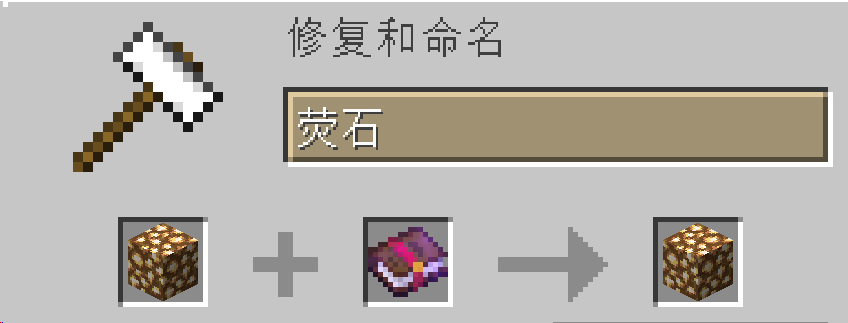
- 铁砧:荧石 + 附魔书(消耗 5 级经验值)
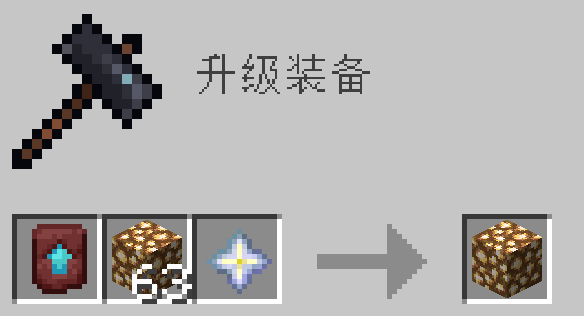
- 锻造台:荧石 + 下界之星 + 下界合金升级模板
- 两者皆可:同时提供上述两种配方(默认设置)
- 无法设置重生点 — 位于有效多区块结构内的重生锚无法设置玩家的重生点
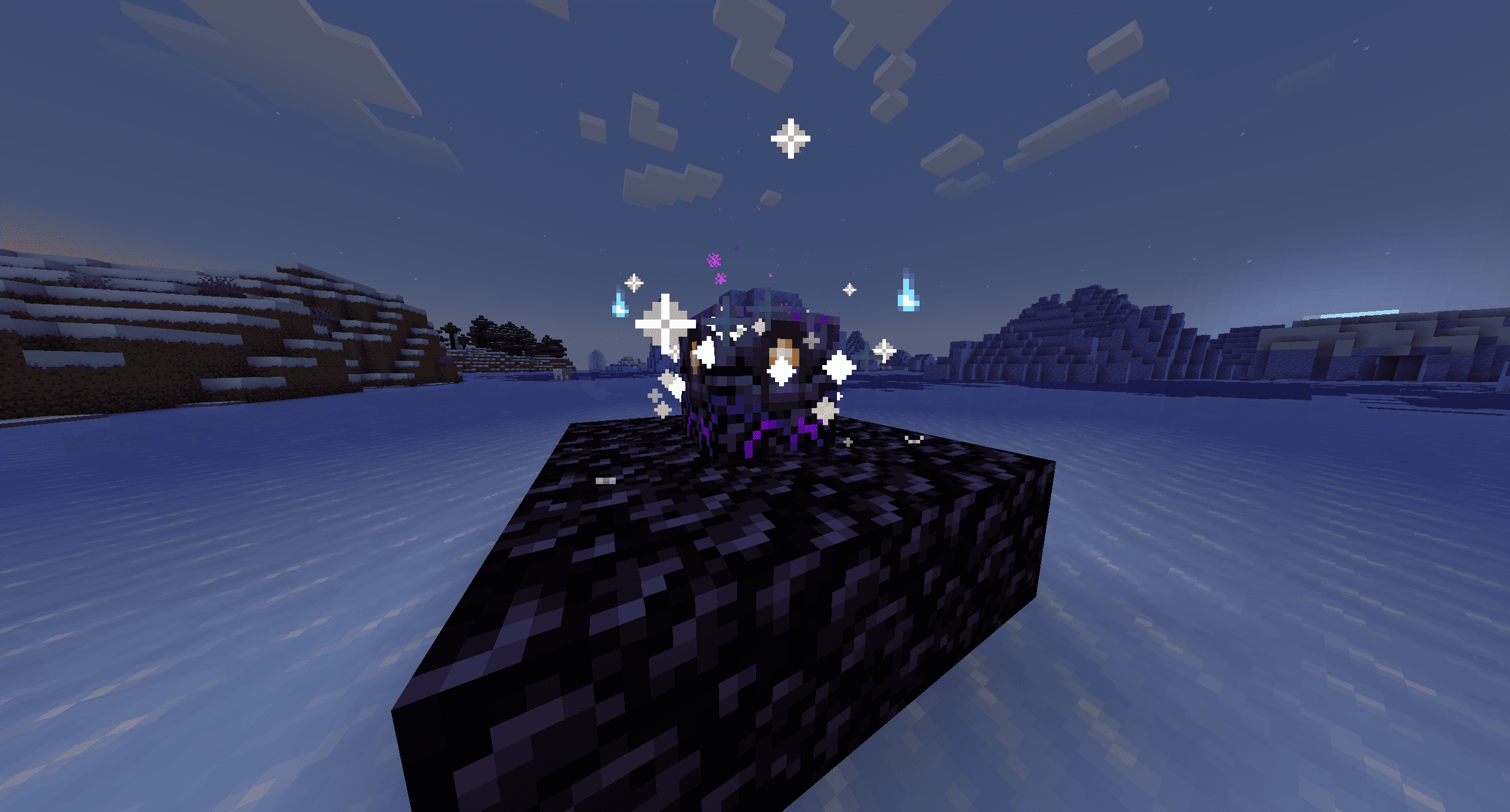
- 持续的视觉反馈 — 当锚处于激活状态时,会持续产生粒子特效
- 破坏结构的惩罚 — 如果黑曜石基座被破坏,能量将迅速流失且粒子效果加剧
- 可配置的能量消耗 — 能量间隔时间可配置(默认:每充能等级 1 小时)
Rift Lodestone(扩展加载器)
- 扩展区块加载范围 — 必须放置在已被活跃的 Rift Respawn Anchor 强制加载的区块相邻(共享边或角)的区块中
- 3×3 黑曜石基座 + 磁石 — 结构与锚相同,但中心方块为磁石
- 自动激活 — 当结构正确放置时会自动激活,伴有粒子特效和音效
- 新增:铁锭合成配方 — 回溯了 Minecraft 1.21.5 版本的磁石合成配方(8 个铁锭 + 1 个錾制石砖)。原版下界合金配方依然可用
- 锚定指南针绑定流程:
- 首先,将荧石升级为 无限荧石 (Infinite Glowstone)(参见上方的合成部分)
- 在铁砧中,组合无限荧石 + 附魔书 → 转换荧石形态
- 手持升级后的荧石并右键点击 Rift Respawn Anchor 以激活它
- 合成普通的死亡之契 (Recovery Compass)(原版物品)
- 手持死亡之契并右键点击活跃的 Rift Lodestone → 死亡之契被消耗,生成一个已绑定的 锚定指南针 (Anchor Guide Compass)
- 锚定指南针始终指向其绑定的磁石,并在工具提示中显示坐标/距离
- 扩展限制:每个 Rift Respawn Anchor 最多支持在其所在区块及其周围 5×5 区块半径内放置 25 个 Rift Lodestone
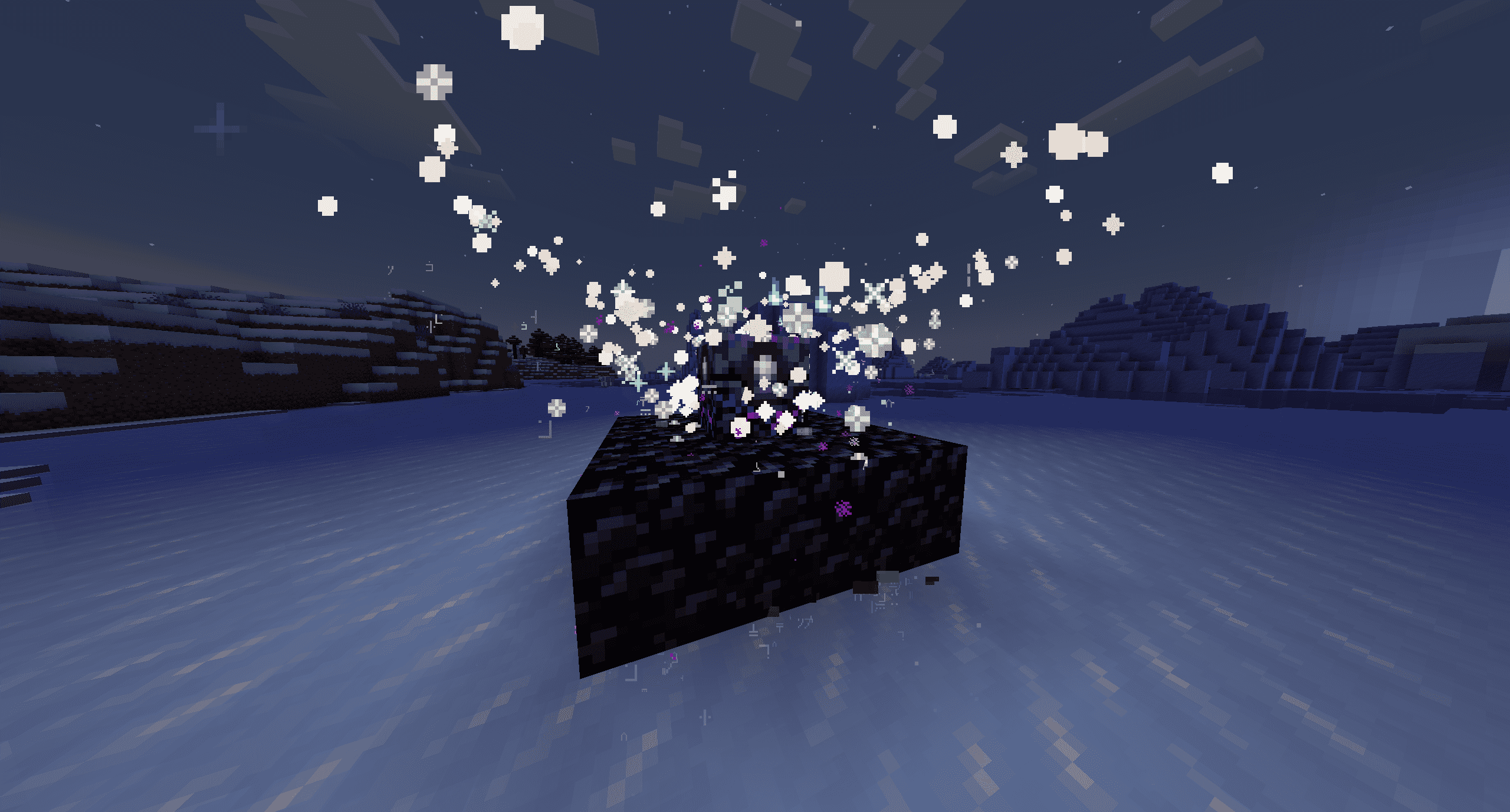
- 破坏惩罚 — 摧毁磁石会立即释放其加载的区块;所有与该磁石绑定的锚定指南针将解除绑定
区块调试棒
- 右键点击任意方块 — 显示区块加载状态、强制加载层级以及附近已加载的区块
- 右键点击活跃的 Rift Respawn Anchor — 显示锚的详细信息(能量、无限模式、剩余时间)
- 右键点击活跃的 Rift Lodestone — 显示绑定的父级锚(如果有)以及链接的指南针数量
前置要求
| 要求 |
版本 |
| Minecraft |
1.21.1 |
| NeoForge |
21.1.222+ |
| Java |
21 |
安装方法
- 为 Minecraft 1.21.1 安装 NeoForge 21.1.222+
- 从 Releases 页面下载最新的
.jar 文件
- 将 JAR 文件放入
.minecraft/mods/ 文件夹
- 启动游戏
使用说明
Rift Respawn Anchor
- 在地面上建造一个 3×3 的黑曜石平台
- 在中心方块的上方放置一个 重生锚
- 手持 荧石 (Glowstone) 并右键点击该锚 → 激活区块加载(随时间消耗能量)
- 若要实现永久区块加载(无能量消耗),请先合成 无限荧石 (Infinite Glowstone)(参见合成部分)
- 激活期间,锚上方会出现粒子特效
- 破坏黑曜石基座会停止区块加载并触发能量流失惩罚
Rift Lodestone
- 确保你拥有一个正在加载自身区块的活跃 Rift Respawn Anchor
- 找到一个相邻区块(与锚所在的区块通过边或角接触)
- 建造 3×3 黑曜石平台并在中心放置 磁石 → 结构自动激活
- 合成一个 死亡之契 (Recovery Compass)(原版物品)
- 手持死亡之契并右键点击活跃的 Rift Lodestone → 死亡之契被消耗,获得一个 锚定指南针 (Anchor Guide Compass)
- 锚定指南针始终指向该磁石并显示其坐标
无限荧石合成
方法 1 — 铁砧(消耗 5 级经验值):
在铁砧中放置 荧石 + 附魔书。
方法 2 — 锻造台(无经验值消耗):
在锻造台中放置 荧石 + 下界之星 + 下界合金升级锻造模板。
破坏 Rift Lodestone
- 其加载的区块会立即停止强制加载
- 所有与该磁石绑定的锚定指南针将解除绑定(物品描述重置)
- 播放破碎音效和粒子爆发效果
? 截图
配置文件
配置文件位于 .minecraft/config/rift-anchoring-common.toml:
# 能量消耗间隔(秒)(默认:3600 = 每充能等级 1 小时)
energyIntervalSeconds = 3600

# 无限荧石合成方法:"anvil"(铁砧)、"smithing"(锻造台)或 "both"(两者)(默认:both)
infiniteGlowstoneMethod = "both"

# 磁石制作配方:"iron"(1.21.5 铁配方)、"netherite"(原版),或 "both"(默认:both)
lodestoneRecipe = "both"

# 每个裂隙重生锚上允许的最大裂隙磁石数量(默认:25,最大值:25)
maxLodestonesPerAnchor = 25

# 启用裂隙磁石操作的详细调试日志输出(默认:false)
enableLodestoneDebugLog = false

[debug]
# 启用区块调试法杖物品(默认:true)
enableDebugWand = true
许可证
本项目根据 GPL-3.0 License 许可。
鸣谢
- NeoForge Team
- Minecraft Community
- an angel
Rift Anchoring
Rift Anchoring is a Minecraft NeoForge 1.21.1 mod that enables permanent chunk loading through two multiblock structures: the Rift Respawn Anchor (core loader) and the Rift Lodestone (expansion loader), complete with visual effects and full configuration support.
Features
Rift Respawn Anchor (Core Loader)
- 3×3 Obsidian Base + Respawn Anchor — Build a solid 3×3 obsidian platform with a Respawn Anchor on top of the center block
- Chunk Loading — Right-click the anchor with Glowstone to activate chunk loading (consumes glowstone, drains energy over time). Use Infinite Glowstone for permanent loading (no energy drain)
- Infinite Glowstone Crafting (configurable method):
- Anvil: Glowstone + Enchanted Book (costs 5 XP levels)
- Smithing Table: Glowstone + Nether Star + Netherite Upgrade Template
- Both: Both recipes available (default)
- No Respawn Point — Respawn Anchors inside a valid multiblock structure cannot set the player's spawn point
- Persistent Visual Feedback — Continuous particle effects while the anchor is active
- Structure Break Punishment — If the obsidian base is broken, energy rapidly drains and particles intensify
- Configurable Energy Drain — Energy interval configurable (default: 1 hour per charge level)
Rift Lodestone (Expansion Loader)
- Extends Chunk Loading — Must be placed in a chunk adjacent (sharing an edge or corner) to a chunk already force-loaded by an active Rift Respawn Anchor
- 3×3 Obsidian Base + Lodestone — Same structure pattern as the anchor, but with a Lodestone
- Auto-activation — Activates automatically when the structure is correct, with particle effects and sound
- New: Iron Ingot Recipe — Backports the Minecraft 1.21.5 lodestone recipe (8 iron ingots + 1 chiseled stone bricks). Vanilla netherite recipe is also available
- Anchor Guide Compass Binding:
- First, upgrade Glowstone to Infinite Glowstone (see crafting above)
- In an Anvil, combine Infinite Glowstone + Enchanted Book → transforms the glowstone
- Hold the upgraded glowstone and right-click the Rift Respawn Anchor to activate it
- Craft a regular Recovery Compass (vanilla)
- Right-click an active Rift Lodestone while holding the Recovery Compass → compass is consumed and a bound Anchor Guide Compass is created
- The Anchor Guide Compass always points to its bound lodestone and shows coordinates/distance in its tooltip
- Expansion Limits: Each Rift Respawn Anchor supports up to 25 Rift Lodestones within a 5×5 chunk radius (including its own chunk)
- Break Punishment — Destroying a lodestone immediately releases its chunk; all Anchor Guide Compasses bound to it become unbound
Chunk Debug Wand
- Right-click any block — Displays chunk loading status, force load level, and nearby loaded chunks
- Right-click an active Rift Respawn Anchor — Shows anchor details (energy, infinite mode, remaining time)
- Right-click an active Rift Lodestone — Shows bound parent anchor (if any) and linked compass count
Requirements
| Requirement |
Version |
| Minecraft |
1.21.1 |
| NeoForge |
21.1.222+ |
| Java |
21 |
Installation
- Install NeoForge 21.1.222+ for Minecraft 1.21.1
- Download the latest
.jar from the Releases page
- Place the JAR into your
.minecraft/mods/ folder
- Launch the game
Usage Guide
Rift Respawn Anchor
- Build a 3×3 obsidian platform on the ground
- Place a Respawn Anchor on top of the center block
- Hold Glowstone and right-click the anchor → activates chunk loading (consumes energy over time)
- For permanent chunk loading (no energy drain), craft Infinite Glowstone first (see crafting section)
- Particle effects appear above the anchor while it's active
- Breaking the obsidian base stops chunk loading and triggers drain punishment
Rift Lodestone
- Ensure you have an active Rift Respawn Anchor loading its own chunk
- Find a neighboring chunk (touching the anchor's chunk by edge or corner)
- Build a 3×3 obsidian platform and place a Lodestone at the center → structure auto-activates
- Craft a Recovery Compass (vanilla item)
- Hold the Recovery Compass and right-click the active Rift Lodestone → compass is consumed, an Anchor Guide Compass is given
- The Anchor Guide Compass always points to the lodestone and shows its coordinates
Infinite Glowstone Crafting
Method 1 — Anvil (costs 5 XP levels):
Place Glowstone + Enchanted Book in an anvil.
Method 2 — Smithing Table (no XP cost):
Place Glowstone + Nether Star + Netherite Upgrade Smithing Template in a smithing table.
Breaking a Rift Lodestone
- Its chunk immediately stops being force-loaded
- All Anchor Guide Compasses bound to that lodestone become unbound (item lore resets)
- A shattering sound and particle burst plays
? Screenshots
Configuration
The configuration file is located at .minecraft/config/rift-anchoring-common.toml:
# Energy consumption interval in seconds (default: 3600 = 1 hour per charge level)
energyIntervalSeconds = 3600

# Infinite Glowstone crafting method: "anvil", "smithing", or "both" (default: both)
infiniteGlowstoneMethod = "both"

# Lodestone crafting recipe: "iron" (1.21.5 iron recipe), "netherite" (vanilla), or "both" (default: both)
lodestoneRecipe = "both"

# Maximum number of Rift Lodestones per Rift Respawn Anchor (default: 25, max: 25)
maxLodestonesPerAnchor = 25

# Enable detailed debug log output for rift lodestone operations (default: false)
enableLodestoneDebugLog = false

[debug]
# Enable the Chunk Debug Wand item (default: true)
enableDebugWand = true
License
This project is licensed under the GPL-3.0 License.
Credits
- NeoForge Team
- Minecraft Community
- an angel


 模组
 模组

 模组
 模组

 模组

 模组

评论 0
登录后参与评分
还没有评论,来抢沙发吧