
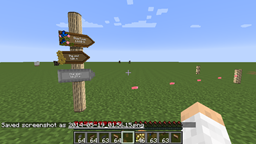
RPGModAdv 添加了 3 种物品。长杆和墙上的告示牌用于创建路径点(waypoint)。先将告示牌放置在长杆上,放置时你可以选择一个路径点,告示牌会自动指向该路径点,并显示到路径点的距离以及路径点的名称(你也可以自定义名称)。右键点击告示牌会显示前往目标路径点的“飞行路径”。
此外,它还添加了一些面包屑(glowcrumbs),当它们在快捷栏中时会自动掉落在地上。只有投放面包屑的玩家才能看到这些面包屑,它们会在大约 1 小时后消失,并且在光线较暗的情况下可见。
如果将一叠面包屑用于告示牌,它们将会被关联。现在你可以沿着你想要的路线走到目的地。一旦到达目的地,路径就会被固定下来,右键点击告示牌将显示自定义路径而不是“飞行路径”。可以通过按住 Shift 键并右键点击告示牌来重置自定义路径。
包含两个按键绑定:小键盘 9 用于清除路径显示,小键盘 8 用于隐藏/显示面包屑。
你是这个资源的作者?登录后可认领此资源。
相似资源
 模组

鞘翅纹饰Elytra Trims
KikuGie
可定制的鞘翅模组,支持装饰纹饰、旗帜图案等更多功能!
装饰装备
477
 模组

玉Jade ?
Snownee
显示你正在注视的方块的信息。(适用于 Minecraft 1.16+ 的 Hwyla/Waila 分支)
实用前置
341
 模组
Xaero的小地图
thexaero
在游戏画面角落显示附近世界地形、玩家、生物和实体的地图。可创建路径点,帮助你找到标记过的位置。
冒险交通
241
 模组

物品管理器Just Enough Items (JEI)
mezz
查看物品与配方
前置实用
240
 模组
KubeJS
Lat
使用 JavaScript 编辑配方、添加自定义物品、编写世界事件!
前置实用
239
 模组
Applied Energistics 2
shartte
AE2:一款流行的自动化与存储模组
存储科技
217
评论 0
登录后参与评分
还没有评论,来抢沙发吧