SceneBlocks
该模组最初是为 CobbleKanto 项目创建的,但其他希望构建冒险地图、解谜路线、洞穴、道馆、地牢以及基于 Cobblemon 的世界的创作者也可以使用它。
它添加了特殊的场景方块,可以与 Cobblemon 招式如 居合斩 (Cut)、碎岩 (Rock Smash)、怪力 (Strength) 和 闪光 (Flash) 互动,允许建造者创建路线、障碍物、隐藏路径、可推动的石球谜题、黑暗洞穴、迷雾区域以及交互式门控系统。
使用 Shockbyte 获得 Minecraft 服务器 25% 折扣!准备好和朋友开始一场史诗般的冒险了吗?只需点击这里或横幅,并使用促销代码 “COBBLEKANTO”,同时你还将帮助我们持续改进模组并开发未来项目!
功能
- Cobblemon 关键招式互动
- 可被居合斩清除的树木和小树
- 可被碎岩清除的岩石
- 可被怪力推动的石球
- 针对每位玩家的居合斩和碎岩障碍清除机制
- 石接收器谜题系统
- 可配置的门区域和目标位置
- 手动重置和手动目标支持
- 隐藏/伪装模式下的门和重置方块
- 具有黑暗/失明效果的闪光区域
- 带有氛围粒子及屏幕覆盖层的迷雾区域
- 用于基于移动机制的地图的向量板
关键招式系统
SceneBlocks 添加了一个自定义的 使用关键招式 按键绑定。
默认情况下,该按键为:
Grave Accent / Backtick(反引号键)
在许多键盘上,这是位于 ESC 附近或 TAB 上方的键。你可以在 Minecraft 的控制设置菜单中更改它。
当玩家注视一个受支持的 SceneBlock 并按下该键时,模组会检查玩家队伍中当前选定的 Cobblemon。
如果该 Cobblemon 习得了所需的招式,则触发相应动作。
支持的关键招式包括:
- 居合斩 (Cut) — 用于清除特定树木
- 碎岩 (Rock Smash) — 用于破坏特定岩石
- 怪力 (Strength) — 用于推动特定石球
- 闪光 (Flash) — 用于进入已配置的闪光区域
居合斩与碎岩障碍
SceneBlocks 包含特殊的树木和岩石,玩家可以使用正确的 Cobblemon 招式来清除这些障碍。
这些障碍专为多人冒险地图设计。当玩家使用正确的招式时,该方块对该玩家变为可通过状态,并在短暂时间后重置。
下方的 GIF 展示了在地图探索过程中清除碎岩障碍的情景。
这意味着其他玩家仍可正常体验该障碍,使其非常适合用于服务器、路线、地牢以及基于进度的地图。
怪力石球
SceneBlocks 包含由 怪力 (Strength) 招式驱动的可推动石球。
玩家可以注视这些方块,并在其选定的 Cobblemon 掌握怪力招式时,使用 使用关键招式 按键来推动它们。
下方的 GIF 展示了将怪力石球推过谜题区域的情景。
怪力石球可用于:
- 石球谜题
- 压力板式路线
- 地牢闸门
- 捷径解锁
- 多步骤谜题房间
- 冒险地图进度推进
石接收器谜题系统
石信息接收器 (Stone Info Receiver) 是 SceneBlocks 中的主要谜题控制方块。
它允许建造者将怪力石球、目标、门、重置点和指令连接到一个单一的谜题系统中。
下方的图片展示了 SceneBlocks 关键招式及接收器相关设置的实际应用。
通过石接收器,你可以配置:
- 门区域
- 多个目标位置
- 可推动石球的起始位置
- 自动重置计时器
- 空闲重置计时器
- 反向门
- 手动目标触发
- 手动重置方块
- 到达目标时的命令
- 可重复或一次性命令行为
该系统具有一定的学习曲线,请确保冷静测试所有内容。如果需要帮助,可以在 Discord 上向 “cobblekanto” 发送消息。
门与重置方块
SceneBlocks 包含两种特殊的实用方块:
- 门方块 (Gate Block)
- 重置方块 (Reset Block)
门方块可作为谜题控制的门、闸或隐藏物品的一部分使用。
下方的 GIF 展示了门方块作为谜题控制路径一部分的使用情景。
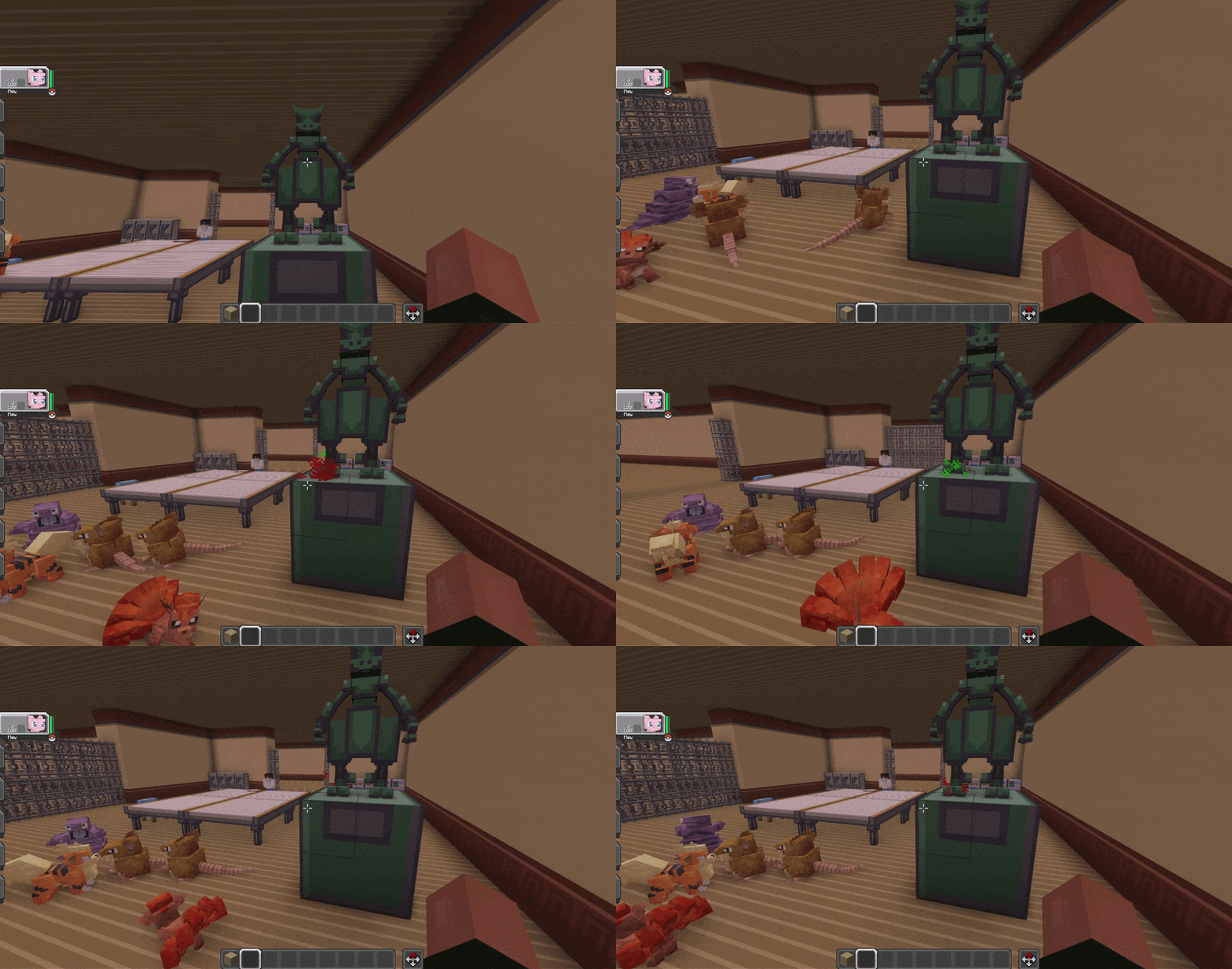
重置方块可以链接到接收器,允许建造者为谜题房间创建手动重置点。
这两种方块均支持视觉伪装。在创造模式下,手持另一种方块物品时,蹲下并对准门或重置方块右键单击,即可使其在视觉上模仿该方块。
这些方块是完全可选的! 你仅使用石信息接收器方块即可配置大多数接收器设置。
闪光区域
SceneBlocks 包含可配置的 闪光区域。
下方的 GIF 展示了应用了黑暗效果的闪光区域,该效果可通过闪光招式清除。
当玩家进入闪光区域时,屏幕会逐渐变暗,玩家会受到类似失明的效果。如果选定的 Cobblemon 掌握了 闪光 (Flash) 招式,玩家可以使用 SceneBlocks 按键绑定来清除该区域的黑暗。
管理员命令:
/sceneblocks flash_area set <name> <x1> <y1> <z1> <x2> <y2> <z2>
/sceneblocks flash_area remove <name>
/sceneblocks flash_area list
/sceneblocks flash_area clear
迷雾区域
SceneBlocks 还包含可配置的 迷雾区域。
下方的 GIF 展示了配置的迷雾区域所营造的氛围视觉效果。
迷雾区域会生成带有屏幕覆盖层和粒子的氛围雾气效果。与闪光区域不同,它们主要是视觉和环境层面的,因此非常适合用于探索和地图氛围营造。
管理员命令:
/sceneblocks fog_area set <name> <x1> <y1> <z1> <x2> <y2> <z2>
/sceneblocks fog_area remove <name>
/sceneblocks fog_area list
/sceneblocks fog_area clear
向量板
SceneBlocks 包含两种向量板方块:
- 速度向量板 (Vector Plate Speed)
- 停止向量板 (Vector Plate Stopper)
下方的 GIF 展示了向量板用于基于移动的地图机制的情景。
速度板会将玩家推向其朝向的方向。
停止板会抵消水平移动。
附加命令
SceneBlocks 还包含用于力量巨石和实体安全的世界设置:
/sceneblocks StrengthCanDamageMobs
更改力量巨石在移动时是否允许伤害/窒息生物。
默认情况下,此设置旨在友好并避免意外的生物伤害。
建造建议
SceneBlocks 主要为自定义地图、服务器和冒险路线设计。
为了获得最佳效果:
- 在对玩家开放之前,请在多人游戏中测试每个谜题。
- 保持复杂的力量谜题条理清晰,避免在同一狭小区域内重叠过多的接收器设置。
- 使用重置计时器以防止谜题房间卡住。
- 对于玩家可能会推离预期路径的巨石,使用空闲重置计时器。
- 使用 Flash 区域进行游戏进程推进,使用 Fog 区域营造氛围。
- 在构建大型基于接收器的谜题房间之前,请备份你的世界。
已知问题
- 具有许多附近巨石、闸门和重置触发器的先进接收器设置应在公共服务器上使用前仔细测试。在非常密集的设置中,重叠的重置计时器偶尔可能会留下旧的巨石模型。
- 大多数设置工具旨在供建造者/管理员使用,而非普通生存玩家。
兼容性与依赖项
- Minecraft 1.21.1
- Fabric API
- Java 21
- Cobblemon
- GeckoLib
常见问题
SceneBlocks 在没有 Cobblemon 的情况下能工作吗?
不能。SceneBlocks 需要 Cobblemon,因为关键招式系统直接从玩家的 Cobblemon 队伍中检查 Cobblemon 招式。
它能在多人游戏中工作吗?
可以。SceneBlocks 的设计考虑到了多人冒险地图。
切割和碎岩障碍使用针对每个玩家的可通过/不可见行为,因此每个玩家可以单独与路线互动。
我可以在我的整合包、服务器或冒险地图中使用这个模组吗?
当然可以!如果该模组被用于公共项目、服务器或地图,请注明出处,我们将不胜感激。
普通玩家能否配置接收器和区域?
不能。主要的配置工具和命令是面向管理员、操作员和地图建造者的。但是……我们计划推出一个“对生存模式友好”的更新!
为什么我的关键招式不起作用?
请检查以下内容:
- 玩家至少拥有一只 Cobblemon。
- 选择了正确的 Cobblemon 槽位。
- 所选的 Cobblemon 知道所需的招式。
- 玩家正看着一个受支持的 SceneBlocks 方块。
- 按键绑定在 Minecraft 控制设置中已正确设置。
特别感谢
- 感谢所有帮助完善 CobbleKanto 项目及其自定义模组的人们。
- 感谢 Cobblemon 社区激发了更多以冒险为核心的 Minecraft 体验。
如果你有想法或反馈,并希望协助我们为 Cobblemon 社区提供更好的工具,请在 Discord 上直接联系 "cobblekanto"!
使用促销代码 COBBLEKANTO 可在 Shockbyte 享受 Minecraft 服务器 25% 的折扣!准备好与你的朋友开始一场史诗般的冒险吧!
巨人源于自然 ??
SceneBlocks 是一个非官方的粉丝自制 Minecraft 模组。
本项目未与 Nintendo、Game Freak、Creatures Inc.、The Pokémon Company、Mojang Studios、Microsoft 或 Cobblemon 团队建立关联、背书、赞助或获得其批准。
Minecraft 是 Microsoft Corporation 的商标。Pokémon 及相关名称是其各自所有者的商标。Cobblemon 属于其各自的创作者。
SceneBlocks
This mod was originally created for the CobbleKanto project, but it can also be used by other creators who want to build adventure maps, puzzle routes, caves, gyms, dungeons, and Cobblemon-based worlds.
It adds special scene blocks that interact with Cobblemon moves such as Cut, Rock Smash, Strength, and Flash, allowing builders to create routes, obstacles, hidden paths, pushable boulder puzzles, dark caves, foggy areas, and interactive gate systems.
Get 25% off your Minecraft server with Shockbyte! Ready to start an epic adventure with your friends? Just click here or on the banner and use promo code “COBBLEKANTO”, plus you’ll be helping us keep improving the mod and developing future projects!
Features
- Cobblemon key move interactions
- Cut trees and small trees
- Rock Smash rocks
- Pushable Strength boulders
- Per-player obstacle clearing for Cut and Rock Smash
- Stone Receiver puzzle system
- Configurable gate areas and target positions
- Manual reset and manual target support
- Hidden/camouflage Gate and Reset blocks
- Flash areas with darkness/blindness effect
- Fog areas with atmospheric particles and overlay
- Vector Plates for movement-based map mechanics
Key Move System
SceneBlocks adds a custom Use Key Move keybind.
By default, the key is:
Grave Accent / Backtick
On many keyboards, this is the key near ESC or above TAB. You can change it in Minecraft's controls menu.
When a player looks at a supported SceneBlock and presses the key, the mod checks the currently selected Cobblemon in the player's party.
If that Cobblemon knows the required move, the action is triggered.
Supported key moves:
- Cut — used on Cut trees
- Rock Smash — used on breakable rocks
- Strength — used on pushable boulders
- Flash — used inside configured Flash areas
Cut and Rock Smash Obstacles
SceneBlocks includes special trees and rocks that can be cleared by players using the correct Cobblemon move.
These obstacles are designed for multiplayer adventure maps. When a player uses the correct move, the block becomes passable for that player and then resets after a short time.
The GIF below shows a Rock Smash obstacle being cleared during map exploration.
This means other players can still experience the obstacle normally, making it useful for servers, routes, dungeons, and progression-based maps.
Strength Boulders
SceneBlocks includes pushable boulders powered by the Strength move.
Players can push these blocks by looking at them and using the Use Key Move key while their selected Cobblemon knows Strength.
The GIF below shows a Strength boulder being pushed through a puzzle area.
Strength boulders can be used for:
- Boulder puzzles
- Pressure-plate style routes
- Dungeon gates
- Shortcut unlocks
- Multi-step puzzle rooms
- Adventure map progression
Stone Receiver Puzzle System
The Stone Info Receiver is the main puzzle controller block in SceneBlocks.
It allows builders to connect Strength boulders, targets, gates, resets, and commands into a single puzzle system.
The image below shows the SceneBlocks key move and receiver-related setup in use.
With the Stone Receiver, you can configure:
- Gate areas
- Multiple target positions
- Pushable boulder start position
- Automatic reset timer
- Idle reset timer
- Inverted gates
- Manual target trigger
- Manual reset block
- On Target Command
- Repeatable or one-time command behavior
This system has a steep learning curve, so make sure to test everything calmly. If you need help, you can send a message to "cobblekanto" on Discord.
Gate and Reset Blocks
SceneBlocks includes two special utility blocks:
The Gate Block can be used as part of puzzle controlled doors, gates or hidden items.
The GIF below shows a Gate Block being used as part of a puzzle-controlled path.
The Reset Block can be linked to a receiver, allowing builders to create manual reset points for puzzle rooms.
Both blocks support camouflage visuals. In creative mode, crouch and right-click a Gate or Reset block while holding another block item to make it visually mimic that block.
These blocks are COMPLETELY OPTIONAL! You can configure most receiver setups using only the Stone Info Receiver block.
Flash Areas
SceneBlocks includes configurable Flash areas.
The GIF below shows a Flash area applying a darkness effect that can be cleared with Flash.
When a player enters a Flash area, the screen fades into darkness and the player receives a blindness-style effect. If the selected Cobblemon knows Flash, the player can use the SceneBlocks keybind to clear the darkness for that area.
Admin commands:
/sceneblocks flash_area set <name> <x1> <y1> <z1> <x2> <y2> <z2>
/sceneblocks flash_area remove <name>
/sceneblocks flash_area list
/sceneblocks flash_area clear
Fog Areas
SceneBlocks also includes configurable Fog areas.
The GIF below shows a configured Fog area creating an atmospheric visual effect.
Fog areas create an atmospheric mist effect with screen overlay and particles. Unlike Flash areas, they are mainly visual and environmental, making them useful for exploration and map atmosphere.
Admin commands:
/sceneblocks fog_area set <name> <x1> <y1> <z1> <x2> <y2> <z2>
/sceneblocks fog_area remove <name>
/sceneblocks fog_area list
/sceneblocks fog_area clear
Vector Plates
SceneBlocks includes two Vector Plate blocks:
- Vector Plate Speed
- Vector Plate Stopper
The GIF below shows Vector Plates being used for movement-based map mechanics.
Speed plates push players in the direction the plate is facing.
Stopper plates cancel horizontal movement.
Additional Commands
SceneBlocks also includes a world setting for Strength boulders and entity safety:
/sceneblocks StrengthCanDamageMobs
Changes whether Strength boulders are allowed to damage/suffocate mobs when moved.
By default, this setting is designed to be friendly and avoid unwanted mob damage.
Builder Recommendations
SceneBlocks was mainly designed for custom maps, servers, and adventure routes.
For best results:
- Test every puzzle in multiplayer before opening it to players.
- Keep complex Strength puzzles organized and avoid overlapping too many receiver setups in the same tiny area.
- Use reset timers to prevent puzzle rooms from getting stuck.
- Use idle reset timers for boulders that players may push away from the intended path.
- Use Flash areas for gameplay progression and Fog areas for atmosphere.
- Back up your world before building large receiver-based puzzle rooms.
Known Issues
- Advanced receiver setups with many nearby boulders, gates, and reset triggers should be tested carefully before being used on a public server. In very dense setups, overlapping reset timers may occasionally leave an old boulder model behind.
- Most setup tools are intended for builders/admins, not normal survival players.
Compatibility & Dependencies
- Minecraft 1.21.1
- Fabric API
- Java 21
- Cobblemon
- GeckoLib
FAQ
Does SceneBlocks work without Cobblemon?
No. SceneBlocks requires Cobblemon because the key move system checks Cobblemon moves directly from the player's Cobblemon party.
Does it work in multiplayer?
Yes. SceneBlocks was created with multiplayer adventure maps in mind.
Cut and Rock Smash obstacles use per-player passable/invisible behavior, so each player can interact with routes individually.
Can I use this in my modpack, server, or adventure map?
Yes, absolutely! Credit is appreciated, especially if the mod is being used in a public project, server, or map.
Can normal players configure receivers and areas?
No. The main configuration tools and commands are intended for admins, operators, and map builders. But... we plan on making a "Survival friendly" update!
Why is my key move not working?
Check these things:
- The player has at least one Cobblemon.
- The correct Cobblemon slot is selected.
- The selected Cobblemon knows the required move.
- The player is looking at a supported SceneBlocks block.
- The keybind is correctly set in Minecraft controls.
Special Thanks
- To everybody helping polish the CobbleKanto project and its custom mods.
- To the Cobblemon community for inspiring more adventure focused Minecraft experiences.
If you have ideas or feedback and want to assist us in delivering better tools for the Cobblemon community, drop a direct message at "cobblekanto" Discord!
Get 25% off your Minecraft server with Shockbyte! Use promo code COBBLEKANTO and get ready to start an epic adventure with your friends!
Gigante pela própria natureza ??
SceneBlocks is an unofficial fan-made Minecraft mod.
This project is not affiliated with, endorsed by, sponsored by, or approved by Nintendo, Game Freak, Creatures Inc., The Pokémon Company, Mojang Studios, Microsoft, or the Cobblemon team.
Minecraft is a trademark of Microsoft Corporation. Pokémon and related names are trademarks of their respective owners. Cobblemon belongs to its respective creators.


 模组

 模组

 模组
 模组
 模组
 模组
评论 0
登录后参与评分
还没有评论,来抢沙发吧