
概览
Server Eye 是一款专为 Forge 和 NeoForge 设计的模组,赋予服务器管理员通过 modId 黑名单来阻止安装了特定模组的玩家加入服务器的能力。
工作原理
当一名玩家连接到你的服务器时,客户端会将该玩家的模组列表发送给服务器,随后将其与 server_eye-common.toml 中设置的黑名单进行比对。如果检测到匹配的 modId,该玩家将被踢出服务器,并被要求移除相关模组。
最佳使用场景
我个人推荐这种方式,因为这是最理想的结果。
目前为止最好的使用场景是:你的服务器是一个整合包服务器! 你只需将 Server Eye 添加到整合包中,这样玩家就不需要手动安装它了。
然后,只需在服务器端放置 Server Eye,根据你的需求进行配置,通过其 modId 屏蔽一些模组,即可正常使用。
注意事项
我最初是为自己的服务器制作此模组的,发布它仅仅是希望其他人可能会觉得有用。 Server Eye 并非完美无缺,但我会尽力维护该项目。
配置
你可以在 Files > Config > server_eye-common.toml 中找到 Server Eye 的配置文件。
屏蔽模组
blacklistedMods
blacklistedMods 是你不希望玩家在服务器上使用的 modIds 列表。
# 添加 modId 的方式如下
blacklistedMods = ["freecam", "xray"]
如何查找 modId?
在 Forge 和 NeoForge 中,内置有一个模组菜单,只需点击“Mods”,就会显示你当前安装的所有模组列表。你可以点击菜单中的任何模组。
在模组版本下方,你应该能看到写着“ModID”的内容。 模组的 ID 始终为小写,因此应该不难找到。见下方示例。
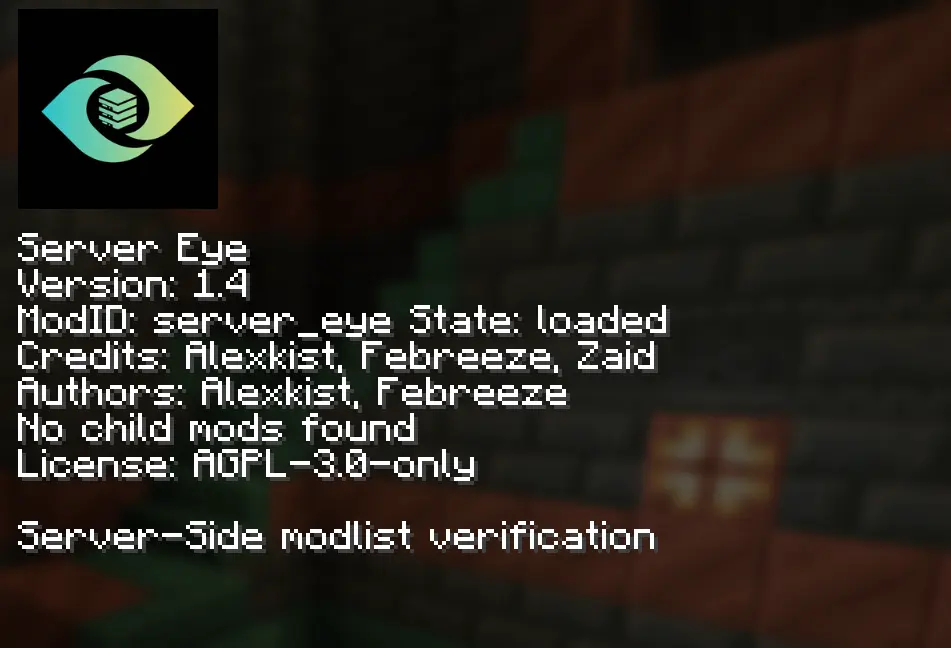
此截图是在 NeoForge 1.21.1 上截取的
白名单玩家
whitelistedPlayers
whitelistedPlayers 是一个玩家列表,这些玩家将跳过 Server Eye 进行的模组检查。目前仅支持用户名。
# 添加玩家的方式如下
whitelistedPlayers = ["Player1", "Player2"]
timeoutSeconds
timeoutSeconds
timeoutSeconds 定义了 Server Eye 等待客户端发送其模组列表的时长。 如果在指定时间内未收到模组列表,玩家将因超时被踢出。
通过将 timeoutSeconds 设置为 0 可以禁用此功能。
"logOnly" 模式
logOnly
启用 logOnly 后,将禁止玩家因黑名单模组而被踢出服务器。如果玩家携带黑名单模组加入,系统将在控制台记录日志。
命令
Server Eye 提供了一些简单的命令,可通过 /server_eye 访问。
Server Eye 1.5 以上的版本也兼容 LuckPerms!
viewMods
/server_eye viewMods
/server_eye viewMods 命令允许你在玩家发送其模组列表后,查看该玩家当前安装的所有模组。
reload
/server_eye reload
此命令仅存在于 Forge 版本中。 如果你运行的是 NeoForge 服务器,NeoForge 会在保存更改后自动应用更新。
/server_eye reload 命令会重新加载 Server Eye 的配置文件,这样在更改配置时无需重启服务器。
LuckPerms 集成
LuckPerms 集成
所有 1.5 以上的 Server Eye 版本均支持 LuckPerms 集成。
分配权限(Web 面板)
在 LuckPerms 中为玩家或角色分配权限非常简单。进入你想要编辑命令权限的玩家或角色页面,滚动到底部,选择 Permission,然后在文本框中输入 "server_eye"。
Server Eye 的权限节点以其模组 ID (server_eye) 开头,请参阅下方以获取所有权限节点名称及其对应的命令访问权限。
权限节点
server_eye.mods- 授予对viewMods子命令的访问权限server_eye.reload- 授予对reload子命令的访问权限(仅限 Forge)
请勿使用 command.server_eye.viewmods 或 command.server_eye.reload! 这些是命令本身,不会更新权限节点。请使用 server_eye.mods 和 server_eye.reload。
常见问题
支持 Fabric 吗?
我没有计划将此项目移植到 Fabric。 ClientID 是比我自己制作的更好的替代方案。因此,如果你想在 Fabric 上使用类似的功能,请使用 ClientID!
这仅是服务端插件吗?
不是。目前对于 Forge 和 NeoForge 没有已知的方法实现纯服务端。 你可以在下方查看更多详情。
你能把它做成一个插件吗?
是的,我可以。 我可以将 Server Eye 的服务端部分做成插件。但是,为了正常工作,它仍然需要其客户端部分的支持。即使它是插件,玩家仍需下载该模组。
即使存在无需模组即可实现的方法,它们的可靠性也不如“插件+模组”的组合,因此我不计划支持任何形式的插件。
Server Eye 可靠吗?
是的,在大多数情况下应该是可靠的,当然,没有什么是完美的。 所以,你不能简单地添加此模组并期望屏蔽 Freecam 就能完全阻止玩家使用它,因为存在绕过像 Server Eye 这类模组检测的方法。
链接
Overview
Server Eye is a Mod designed for Forge and NeoForge, giving Server Owners the ability to Blacklist Mods via there modId to prevent (most) Players with these Mods from joining the Server if they have a blacklisted Mod installed.
How does this work?
Once a Player connects to your Server, the Client will send the Player's Mod list to the Server, which will the be compared to the Blacklist set in server_eye-common.toml. If a modId matches, the Player will be kicked from the Server, with them being asked to remove the Mod.
Best use-case
I personally recommend doing this, as it is an ideal outcome.
The best use case by far is if your Server is Modded and has a Modpack! You can just add Server Eye to the Modpack, so Players do not have to install it manually.
Then, simply put Server Eye on the Server's end, configure it to match your needs, Blacklist some Mods via there modId and you should be good to go.
Heads up!
I made this Mod for my Server, and only published it in the hoppes that people may find it useful. Server Eye is not perfect, but I will try to maintain the Project as best as I can.
Configuration
You can find Server Eye's Config under Files > Config > server_eye-common.toml
Blacklisting Mods
blacklistedMods
blacklistedMods is a list of modIds that you do not want your Players to use on your Server.
# This is how you add modIds
blacklistedMods = ["freecam", "xray"]
Where can I find a modId?
On Forge and NeoForge, you have an inbuild Mod Menu, just click on "Mods", and it will show a list of all Mods you currently have installed. You can click on any Mod listed within the Menu.
Right below the Mod'ss Version, you should be able to find something that says "ModID". A Mod's ID is always lowercase, so it should not be hard to find. You can see an example below.
This Screenshot was taken on NeoForge 1.21.1
Whitelisting Players
whitelistedPlayers
whitelistedPlayers is a list of Players which will skip the Mod checks that Server Eye does. This currently only Supports Usernames.
# This is how you add Players
whitelistedPlayers = ["Player1", "Player2"]
timeoutSeconds
timeoutSeconds
timeoutSeconds is the Duration where Server Eye waits for the Client to send its Modlist. If the Modlist is not send in the specified duration, the Player will be kicked for timing out.
This feature can be disabled by setting timeoutSeconds to 0
"logOnly" Mode
logOnly
logOnly will disable Players being kicked from the Server. If a Player joins with a Blacklisted Mod, it will be logged in the Console.
Commands
Server Eye has a few simple Commands, which can be accessed via /server_eye.
Server Eye Versions above 1.5 are also LuckPerms compatible!
viewMods
/server_eye viewMods
The /server_eye viewMods Command allows you to see all the Mods a Player currently has installed, once the Player has sent there Modlist.
reload
/server_eye reload
This Command only exists for the Forge version. If you are running a NeoForge Server, NeoForge will automatically apply changes once saved.
The /server_eye reload Command will reload Server Eye's Config File, so you do not have to restart the Server when changing the Config.
LuckPerms Integration
LuckPerms Integration
LuckPerms Integration is availible for all Server Eye versions above 1.5.
Giving Permissions (Web-Panel)
Giving Permissions for a Player or Role within LuckPerms is quite simple, go to a Player or Role you would like edit Command Permissions for, go to the Bottom of the Page, select Permission and type "server_eye" in the Textfield.
Server Eye's Permission Nodes start with its modId (server_eye), check below for all Permission Node names and to what Commands they give access
Permission Nodes
server_eye.mods- Gives access to theviewModssub-commandserver_eye.reload- Gives access to thereloadsub-command (Forge Only)
DO NOT USE command.server_eye.viewmods OR command.server_eye.reload! These are the Commands itself, and will not update the Permission Nodes. Use server_eye.mods and server_eye.reload
Q&A
Fabric Support?
I have no plans to port this Project to Fabric. ClientID is an allot better alternative then what I created here. So if you want something simular for Fabric, use ClientID!
Is this Server-Side only?
No. there is no known methood to do so for Forge and NeoForge. You can get more detail below.
Can you make this a Plugin?
Yes, I could. I can make the Server-side of Server Eye a Plugin. But, it would still need its Client-side to work correctly. Players would still need to Download the Mod, even if it is a Plugin.
Even if there are methoods to do so without the Mod, they are not as reliable as a Plugin Mod pair, I do not have plans for any kind of Plugin Support.
Is Server Eye reliable?
Yes, it should be in most cases, but ofcourse, nothing is perfect. So, you cannot just add this and expect that if you Blacklist Freecam that your Players cannot use it anymore, there are ways to bypass Mods like Server Eye.
Links

下载 Server Eye
下载 Server Eye
下载 Server Eye
下载 Server Eye
下载 Server Eye
下载 Server Eye
下载 Server Eye
下载 Server Eye
下载 Server Eye
下载 Server Eye
Server Eye 1.5 (Forge)
- 添加了 LuckPerms 集成
- 使用 Server Eye 的权限节点进行 LuckPerms 集成
- 在我们的 wiki 上了解更多信息
- 重构了基于节点的权限系统
关于这个资源的讨论、问题反馈与使用心得
还没有讨论,来发第一帖吧
你是这个资源的作者?登录后可认领此资源。
相似资源
 模组

显示你正在注视的方块的信息。(适用于 Minecraft 1.16+ 的 Hwyla/Waila 分支)
 模组

查看物品与配方
 模组
在游戏画面角落显示附近世界地形、玩家、生物和实体的地图。可创建路径点,帮助你找到标记过的位置。
 模组
使用 JavaScript 编辑配方、添加自定义物品、编写世界事件!
 模组
添加区块认领和玩家组队功能,并与 Xaero's Minimap 和 World Map 集成
 模组
添加全屏世界地图,显示你在世界中已探索的区域。与 Xaero's Minimap 搭配使用效果极佳。
评论 0
登录后参与评分
还没有评论,来抢沙发吧