
一款使用 Patbox 开发的 Polymer 实现的服务器端模组,添加了背包功能。
概述
GeyserMC(基岩版)支持仅适用于 GeyserMC 支持的最新 Minecraft 版本。
在更新之前,建议查看变更日志以了解破坏性更改。
新增内容
本模组添加了 6 种物品。
- 小型背包,拥有 9 个格子。
- 中型背包,拥有 18 个格子。
- 大型背包,拥有 27 个格子。
- 末影背包,一个允许你随时随地访问末影箱的背包!
- 全球背包,拥有 54 个格子,其库存可以通过将两个全球背包掉落在地面上并加入一颗末影珍珠来链接其他全球背包进行共享!
- 熔岩背包,当装满时,该背包会自动清空第一行并将第二行移至第一行。本质上是一个垃圾桶背包。
模块
- 目前,本模组添加了:
- 合成模块
- 切石机模块
- 锻造台模块
- 虚空模块
- 真空模块
- 唱片模块
-
要将它们应用到背包上:
- 将模块和背包放入锻造台中。
-
要使用它们:
- 合成模块:在空中潜行并正常打开背包,然后点击合成模块以打开合成界面。
- 切石机模块:与合成模块相同,但显示切石机界面。
- 锻造台模块:与合成模块相同,但显示锻造台界面。
- 虚空模块:你可以将其过滤器添加到它里面,方法是将其放入工作台并添加你想过滤的物品周围。背包会将你指定在过滤器中的附近物品销毁。
- 真空模块:与虚空模块相同,但你可以将其模式更改为白名单、黑名单或匹配背包内容。
- 唱片模块:要使用它,首先你需要将其与背包集成,并进入背包升级容器 GUI。要放入音乐唱片,请在鼠标光标持有音乐唱片时点击唱片模块。如果你点击太快,可以慢慢改变模式将其取出。
它还添加了一种附魔!
- 容量,一种附魔,每级增加你的背包 9 个额外存储格子!(注意:仅可应用于中型和大型背包)。
此外,普通背包像线团一样可以染色!
1.3 及以上版本
- 背包就像线团。你可以使用背包的物品形式像线团一样向其输入物品。背包只允许插入物品。
- 背包。背包。你可以在库存中右键点击背包以打开它。
- 可放置的背包。
注意:以下操作需要你拥有 Trinkets (Polymer Port) 模组!
- 你可以将背包放在饰品背部槽位。要打开背包,请执行 /open。
- 你还可以放置它!只需手持空手右键点击地面即可。
配方


命令
-
/backpacks:
/backpack backup创建备份。/backpacks list: 列出创建的背包实例。/backpacks open <UUID>: 指定 UUID 以打开背包实例。/backpacks set <name> <bool>: 将设置设置为 true 或 false。
-
/backpacks open config :
/backpacks open config reset: 重置背包配置。/backpacks open config reload: 保存背包配置。/backpacks open config save: 重新加载背包配置。
-
/backpacks set :
/backpacks set backpack_self_visibility: 当装备在背部饰品槽位时显示背部的背包(禁用后只有你看不到它)/backpacks set hide_backpack_when_looking_down: 向下看时隐藏背包(禁用后可在向下看时看到背包)/backpacks set equip_with_mainhand_full: 允许在主手已满时装备已放置的背包。/backpacks set equip_with_offhand_full: 允许在副手已满时装备已放置的背包。/backpacks set place_with_mainhand_full: 允许在主手已满时放置已放置的背包。/backpacks set place_with_offhand_full: 允许在副手已满时放置已放置的背包。
- /open :
- 允许当你装备在饰品背部槽位时打开背包。
配置
back_positions: 调整背包在玩家背上的位置。back_yaw: 控制背包的水平旋转(左右)。back_pitch_when_sneaking: 改变玩家在潜行时背包的倾斜角度。
display_back: <默认值: true> 决定装备时背包是否显示在角色背后。breaks_with_flow<默认值: true> 决定当水流经过时背包是否会损坏。
types_of_backpacks:添加或删除条目,以移除或创建背包。
添加纹理
输入 /polymer generate 命令。
资源包将位于你的服务器文件夹中,名为 polymer-resourcepack.zip,或者你可以在 Polymer 的配置中启用 自动托管。
Geyser 支持
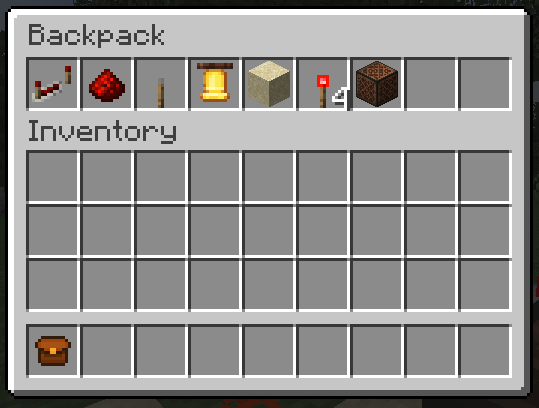
完全支持 Geyser,但当你背着背包时不支持。这是唯一不支持的情况,但如果 Java 玩家看到你背着背包,他们可以完整地看到背后的背包。游戏内示例
Bug
请 报告 在使用此模组时可能出现的任何 bug。
鸣谢
- Octal 提供了原版模组 Server Backpacks,本模组基于它开发。
- MOEJ-The-Good 贡献了诸多提升游戏体验的想法。
- ndellagrotte 贡献了熔岩背包(Lava Backpack)。
A server-sided mod that adds backpacks using Polymer by Patbox
Overview
GeyserMC (Bedrock) support is only for the latest Minecraft versions supported by GeyserMC.
Before updating, it's recommended to check the changelog for breaking changes.
Additions
This mod adds 6 items.
- A small backpack, that has 9 slots.
- A medium backpack, that has 18 slots.
- A large backpack, that has 27 slots.
- A ender backpack, a backpack that lets you access your ender chest from anywhere!
- A global backpack, that has 54 slots and it's inventory can be shared by linking it with other global backpacks using an ender pearl by dropping 2 global backpacks on the ground plus an ender pearl!
- A lava backpack, that when full the backpack will clear the first row and move the second row to the first row. Essentialy a trash backpack.
Modules
- Currently, this mod adds:
- Crafting Module
- Stonecutter Module
- Smithing Table Module
- Void Module
- Vacuum Module
- Jukebox Module
-
To apply them to the backpack:
- Put the module and the backpack inside a smithing table.
-
To use them:
- Crafting Module: Sneak and open the backpack normally in the air, then you can click on the crafting module to open a crafting ui.
- Stonecutter Module: The same as the crafting module, but it shows the stonecutter ui.
- Smithing Table Module: The same as the crafting module, but it shows the smithing table ui.
- Void Module: You can add to it's filter by putting it inside a crafting table and add the items you want to filter around it. The backpack will void any nearby items you specified in the filter.
- Vacuum Module: The same as void module, but you can change it's mode to whitelist, blacklist or match backpack's content.
- Jukebox Module: To use it, first you need to integrate it with a backpack, and go inside the backpack's upgrade container GUI. To put the music disc, click the Jukebox Module while your mouse cursor is holding the music disc. Slowly change the mode as you can take it out if you click too fast.
It also adds an enchantment!
- Capacity, an enchantment that increases your backpack's storage by 9 additional slots per level! (Note: Can be applied on medium and large backpack only).
Also, Regular backpacks are dyeable like bundles!
1.3 and above
- Backpacks are like bundles. You can use the item form of a backpack to input item into it like a bundle. Backpacks only allows inserting item.
- Backpacks. backpacks. You can right click a backpack in a inventory to open it.
- Placeable backpacks.
Note: This below requires you have the Trinkets (Polymer Port) mod!
- You can put backpacks on a trinkets back slot. To open the backpack do /open.
- You also place it! Just shift right click on the ground with an empty hand.
Recipes
Commands
-
/backpacks:
/backpack backupMakes a backup./backpacks list: Lists created backpack instances./backpacks open <UUID>: Specify an UUID to open a backpack instance./backpacks set <name> <bool>: Set a setting to true or false.
-
/backpacks open config :
/backpacks open config reset: Resets the backpack's config./backpacks open config reload: Saves the backpack's config./backpacks open config save: Reloads the backpack's config.
-
/backpacks set :
/backpacks set backpack_self_visibility: Show a backpack on the back when equipped on the back trinket slot (when disabled only you wouldn't see it)/backpacks set hide_backpack_when_looking_down: Hide a backpack when looking down (disable to see the backpack when looking down)/backpacks set equip_with_mainhand_full: Allows to equip a placed backpack when your mainhand is full./backpacks set equip_with_offhand_full: Allows to equip a placed backpack when your offhand is full./backpacks set place_with_mainhand_full: Allows to place a placed backpack when your mainhand is full./backpacks set place_with_offhand_full: Allows to place a placed backpack when your offhand is full.
- /open :
- Allows to open a backpack when it is equipped on the trinkets back slot.
Configuration
back_positions: Adjusts the backpack’s position on the player’s back.back_yaw: Controls horizontal rotation (left/right) of the backpack.back_pitch_when_sneaking: Alters the tilt angle of the backpack when the player is sneaking.
display_back: <default: true> Determines whether or not the backpack should be displayed on the back when equipped.breaks_with_flow<default: true> Determines whether or not the backpack should break when water flows to it.
types_of_backpacks: Add or remove an entry to remove or create a backpack.
Adding Textures
Write /polymer generate command. Resource pack will be located in your server folder as polymer-resourcepack.zip or you can enable auto-host in polymer's config.
Geyser Support
Geyser is fully supported, but not when your wearing the backpacks. That is the only unsupported thing, but java players can fully see the backpacks on the back if you wear it.Example in game
Bugs
Please report any bugs that might occur while using this mod.
Credits
- Octal for the orignal mod Server Backpacks as this is based on it.
- MOEJ-The-Good for the quality of life ideas.
- ndellagrotte for contributing the Lava Backpack.

下载 Server Backpacks!
下载 Server Backpacks!
下载 Server Backpacks!
下载 Server Backpacks!
需要联机服务器吗?
稳定流畅、一键部署,几分钟即可和朋友联机开服
最低仅需 8 元/月 即可畅快联机
下载 Server Backpacks!
下载 Server Backpacks!
需要联机服务器吗?
稳定流畅、一键部署,几分钟即可和朋友联机开服
最低仅需 8 元/月 即可畅快联机
下载 Server Backpacks!
需要联机服务器吗?
稳定流畅、一键部署,几分钟即可和朋友联机开服
最低仅需 8 元/月 即可畅快联机
下载 Server Backpacks!
需要联机服务器吗?
稳定流畅、一键部署,几分钟即可和朋友联机开服
最低仅需 8 元/月 即可畅快联机
下载 Server Backpacks!
下载 Server Backpacks!
更新日志
- 添加了
/backpacks set命令- 支持为每个玩家单独设置背包配置,更多信息请参阅模组页面的描述。
- 添加了锻造台模块
- 这是一个用于锻造台的模块
已更新至 26.3
关于这个资源的讨论、问题反馈与使用心得
还没有讨论,来发第一帖吧
你是这个资源的作者?登录后可认领此资源。
相似资源
 模组
在游戏画面角落显示附近世界地形、玩家、生物和实体的地图。可创建路径点,帮助你找到标记过的位置。
 模组
添加全屏世界地图,显示你在世界中已探索的区域。与 Xaero's Minimap 搭配使用效果极佳。
 模组

让你能够在世界中的任何位置定位结构。
 模组

对 Minecraft 的沙漠神殿进行了全面重新设计!
 模组

感受痛苦!
 模组

TerraFirmaCraft (TFC) 是一个全面转换模组,对生存模式进行了彻底的改造与重新设计。
评论 0
登录后参与评分
还没有评论,来抢沙发吧