Servarium
为 Minecraft 添加可自定义的服务器列表,并允许你配置服务器的各个方面。
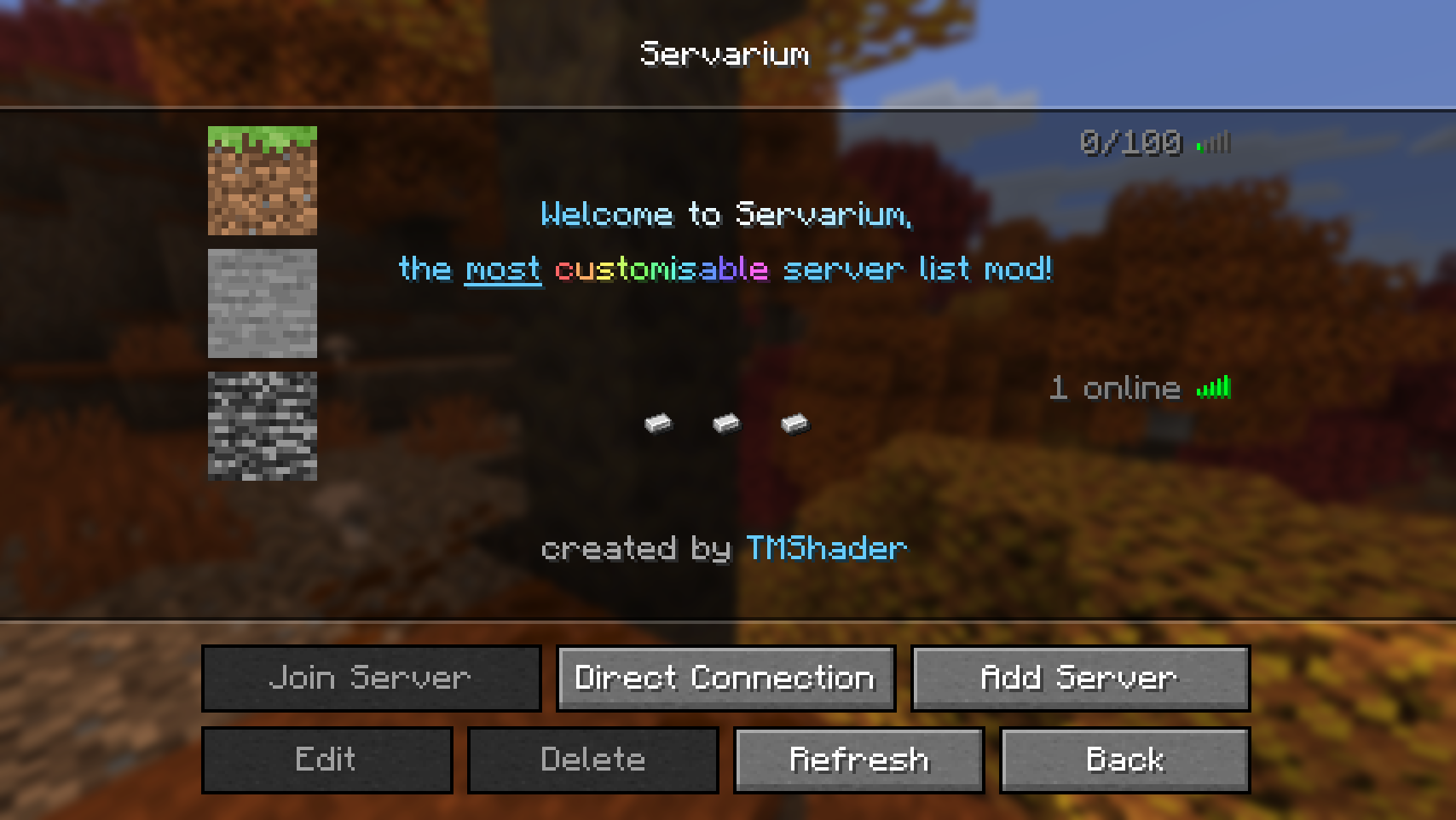
功能特性
- 支持自定义名称、MOTD(每日公告)和玩家数量,并支持颜色与格式设置(Markdown 与 QuickText)
- 自定义服务器图标
- 可修改的延迟图标和玩家数量显示
- 自定义文本对齐方式和间距选项
- 游戏内配置编辑器
- 使用原版服务器的 MOTD、延迟和/或玩家数量作为选项,而非强制覆盖
- 模板化玩家计数,利用实际玩家数据实现如“15 of 100”之类的格式
注意: 未勾选的功能尚不可用,但计划在未来的版本中推出。
依赖要求
Servarium 是一个客户端模组,需要以下依赖项:
Placeholder API 已直接捆绑在该模组中,无需单独安装。
配置结构
配置文件采用 YAML 格式,位于你的 Minecraft 目录下的 config/servarium/config.yml。它包含两个顶级部分:
| Key |
Type |
Default |
Description |
settings |
Settings |
see below |
模组通用设置。 |
servers |
list of Server entries |
[] |
在自定义服务器列表中显示的服务器。 |
注意: 配置文件中列出的某些值尚未实现。它们在下方标记为 "⚠️ Not yet implemented.",目前请勿使用。
示例

---
settings:
  list_header: "Servarium"
  button_label: "Servarium"
  button_placement: NEXT_TO_MULTIPLAYER

servers:
  - name: "Minecraft Server"
    address: "play.example.com"
    icon:
      type: DEFAULT
    motd: |-
      Example MOTD
      for the example server
    player_count:
      type: FORCED
      value: "12/100"
    ping_icon: LEVEL_5
    text_alignment: CENTER
    text_spacing: BALANCED
所有选项均为可选。任何未填写的选项将回退到其默认值。
Settings
控制模组在主菜单中显示方式的通用选项。
| Key |
Type |
Default |
Description |
list_header |
string |
"Servarium" |
服务器列表顶部显示的文本。 |
button_label |
string |
"Servarium" |
打开服务器列表的按钮上显示的文本。 |
button_placement |
enum |
NEXT_TO_MULTIPLAYER |
按钮在主标题屏幕上的放置位置。 |
button_placement
| Value |
Behavior |
NEXT_TO_MULTIPLAYER |
将按钮添加至多人游戏按钮旁边。 (默认) |
REPLACE_MULTIPLAYER |
用 Servarium 按钮替换多人游戏按钮。 |
NEXT_TO_REALMS |
将按钮添加至 Realms 按钮旁边。 |
REPLACE_REALMS |
用 Servarium 按钮替换 Realms 按钮。 |
Server entries
servers 列表中的每一项描述一个服务器。
| Key |
Type |
Default |
Description |
name |
string |
"Minecraft Server" |
服务器显示的名称。 |
address |
string |
"" |
服务器地址(例如 play.example.com 或 play.example.com:25566)。 |
icon |
Icon |
see below |
服务器显示的图标。参见 icon。 |
motd |
string |
"" |
每日公告,最多两行。参见 motd。 |
player_count |
Player count |
see below |
控制玩家数量的显示方式。 |
ping_icon |
enum |
LEVEL_5 |
控制连接/延迟图标。 |
text_alignment |
enum |
LEFT |
服务器文本的对齐方式。 |
text_spacing |
enum |
VANILLA |
服务器文本的行间距。 |
Icon
控制服务器图标渲染的对象:
| 键 |
类型 |
默认值 |
描述 |
type |
枚举 |
DEFAULT |
图标来源类型。 |
value |
string |
省略 |
文件名、纹理集与精灵、用户名或 Base64 字符串。 |
type
| 值 |
行为 |
value |
NONE |
在 GUI 中不绘制任何图标。 |
忽略 |
DEFAULT |
显示默认的服务器图标。(默认) |
忽略 |
FILE |
从 icons/ 目录加载图像。 |
必需 |
ATLAS |
渲染来自游戏纹理集的纹理。 |
必需 |
PLAYER |
显示玩家皮肤中的脸部图像。 |
必需 |
BASE64 |
渲染 Base64 编码的图像。 |
必需 |
使用文件
将文件放置在 config/servarium/icons/ 目录下:
config/servarium/
├── config.yml
└── icons/
    └── my_server.png
将 value 设置为文件名:
icon:
  type: FILE
  value: "my_server.png"
不支持子文件夹和其他路径。文件必须直接放在 icons 文件夹中。
使用纹理集纹理
指定纹理集及其中的精灵,两者之间用空格分隔:
icon:
  type: ATLAS
  value: "blocks block/bedrock"
此处 blocks 是纹理集,block/bedrock 是该纹理集中的精灵。
使用玩家脸部
icon:
  type: PLAYER
  value: "TMShader"
使用 Base64
icon:
  type: BASE64
  value: "iVBORw0KGgoAAAANSUhEUg..."
使用默认图片或隐藏图标
icon:
  type: DEFAULT
icon:
  type: NONE
图片尺寸
推荐使用 64x64 的图片。其他尺寸的图片会自动调整大小。
motd
每日消息(MOTD)最多可有 2 行。要配置这两行,请使用 YAML 的字面量块样式(|)将文本写为多行字符串:
motd: |
  First line
  Second line
对于单行内容,普通字符串即可:
motd: "Welcome!"
玩家数量
包含两个属性的对象:
| 键 |
类型 |
默认值 |
描述 |
type |
枚举 |
FORCED |
如何确定玩家数量。 |
value |
string |
"" |
FORCED 类型所使用的文本。 |
type
| 值 |
行为 |
value |
NONE |
隐藏玩家数量。 |
忽略 |
FORCED |
始终按原样显示 value 中的文本。(默认) |
必需 |
VANILLA |
⚠️ 尚未实现。 |
忽略 |
TEMPLATED |
⚠️ 尚未实现。 |
必需 |
示例
# 隐藏玩家数量
player_count:
  type: NONE
# 始终显示固定文本
player_count:
  type: FORCED
  value: "12/100"
ping_icon
控制服务器条目右侧显示的图标。
| 值 |
行为 |
NONE |
不显示延迟图标。 |
VANILLA |
⚠️ 尚未实现。 |
LEVEL_1 |
始终显示延迟等级 1 的图标 |
LEVEL_2 |
始终显示延迟等级 2 的图标 |
LEVEL_3 |
始终显示延迟等级 3 的图标 |
LEVEL_4 |
始终显示延迟等级 4 的图标 |
LEVEL_5 |
始终显示延迟等级 5 的图标 (默认) |
UNREACHABLE |
始终显示“无法连接”的图标 |
text_alignment
| 值 |
行为 |
LEFT |
将 MOTD 和服务器名称左对齐。 (默认) |
CENTER |
居中显示 MOTD 和服务器名称。 |
text_spacing
控制服务器名称与 MOTD 各行之间的垂直间距。原版游戏中,服务器名称与第一行 MOTD 之间的间隙大于两行 MOTD 之间的间隙。所有其他选项在三行之间应用相等的间距。
| 值 |
行为 |
VANILLA |
使用原版间距。 (默认) |
RELAXED |
比 BALANCED 稍大的间距。 |
BALANCED |
所有行之间间距相等,最接近原版效果。 |
COMPACT |
更紧凑的间距。 |
TIGHT |
可用的最紧凑间距。 |
定位服务器名称
当 text_spacing 不为 VANILLA 时,可以将服务器文本视为三行:name 是第 1 行,而 motd 提供第 2 和第 3 行。
这允许你将服务器名称放置在第 2 行(即 motd 的第一行),从而使其垂直居中。为此,请将 name 设置为空字符串,并将实际名称作为 motd 的第一行写入:
servers:
  - name: ""
    motd: "My Server"
    text_spacing: BALANCED
文本格式与占位符
Servarium 使用 Placeholder API 内置的 QuickText 和 Markdown 格式化器来解析文本。可以在以下配置项中使用格式化标签和样式:
settings.list_headersettings.button_labelservers[].nameservers[].motdservers[].player_count.value(当 type 为 FORCED 或 TEMPLATED 时)
有关完整的标签、颜色、渐变及语法规则列表,请参阅 QuickText 文档。
快速参考
| Key |
Allowed values |
Default |
settings.list_header |
任意字符串 |
"Servarium" |
settings.button_label |
任意字符串 |
"Servarium" |
settings.button_placement |
NEXT_TO_MULTIPLAYER, REPLACE_MULTIPLAYER, NEXT_TO_REALMS, REPLACE_REALMS |
NEXT_TO_MULTIPLAYER |
servers[].name |
任意字符串 |
"Minecraft Server" |
servers[].address |
任意字符串 |
"" |
servers[].icon.type |
NONE, DEFAULT, FILE, ATLAS, PLAYER, BASE64 |
DEFAULT |
servers[].icon.value |
文件名、Atlas 与精灵、用户名或 base64 字符串 |
省略 |
servers[].motd |
任意字符串,最多两行 |
"" |
servers[].player_count.type |
NONE, FORCED(VANILLA 和 TEMPLATED 尚未实现) |
FORCED |
servers[].player_count.value |
任意字符串(仅 FORCED 和 TEMPLATED 类型必需) |
"" |
servers[].ping_icon |
NONE, LEVEL_1, LEVEL_2, LEVEL_3, LEVEL_4, LEVEL_5, UNREACHABLE(VANILLA 尚未实现) |
LEVEL_5 |
servers[].text_alignment |
LEFT, CENTER |
LEFT |
servers[].text_spacing |
VANILLA, RELAXED, BALANCED, COMPACT, TIGHT |
VANILLA |
Servarium
Adds a customisable server list to Minecraft and enables you to configure every aspect of your servers.
Features
- Configurable name, motd and player count with colour and formatting support (Markdown & QuickText)
- Custom server icon
- Modifiable ping icon and player count
- Custom text alignment and spacing options
- In-game config editor
- Using vanilla server motd, ping and/or player count instead of a forced one available as an option
- Templated player count to enable formats such as "15 of 100" using actual player count data
Note: Unchecked features are not yet available but are planned for a later release.
Requirements
Servarium is a client-side mod and requires the following dependencies:
Placeholder API is bundled directly into the mod and does not need to be installed separately.
Configuration Structure
The configuration file is written in YAML and is located at config/servarium/config.yml in your Minecraft directory. It has two top-level sections:
| Key |
Type |
Default |
Description |
settings |
Settings |
see below |
General mod settings. |
servers |
list of Server entries |
[] |
The servers shown in the custom server list. |
Note: Some values are listed in the configuration but are not yet implemented. They are marked with "⚠️ Not yet implemented." below and should not be used for now.
Example
---
settings:
  list_header: "Servarium"
  button_label: "Servarium"
  button_placement: NEXT_TO_MULTIPLAYER

servers:
  - name: "Minecraft Server"
    address: "play.example.com"
    icon:
      type: DEFAULT
    motd: |-
      Example MOTD
      for the example server
    player_count:
      type: FORCED
      value: "12/100"
    ping_icon: LEVEL_5
    text_alignment: CENTER
    text_spacing: BALANCED
All options are optional. Any option you leave out falls back to its default value.
Settings
General options that control how the mod appears in the main menu.
| Key |
Type |
Default |
Description |
list_header |
string |
"Servarium" |
The text displayed at the top of the server list. |
button_label |
string |
"Servarium" |
The text displayed on the button that opens the server list. |
button_placement |
enum |
NEXT_TO_MULTIPLAYER |
Where the button is placed on the title screen. |
button_placement
| Value |
Behavior |
NEXT_TO_MULTIPLAYER |
Adds the button next to the Multiplayer button. (default) |
REPLACE_MULTIPLAYER |
Replaces the Multiplayer button with the Servarium button. |
NEXT_TO_REALMS |
Adds the button next to the Realms button. |
REPLACE_REALMS |
Replaces the Realms button with the Servarium button. |
Server entries
Each item in the servers list describes one server.
| Key |
Type |
Default |
Description |
name |
string |
"Minecraft Server" |
The name displayed for the server. |
address |
string |
"" |
The address of the server (for example play.example.com or play.example.com:25566). |
icon |
Icon |
see below |
The icon shown for the server. See icon. |
motd |
string |
"" |
The message of the day, up to 2 lines. See motd. |
player_count |
Player count |
see below |
Controls how the player count is displayed. |
ping_icon |
enum |
LEVEL_5 |
Controls the connection/ping icon. |
text_alignment |
enum |
LEFT |
Alignment of the server text. |
text_spacing |
enum |
VANILLA |
Line spacing of the server text. |
Icon
An object controlling how the server icon is rendered:
| Key |
Type |
Default |
Description |
type |
enum |
DEFAULT |
The icon source type. |
value |
string |
omitted |
The file name, atlas and sprite, username, or base64 string. |
type
| Value |
Behavior |
value |
NONE |
Draws no icon in the GUI. |
Ignored |
DEFAULT |
Displays the default server icon. (default) |
Ignored |
FILE |
Loads an image from the icons/ directory. |
Required |
ATLAS |
Renders a texture from a game atlas. |
Required |
PLAYER |
Shows a player's face from their skin. |
Required |
BASE64 |
Renders a Base64-encoded image. |
Required |
Using a file
Place the file in config/servarium/icons/:
config/servarium/
├── config.yml
└── icons/
    └── my_server.png
Set value to the file's name:
icon:
  type: FILE
  value: "my_server.png"
Subfolders and other paths are not supported. The file must be placed directly in the icons folder.
Using an atlas texture
Specify the atlas and the sprite from it, separated by a space:
icon:
  type: ATLAS
  value: "blocks block/bedrock"
Here blocks is the atlas and block/bedrock is the sprite from that atlas.
Using a player's face
icon:
  type: PLAYER
  value: "TMShader"
Using base64
icon:
  type: BASE64
  value: "iVBORw0KGgoAAAANSUhEUg..."
Using the default image or hiding the icon
icon:
  type: DEFAULT
icon:
  type: NONE
Image size
A 64x64 image is recommended. Images of any other size are resized automatically.
motd
The message of the day can have a maximum of 2 lines. To configure both lines, write the text as a multi-line string using YAML's literal block style (|):
motd: |
  First line
  Second line
For a single line, a regular string is enough:
motd: "Welcome!"
Player count
An object with two properties:
| Key |
Type |
Default |
Description |
type |
enum |
FORCED |
How the player count is determined. |
value |
string |
"" |
The text used by the FORCED type. |
type
| Value |
Behavior |
value |
NONE |
Hides the player count. |
Ignored |
FORCED |
Always displays the text in value exactly as written. (default) |
Required |
VANILLA |
⚠️ Not yet implemented. |
Ignored |
TEMPLATED |
⚠️ Not yet implemented. |
Required |
Examples
# Hide the player count
player_count:
  type: NONE
# Always show a fixed text
player_count:
  type: FORCED
  value: "12/100"
ping_icon
Controls the icon shown on the right side of the server entry.
| Value |
Behavior |
NONE |
No ping icon is shown. |
VANILLA |
⚠️ Not yet implemented. |
LEVEL_1 |
Always shows the ping level 1 icon |
LEVEL_2 |
Always shows the ping level 2 icon |
LEVEL_3 |
Always shows the ping level 3 icon |
LEVEL_4 |
Always shows the ping level 4 icon |
LEVEL_5 |
Always shows the ping level 5 icon (default) |
UNREACHABLE |
Always shows the "unreachable" icon |
text_alignment
| Value |
Behavior |
LEFT |
Aligns the motd and server name to the left. (default) |
CENTER |
Centers the motd and server name. |
text_spacing
Controls the vertical spacing between the server name and the MOTD lines. In vanilla, the gap between the server name and the first line of the MOTD is larger than the gap between the two MOTD lines. All other options apply equal spacing across all three lines.
| Value |
Behavior |
VANILLA |
Uses the vanilla spacing. (default) |
RELAXED |
Slightly larger spacing than BALANCED. |
BALANCED |
Equal spacing between all lines, closest to vanilla. |
COMPACT |
Tighter spacing. |
TIGHT |
The tightest spacing available. |
Positioning the server name
When text_spacing is not VANILLA, the server text can be thought of as having three lines: name is line 1, and motd provides lines 2 and 3.
This lets you place the server name on line 2 (the first line of the motd), which centers it vertically. To do this, set name to an empty string and write the actual name as the first line of the motd:
servers:
  - name: ""
    motd: "My Server"
    text_spacing: BALANCED
Text Formatting & Placeholders
Servarium parses text using Placeholder API's built-in QuickText and Markdown formatters. Formatting tags and styles can be used in:
settings.list_headersettings.button_labelservers[].nameservers[].motdservers[].player_count.value (when type is FORCED or TEMPLATED)
For the full list of tags, colours, gradients, and syntax rules, see the QuickText Documentation.
Quick reference
| Key |
Allowed values |
Default |
settings.list_header |
Any string |
"Servarium" |
settings.button_label |
Any string |
"Servarium" |
settings.button_placement |
NEXT_TO_MULTIPLAYER, REPLACE_MULTIPLAYER, NEXT_TO_REALMS, REPLACE_REALMS |
NEXT_TO_MULTIPLAYER |
servers[].name |
Any string |
"Minecraft Server" |
servers[].address |
Any string |
"" |
servers[].icon.type |
NONE, DEFAULT, FILE, ATLAS, PLAYER, BASE64 |
DEFAULT |
servers[].icon.value |
File name, atlas and sprite, username, or base64 string |
omitted |
servers[].motd |
Any string, up to 2 lines |
"" |
servers[].player_count.type |
NONE, FORCED (VANILLA and TEMPLATED are not yet implemented) |
FORCED |
servers[].player_count.value |
Any string (required only for FORCED and TEMPLATED) |
"" |
servers[].ping_icon |
NONE, LEVEL_1, LEVEL_2, LEVEL_3, LEVEL_4, LEVEL_5, UNREACHABLE (VANILLA is not yet implemented) |
LEVEL_5 |
servers[].text_alignment |
LEFT, CENTER |
LEFT |
servers[].text_spacing |
VANILLA, RELAXED, BALANCED, COMPACT, TIGHT |
VANILLA |


 模组

 模组

 模组
 模组
 模组
 模组
评论 0
登录后参与评分
还没有评论,来抢沙发吧