
设置家与 waypoints
设置家与 waypoints 允许玩家设置家(home)和航点(waypoints)。该模组开发的重点在于用户体验(自动补全、按键绑定、命令反馈、颜色等……)。此模组支持在客户端和服务端进行配置。
对于 1.12.2 版本,请查看 GitHub 上的这份文档
掌握模组的 4 个命令
- /shw 列出所有可用命令,
- /sethome 创建或更新你的家,
- /home 传送至你的家,
- /wp 设置、使用、更新或删除你的路点。

支持的语言
- ?? English
- ?? French
- ?? German
- ?? Republic of China (Taiwan)
If your language is missing, you can contribute to this mod on GitHub by submitting a pull request.
关注项目进展
你可以在 Trello 上关注正在处理的问题和功能。
安装
然后将下载的 .jar 文件放入mods/文件夹中,客户端和服务器端都需要添加。
这样就完成了!
配置
Set Home & Waypoints 允许你通过命令(单人 + 多人)或 GUI(仅单人)为客户端进行配置,并为服务器使用配置文件来设置冷却时间、维度传送和路标数量。
所有玩家都可以通过执行/home config查看当前家配置的详细信息,并通过/wp config查看路标配置的详细信息。

拥有管理员权限 (3)的玩家可以在游戏中使用 /home config <…> 和 /wp config <…> 命令配置服务器,而无需重启服务器 ✅ 建议将引导具有足够权限的玩家进行操作。
客户端通过 GUI 使用
此菜单由 Configured 模组 生成。Configured 是一款简洁轻量的模组,可为每个模组动态创建配置菜单。
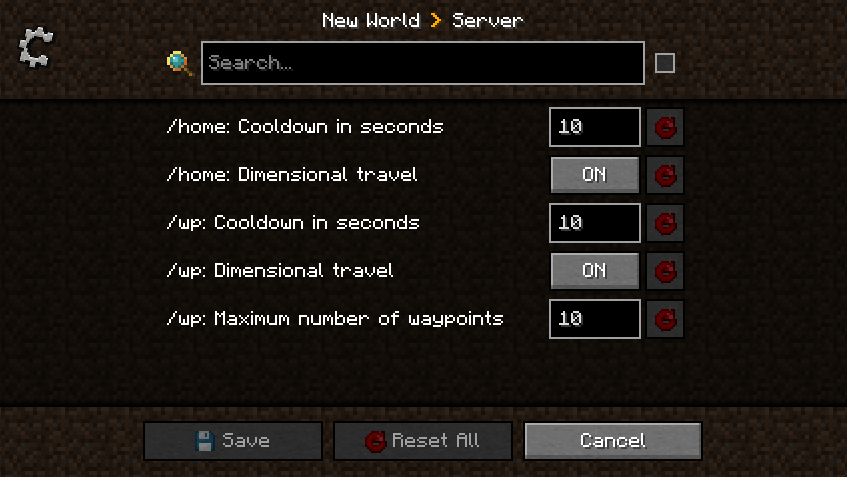
通过命令在客户端配置
使用命令更新 Home 的 dimensionalTravel 示例:

通过配置文件在服务端配置
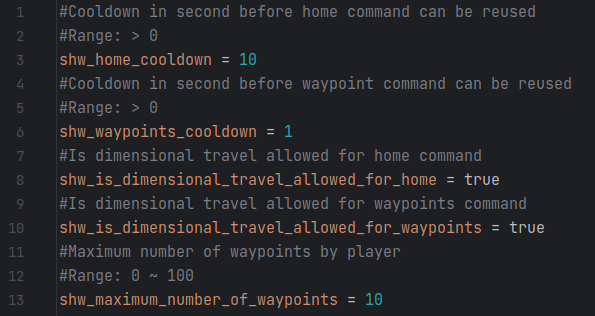
该配置文件会在服务器初始化时生成于 world/serverconfig/shw-server.toml。
设置新值将立即生效,无需重启服务器。
在服务器运行时更新配置不会向玩家发送通知。
命令用法
所有命令均提供游戏内补全建议以引导玩家。/shw 命令将列出所有可用命令。
/sethome 和 /home 命令
家(Home)是唯一的,执行 /sethome 即可在任何维度设置你的家。随后执行 /home 或按下 H 键即可传送至你的家。
是的,本模组内置了可配置的快捷方式(默认为 H 键),用于快速传送至你的家。这无疑能救命。
注意,重新执行 /sethome 会将家的位置更新为玩家当前的位置。

/wp 命令
航点(Waypoints)用于保存其他地点。默认允许保存 10 个航点。
管理员可使用 /wp config maximumWaypointsNumber <数量> 来配置此项设置。
设置、使用、列出航点
使用 /wp set <航点名称> 创建航点,然后使用 /wp use <航点名称> 传送至对应航点。

执行 /wp list 将显示玩家的所有航点及剩余可用空间。
更新、移除、撤销航点
可以通过执行 /wp update <waypoint name> 更新路标,或通过执行 /wp remove <waypoint name> 删除路标。
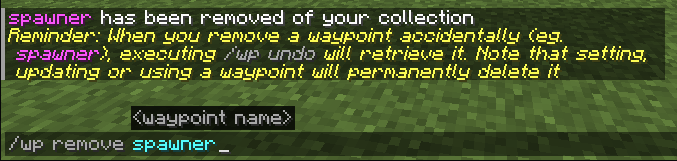
可以通过执行 /wp undo 来撤销最后一次删除的坐标点。请注意,在设置、更新或使用其他坐标点后,此操作将不再允许。

可以通过执行 /wp clear 来清除所有坐标点。请谨慎操作,此动作将移除玩家的所有坐标点且无法撤销。
Set Home & Waypoints
Set Home & Waypoints allows players to set a home and waypoints. The development was focused on user experience (autocomplete, key bind, command feedback, colors…). This mod is configurable on both client and server side.
For 1.12.2 version, check this documentation on GitHub
4 commands to master the mod
- /shw List all available commands,
- /sethome Create or update your home,
- /home Teleport to your home,
- /wp Set, use, update, remove your waypoints.
Supported languages
- ?? English
- ?? French
- ?? German
- ?? Republic of China (Taiwan)
If your language is missing, you can contribute to this mod on GitHub by submitting a pull request.
Follow project development
You can follow working issues/features on Trello.
Installation
First of all, download Set Home & Waypoints.
Then add downloaded .jar in mods/ folder on both client and server side.
That's it!
Configuration
Set Home & Waypoints allows you to configure cooldown, dimensional travel and number of waypoints using commands (solo + multiplayer) or GUI (only solo) for client and config file for server.
All players can display current home and waypoints configuration by executing /home config for home configuration and /wp config for waypoints configuration.
A player with admin permission (3) can configure the server in game using /home config <…> and /wp config <…> commands without restarting the server ✅ Suggestions will guide players with sufficient permissions.
Client side using GUI
This menu was generated using Configured mod. Configured is a simple and lightweight mod that dynamically creates a configuration menu for every mod.
Client side using commands
Example of updating dimensionalTravel for Home using command:
Server side using config file
This configuration file is generated at server initialization in world/serverconfig/shw-server.toml.
Setting a new value will take instantly effect. Restarting the server is not necessary.
Updating configuration while the server is running will not notify players.
Commands usage
All commands have suggestions to guide players in game. /shw command will list all available commands.
/sethome and /home commands
Home is unique, set your home in any dimension by executing /sethome. Then, executing /home or pressing H key will teleport you on your home.
Yes, this mod come with a configurable shortcut (H key by default) to fast tp to your home. This will certainly save life.
Note that, re-executing /sethome will update home position with player location.
/wp command
Waypoints are used to save additional locations. By default, 10 waypoints are allowed.
Admins can configure this setting using /wp config maximumWaypointsNumber <count>.
Set, Use, List waypoints
Create waypoints with /wp set <waypoint name> and then teleport to them using /wp use <waypoint name>.
Executing /wp list will show all player waypoints and available space.
Update, Remove, Undo waypoints
Waypoints can be updated by executing /wp update <waypoint name> or removed by executing /wp remove <waypoint name>.
Last removed waypoint can be rollback by executing /wp undo. Note that this action will not be permitted after setting, updating or using another waypoint.
Waypoints can be cleared by executing /wp clear. Be careful, this action will remove all player waypoints and cannot be rollback.
下载 Set Home & Waypoints
需要联机服务器吗?
稳定流畅、一键部署,几分钟即可和朋友联机开服
最低仅需 8 元/月 即可畅快联机
下载 Set Home & Waypoints
需要联机服务器吗?
稳定流畅、一键部署,几分钟即可和朋友联机开服
最低仅需 8 元/月 即可畅快联机
下载 Set Home & Waypoints
需要联机服务器吗?
稳定流畅、一键部署,几分钟即可和朋友联机开服
最低仅需 8 元/月 即可畅快联机
下载 Set Home & Waypoints
需要联机服务器吗?
稳定流畅、一键部署,几分钟即可和朋友联机开服
最低仅需 8 元/月 即可畅快联机
下载 Set Home & Waypoints
需要联机服务器吗?
稳定流畅、一键部署,几分钟即可和朋友联机开服
最低仅需 8 元/月 即可畅快联机
下载 Set Home & Waypoints
需要联机服务器吗?
稳定流畅、一键部署,几分钟即可和朋友联机开服
最低仅需 8 元/月 即可畅快联机
下载 Set Home & Waypoints
需要联机服务器吗?
稳定流畅、一键部署,几分钟即可和朋友联机开服
最低仅需 8 元/月 即可畅快联机
下载 Set Home & Waypoints
需要联机服务器吗?
稳定流畅、一键部署,几分钟即可和朋友联机开服
最低仅需 8 元/月 即可畅快联机
下载 Set Home & Waypoints
需要联机服务器吗?
稳定流畅、一键部署,几分钟即可和朋友联机开服
最低仅需 8 元/月 即可畅快联机
下载 Set Home & Waypoints
需要联机服务器吗?
稳定流畅、一键部署,几分钟即可和朋友联机开服
最低仅需 8 元/月 即可畅快联机
暂无更新日志
关于这个资源的讨论、问题反馈与使用心得
还没有讨论,来发第一帖吧
你是这个资源的作者?登录后可认领此资源。
相似资源
 模组

可定制的鞘翅模组,支持装饰纹饰、旗帜图案等更多功能!
 模组

原版世界生成优化模组
 模组
在游戏画面角落显示附近世界地形、玩家、生物和实体的地图。可创建路径点,帮助你找到标记过的位置。
 模组

适用于 MC 1.18+ 的 Effekseer 加载器
 模组

新增 50+ 个独特生物群系,为你的世界增添新树木、花卉等更多元素!
 模组

一个基于构建器的 Minecraft 配置库!
评论 0
登录后参与评分
还没有评论,来抢沙发吧