?️ 设置
如需任何建议或 Bug 报告,请在 Discord 上私信 @SupRani。
将每项游戏设置保存为预设,并在几秒内通过简洁的游戏内菜单进行切换——无需编辑配置文件、无需重启游戏、无需使用外部工具。
? 完整快照
一个预设即可一次性捕获你整个客户端的状态——包括视频、控制、辅助功能、声音、皮肤、聊天,甚至已启用的资源包及其精确的加载顺序。选择一个预设,它便会将所有内容实时写回游戏中。
?️ 分类开关
每个预设包含 7 个开关,仅在你开启的那些类别会被应用——因此每个预设只控制你想要的部分,其余保持原样。
- 视频 — 渲染距离、视场角 (FOV)、GUI 缩放、最大 FPS、画质
- 控制 — 鼠标灵敏度及所有按键绑定
- 辅助功能 — 文本背景、旁白、屏幕特效
- 声音 — 所有音量滑块
- 皮肤 — 披风、身体图层和主手设置
- 聊天 — 透明度、宽度、颜色和延迟
- 资源包 — 已启用的资源包及其加载顺序
⚡ 即时切换
在游戏中只需单击即可更换整套配置。在一秒内于 PvP、建造、截图和录制之间切换——无需深入原版选项菜单翻找。
? 预设管理器
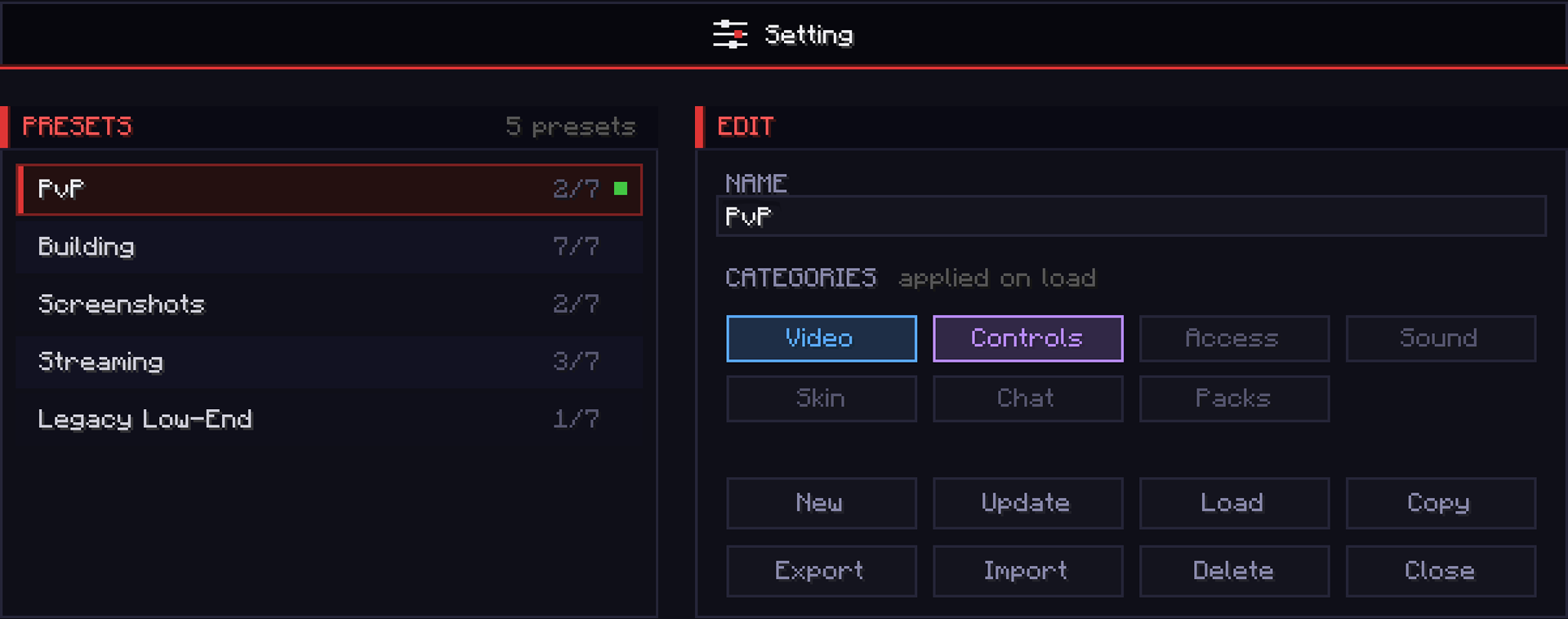
保存、重命名、更新、复制和删除无限数量的预设。绿色圆点标记当前正在运行的预设,琥珀色圆点则在你实时设置偏离该预设时发出警告——让你始终清楚何时需要重新保存。
? 分享代码
导出任意预设为单行代码并粘贴到 Discord 中。导入好友的代码即可瞬间加载其完全相同的配置——几秒内复制高手的全部设置。
?️ 图形界面
这不是普通的 Minecraft 设置界面。Setting 采用完全自定义的深色 UI——可滚动的预设列表、颜色分类别的类别标签、整洁的按钮网格,以及实时显示活跃/偏移状态的指示器——以居中卡片形式呈现,在任何 GUI 缩放比例下都像素级完美匹配。全部在游戏内完成,无需外部工具,无需寻找配置文件。
Fabric 1.21.11
?️ Setting
For any suggestions or Bug Reports, Please DM @SupRani on Discord.
Save every game setting as a preset and switch between them in seconds — all from a clean in-game menu. No configs to edit, no restarts, no external tools.
? Full Snapshot
One preset captures your entire client at once — video, controls, accessibility, sound, skin, chat, and even your enabled resource packs and their exact load order. Select a preset and it writes everything straight back into the game, live.
?️ Category Toggles
Every preset has 7 toggles, and only the ones you turn on are applied when you load it — so each preset controls exactly what you want and leaves everything else untouched.
- Video — render distance, FOV, GUI scale, max FPS, graphics
- Controls — mouse sensitivity and every keybind
- Accessibility — text background, narrator, screen effects
- Sound — every volume slider
- Skin — cape, body layers, and main hand
- Chat — opacity, width, colors, and delay
- Packs — enabled resource packs and load order
⚡ Instant Switching
Swap your whole setup mid-game with a single click. Jump between PvP, building, screenshots, and recording in a second — no digging through the vanilla options menus.
? Preset Manager
Save, rename, update, duplicate, and delete unlimited presets. A green dot marks the preset you're currently running, and an amber dot warns you the moment your live settings drift from it — so you always know when to re-save.
? Share Codes
Export any preset to a single-line code and drop it into Discord. Import a friend's code to load their exact setup instantly — copy a pro's entire config in seconds.
?️ The GUI
This is not your average Minecraft settings screen. Setting features a fully custom-built dark UI — a scrollable preset list, colour-coded category chips, a clean button grid, and live active/drift indicators — built as a centered card that looks pixel-identical at every GUI scale. All inside the game, no external tools, no config file hunting.
Fabric 1.21.11


 模组

 模组

 模组
 模组
 模组
 模组
评论 0
登录后参与评分
还没有评论,来抢沙发吧