Show Durability 2
常规设置
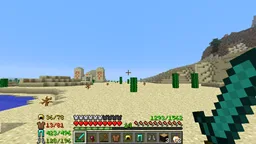
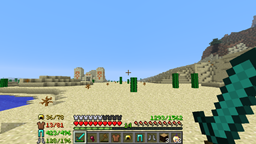
工具的耐久度会显示在饥饿栏上方。(可关闭)
盔甲的耐久度会显示在你的快捷栏左侧或右侧(可关闭,支持自定义配置)。
耐久度会以颜色形式显示,类似于原版耐久条的颜色。
支持 Tinkers Construct 物品。
需要 Forge。
如果你想支持我:
一些图片
更新日志
1.2.10
- 修复了 调试模式下的 一些 小 问题
1.2.9
- 添加了 Tooltip 与 Show Durability 1(Forge 版本)的 兼容性
1.2.8
- 添加了 Tinkers Construct 支持 (如果有遗漏请告诉我)
1.2.7
- 重构了代码
1.2.6
- 护甲 HUD 现在 支持 显示 当前 穿戴 的 护甲 图标
- 在配置文件中添加了新选项
- 可以关闭和开启盔甲图标
- 护甲 HUD 的图标版本提供两种设计布局
- 耐久度的 显示方式 现在完全可自定义
- 空 护甲 槽 的 文本 也 完全 可自定义
- 左侧 的 护甲 HUD 现在 动态适配
1.2.3
- 修复了 在聊天框中输入时按键绑定被意外激活的 bug
1.2.2
- 更新至 1.6.2
- 添加了 按键绑定 以在游戏内切换 盔甲 HUD 的 侧边 (默认:L = 左侧,Graves = 右侧)
- 由 按键绑定 引起的 设置 现在 会保存在配置文件中
- 调整了更新日志的排序,使最新的更改始终排在第一位。
1.1.1
- 修复了 骑乘马匹时 工具 HUD 的问题
1.1.0
- 已更新 至 1.6.1 (也制作了 1.5.2 版本)
- 添加了 包含选项的 配置文件:
- 颜色
- 在受击时闪烁
- 可配置的闪烁条件
- 盔甲耐久度
- 可配置 其位于快捷栏的左侧还是右侧
- 你可以通过按 F7(按键可在控制设置中配置)在游戏内切换盔甲显示的开与关。
1.0.2
- 修复了氧气条被遮挡的定位问题
- 调整了 创意模式 中的 位置
1.0.1
- 首次发布!!!
- 兴奋感
Show Durability 2
General
The tools durability is displayed right above the hunger bar. (can be turned off)
The durability of your armor will be displayed at the left or right side of your hot-bar (can be turned off, configurable).
The durability is displayed in color, similar like the color of the durability bar from vanilla.
Supports Tinkers Construct Items.
Forge is required.
If you want to support me:
Here some Pictures
Changelog
1.2.10
	- fixed some minor bugs with debug mode
1.2.9
	- Added Tooltip and compatibility with the new Show Durability 1(forge version)
1.2.8
	- Added Tinkers Construct support (tell me if i missed something)
1.2.7
	- Refactured the code
1.2.6
	- Armor HUD is now available with icons of the worn armor
	- Addet new options to config file
		- armor icons can be turned of and on
		- there are two design layouts for the icons version of the armor HUD
		- the way durability is displayed is now fully customizable
		- empty armor slot text is also fully customizable
	- Armor HUD on the left now fits dynamicly
1.2.3
	- Fixed a bug where keybindings got activated while typing on chat
1.2.2
	- Updated to 1.6.2
	- Addet key bindings to switch side of Armor HUD ingame (default: l = left, graves = right)
	- Settings caused by key bindings are saved in config file now
	- Changed order of changelog so the most recent change is allways the first
1.1.1
	- fixed problem with tool HUD while riding a horse
1.1.0
	- Upadated to 1.6.1 (made a 1.5.2 version too)
	- Addet Config file with options:
		- Color
		- Flicker when critical state
			- configurable conditions for flickering
		- Armor Durability
			- configurable if its on the left or the right side of the hotbar
	- you can toggle the Armor Display on and off ingame by pressing F7 (key is configurable in controll settings)
1.0.2
	- Fixed positioning bug where oxygen-bar was covered
	- Adjusted positioning for creative mode
1.0.1
	- Released for the first time!!!
	- Excitement
 模组
 模组

 模组

 模组

 模组

 模组
评论 0
登录后参与评分
还没有评论,来抢沙发吧