
⚠️ 自 Cobblemon 1.7 起,本模组已不再支持!⚠️
本模组提供的功能已于 1.7 版本移植至 Cobblemon!?
Cobblemon - Show Held Items
这是 Cobblemon 的附属模组,因此如果未安装 Cobblemon,本模组将不会生效。
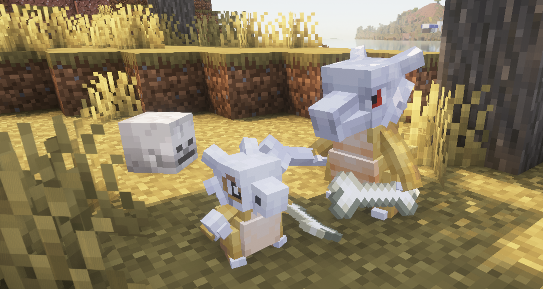
本模组允许宝可梦在世界的持有物品进行渲染。 当加入一个未安装此模组的服务器时,仅会渲染你自己宝可梦的物品。

Technical Information
Server Configuration
可以通过向服务器添加数据包来替换 "hidden_items.json"、"wearable_eye_items.json" 或 "wearable_hat_items.json" 物品标签文件,从而由服务器控制隐藏或显示为帽子/眼镜的物品。被隐藏的物品对宝可梦的所有者仍然可见。
隐藏物品的路径为:
datapacks\[YOUR_SERVER'S_DATAPACK]\data\show-held-items\tags\item\hidden_items.json
该文件的默认设置如下:
{
  "replace": true,
  "values": [
    "#cobblemon:held/is_held_item",
    "#cobblemon:berries"
  ]
}
此处可以添加任何模组物品或原版物品。
眼部物品和帽子的路径为:
datapacks\[YOUR_SERVER'S_DATAPACK]\data\show-held-items\tags\item\wearable_eye_items.json
datapacks\[YOUR_SERVER'S_DATAPACK]\data\show-held-items\tags\item\wearable_hat_items.json
以下是使用 Villager Hats 和 Simple Hats 的示例:
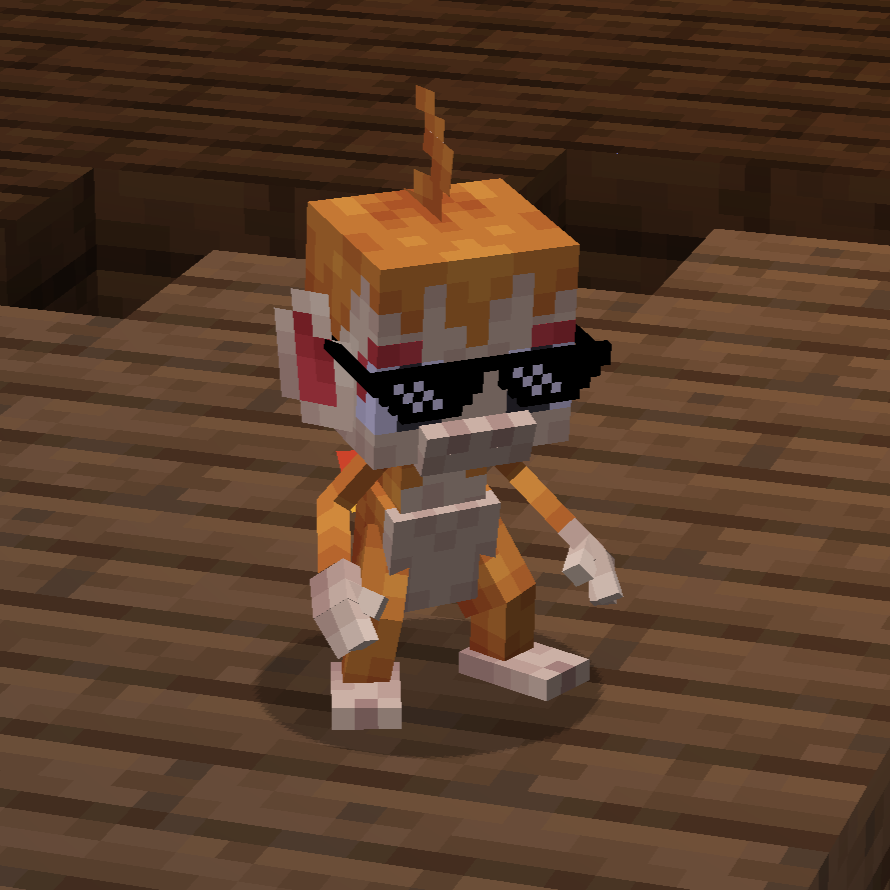
wearable_eye_items.json:
{
  "replace": false,
  "values": [
    "simplehats:clockface",
    "simplehats:sunglasses",
  ]
}
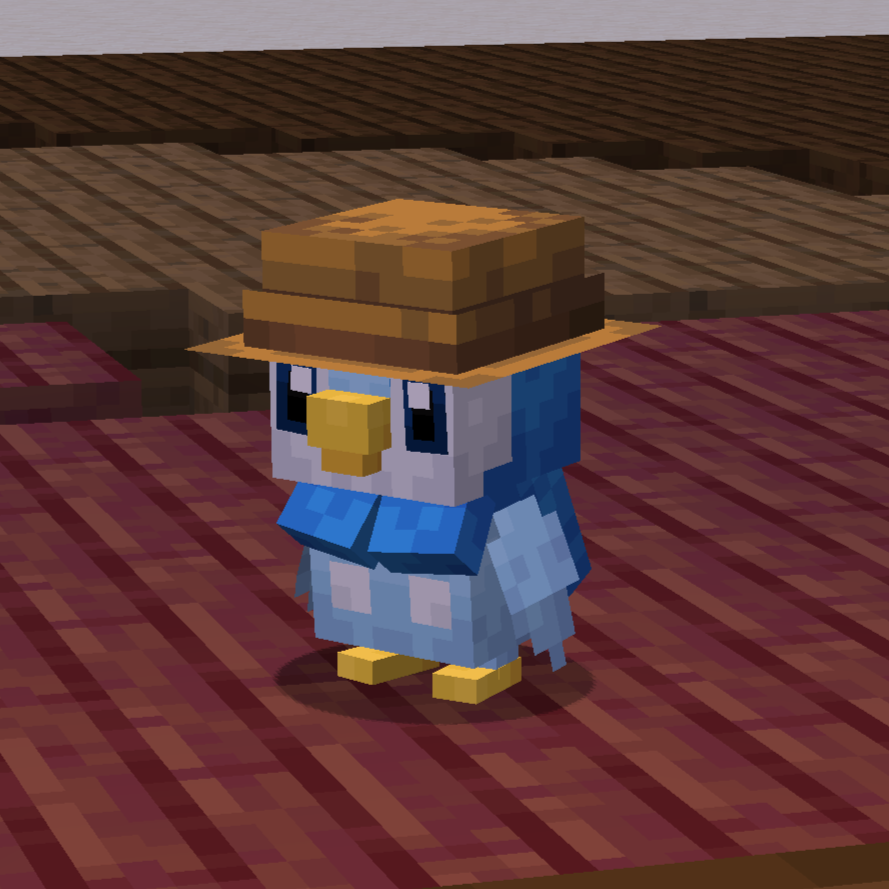
wearable_hat_items.json:
{
  "replace": false,
  "values": [
    "#villagerhats:hats"
  ]
}
Compatibility With Other Models
如果有某些宝可梦不渲染其持有物品,或者你希望自定义的 Fakemon 也能显示持有物品,你可以在模型中添加名为 "held_item" 或 "held_item_fixed" 的定位器(locator)。
"held_item" 定位器将以与玩家渲染物品相同的方式渲染持有物品。这对于望远镜、三叉戟和其他工具等物品最为有效。
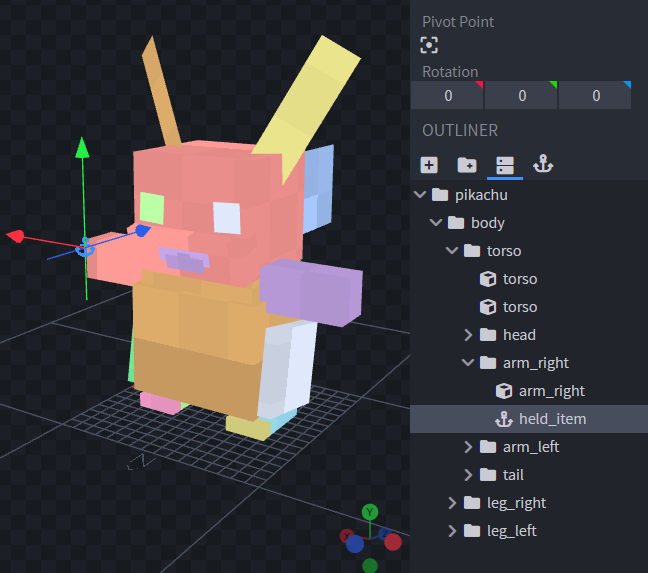
有时让物品以与玩家相同的方式持握看起来不太合适。因此,对于鸟类或犬类宝可梦,最好使用 "held_item_fixed"。这将渲染扁平的默认物品模型。
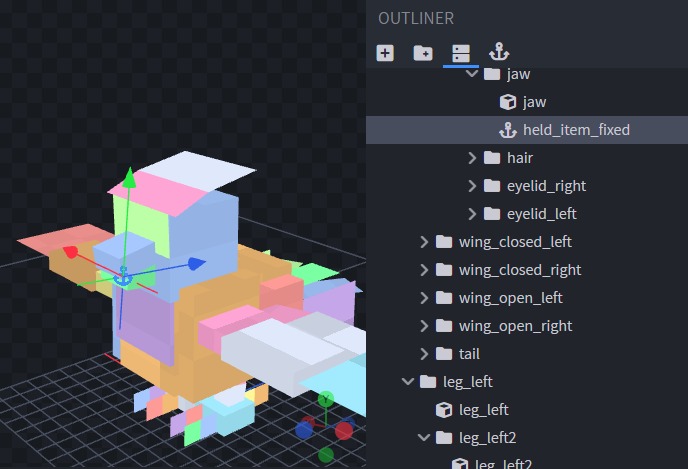
要更改物品的旋转角度,只需更改定位器的旋转角度即可。
要支持可穿戴的帽子或眼部物品,请在模型上靠近眼睛或头顶的位置添加 "held_item_head" 和 "held_item_eyes" 定位器。
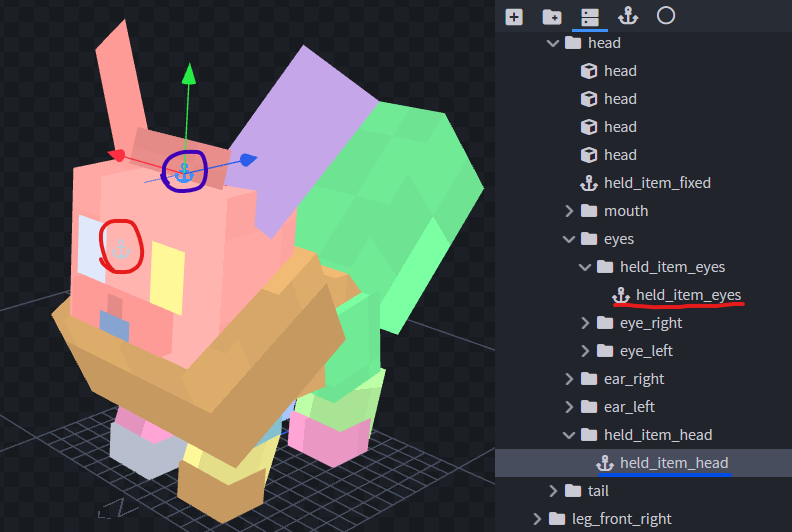
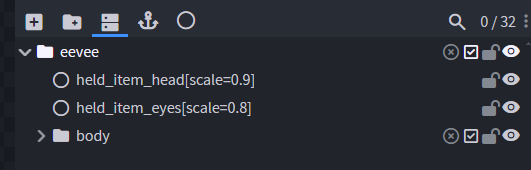
如果持有物品的大小不太合适,你可以使用空对象(Null Objects)向定位器添加修饰符。给空对象命名为你想要修改的定位器名称,后跟方括号和一个缩放值,例如:"held_item_head[scale=2.25]"。
如果你有任何其他疑虑或问题,可以在这里询问。 谢谢!
⚠️ As of Cobblemon 1.7 this mod is no longer supported! ⚠️
The feature the this mod provides has been ported into Cobblemon as of version 1.7! ?
Cobblemon - Show Held Items
This is a side mod for Cobblemon so it will not do anything without Cobblemon installed.
This mod allows Pokémon's Held Items render in the world. When joining a server that does not have this mod installed, only your own Pokémon's items will be rendered.
Technical Information
Server Configuration
The items that are hidden or shown as hats/glasses can be controlled by the server by adding a data pack to the server that replaces the "hidden_items.json", "wearable_eye_items.json" or "wearable_hat_items.json" item tag file. Hidden items will still be visible to the Pokémon's owner.
The path for hidden items is:
datapacks\[YOUR_SERVER'S_DATAPACK]\data\show-held-items\tags\item\hidden_items.json
These are the default settings of the file:
{
  "replace": true,
  "values": [
    "#cobblemon:held/is_held_item",
    "#cobblemon:berries"
  ]
}
Any modded or vanilla items can be added here.
The paths for eye items and hats are:
datapacks\[YOUR_SERVER'S_DATAPACK]\data\show-held-items\tags\item\wearable_eye_items.json
datapacks\[YOUR_SERVER'S_DATAPACK]\data\show-held-items\tags\item\wearable_hat_items.json
Here is an example using Villager Hats and Simple Hats:
wearable_eye_items.json:
{
  "replace": false,
  "values": [
    "simplehats:clockface",
    "simplehats:sunglasses",
  ]
}
wearable_hat_items.json:
{
  "replace": false,
  "values": [
    "#villagerhats:hats"
  ]
}
Compatibility With Other Models
If there are Pokemon that do not render their held item or if you would like to have custom Fakemon show their held items, you can add a locator in the model named "held_item" or "held_item_fixed".
The "held_item" locator will render held items the same way that players render items. This is most effective for items like the spyglass, trident and other tools.
Sometimes it doesnt look quite right to have an item held the same way as the player. So for bird or dog-like pokemon, it may be best to use "held_item_fixed". This will render the flat default item model.
To change the rotation of the item, simply change the rotation of the locator.
To support wearable hat or eye items add locators "held_item_head" and "held_item_eyes" onto the model either near the eyes or on top of the head.
If the held item isn't quite the right size you can add modifiers to the locators using Null Objects. Give the Null Object the name of the locator you wish to modify followed by square brackets and a scale value, e.g., "held_item_head[scale=2.25]".
If you have any other concerns or questions, you can inquire here. Thank you!
下载 Cobblemon - 显示手持物品
下载 Cobblemon - 显示手持物品
下载 Cobblemon - 显示手持物品
下载 Cobblemon - 显示手持物品
下载 Cobblemon - 显示手持物品
下载 Cobblemon - 显示手持物品
下载 Cobblemon - 显示手持物品
下载 Cobblemon - 显示手持物品
下载 Cobblemon - 显示手持物品
v0.2.3:
- 修复了在服务器上渲染方块实体时的崩溃问题。
关于这个资源的讨论、问题反馈与使用心得
还没有讨论,来发第一帖吧
你是这个资源的作者?登录后可认领此资源。
相似资源
 模组

可定制的鞘翅模组,支持装饰纹饰、旗帜图案等更多功能!
 模组

显示你正在注视的方块的信息。(适用于 Minecraft 1.16+ 的 Hwyla/Waila 分支)
 模组
使用 JavaScript 编辑配方、添加自定义物品、编写世界事件!
 模组

查看物品与配方
 模组
在游戏画面角落显示附近世界地形、玩家、生物和实体的地图。可创建路径点,帮助你找到标记过的位置。
 模组
AE2:一款流行的自动化与存储模组
评论 0
登录后参与评分
还没有评论,来抢沙发吧