
依赖项:
- Architectury API
支持的模组:
- EMI
- Roughly Enough Items
- Just Enough Items
- Applied Energistics 2
- FTB Quests
- Patchouli
虽然列出的模组不多,但 Showcaser 允许你分享来自许多模组化界面的物品!
功能
-
支持自定义物品堆叠提示。你可以分享附魔钻石剑、带有 ponder(思考)的 Create 模组物品,或 AE2 的物品存储单元,提示将显示自定义内容或处理自定义操作。
-
服务器验证标记。从由服务器控制的库存中共享的物品会被标记为已验证,让你可以炫耀你的成果!
-
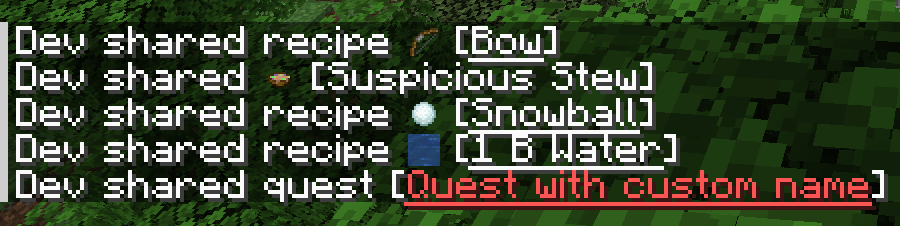
可点击的消息。共享的合成配方和任务已绑定到点击事件,允许你通过点击消息来打开它们。
使用方法
默认情况下,共享快捷键是 Shift + X
一切都很简单明了:
-
物品 → 悬停在槽位上并按下快捷键
-
EMI / REI / JEI 的合成配方 → 悬停在资源上并使用共享快捷键
-
FTB Quest → 打开你想要共享的任务并按下快捷键
-
Patchouli → 打开书并共享整本书,或者进入你需要共享的条目并进行共享
Showcaser 必须在客户端和服务端都安装才能正常工作
如果你想了解更多关于配置和服务器命令的信息,请查看我们的 GitHub 页面!

你是这个资源的作者?登录后可认领此资源。
相似资源
 模组

鞘翅纹饰Elytra Trims
KikuGie
可定制的鞘翅模组,支持装饰纹饰、旗帜图案等更多功能!
装饰装备
477
 模组

玉Jade ?
Snownee
显示你正在注视的方块的信息。(适用于 Minecraft 1.16+ 的 Hwyla/Waila 分支)
实用前置
341
 模组
Xaero的小地图
thexaero
在游戏画面角落显示附近世界地形、玩家、生物和实体的地图。可创建路径点,帮助你找到标记过的位置。
冒险交通
241
 模组

物品管理器Just Enough Items (JEI)
mezz
查看物品与配方
前置实用
240
 模组
KubeJS
Lat
使用 JavaScript 编辑配方、添加自定义物品、编写世界事件!
前置实用
239
 模组
Applied Energistics 2
shartte
AE2:一款流行的自动化与存储模组
存储科技
217
评论 0
登录后参与评分
还没有评论,来抢沙发吧