潜影盒与 bundles - 增强型物品栏管理!
受够了物品栏溢出?Shulker & Bundles 通过允许你直接从物品栏中与潜影盒(Shulker Boxes)和 bundles 进行无缝交互,大幅提升了你的存储解决方案!将物品拾取到副手槽位的潜影盒或任意 bundle 中,并在手持时按住 Shift 右键即可使用直观的 GUI 访问其内容。
? 联系我与支持信息
? 主要支持渠道(推荐)
所有常规问题、功能请求和非紧急的 bug 报告都应发布在我们的 Discord 服务器 的相应频道中。 我们会积极监控该服务器并尽快回复。这能确保整个社区都能从讨论和解决方案中受益。
? 紧急私聊 (PM) 政策
虽然我们更倾向于所有问题先通过 Discord 服务器处理,但在 特定的紧急情况下,欢迎你直接私聊我:
- 允许的原因: 你的服务器正在 崩溃 或出现 严重的、破坏游戏的关键错误,且这些错误直接与我发布的某个模组/插件相关。
- 要求: 你必须拥有该服务器的所有权。
- 时区: 我处于 (中欧时间 CET/CEST) 时区。
- 私聊时间: 请仅在 上午 10:00 至晚上 10:00(布鲁塞尔时间) 之间发送私聊消息。
我将尽力尽快回复你的私聊以提供帮助,并查看我能做些什么来解决你的紧急问题。然而,请注意不保证即时回复,私聊是一种职业礼仪,而非一种权利。 感谢你的理解与合作!
功能
直接 GUI 访问
- 潜影盒 GUI: 对主手或副手槽位中的潜影盒按住 Shift 右键即可打开其 27 格的 GUI,无需将其放置在地面上!
- 当 GUI 打开时,你的手部位置会出现一个 “Editing Shulker: [潜影盒名称]” 的占位符。
- 权限:
shulkerbundle.open
- 注意: 无法打开手持堆叠状态的潜影盒。
- Bundle GUI: 对主手或副手槽位中的 Bundle 按住 Shift 右键即可打开一个动态自定义 GUI。
- GUI 的大小会根据 bundle 内已存在的唯一物品类型数量调整为 9、18 或 27 格(手动交互最多支持 27 种唯一类型)。
- 当 GUI 打开时,你的手部位置会出现一个 “Editing: [Bundle 名称]” 的占位符。
- 注意: 如果 bundle 中包含超过 27 种唯一物品类型,则无法打开 Bundle GUI。
- 权限:
shulkerbundle.open_bundle_gui
自动拾取物品
- 潜影盒自动拾取(副手): 如果有空间,你拾取的物品会直接进入副手槽位的潜影盒中。
- 权限:
shulkerbundle.hold.shulker
- 通知: 当物品被拾取时,你会收到动作栏消息,显示 “Shulker has X empty slots left”。此通知专门在第三行(第 18-26 格)的新物品填满一个格子时触发。
- 排除项: 不会拾取其他潜影盒、Bundles 或占位符物品。
- 注意: 不支持副手槽位中堆叠状态的潜影盒物品进行自动拾取。
- Bundle 自动拾取(主手与副手): 你拾取的物品会直接进入主手物品栏或副手槽位中任何可用的 Bundle 中。
- 权限:
shulkerbundle.hold.bundle
- 通知: 如果 bundle 中有 32 个或更多物品但未装满,你会收到动作栏消息显示 “Bundle has (X/64) items”;否则显示 “Bundles with space X”。
- 条件: 如果玩家正在潜行、物品位于自动拾取黑名单上(蛋糕、南瓜派或其他 Bundles),或者添加新的唯一物品类型会导致 bundle 内的唯一类型超过限制,则跳过向 Bundles 的自动拾取。
- 排除项: 标记有
CrateBundleNoAutoPickup NBT 标签的物品将被忽略。
Bundle 物品交互规则
- GUI 黑名单: 防止通过自定义 GUI 手动将
Cake(蛋糕)、Pumpkin Pie(南瓜派)、Shulker Box(潜影盒)物品以及其他非空的 Bundle 物品放入 Bundle 中。占位符 bundle 和潜影盒也会被阻止。
- 手动物品栏交互限制: 尝试将光标上的物品通过右键点击放入物品栏中的 Bundle 时,适用类似的限制。
- 尝试添加黑名单物品或通过右键点击超出唯一物品数量限制的操作将被阻止。
- 任何非空的 Bundle 都不能放入另一个 Bundle 中。
- Bundle 嵌套防止(左键点击): 防止通过将光标上的 Bundle 左键点击放入物品栏槽位中的另一个 Bundle。
- 唯一物品数量限制: 向 Bundles 的自动拾取限制为 9 种唯一物品类型。手动插入 Bundle GUI 的限制为 27 种唯一物品类型。
命令(管理员与个人)
/shulkerbundle 或 /sb:显示模组的主要帮助页面。
全局命令(仅限管理员)
需要 shulkerbundle.admin 权限(OP 等级 2)。
/sb global gui [shulker|bundle]:切换所有玩家打开 GUI 的能力。/sb global pickup [shulker|bundle]:切换所有玩家的自动拾取功能。/sb global notify [shulker|bundle]:切换所有玩家的动作栏通知。
个人命令
这些命令允许每个玩家为自己切换功能。它们按玩家在服务器上保存设置。
/sb personal gui [shulker|bundle]:切换你打开 GUI 的个人偏好。/sb personal pickup [shulker|bundle]:切换你自动拾取的个人偏好。/sb personal notify [shulker|bundle]:切换你通知功能的个人偏好。
客户端配置(通过 ModMenu)
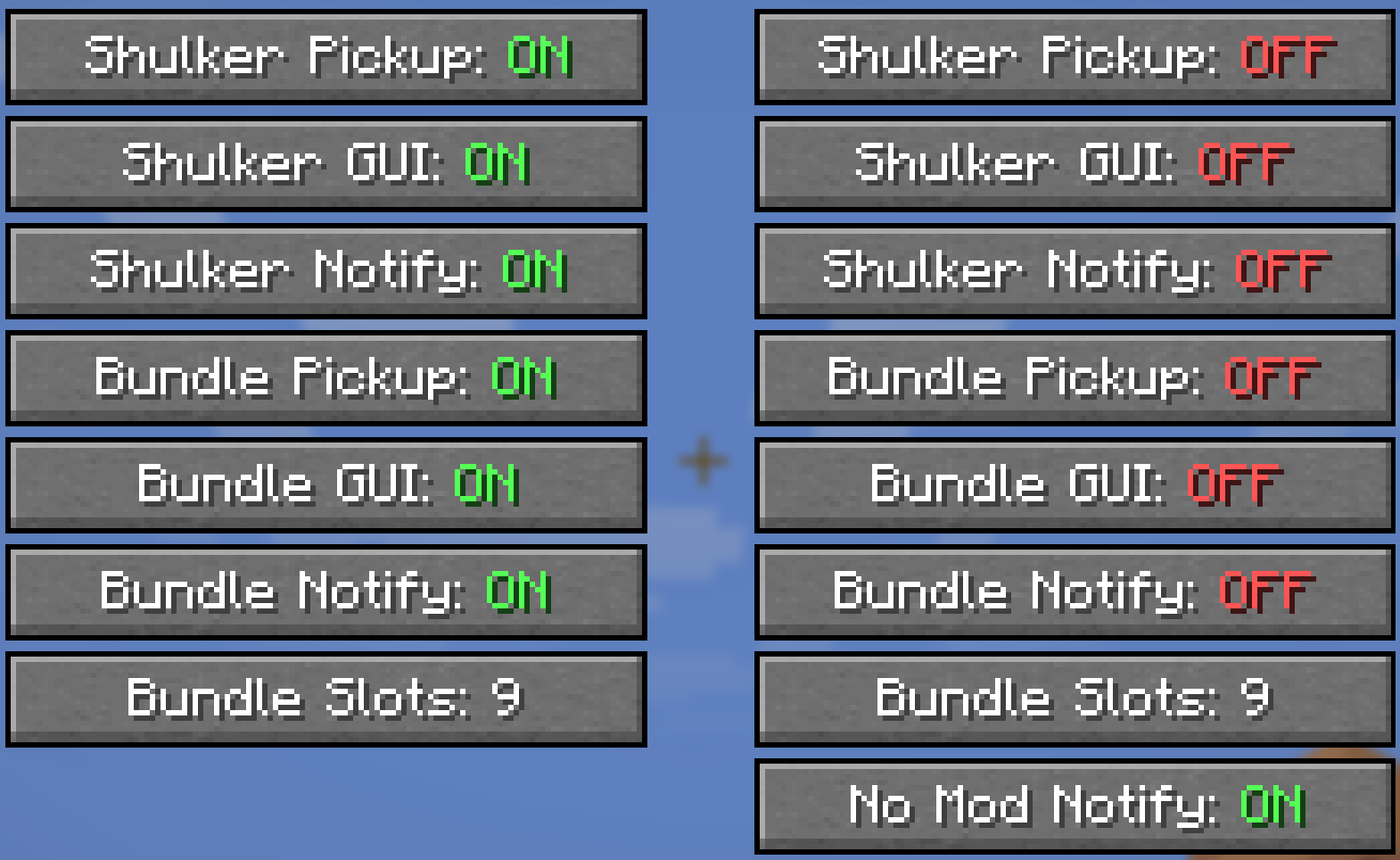
- 如果您已安装 ModMenu,则可以访问详细的配置界面。
- 设置分为 单人游戏 和 多人游戏 两个类别,允许您为每种场景设置不同的偏好。
- 这些开关是
/sb personal 命令的替代方案,让您完全掌控自己的体验。
功能控制机制(权限层级)
本模组使用三层系统来确定某项功能对玩家是否激活。
- 玩家选择(客户端): 玩家必须在个人设置中启用该功能(通过 ModMenu 配置或
/sb personal 命令)。如果玩家禁用了某项功能,无论服务器设置如何,该功能对他们来说将始终处于关闭状态。
- 服务器全局设置: 如果玩家已启用该功能,服务器随后会检查其全局设置。如果该功能在全局范围内已启用(通过
/sb global),则玩家可以正常使用它。
- 服务器权限: 如果该功能在全局范围内被禁用,服务器随后会检查玩家是否拥有针对该功能的特定权限节点(例如
shulkerbundle.open)。
- 最高优先级覆盖: 多人游戏配置界面有一个 “拒绝服务器权限” 开关。启用后,它将作为“硬性退出”选项,强制在服务器上禁用本模组的所有功能,忽略任何全局设置或权限。
服务器管理
- 客户端模组检测: 服务器可以检测玩家是否安装了该模组。如果玩家未安装该模组加入服务器,他们将收到一个操作栏消息,其中包含指向本页面的可点击链接。此消息每位玩家仅显示两次。
- 服务器配置: 服务器所有者可以在
shulkerbundle.json 配置文件中将 notifyPlayer: false,从而禁用此通知消息。
点击查看所有权限节点及其描述
shulkerbundle.open: 允许通过Shift+右键打开潜影盒 GUI。shulkerbundle.open_bundle_gui: 允许通过Shift+右键打开自定义收纳袋 GUI。shulkerbundle.hold.shulker: 允许物品自动插入副手的潜影盒中。shulkerbundle.hold.bundle: 允许物品自动插入玩家背包中的收纳袋内。shulkerbundle.notify.shulker: 允许玩家接收关于潜影盒填充状态的操作栏通知。shulkerbundle.notify.bundle: 允许玩家接收关于收纳袋填充状态的操作栏通知。shulkerbundle.admin: 授予管理员权限,包括使用全局切换命令。(默认:OP 等级 2)shulkerbundle.command.use: 允许使用基础 /shulkerbundle(以及 /sb)命令查看帮助页面。(默认:任何人)
整合包政策
- 您获准将此模组包含在任何整合包中。
- 请勿直接修改模组的 JAR 文件。
- 整合包本身,或在整合包内访问此模组的方式,不得出售。
Shulker & Bundles - Enhanced Inventory Management!
Tired of inventory overflow? Shulker & Bundles supercharges your storage solutions by allowing seamless interaction with Shulker Boxes and Bundles directly from your inventory! Pick up items into your off-hand Shulker or any Bundle, and access their contents using shift right-click while holding on the fly with intuitive GUIs.
? Contact Me & Support Information
? Primary Support Channel (Preferred)
All general questions, feature requests, and non-urgent bug reports should be posted in the appropriate channels on our Discord Server. We actively monitor the server and will respond as soon as possible. This ensures that the whole community can benefit from the discussion and solutions.
? Urgent Private Messaging (PM) Policy
While we prefer all issues to be handled via the Discord server first, you are welcome to PM me directly under specific urgent circumstances:
- Allowed Reason: Your server is crashing or experiencing critical, game-breaking errors directly related to one of my mods/plugins.
- Requirement: You must be the owner of the server.
- Time Zone: I am operating in the (CET/CEST) Time Zone.
- PM Hours: Please only send private messages between 10:00 AM and 10:00 PM (Brussels Time).
I will endeavor to answer your PM as soon as I can to be helpful and see what I can do to resolve your urgent issue. However, please understand that immediate responses are not guaranteed, and private messaging is a professional courtesy, not an entitlement. Thank you for your understanding and cooperation!
Features
Direct GUI Access
- Shulker Box GUI: Shift-right-click a Shulker Box (in main or off-hand) to open its 27-slot GUI without placing it down!
- An "Editing Shulker: [Shulker Name]" placeholder appears in your hand while the GUI is open.
- Permission:
shulkerbundle.open
- Note: Stacked shulker boxes in hand cannot be opened.
- Bundle GUI: Shift-right-click a Bundle (in main or off-hand) to open a dynamic custom GUI.
- The GUI size adjusts to 9, 18, or 27 slots based on the number of unique item types already within the bundle (max 27 unique types for manual interaction).
- An "Editing: [Bundle Name]" placeholder appears in your hand while the GUI is open.
- Note: The Bundle GUI cannot be opened if the bundle contains more than 27 unique item types.
- Permission:
shulkerbundle.open_bundle_gui
Automatic Item Collection
- Shulker Auto-Pickup (Off-hand): Items you pick up go directly into your off-hand Shulker Box if space is available.
- Permission:
shulkerbundle.hold.shulker
- Notifications: Receive action bar messages showing "Shulker has X empty slots left" when items are picked up, specifically triggered by a new item filling a slot in the third row (slots 18-26).
- Exclusions: Will not pick up other Shulker Boxes, Bundles, or placeholder items.
- Note: Stacked shulker box items in the off-hand are not supported for auto-pickup.
- Bundle Auto-Pickup (Inventory & Off-hand): Items you pick up go directly into any available Bundles in your main inventory or off-hand.
- Permission:
shulkerbundle.hold.bundle
- Notifications: Receive action bar messages indicating "Bundle has (X/64) items" if the bundle has 32 or more items but is not full, or "Bundles with space X" otherwise.
- Conditions: Auto-pickup into Bundles is skipped if the player is sneaking, the item is on the auto-pickup blacklist (Cake, Pumpkin Pie, or other Bundles), or if adding a new unique item type would exceed 9 unique types already in the bundle.
- Exclusions: Items marked with the
CrateBundleNoAutoPickup NBT tag are ignored.
Bundle Item Interaction Rules
- GUI Blacklist: Prevents
Cake, Pumpkin Pie, Shulker Box items, and other Bundle items (unless empty) from being manually placed into a Bundle via the custom GUI. Placeholder bundles and shulkers are also blocked.
- Manual Inventory Interaction Restrictions: Similar restrictions apply when trying to right-click items from your cursor into a Bundle in your inventory.
- Attempting to add blacklisted items or exceeding unique item limits via right-click will be blocked.
- Any non-empty Bundle cannot be put into another Bundle.
- Bundle Nesting Prevention (Left-Click): Prevents putting a Bundle held on the cursor into another Bundle in an inventory slot by left-clicking.
- Unique Item Limits: Auto-pickup into Bundles is limited to 9 unique item types. Manual insertion into the Bundle GUI is limited to 27 unique item types.
Commands (Admin & Personal)
/shulkerbundle or /sb: Shows the main help page for the mod.
Global Commands (Admin-Only)
Requires the shulkerbundle.admin permission (OP Level 2).
/sb global gui [shulker|bundle]: Toggles the ability to open GUIs for all players./sb global pickup [shulker|bundle]: Toggles auto-pickup functionality for all players./sb global notify [shulker|bundle]: Toggles action bar notifications for all players.
Personal Commands
These commands allow each player to toggle features for themselves. They are saved per-player on the server.
/sb personal gui [shulker|bundle]: Toggles your personal preference for opening GUIs./sb personal pickup [shulker|bundle]: Toggles your personal preference for auto-pickup./sb personal notify [shulker|bundle]: Toggles your personal preference for notifications.
Client-Side Configuration (via ModMenu)
- If you have ModMenu installed, you can access a detailed config screen.
- Settings are split into Singleplayer and Multiplayer categories, allowing you to have different preferences for each context.
- These toggles are an alternative to the
/sb personal commands and give you full control over your experience.
How Features are Controlled (Permission Hierarchy)
This mod uses a 3-layer system to determine if a feature is active for a player.
- Player's Choice (Client-Side): The player must have the feature enabled in their personal settings (via the ModMenu config or
/sb personal command). If a player disables a feature, it will always be off for them, regardless of server settings.
- Server's Global Setting: If the player has the feature enabled, the server then checks its global settings. If the feature is enabled globally (via
/sb global), the player can use it.
- Server Permissions: If the feature is disabled globally, the server will then check if the player has the specific permission node for it (e.g.,
shulkerbundle.open).
- Master Override: The multiplayer config screen has a "Deny Server Permissions" toggle. When enabled, it acts as a "hard opt-out," forcing all of this mod's features to be disabled for you on the server, ignoring any global settings or permissions.
Server Administration
- Client Mod Detection: The server can detect if players have the mod installed. If a player joins without it, they will receive an action bar message with a clickable link to this page. This message only appears twice per player.
- Server Configuration: Server owners can disable this notification message by setting
notifyPlayer: false in the shulkerbundle.json config file.
Click to view all permission nodes and their descriptions
shulkerbundle.open: Allows opening the Shulker Box GUI with shift-right-click.shulkerbundle.open_bundle_gui: Allows opening the custom Bundle GUI with shift-right-click.shulkerbundle.hold.shulker: Allows items to be automatically inserted into the off-hand Shulker Box.shulkerbundle.hold.bundle: Allows items to be automatically inserted into Bundles in the player's inventory.shulkerbundle.notify.shulker: Allows players to receive action bar notifications for Shulker Box fill status.shulkerbundle.notify.bundle: Allows players to receive action bar notifications for Bundle fill status.shulkerbundle.admin: Grants administrative permissions, including use of the global toggle commands. (Default: OP Level 2)shulkerbundle.command.use: Allows use of the base /shulkerbundle (and /sb) command to view help pages. (Default: anyone)
Modpack Policy
- You ARE PERMITTED to include this mod in any modpack.
- Please do not modify the mod's JAR file directly.
- The modpack itself, or access to this mod within the modpack, must not be sold.


 模组
 模组

 模组

 模组

 模组
 模组

评论 0
登录后参与评分
还没有评论,来抢沙发吧