欢迎来到 Shutters 2.0!
你好,欢迎!感谢你在百忙之中访问 Shutters 2.0 的信息与下载页面!
Shutters 2.0 是什么?
Shutters 2.0 是旧版 Shutters 模组针对 1.7 版本的全新版本!终于被带入了现代 Minecraft!该模组添加了卷帘式门,具备防爆特性且设计美观。
如何开始使用 Shutters 2.0?
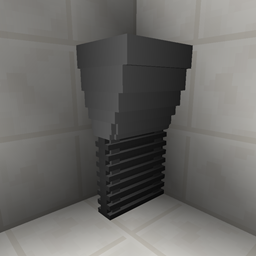
Shutters 2.0 包含两个主要方块:卷帘滚筒(Shutter Roller)和卷帘控制器(Shutter Controller)。此外还需要门绘图器物品(Door Plotter)!
合成方法:
卷帘滚筒(Shutter Roller):
所需材料:
红石 × 4
黑曜石 × 3
铁块 × 1
活塞 × 1
卷帘控制器(Shutter Controller):
所需材料:
红石 × 8
卷帘滚筒 × 1
门绘图器(Door Plotter):
所需材料:
卷帘滚筒 × 1
红石 × 1
铁锭 × 1
如何建造你的门:
合成所需组件:
制作你的卷帘滚筒(每扇门最多使用 64 个)
制作你的卷帘控制器
制作你的门绘图器
排列你的卷帘滚筒
将卷帘滚筒放置在门框顶部:
放置你的卷帘控制器
站在卷帘滚筒行的一端:
(确保你正沿着滚筒的行方向观看。)
在行的末端放置你的卷帘控制器:
将门绘图器放入副手
要将门绘图器放入副手,请在快捷栏选中它并按下 'F' 键。(除非你修改了按键设置)
右键点击卷帘控制器
右键点击卷帘控制器将检测其后方整行中的所有卷帘滚筒。
现在你可以使用了!只需为卷帘控制器提供动力即可运行!
截图
整合包
我非常支持模组社区所做的一切工作,我很高兴这个模组能被用于任何整合包中,只要满足以下条件:
1:包含指向此帖子的链接。
2:署名我(MageProtocol)为作者。
3:不得通过该整合包牟利。
如果满足以上所有条件,我将非常乐意!
希望你享受这个模组,欢迎提供任何反馈!谢谢!
Welcome to Shutters 2.0!
Hello and welcome! Thank you for taking the time to visit the Shutters 2.0 information and downloads page!
What is Shutters 2.0?
Shutters 2.0 is a new version of the old Shutters mod for 1.7! Finally being brought forward! The mod adds in a shutter style of door which boasts being blast proof and aesthetically pleasing design.
How to get started with Shutters 2.0?
Shutters 2.0 consists of 2 primary blocks: The Shutter Roller and the Shutter Controller. The Door Plotter item is also required!
How to craft:
Shutter Roller:
Components:
4 Redstone
3 Obsidian
1 Iron Block
1 Piston
Shutter Controller:
Components:
8 Redstone
1 Shutter Roller
Door Plotter:
Components:
1 Shutter Roller
1 Redstone
1 Iron Ingot
How to build your door:
Craft the components:
Build your Shutter Rollers (maximum of 64 per door)
Build your Shutter Controller
Build your Door Plotter
Arrange your Shutter Rollers
Place your Shutter Rollers at the top of your door frame:
Place your Shutter Controller
Position your player at the end of the row of Shutter Rollers:
(Ensuring you are looking down the row of Rollers.)
Place your Shutter Controller on the end of the row:
Place your Door Plotter in your off hand
To place the Door Plotter in your off hand, select it on your hotbar and select the 'F' key. (Unless changed)
Right Click the Shutter Controller
Right clicking the Shutter Controller will detect all of the Shutter Rollers in the row behind it.
Now you're good to go! Simply provide the Shutter Controller with some power and off you go!
Screenshots
Modpacks
I highly support everything done by the modding community, I am happy for this mod to be used in any pack, so long as:
1: There is a link back to this post.
2: I (MageProtocol) am credited as the author.
3: You do not try to make any money off the packs.
If all of these conditions are met, I am happy!
I hope you enjoy this mod, any feedback is always appreciated! Thank you!

 模组

 模组

 模组
 模组

 模组

 模组

评论 0
登录后参与评分
还没有评论,来抢沙发吧