Simple Atlas
将你的地图世界装进一个物品中。
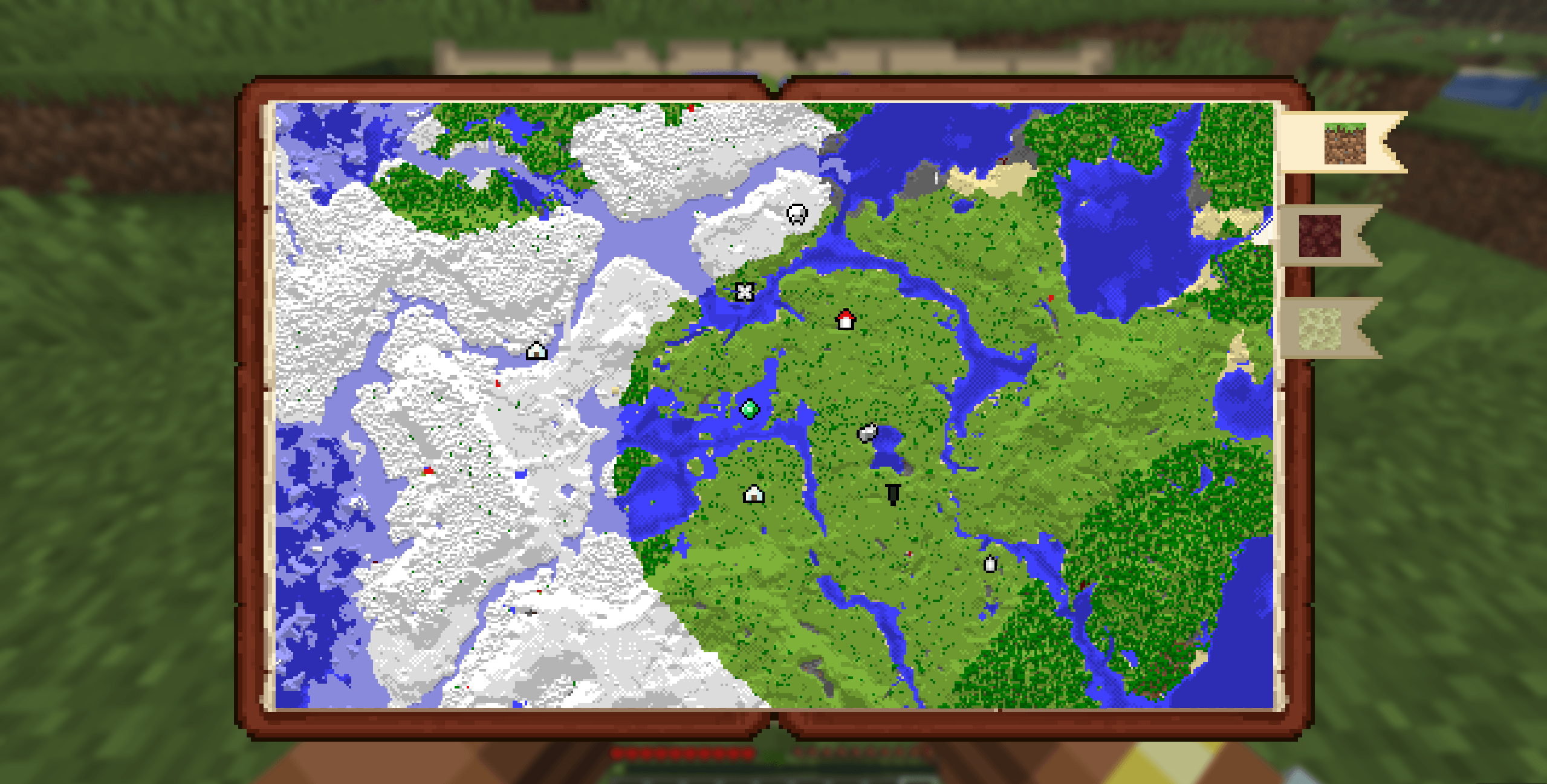
Simple Atlas 添加了一个Atlas物品,它可以存储多张已填充的地图并合并为单一的交互式视图,让你无需频繁切换多张地图即可在已探索区域中自由平移查看。
功能
Atlas 物品
- 在工作台合成 Atlas,并通过制图台添加已填充的地图
- Atlas 仅接受与第一张插入地图相同比例的地图
- 在制图台使用书本可复制一份 Atlas
- 在制图台使用纸张可将所有 Atlas 地图提升一级比例
- 在制图台合并两张同尺寸的 Atlas 以整合其地图和航点
- 通过制图台可以将低比例地图集成到现有 Atlas 中
交互式世界地图
- 滚轮缩放
- 左键拖拽平移
- 按
R重置缩放/平移至当前玩家位置 - 玩家标记直接显示在 Atlas 上
- 维度书签标签页分别隔离主世界、下界、末地及其他维度的 Atlas 图块
航点
- 在 Atlas 上右键点击以创建航点
- 在旗帜上使用 Atlas 可从旗帜的颜色和名称添加航点
- 右键点击现有航点标记以执行上下文操作
- 用户可以编辑或删除航点
- 航点和地图点的上下文菜单支持复制坐标
- 航点名称有长度限制以保持标签可读性
- 航点数据保存在 Atlas 物品本身中
- 右键点击已映射的图块可从 Atlas 中移除该地图并返回已填充的地图物品
导航罗盘
- 在航点上选择 Locate 将其固定到定位栏
- 选择 Stop Locating 取消固定
- 可以固定多个航点
多人联机感知地图同步
- 当玩家手持 Atlas 时,地图数据会从服务器实时同步
- Atlas 查看器在服务端进行追踪
使用方法
- 合成 Atlas。
- 使用制图台添加地图、用书本复制 Atlas、用纸张调整 Atlas 比例,或合并同比例的 Atlas。
- 在主手持有 Atlas 并使用它以打开 Atlas 界面。
- 滚动、拖拽并切换维度标签页以检查你的地图区域。
- 右键点击地图点或航点以管理航点、复制坐标、移除地图以及可选的导航功能。
合成配方
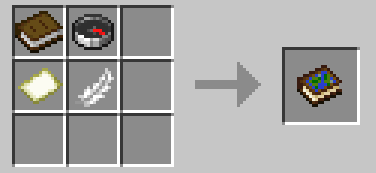
- shapeless
兼容性
- Minecraft:
26.1.x - 加载器: Fabric (
fabric-loader >= 0.18.6) - Java:
25+ - Fabric API: 必需
备注
- Atlas 布局期望地图具有相同的比例,它会放大较小的地图,但会拒绝较大的地图
- 航点和导航状态与每个 Atlas 物品绑定。
- Atlas UI 中的传送动作使用玩家命令,根据服务器设置可能需要权限。
- 专为单人及多人联机生存玩法设计。
问题/反馈
- 在 GitHub Issues 页面报告错误或提出改进建议
Simple Atlas
Carry your mapped world in one item.
Simple Atlas adds an Atlas item that stores multiple filled maps and opens into a single interactive view, so you can pan around your explored area without juggling lots of maps.
Features
Atlas item
- Craft an Atlas and add filled maps through the cartography table
- Atlas only accepts maps with the same scale as the first map inserted
- Use a book at the cartography table to duplicate an atlas
- Use paper at the cartography table to scale every atlas map up by one level
- Merge two atlases of equal size at the cartography table to combine their maps and waypoints
- Lower-scale maps can be integrated into an existing atlas through the cartography table
Interactive world map
- Scroll to zoom
- Left-drag to pan
- Press
Rto reset zoom/pan to your current player position - Player marker is shown directly on the atlas
- Dimension bookmark tabs separate Overworld, Nether, End, and other-dimension atlas tiles
Waypoints
- Right-click on the atlas to create waypoints
- Use an atlas on a banner to add a waypoint from the banner's color and name
- Right-click existing waypoint markers for context actions
- User can edit or delete waypoints
- Waypoint and map-point context menus can copy coordinates
- Waypoint names are capped to keep labels readable
- Waypoints are saved in the atlas item itself
- Right-clicking a mapped tile can remove that map from the atlas and return the filled map item
Navigation compass
- Choose Locate on a waypoint to pin the waypoint to the locator bar
- Choose Stop Locating to remove pin
- Multiple waypoints can be pinned
Multiplayer-aware map syncing
- While a player is holding an atlas, map data is synced live from the server
- Atlas viewers are tracked server-side
How to use
- Craft an Atlas.
- Use the cartography table to add maps, duplicate atlases with books, scale atlases with paper, or merge equal-scale atlases.
- Hold the atlas in your main hand and use it to open the atlas screen.
- Scroll, drag, and switch dimension tabs to inspect your mapped area.
- Right-click map points or waypoints to manage waypoints, copy coordinates, remove maps, and optional navigation.
Recipe
- shapeless
Compatibility
- Minecraft:
26.1.x - Loader: Fabric (
fabric-loader >= 0.18.6) - Java:
25+ - Fabric API: required
Notes
- The atlas layout expects maps of the same scale and will scale up smaller maps, but larger ones will be rejected
- Waypoint and navigation state is tied to each atlas item.
- Teleport actions in the atlas UI use player commands and may require permission depending on the server.
- Designed for both singleplayer and multiplayer survival workflows.
Issues/Feedback
- Report bugs or suggest improvements on the GitHub Issues page
下载 Simple Atlas
下载 Simple Atlas
下载 Simple Atlas
下载 Simple Atlas
需要联机服务器吗?
稳定流畅、一键部署,几分钟即可和朋友联机开服
最低仅需 8 元/月 即可畅快联机
下载 Simple Atlas
需要联机服务器吗?
稳定流畅、一键部署,几分钟即可和朋友联机开服
最低仅需 8 元/月 即可畅快联机
下载 Simple Atlas
需要联机服务器吗?
稳定流畅、一键部署,几分钟即可和朋友联机开服
最低仅需 8 元/月 即可畅快联机
下载 Simple Atlas
需要联机服务器吗?
稳定流畅、一键部署,几分钟即可和朋友联机开服
最低仅需 8 元/月 即可畅快联机
下载 Simple Atlas
需要联机服务器吗?
稳定流畅、一键部署,几分钟即可和朋友联机开服
最低仅需 8 元/月 即可畅快联机
下载 Simple Atlas
需要联机服务器吗?
稳定流畅、一键部署,几分钟即可和朋友联机开服
最低仅需 8 元/月 即可畅快联机
下载 Simple Atlas
需要联机服务器吗?
稳定流畅、一键部署,几分钟即可和朋友联机开服
最低仅需 8 元/月 即可畅快联机
重大更新: 模组 ID 已从 simple-atlas 更改为 simple_atlas,以准备支持 NeoForge。
现有世界中的地图不会迁移。你的配置文件已自动迁移。
- 修复了当 atlas 包含来自多个维度的地图时,地图标记和玩家图标在 atlas 上偏移的问题(感谢 @lemonpie03)
- 添加了德语翻译(感谢 @MadByteDE)
- 添加了简体中文翻译(感谢 @AuserTI)
关于这个资源的讨论、问题反馈与使用心得
还没有讨论,来发第一帖吧
你是这个资源的作者?登录后可认领此资源。
相似资源
 模组

可定制的鞘翅模组,支持装饰纹饰、旗帜图案等更多功能!
 模组

显示你正在注视的方块的信息。(适用于 Minecraft 1.16+ 的 Hwyla/Waila 分支)
 模组
在游戏画面角落显示附近世界地形、玩家、生物和实体的地图。可创建路径点,帮助你找到标记过的位置。
 模组

查看物品与配方
 模组
使用 JavaScript 编辑配方、添加自定义物品、编写世界事件!
 模组
AE2:一款流行的自动化与存储模组
评论 0
登录后参与评分
还没有评论,来抢沙发吧