
? 简易数据包
本模组旨在简化向游戏中添加数据包的方式。为此,该模组会在 Minecraft 的根目录下创建一个名为 datapacks 的文件夹。在我看来,玩家低估了数据包的潜力,这主要是因为并非所有人都了解如何将数据包安装到游戏中。虽然向游戏中添加数据包比安装模组或资源包稍显复杂,但许多数据包都能为游戏带来大量的内容。
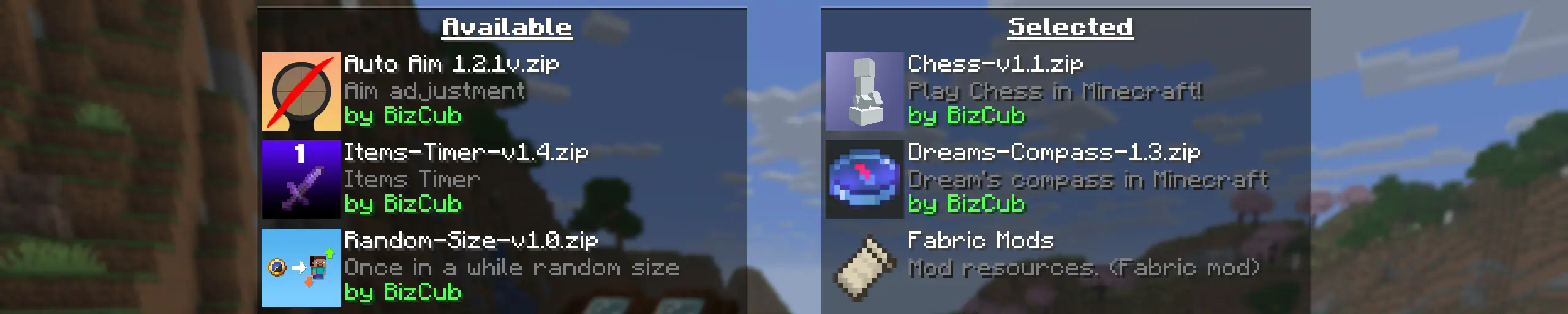
我的目标是制作一款能帮助玩家向游戏中安装数据包的模组,让他们能够获得一段段难忘的新体验。
? 使用方法

若要启动包含数据包的世界,你需要下载与所选 Minecraft 版本兼容的任何数据包,打开并将其放入 datapacks 文件夹中,然后开始创建世界并从列表中选择所需的数据包。然而,在使用 Cloth Config 时,模组设置会指定下载文件夹的路径,因此要使用数据包,你只需下载它们,然后在数据包选择菜单中简单地启用所需的数据包即可。
✨ 功能
在可能的情况下,我为该模组添加了所有我能想到的最基础的功能。
点击展开
-
因为我希望尽可能多的玩家开始使用数据包,所以我让该模组在 4 种不同的加载器上可用,以便它可以从几乎任何整合包中运行。
-
该模组拥有配置选项。模组使用的值可以在模组菜单(Fabric 需要 ModMenu)中进行更改,也可以通过 Cloth Config API 提供的配置文件进行更改。
-
该模组允许玩家从不同文件夹中添加和加载数据包。要更改这些数据包的来源,需要在模组设置中进行配置。如果你想指定游戏根目录下的一个文件夹(例如
my_datapacks),而不是完整路径C:\Users\{USERNAME}\AppData\Roaming\.minecraft\my_datapacks,只需在模组设置菜单的字段中输入文件夹名称即可。 -
默认情况下,数据包会从根目录下的
datapacks文件夹和下载文件夹中加载,这使得它们在安装后能立即出现在游戏中(前提是已加载 Cloth Config API;否则,仅会使用datapacks文件夹)。 -
模组设置中有两个列表:一个用于必需数据包,另一个用于可选数据包。第一个列表指定进入世界时自动应用的数据包路径。第二个列表包含保持非活动状态但可以随时通过
/datapack enable命令启用的数据包。 -
Simple Datapacks 模组可在服务器上运行。由于服务器上无法访问模组设置,它会自动使用
datapacks文件夹中的所有数据包。 -
可以禁用特性包(实验性数据包)。如果你不使用特性包,可以将其禁用以节省数据包选择屏幕上的空间。在模组设置中,可以将功能包设置为必需,这样它们将在世界启动时自动应用。
-
与类似的模组不同,即使你禁用了该模组,数据包仍将继续在世界中工作。在模组设置中,你可以启用将数据包复制到世界文件夹的功能。在这种情况下,数据包无需模组即可工作,因为游戏将从世界中读取它。
? 支持
? Simple Datapacks
The purpose of this mod is to simplify the ways of adding datapacks to the game. To do this, the mod creates a folder in the root directory of Minecraft called datapacks. In my opinion, the capabilities of datapacks are underestimated by players, mostly because not everyone understands how to install datapacks into the game. This is more difficult to do than to install a mod or resource pack, although many datapacks bring a lot of content to the game.
My goal is to make a mod that will help players with installing datapacks into the game so that they can get a new portion of unforgettable impressions.
? Usage
In order to launch a world with datapacks, you need to download any datapack that is compatible with the selected version of Minecraft, open and place the datapack in the datapacks folder, start creating a world and select the desired datapack from the list. However, when using Cloth Config, the mod settings specify the path to the downloads folder, so to use datapacks, you only need to download them, then simply open the datapack selection menu and enable the desired one.
✨ Features
Whenever possible, I added the most basic features for the mod that I could imagine.
Click to open
-
Since the main thing for me is that as many players as possible start using datapacks, I made the mod available on 4 different loaders so that it can be launched from almost any modpack.
-
The mod has a configuration. The values used by the mod can be changed in the mod menu (Fabric requires ModMenu), and can also be changed in the configuration file, which is available using the Cloth Config API.
-
The mod allows players to add and load datapacks from different folders. To change the sources of these packs, you need to configure them in the mod settings. If you want to specify a folder in the game's root directory, for example,
my_datapacksinstead of the full pathC:\Users\{USERNAME}\AppData\Roaming\.minecraft\my_datapacks, simply enter the folder name in the field in the mod settings menu. -
By default, datapacks are loaded from the datapacks folder in the root directory and the downloads folder, allowing them to appear in the game immediately after installation (provided Cloth Config API is loaded; otherwise, only the datapacks folder will be used).
-
The mod settings have two lists: one for required and one for optional datapacks. The first list specifies the paths to datapacks that are automatically applied when entering a world. The second list contains datapacks that remain inactive but can be enabled at any time using the
/datapack enablecommand. -
The Simple Datapacks mod runs on the server. Since the mod settings are not accessible on the server, it automatically uses all datapacks from the datapacks folder.
-
It's possible to disable feature packs (experimental datapacks). If you don't use feature packs, you can disable them to save space on the datapack selection screen. In the mod settings, function packages can be set to required, and then they will be applied when the world starts.
-
Unlike similar mods, datapacks will continue to work in the world, even if you disable the mod. In the mod settings, you can enable copying datapacks to the world folder. In this case, the datapack will work without the mod, because the game will read it from the world.
? Support

下载 Simple Datapacks
需要联机服务器吗?
稳定流畅、一键部署,几分钟即可和朋友联机开服
最低仅需 8 元/月 即可畅快联机
下载 Simple Datapacks
需要联机服务器吗?
稳定流畅、一键部署,几分钟即可和朋友联机开服
最低仅需 8 元/月 即可畅快联机
下载 Simple Datapacks
需要联机服务器吗?
稳定流畅、一键部署,几分钟即可和朋友联机开服
最低仅需 8 元/月 即可畅快联机
下载 Simple Datapacks
需要联机服务器吗?
稳定流畅、一键部署,几分钟即可和朋友联机开服
最低仅需 8 元/月 即可畅快联机
下载 Simple Datapacks
需要联机服务器吗?
稳定流畅、一键部署,几分钟即可和朋友联机开服
最低仅需 8 元/月 即可畅快联机
下载 Simple Datapacks
需要联机服务器吗?
稳定流畅、一键部署,几分钟即可和朋友联机开服
最低仅需 8 元/月 即可畅快联机
下载 Simple Datapacks
需要联机服务器吗?
稳定流畅、一键部署,几分钟即可和朋友联机开服
最低仅需 8 元/月 即可畅快联机
下载 Simple Datapacks
需要联机服务器吗?
稳定流畅、一键部署,几分钟即可和朋友联机开服
最低仅需 8 元/月 即可畅快联机
下载 Simple Datapacks
需要联机服务器吗?
稳定流畅、一键部署,几分钟即可和朋友联机开服
最低仅需 8 元/月 即可畅快联机
下载 Simple Datapacks
需要联机服务器吗?
稳定流畅、一键部署,几分钟即可和朋友联机开服
最低仅需 8 元/月 即可畅快联机
修复
- 修复每次重新加载时重建数据包源,导致模组数据驱动内容失效的问题
关于这个资源的讨论、问题反馈与使用心得
还没有讨论,来发第一帖吧
你是这个资源的作者?登录后可认领此资源。
相似资源
 模组

一个用于收集生物掉落物的多区块模组。
 模组

显示你正在注视的方块的信息。(适用于 Minecraft 1.16+ 的 Hwyla/Waila 分支)
 模组

查看物品与配方
 模组

原版世界生成优化模组
 模组
在游戏画面角落显示附近世界地形、玩家、生物和实体的地图。可创建路径点,帮助你找到标记过的位置。
 模组
使用 JavaScript 编辑配方、添加自定义物品、编写世界事件!
评论 0
登录后参与评分
还没有评论,来抢沙发吧