
Simple Shulker Preview
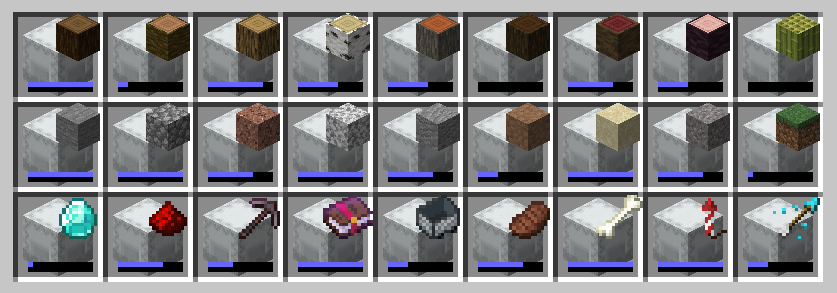
Simple Shulker Preview 是一款小型 Fabric 模组,用于显示一个图标来指示潜影盒的内容。该图标会出现在物品栏中潜影盒图标的上方。
其他下载页面请参见 CurseForge 或 Modrinth。
依赖项
本模组需要 YetAnotherConfigLib (YACL) v3 来管理配置,以及 ModMenu 以在游戏内访问配置界面。
配置项
我不会逐一介绍所有配置项,因为它们随时间有所增加。简要概述如下:
| 选项 | 描述 |
|---|---|
Preview Selection Logic |
根据位置或数量决定容器中应显示哪个物品。 |
Icon Based on Container Name |
提供基于自定义命名容器显示图标的选项。 |
Preview Icon Position & Size |
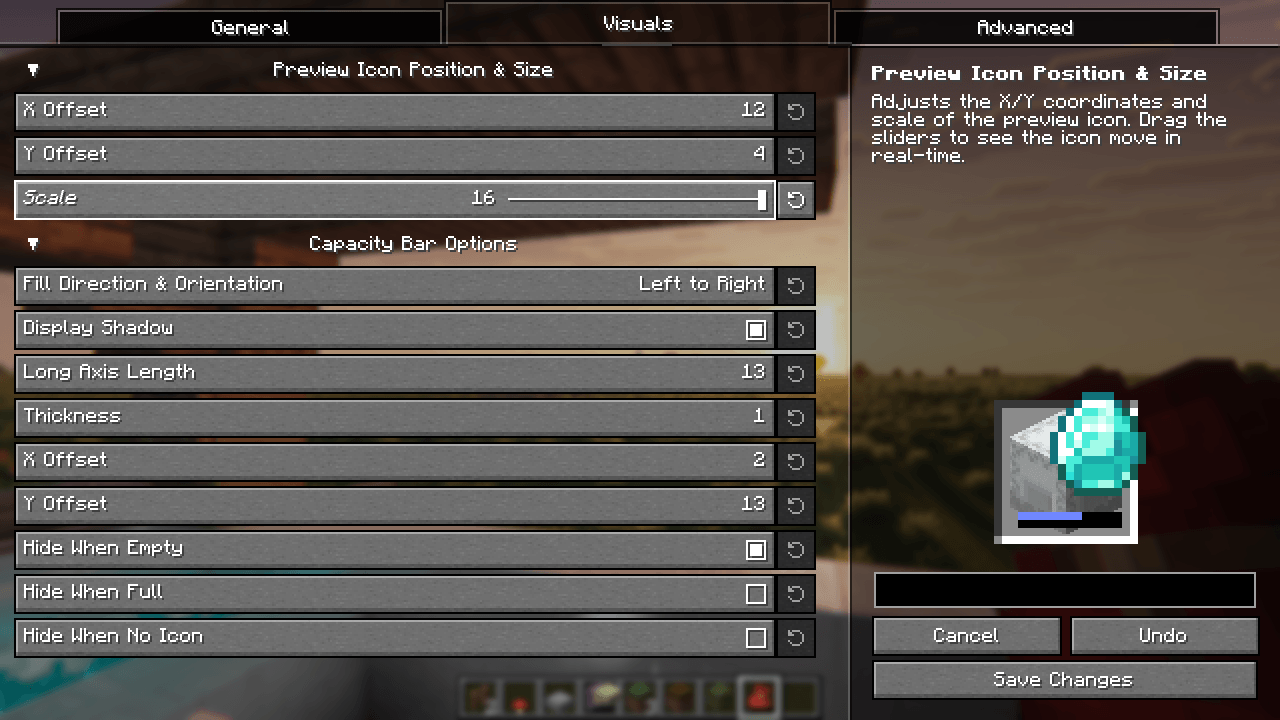
调整图标的 x 和 y 偏移量,以及缩放比例(通用、堆叠或包裹)。 |
Show Capacity Bar |
切换容量条的显示,指示容器的填充程度。 |
Capacity Bar Options |
设置容量条的位置、大小、方向和阴影。 |
Thresholds to Show Preview Icon |
设置显示图标所需的最小物品数/槽位数限制。 |
Preview Icons on Bundles / Modded |
切换对包裹、其他容器物品等的兼容模式。 |
Enable Mod |
全局启用或禁用所有预览图标和容量条。 |
在使用自定义命名的潜影盒时,你需要使用与生成物品相同的命名约定进行命名。例如,将潜影盒命名为 minecraft:grass_block(或简单的 grass_block)将显示草方块。如果提供了无效的名称,它将继续遵循“预览选择逻辑”配置(当然,如果“基于容器名称的图标”设置为“仅命名时显示图标”,则除外)。
贡献
欢迎贡献和建议!请将所有问题限制为一次一个功能——如果你有很多想法,可以随意同时打开多个问题。同样,请将拉取请求限制为一次一个功能,并尽量遵循现有的代码风格。
要进一步讨论或获取新更新的通知,请查看我的 Discord。如果你喜欢我的工作,考虑在 Ko-Fi 上支持我!
Simple Shulker Preview
Simple Shulker Preview is a small fabric mod that displays an icon indicating the contents of a shulker. This icon appears on top of the shulker icon in inventory slots.
For other download pages, please see CurseForge or Modrinth.
Dependencies
This mod requires YetAnotherConfigLib (YACL) v3 to manage configurations, and ModMenu to access the config screen in-game.
Configs
I won't go through all the configs, since they've increased over time. A brief overview is as follows:
| Option | Description |
|---|---|
Preview Selection Logic |
Decides which item in the container should be displayed based on position or quantity. |
Icon Based on Container Name |
Provides options to display an icon based on custom-named containers. |
Preview Icon Position & Size |
Adjust the x and y offsets of the icon, as well as scale (general, stacked, or bundle). |
Show Capacity Bar |
Toggle the capacity bar, indicating how full the container is. |
Capacity Bar Options |
Set the position, size, orientation, and shadow of the capacity bar. |
Thresholds to Show Preview Icon |
Set minimum limits for the number of items/slots required to display an icon. |
Preview Icons on Bundles / Modded |
Toggle compatibility modes for Bundles, other container items, etc. |
Enable Mod |
Globally enables or disables all preview icons and capacity bars. |
When using custom named shulkers, you need to name it using the same conventions required for spawning in items. For example, naming a shulker minecraft:grass_block (or simply grass_block) will display a grass block. If an invalid name has been given, it will continue to follow the 'Preview Selection Logic' configuration (unless 'Icon Based on Container Name' has been set to 'Hide Icons Unless Named', of course).
Contributing
Contributions and suggestions are always welcome! Please limit all issues to only one feature at a time - feel free to open multiple at once if you have many ideas. Similarly, please limit pull requests to a single feature at a time and try to follow the existing code style.
To further discuss or get notifications of new updates, check out my Discord. If you like what I do, consider supporting me on Ko-Fi!

下载 Simple Shulker Preview
下载 Simple Shulker Preview
需要联机服务器吗?
稳定流畅、一键部署,几分钟即可和朋友联机开服
最低仅需 8 元/月 即可畅快联机
下载 Simple Shulker Preview
下载 Simple Shulker Preview
需要联机服务器吗?
稳定流畅、一键部署,几分钟即可和朋友联机开服
最低仅需 8 元/月 即可畅快联机
下载 Simple Shulker Preview
下载 Simple Shulker Preview
下载 Simple Shulker Preview
下载 Simple Shulker Preview
下载 Simple Shulker Preview
下载 Simple Shulker Preview
已适配 MC 26.3!此次更新带来了重大的界面改动,感谢 @mfishma 的出色工作。
更新内容
- 由 @mfishma 在 中实现了 YACL 及实时预览功能
- 由 @EvModder 在 中完成了最终界面 Bug 修复
新贡献者
- @mfishma 在 中完成了首次贡献
- @EvModder 在 中完成了首次贡献
完整变更日志:
关于这个资源的讨论、问题反馈与使用心得
还没有讨论,来发第一帖吧
你是这个资源的作者?登录后可认领此资源。
相似资源
 模组

可定制的鞘翅模组,支持装饰纹饰、旗帜图案等更多功能!
 模组

显示你正在注视的方块的信息。(适用于 Minecraft 1.16+ 的 Hwyla/Waila 分支)
 模组
在游戏画面角落显示附近世界地形、玩家、生物和实体的地图。可创建路径点,帮助你找到标记过的位置。
 模组

查看物品与配方
 模组
使用 JavaScript 编辑配方、添加自定义物品、编写世界事件!
 模组
AE2:一款流行的自动化与存储模组
评论 0
登录后参与评分
还没有评论,来抢沙发吧