文档 · Discord · 源代码与问题反馈
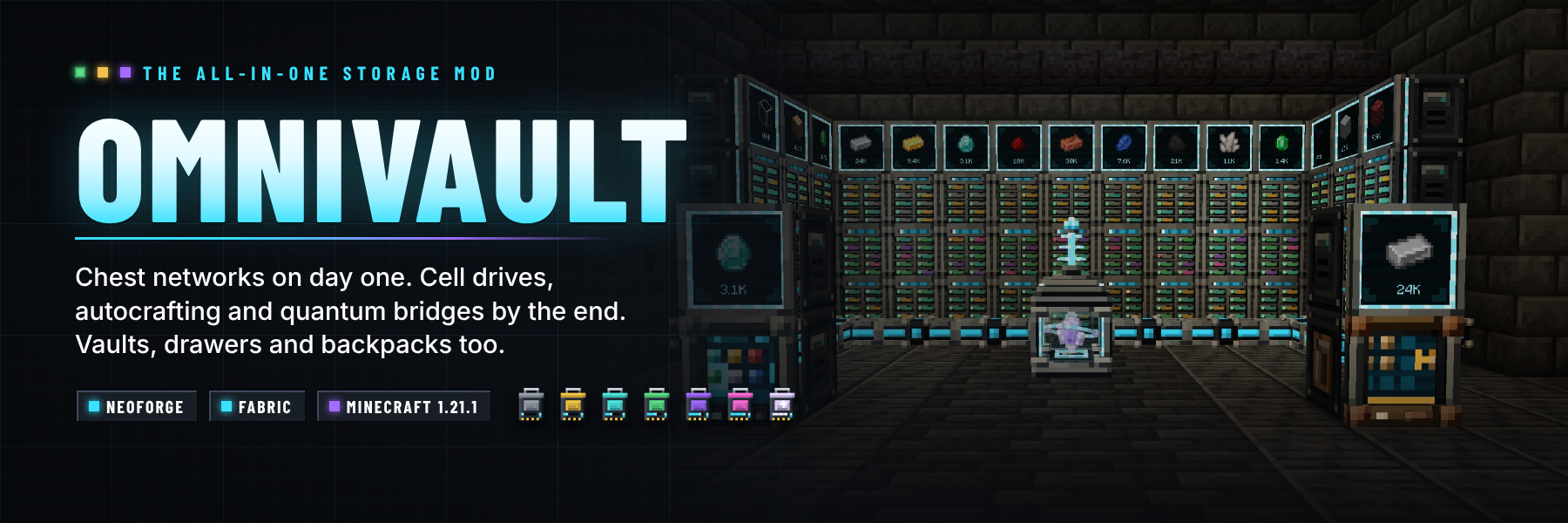
满足所有存储需求的模组。 从第一天起,使用由原版材料制成的存储中心(Storage Hub),将房间内所有箱子整合为一个可搜索的终端。随着发展,通过存储驱动器(Cell Drives)、存储细胞、总线以及全自动合成系统,构建无频道限制的数字化网络;最终利用奇点细胞(Singularity cells)和量子桥梁(Quantum Bridges)实现跨维度的网络互联。在此过程中,你将体验到:六层级的保险箱、具备压缩功能的抽屉及其控制器、链接保险箱,以及可穿戴、可放置且可升级的背包。每个方块均为手工制作的 3D 模型。
Minecraft 1.20.1, 1.21.1, 26.2 and 26.3 · Forge, NeoForge and Fabric · 支持服务端和客户端安装 · JEI 可选

Simple Terminals 现已更名为 OmniVault。 2.0 版本将一个单一的合成终端转变为一个完整的存储模组。
使用过 Simple Terminals 的世界中,原有的合成终端得以保留:旧的 simple_terminals:crafting_terminal ID 现在会加载为 OmniVault 的合成终端。
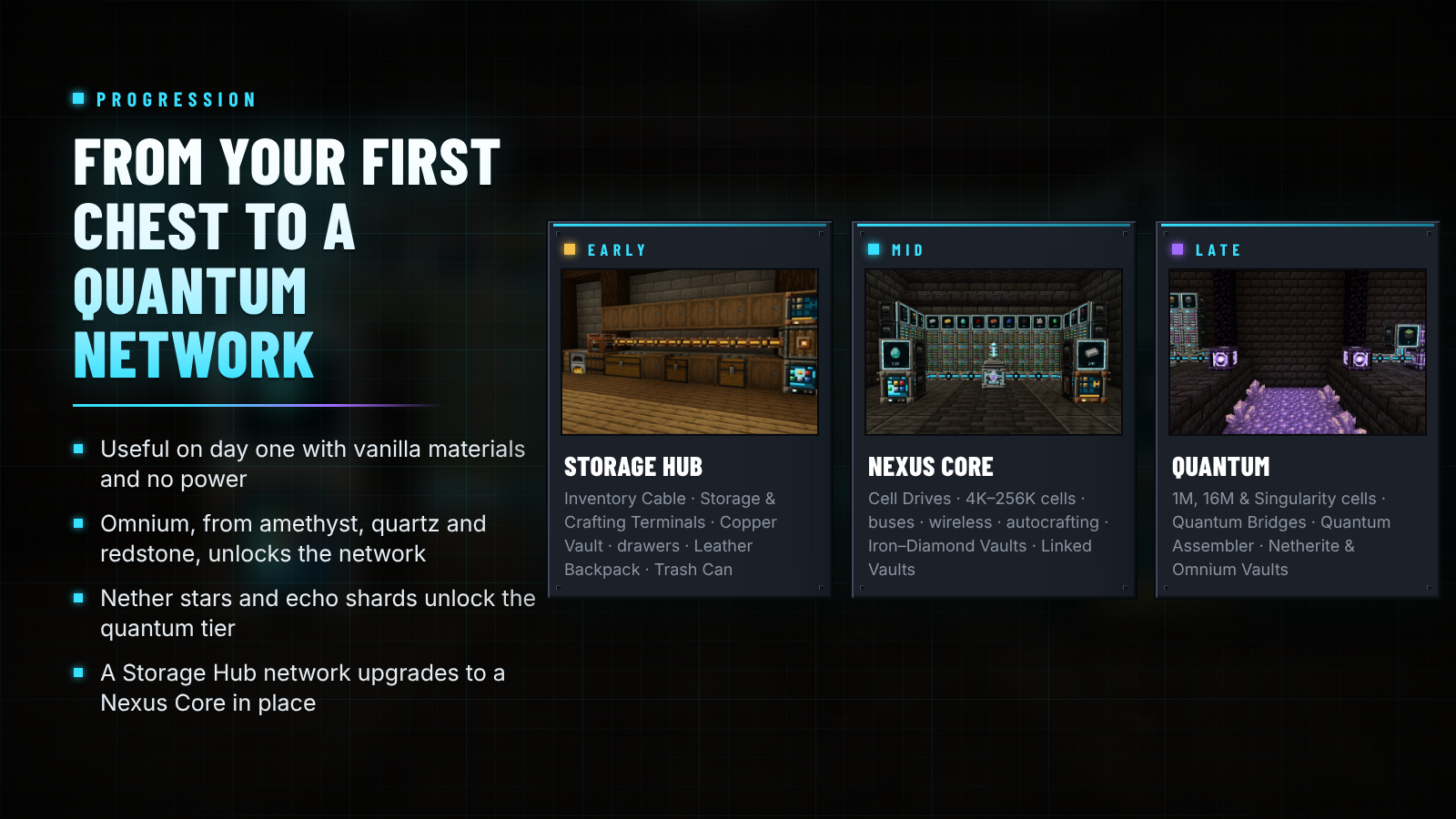
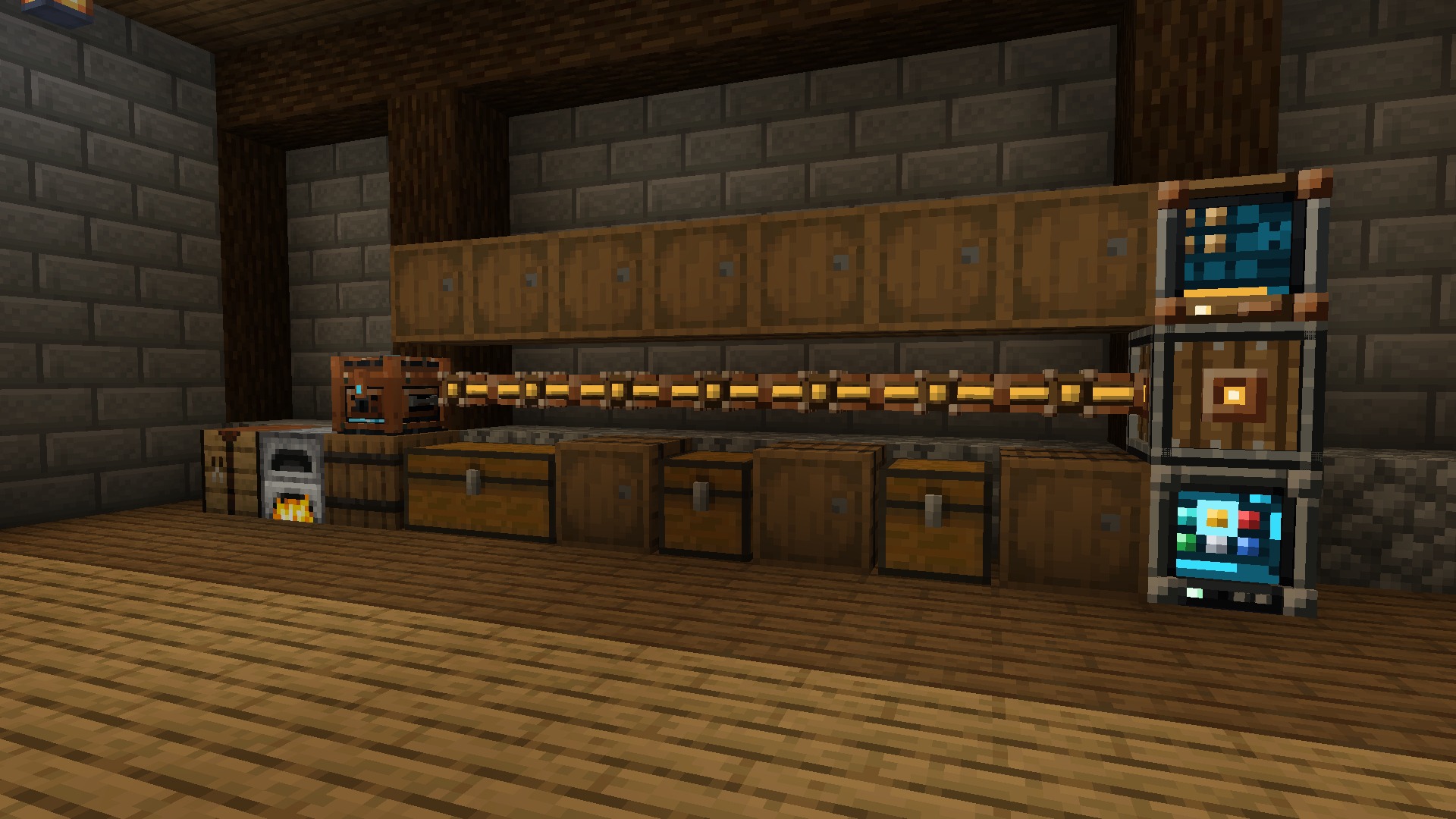
- 前期: 存储中心(Storage Hub)和库存线缆(Inventory Cable)网络连接所有接触到的箱子和桶,材料源自原版
- 存储网络: 核心枢纽(Nexus Core)、可染色线缆、存储驱动器(Cell Drives)、容量从 4K 到奇点的物品和流体细胞、各类终端、
总线、网络端口(Network Port)、分解器(Destructor)、制造器(Constructor)、信号发射器(Signal Emitter)、存储监视器(Storage Monitor)、无线终端和量子桥梁
- 自动合成: 配方、配方编码终端(Pattern Encoding Terminal)、配方提供器(Pattern Providers)、装配台(Assemblers)、量子装配台(Quantum Assemblers)和合成处理器(Crafting Processors),配备规划器和实时状态屏幕
- 物理存储: 六个等级的保险箱及升级套件、抽屉、压缩抽屉及其控制器、链接保险箱(Linked Vaults)和 pouches、垃圾桶(Trash Can)和重定位器(Relocators)
- 背包: 六个等级,九个升级选项

| 阶段 |
制作材料 |
建造内容 |
| 前期 |
原版材料,无需电力 |
存储中心和库存线缆、存储终端和合成终端、铜制保险箱、抽屉、皮革背包、垃圾桶 |
| 中期 |
Omnium(紫水晶、下界石英和红石混合铁并熔炼而成) |
核心枢纽、存储驱动器和 4K–256K 细胞、总线、无线终端、自动合成、铁至钻石保险箱及背包、压缩抽屉、链接保险箱、重定位器 |
| 后期 |
下界之星、回声碎片、下界合金 |
1M、16M 和奇点细胞、量子桥梁、量子装配台、量子无线终端、下界合金和 Omnium 保险箱、下界合金背包 |
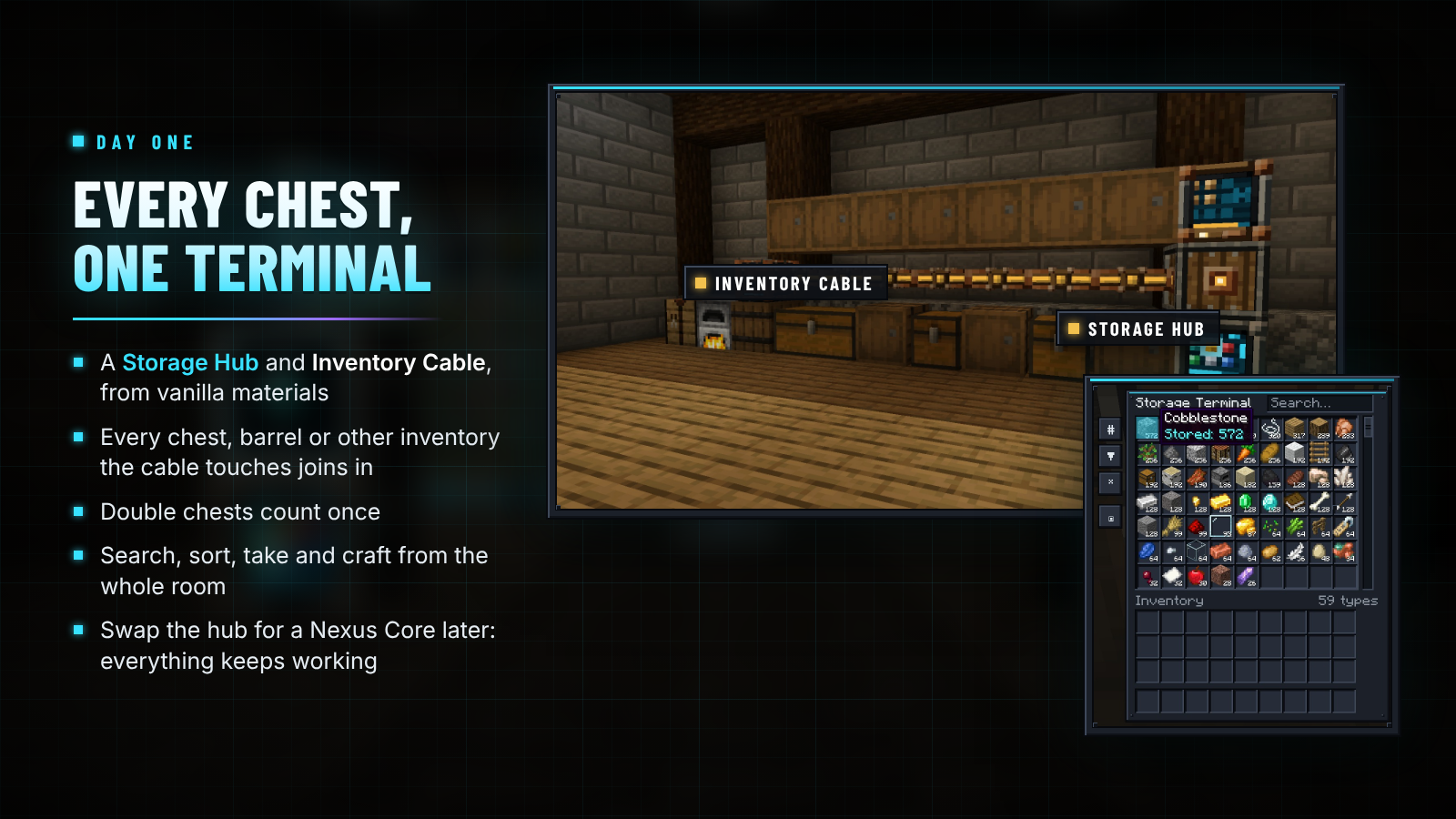
放置一个存储中心(Storage Hub),让库存线缆(Inventory Cable)经过你的箱子、桶和抽屉,并添加一个存储终端(Storage Terminal):
任何被存储中心或线缆接触的容器都会显示为一个统一的存储空间,双箱算作一个整体。存储中心网络故意不包含细胞、自动合成和无线终端功能。当你需要这些功能时,只需用核心枢纽替换存储中心,其他一切仍可正常工作。

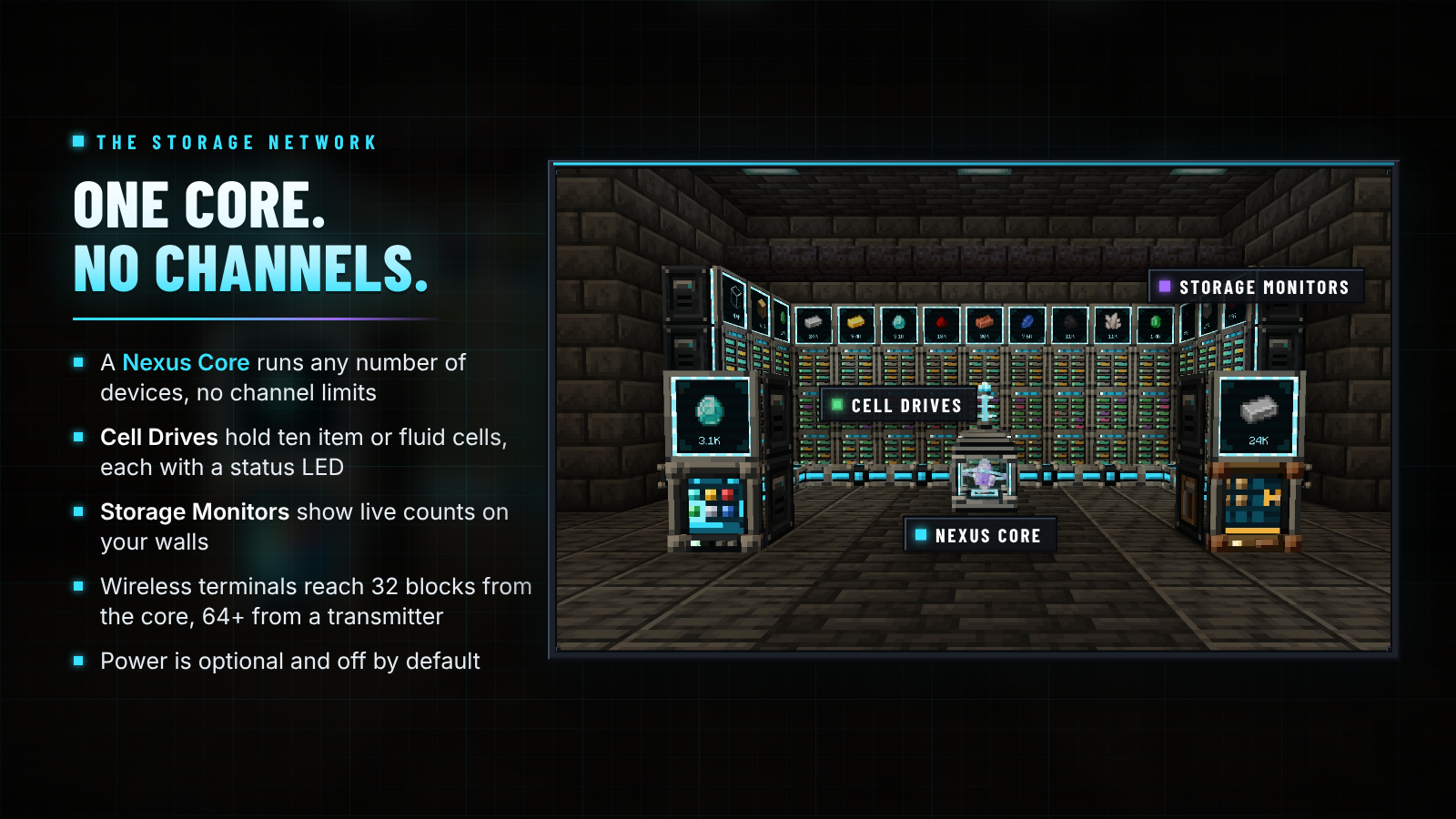
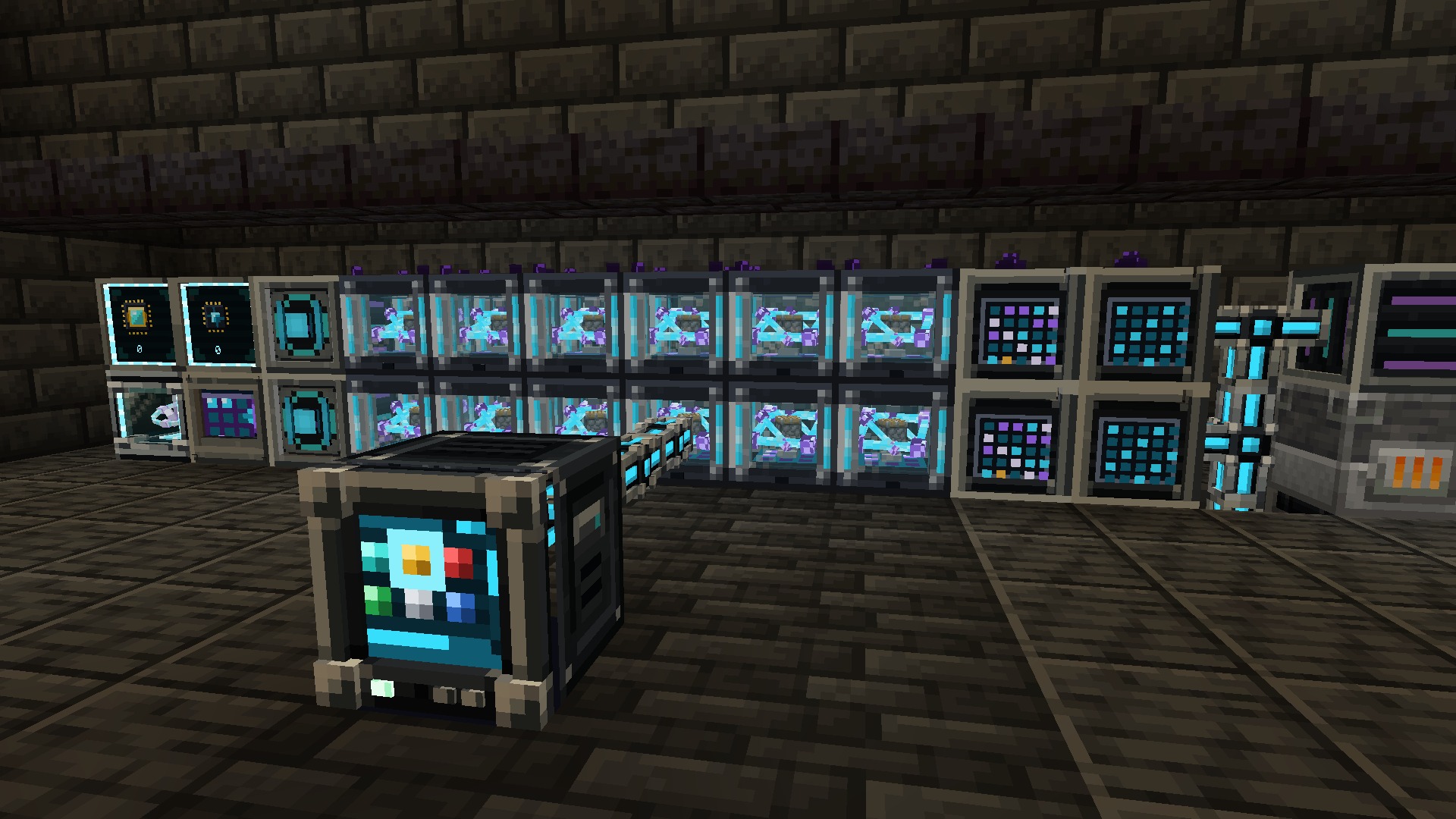
每个网络只有一个根节点,设备数量不限,无需频道。核心枢纽(Nexus Core)是一个反应堆笼状结构,内含悬浮的 Omnium 晶体,在网络在线时会旋转;右键点击可查看设备概览、已存储物品及容量。线缆会自动连接,并可染色以区分并行网络。
| 设备 |
功能说明 |
| 存储驱动器(Cell Drive) |
十个插槽用于安装物品和流体细胞,每个插槽配有 LED 指示灯:绿色表示空间充足,琥珀色表示接近满载,红色表示已满 |
| 存储/合成终端 |
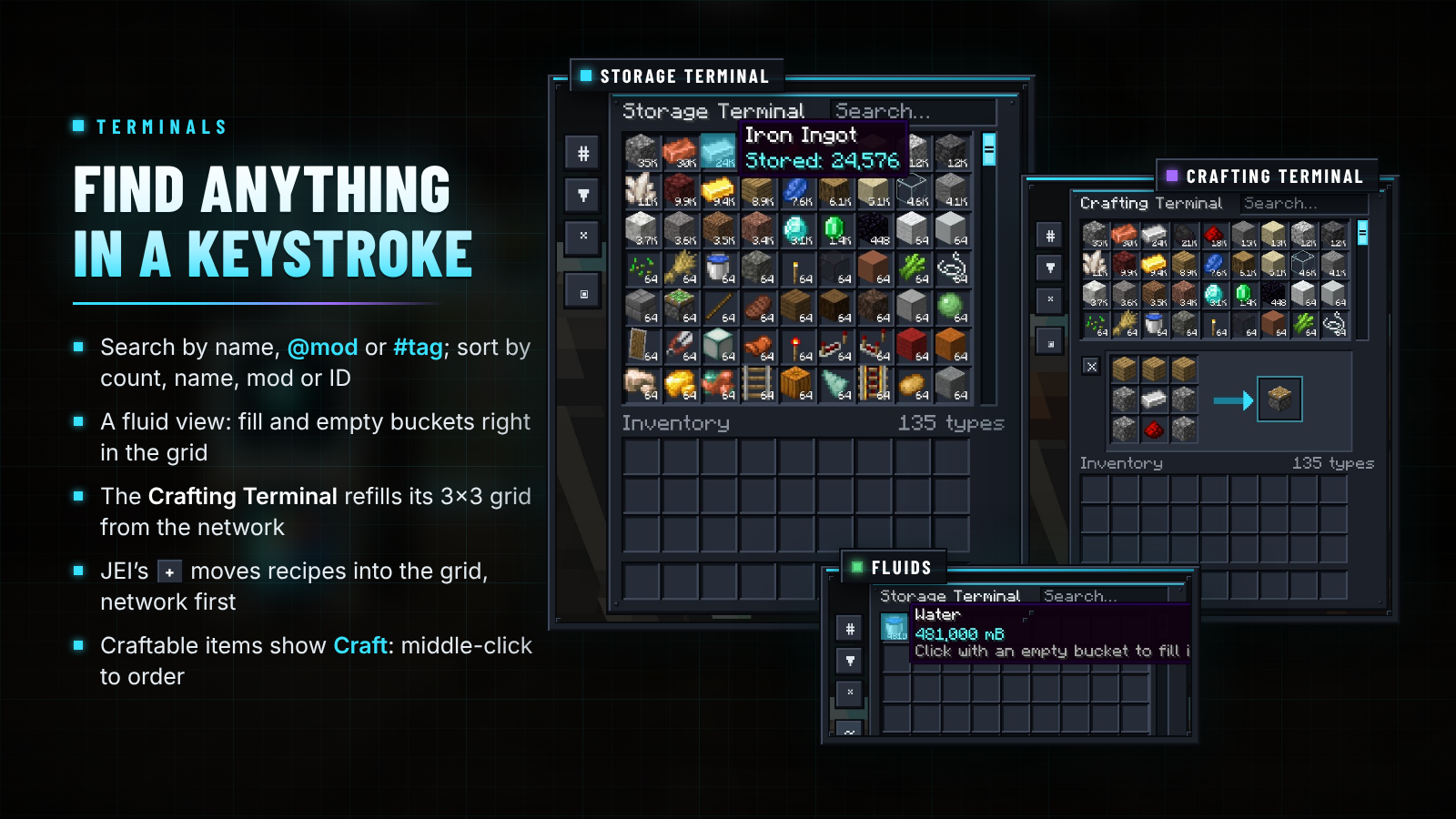
整个网络的可搜索、可排序网格视图;合成终端额外增加一个 3×3 网格,并能自我补充材料 |
| 导入/导出总线 |
从容器中拉取物品和流体,或推入其中 |
| 存储总线 |
使其面对的面容器或储罐成为网络的一部分,支持过滤器、优先级和访问模式设置 |
| 网络端口(Network Port) |
将整个网络作为一个容器和储罐呈现,供漏斗和管道使用 |
| 分解器/制造器 |
将方块开采进网络,或从网络中放置方块 |
| 信号发射器 |
当网络中某种物品的数量达到(或少于)设定值时,输出红石信号 |
| 存储监视器 |
在屏幕上显示一种物品及其实时数量;右键点击可进行存储或取出操作 |
| 无线发射器 |
扩展无线范围;最多容纳四个范围升级组件 |
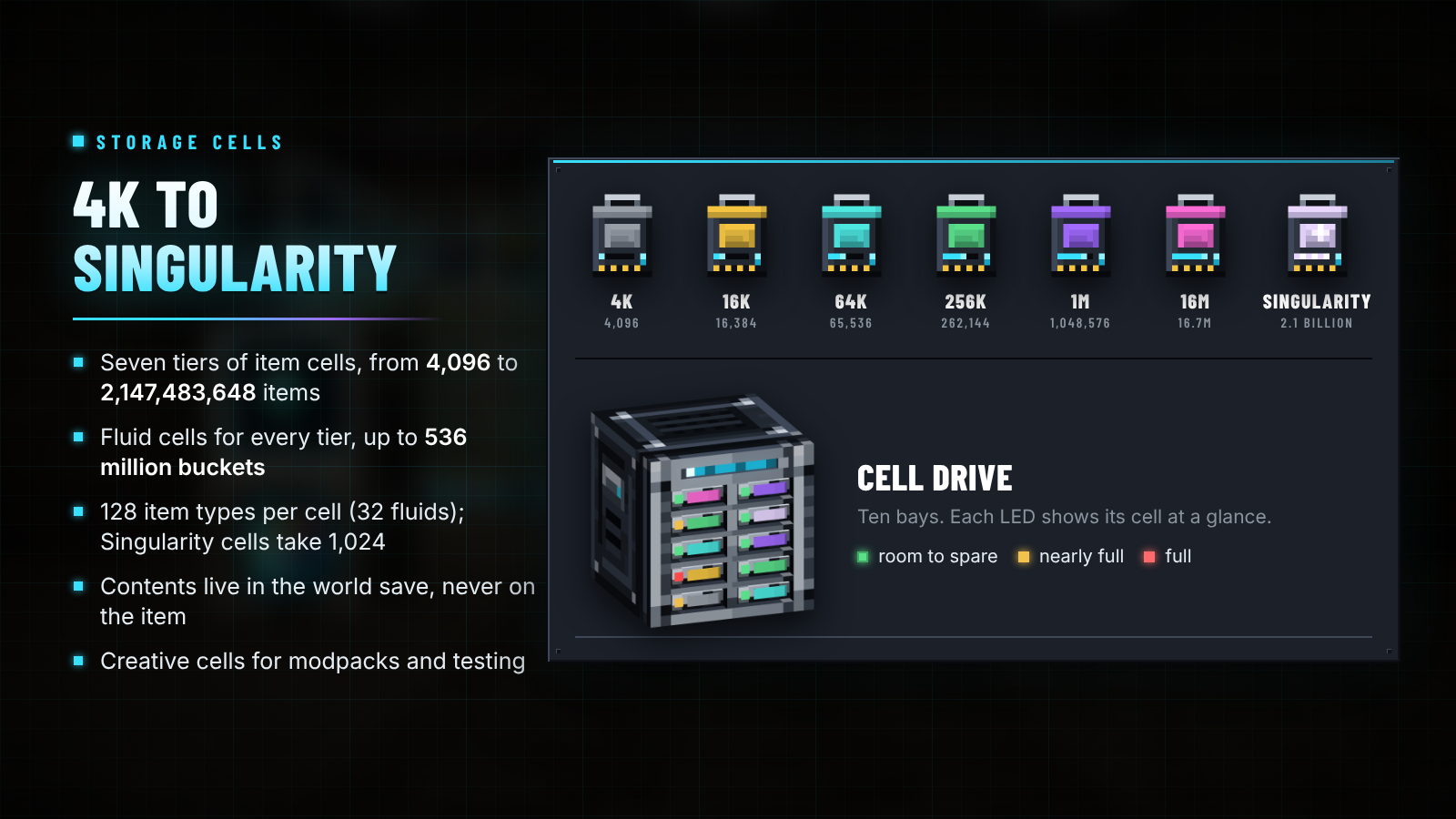
| 细胞 |
物品容量 |
流体细胞容量 |
| 4K |
4,096 |
1,024 桶 |
| 16K |
16,384 |
4,096 桶 |
| 64K |
65,536 |
16,384 桶 |
| 256K |
262,144 |
65,536 桶 |
| 1M |
1,048,576 |
262,144 桶 |
| 16M |
16,777,216 |
4,194,304 桶 |
| 奇点(Singularity) |
2,147,483,648 |
536,870,912 桶 |
| 创造模式(Creative) |
几乎无限 |
几乎无限 |
一个物品细胞最多可容纳 128 种不同的物品,一个流体细胞最多可容纳 32 种流体;奇点细胞可容纳 1,024 种。细胞的存储在世界的存档数据中,而非物品本身,因此即使是一个满格的 16M 细胞也不会导致数据包或区块数据膨胀。细胞由细胞外壳(Cell Housing)和存储矩阵(Storage Matrix)组成,空细胞在潜行使用时可以拆解。
无线。 潜行右键使用无线终端连接至核心。它在核心32格范围内有效,或距离无线发射器64格再加上每个范围升级增加48格。按住它时按 G 键打开。在锻造台使用量子升级模板和下界之星进行升级,可在任意维度实现任意距离的连接。
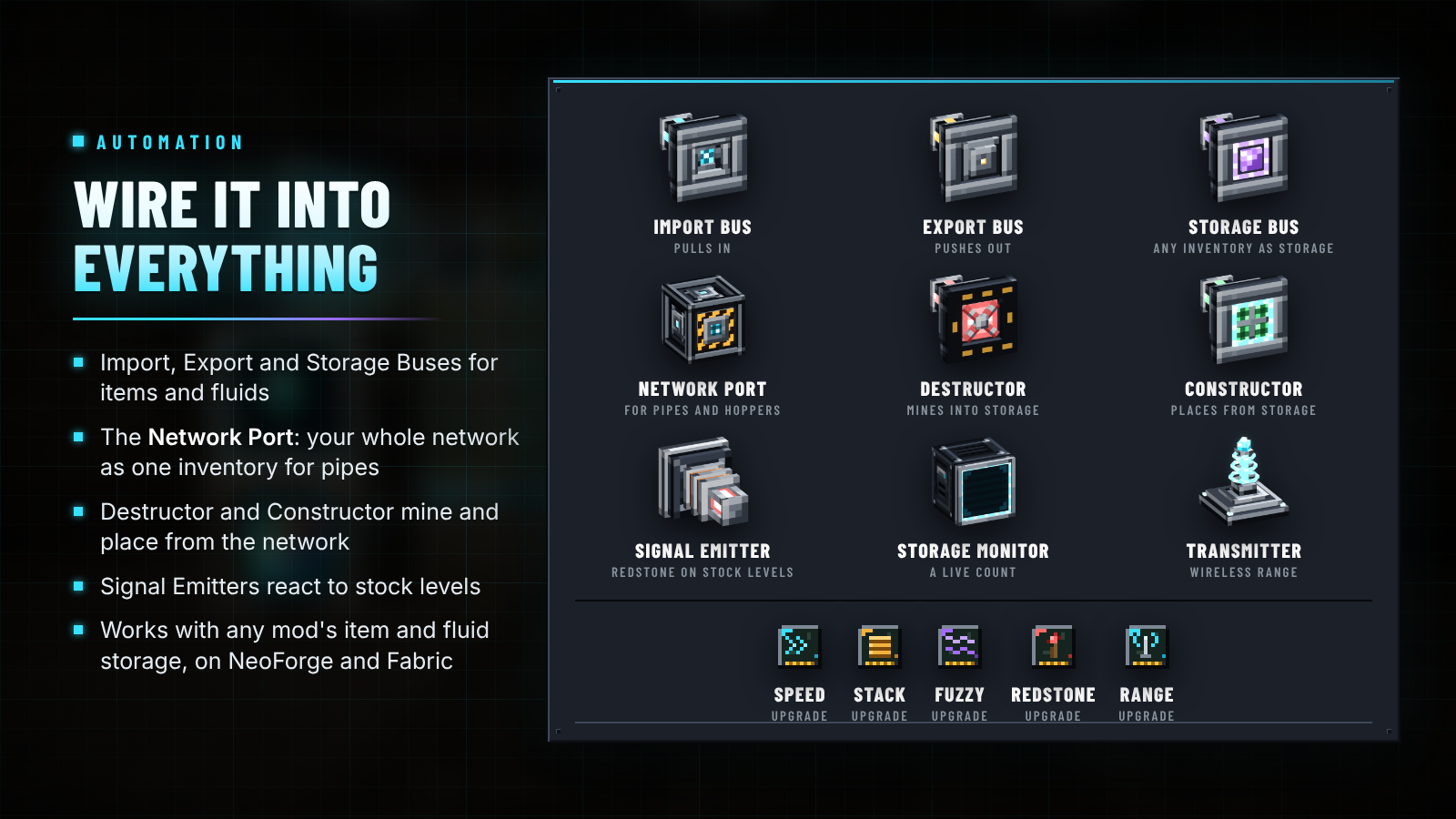
升级卡片: 速度(设备操作频率翻倍,每张卡片最多叠加四次)、堆叠(总线每次移动量翻倍,每张卡片最多叠加四次)、模糊(过滤器忽略伤害和其他数据)、红石(只需信号即可运行)和范围。具有更高优先级的存储会最先填满并最后清空;新物品倾向于存入已有同类物品的存储中。

| 输入 |
功能 |
| 在搜索框中输入 |
按名称搜索;@mod 按模组筛选,#tag 按物品标签筛选;用空格组合条件 |
| 左键/右键点击物品 |
取出一组/半组 |
| Shift + 右键/Shift + 左键 |
取出一个物品/将一组物品发送到你自己的背包 |
| 手持物品点击光标槽位 |
存入该物品(右键存入一个);Shift+点击背包中的任意物品以存入 |
| 流体视图中放置桶 |
空桶装满,满桶倒空 |
| 在中键或 Ctrl + 点击可制作物品 |
请求网络进行制作 |
制作终端中的 JEI + |
将配方从网络或你的背包移入网格 |
按数量、名称、模组或注册表顺序排序,并可显示全部、仅已存储的物品或仅可制作的物品。

| 部件 |
作用 |
| 模式编码终端 |
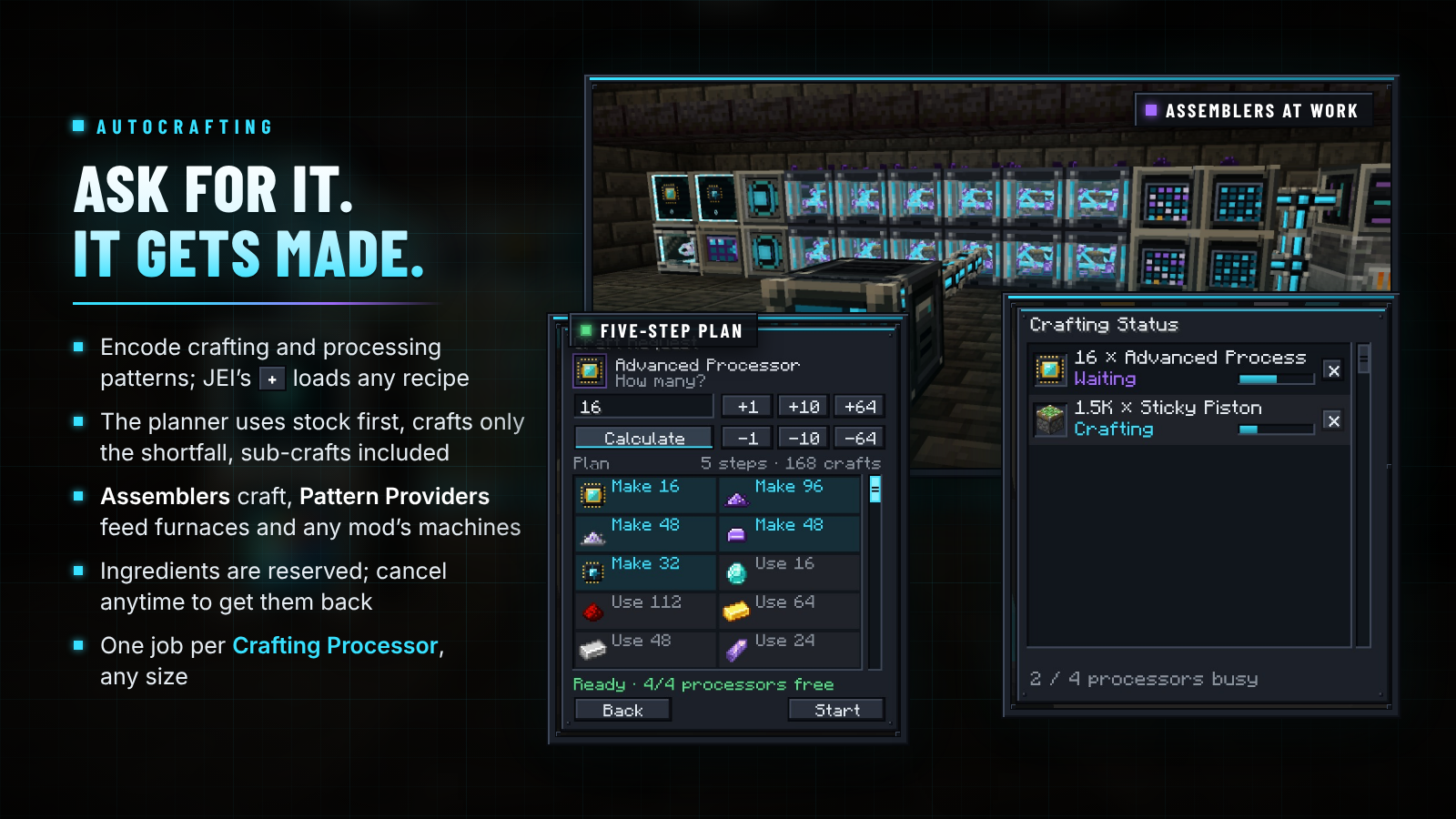
编码制作模式(3×3配方)和处理模式(最多9个输入 → 最多3个输出)。配合 JEI,在任何配方上按 + 即可填充编辑器:制作模式下为制作配方,处理模式下为熔炉和机器配方 |
| 模式提供器 |
持有9个模式,并将处理输入推送到它所面对方向的熔炉或机器中,支持来自任何模组的配方 |
| 组装器 |
执行制作步骤;最多安装四个速度升级以提升效率 |
| 量子组装器 |
每个周期的制作次数是组装器的十六倍(未计算速度升级加成) |
| 制作处理器 |
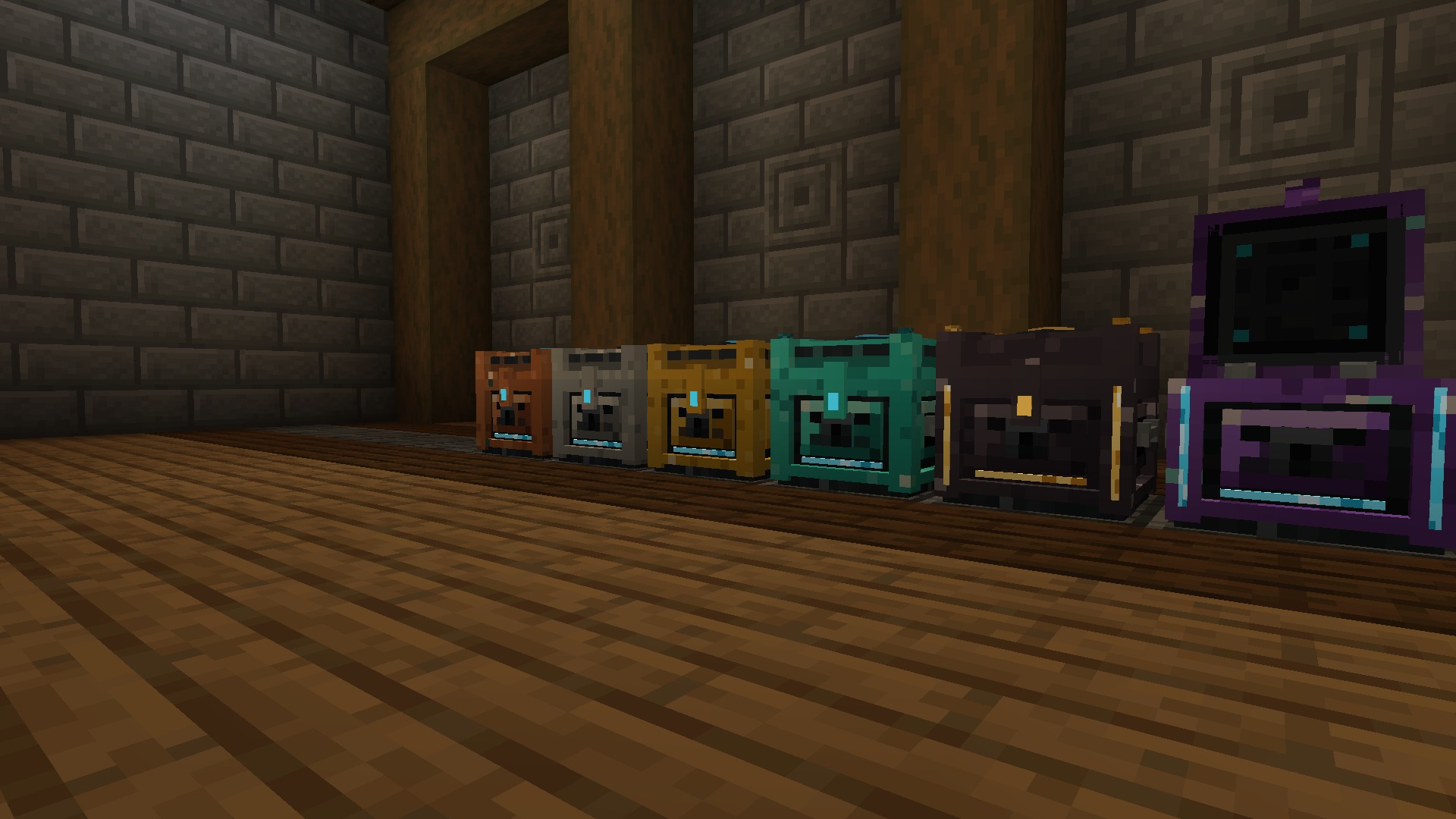
每个处理器处理一个制作任务;右键点击可查看制作状态屏幕 |
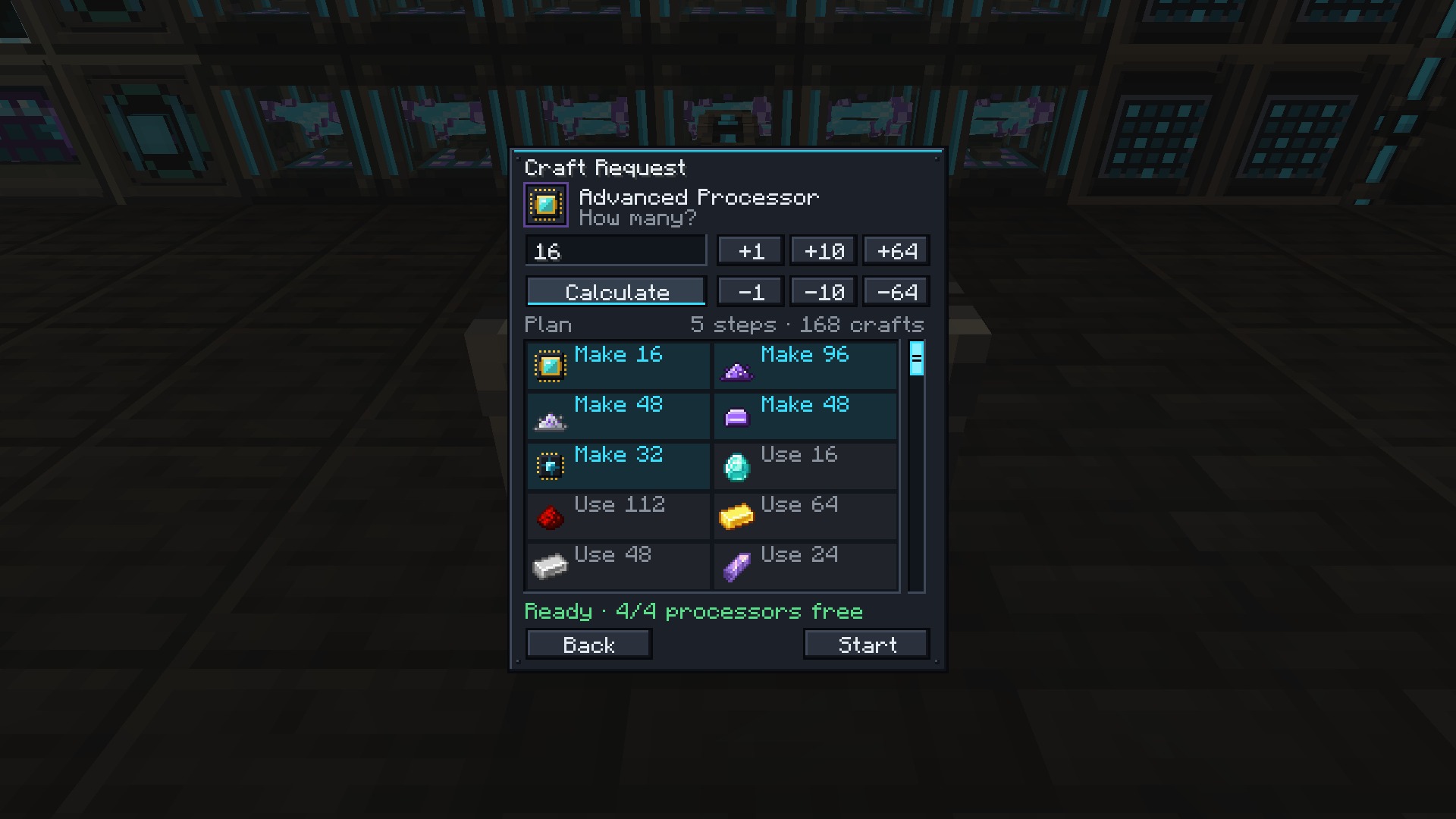
在任何终端中中键点击可制作的物品,输入数量并按 Calculate:计划列表将显示所需存储物品、需制作的物品以及缺失的物品。系统会优先使用已存储的物品,仅制作不足部分,批量重复制作并防止无限循环。Start 锁定原料以防止其他操作占用;在制作状态中取消可收回所有锁定的物品。

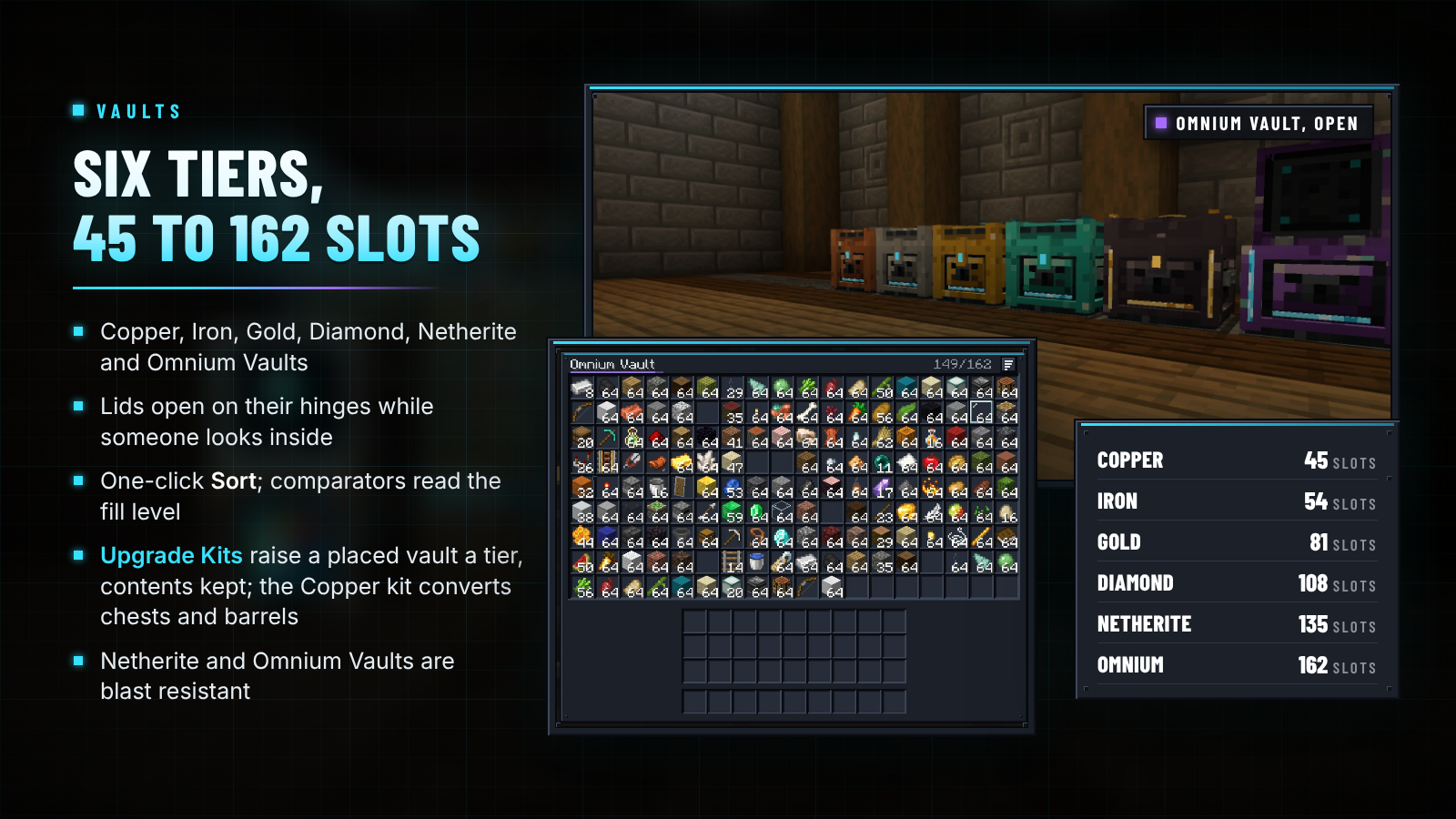
| 保险箱 |
容量 |
网格 |
备注 |
| 铜制 |
45 |
9 × 5 |
|
| 铁制 |
54 |
9 × 6 |
|
| 金制 |
81 |
9 × 9 |
|
| 钻石制 |
108 |
12 × 9 |
|
| 下界合金制 |
135 |
15 × 9 |
防爆 |
| Omnium |
162 |
18 × 9 |
防爆 |
盖子通过铰链打开,方便查看内部内容,Sort 一键整理并排序内容,比较器可读取保险箱的填充程度。Vault Upgrade Kits 可将已放置的保险箱提升一级,并保留其内容、名称和朝向;铜制升级套件还可将原版箱子或木桶转换为铜制保险箱。
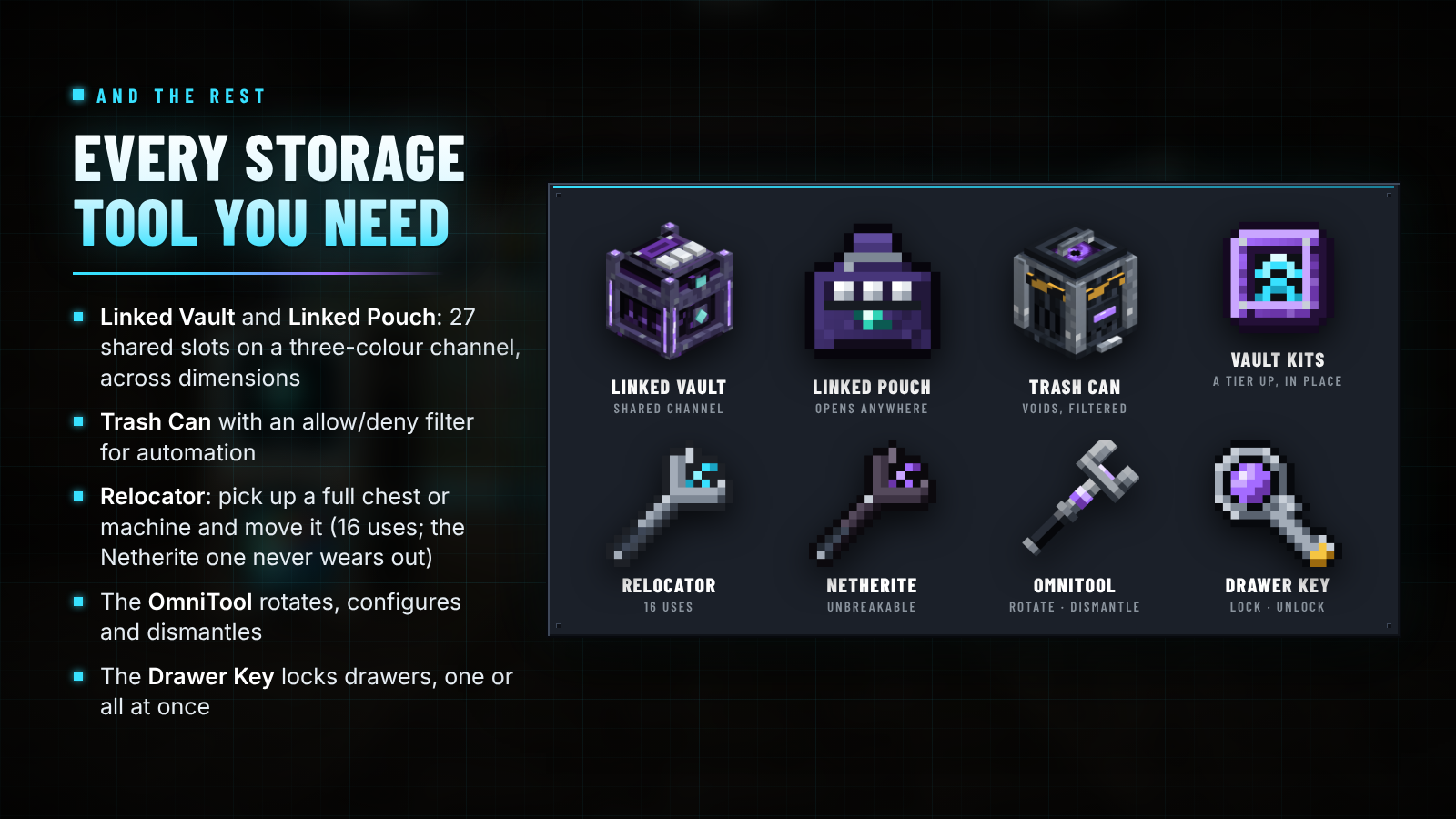
- 链接保险箱: 同一三种颜色上的所有链接保险箱共享27格容量,跨维度可用。染色锁扣选择通道;钻石或 OmniTool 使其私有。绑定 链接 pouch 可从任意位置打开。
- 垃圾桶: 销毁投入的物品,管道和漏斗可使用允许/拒绝过滤器。
- 重定位器: 拾取装有物品的箱子、熔炉或其他模组的机器,并将其放置在别处。可使用16次;下界合金重定位器永不磨损。

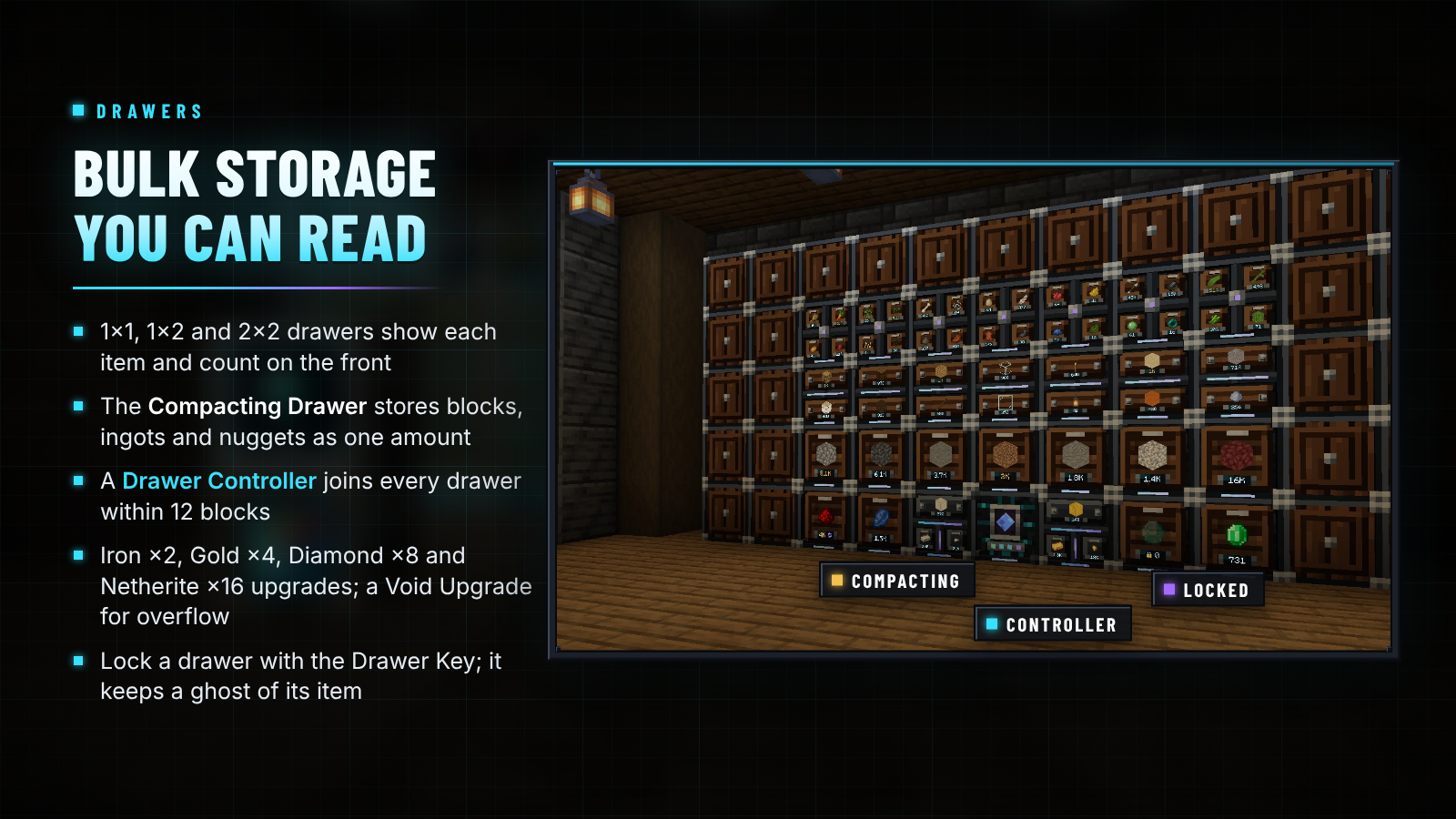
| 抽屉 |
隔间数 |
每格基础容量 |
| 1×1 抽屉 |
1 |
32 组 |
| 1×2 抽屉 |
2 |
16 组 |
| 2×2 抽屉 |
4 |
8 组 |
| 压缩抽屉 |
3 个链接层级 |
8 组最压缩形态的物品 |
- 右键正面以插入手持的物品组,再次快速右键可插入你携带的所有匹配物品。左键取出一组物品,潜行+左键取出单个物品。
- **铁(×2)、金(×4)、钻石(×8)和下界合金(×16)**容量升级效果叠加;虚空升级会销毁溢出部分。空手右键可打开升级界面。
- 压缩抽屉将物品及其方块和粒状形式合并为单一数量存储。
- 抽屉控制器可将 12 格范围内(直接相连、通过其他抽屉或抽屉装饰块连接)的所有抽屉联网;漏斗和网络均可通过它访问所有抽屉。
- 抽屉钥匙将抽屉锁定于其当前物品,因此即使格子为空,也会保留该物品的“幽灵”状态。

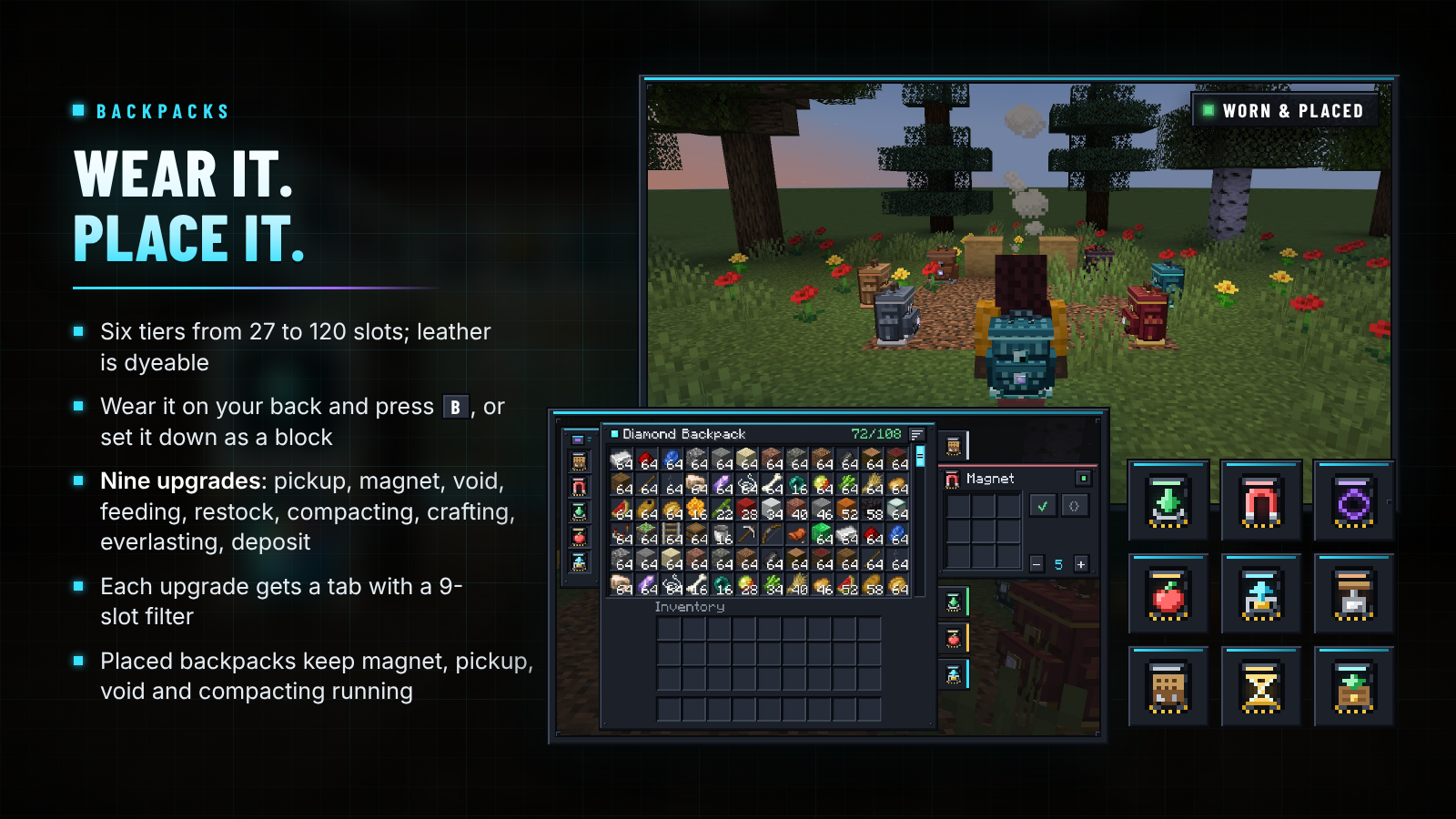
| 背包 |
槽位 |
升级槽位 |
| 皮革(可染色) |
27 |
1 |
| 铜 |
36 |
2 |
| 铁 |
54 |
3 |
| 金 |
81 |
4 |
| 钻石 |
108 |
5 |
| 下界合金(防火) |
120 |
6 |
右键打开背包,或在胸甲槽穿戴后按 B 键打开。潜行右键地面可放置背包;已放置的背包可与漏斗和管道配合使用。用下一等级的材料围绕背包放置八个即可升级(在锻造台上从钻石升级为下界合金);背包内的物品和升级状态会始终保留。
| 升级 |
功能说明 |
| 拾取 |
自动拾取的物品直接进入背包 |
| 磁力 |
吸引 8 格范围内的物品和经验球到你身边 |
| 虚空 |
销毁被过滤的物品,或仅丢弃背包无法容纳的部分 |
| 喂食 |
饥饿时自动食用背包中的食物,跳过有害食物 |
| 补货 |
补充快捷栏中的物品组 |
| 压缩 |
使用可逆配方将九个(或四个)物品转化为对应方块 |
| 合成 |
提供 3×3 合成网格选项卡 |
| 永恒 |
掉落的背包永不消失且不可被破坏 |
| 存入 |
潜行右键容器,将匹配物品清空存入其中 |
每个升级都配有一个含 9 个槽位的允许/禁止过滤器及开关。已放置的背包会持续运行其磁力、拾取、虚空的压缩升级功能。

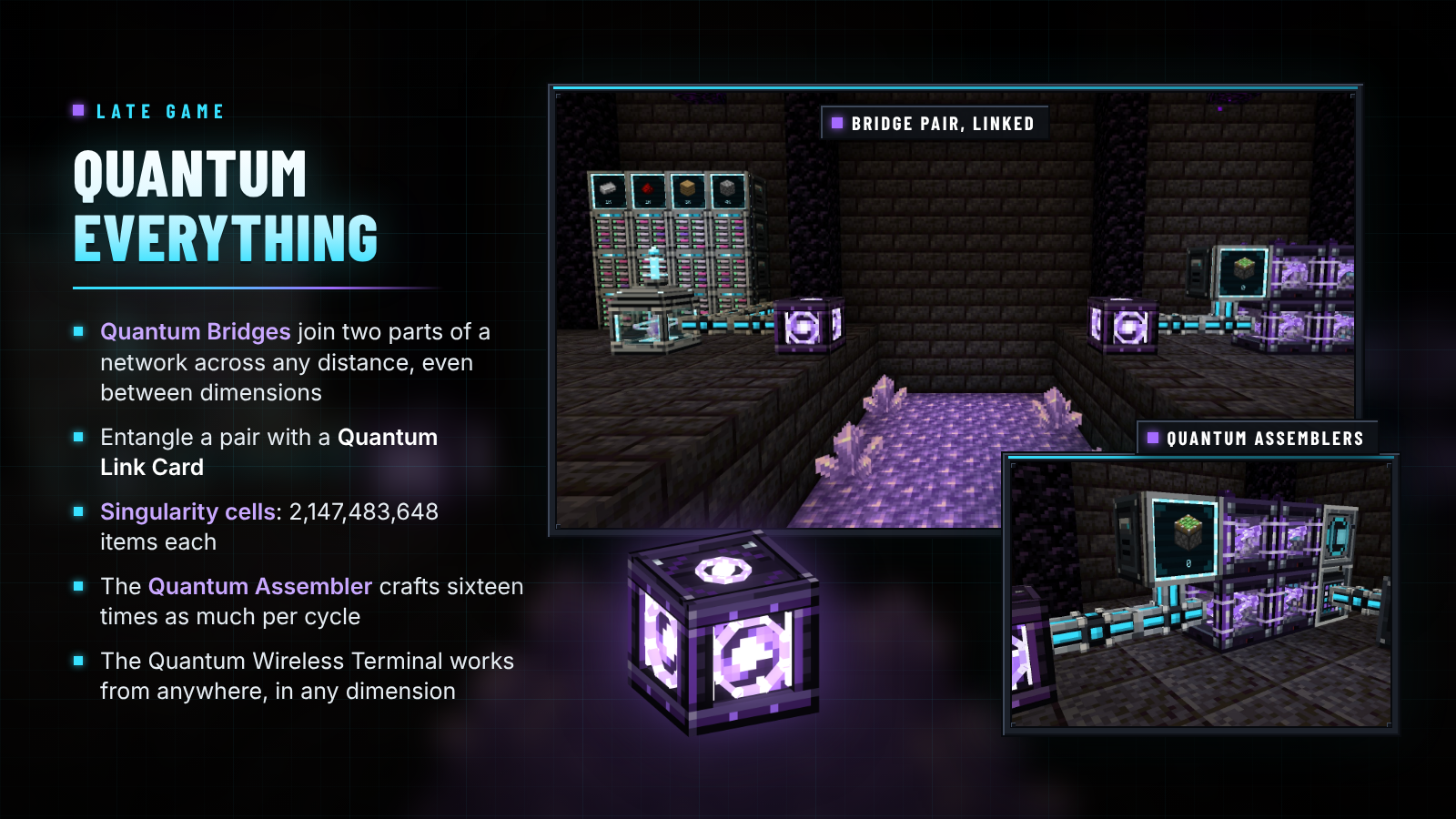
- 量子桥: 在两座桥之间分别使用量子链接卡配对,网络即可在任意距离和维度间保持连通(只要两端均处于加载状态):例如主网络的下界前哨站,或连接到金库的挖矿基地。每座桥需要 4 个回声碎片、2 个量子处理器、2 个末影箱、1 个 Omnium 块和下界之星。
- 奇点细胞: 可存储最多 2,147,483,648 个物品(涵盖最多 1,024 种类型),或 536,870,912 桶流体。
- 量子装配台: 由 4 个量子处理器、3 个 Omnium 锭、1 个装配台下界之星制成,其每周期制作速度是普通装配台的十六倍。
- 量子无线终端: 可在任意距离、任意维度访问你的网络。
- 下界合金与 Omnium 金库(分别为 135 和 162 个防爆槽位)、防火的下界合金背包、下界合金传送器以及下界合金抽屉升级。

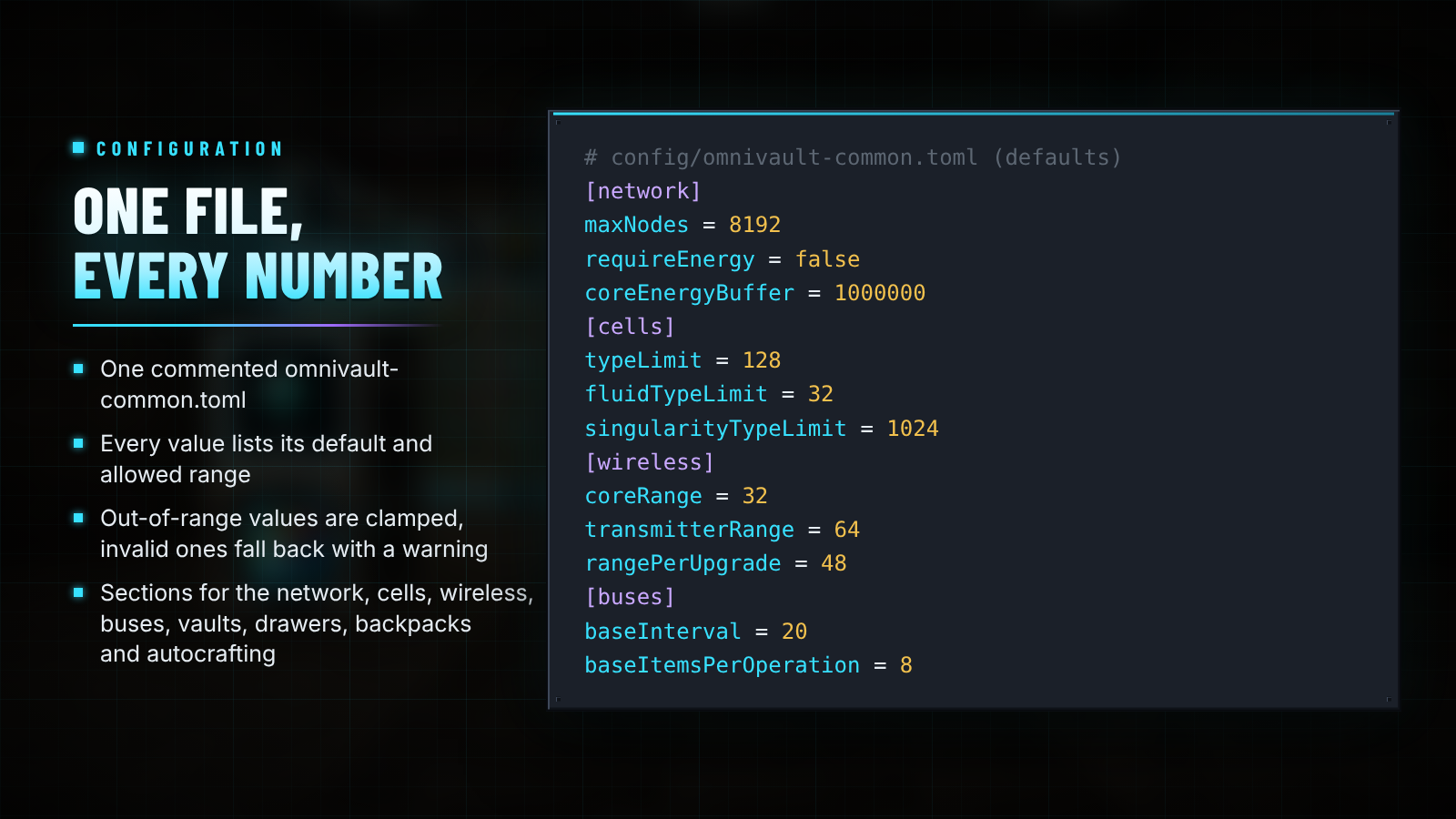
OmniVault 生成一个带注释的 config/omnivault-common.toml 配置文件。每个值均列出其默认值和允许范围;超出范围的值会被钳制,无效值则回退至默认值并附带警告。在 [network] 下设置 requireEnergy = true 后,Nexus Core 将通过任何模组的线缆获取能量:Forge 和 NeoForge 上使用 Forge Energy,Fabric 上使用 Team Reborn Energy。编辑后需重启游戏生效。

| Minecraft |
Loader |
Java |
还需安装 |
| 26.3 |
NeoForge 26.3.0.100+ |
25 |
无(JEI 可选) |
| 26.3 |
Fabric Loader 0.20.1+ |
25 |
Fabric API(JEI 可选) |
| 26.2 |
NeoForge 26.2.0.93+ |
25 |
无(JEI 可选) |
| 26.2 |
Fabric Loader 0.20.1+ |
25 |
Fabric API(JEI 可选) |
| 1.21.1 |
NeoForge 21.1.80+ |
21 |
无(JEI 可选) |
| 1.21.1 |
Fabric Loader 0.16.14+ |
21 |
Fabric API(JEI 可选) |
| 1.20.1 |
Forge 47.4.28+ |
17 |
无(JEI 可选) |
| 1.20.1 |
Fabric Loader 0.20.1+ |
17 |
Fabric API(JEI 可选) |
- 需在服务器和每位客户端上都安装 OmniVault。每个版本和加载器提供相同的内容。
- 存储总线、库存电缆、总线与模式提供者可兼容任何模组的物品和流体存储:支持 Forge 和 NeoForge 的物品/流体处理器,或 Fabric 的 Transfer API。
- 来自 Simple Terminals?请先备份世界,然后替换 jar 文件:合成终端的数据会保留,适用于 1.20.1 和 26.2 版本,如同 1.21.1 一样。
- 从 1.21.1 升级到 26.2 或 26.3?细胞、背包和链接金库的数据都会保留。

我需要供电吗? 不需要。能量系统默认关闭;如果你的整合包需要,可开启 requireEnergy(Forge 和 NeoForge 使用 Forge Energy,Fabric 使用 Team Reborn Energy)。
有频道限制吗? 没有。一个核心节点可连接任意数量的设备。
我能不进入下界开始游戏吗? 可以。存储中心、库存电缆、两种终端、铜金库、抽屉和皮革背包仅需原版材料即可制作。
大型单元格或装满的背包会导致服务器卡顿吗? 单元格和背包的内容存储在世界存档中,拥有独立的 ID,而不是存储在物品本身之上,因此满载的物品绝不会导致库存数据膨胀或增加网络流量。
它是否兼容我的其他存储和机器模组? 任何暴露物品或流体存储接口的模组(NeoForge 处理器、Fabric 的 Transfer API)都可以通过存储总线或库存电缆进行连接,由总线馈送并由模式提供器驱动。
服务器端和客户端都需要安装吗? 两者都需要。
文档在哪里? 进度系统 ·
网络 ·
自动合成 ·
存储 ·
背包 ·
配置

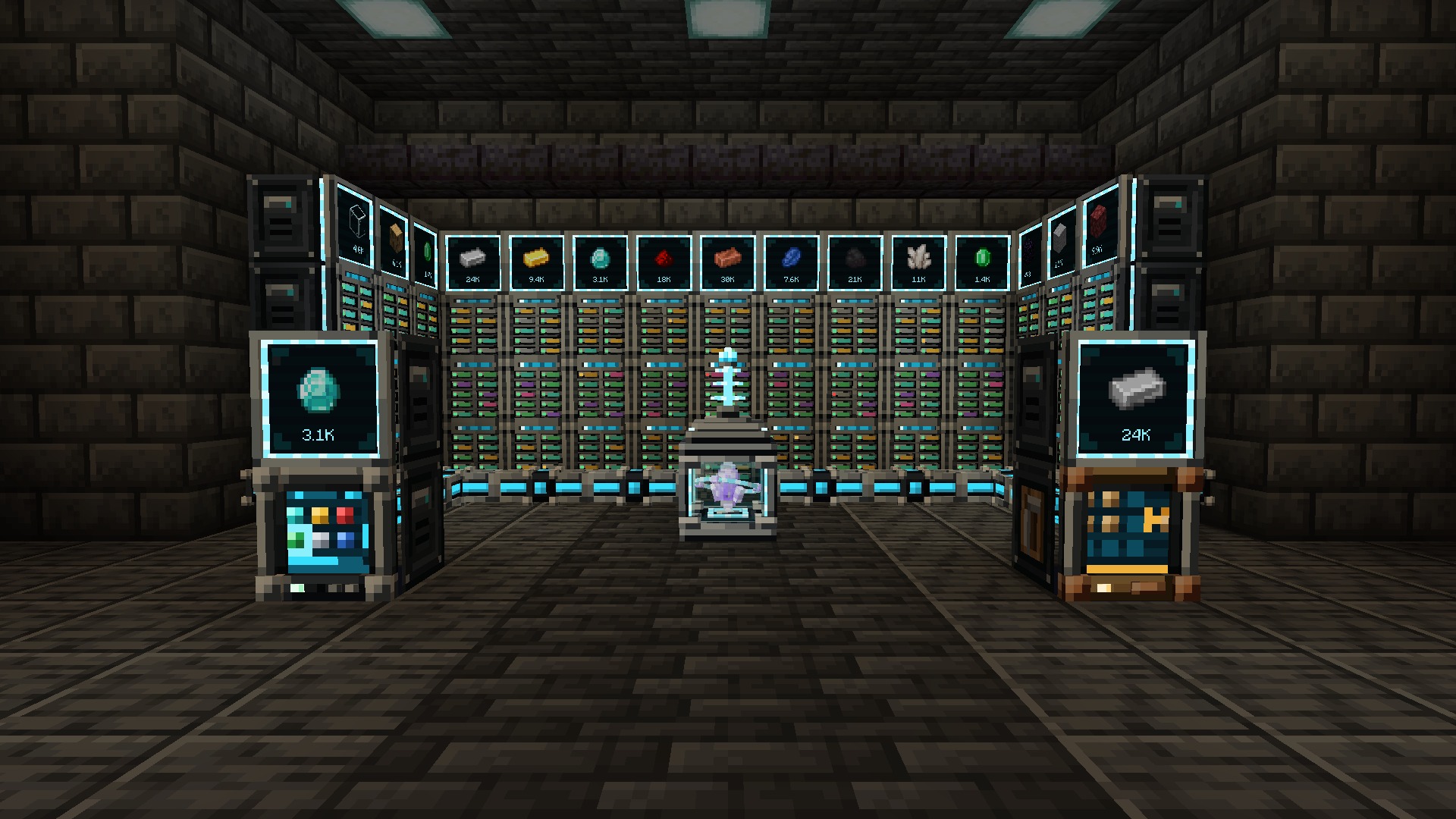
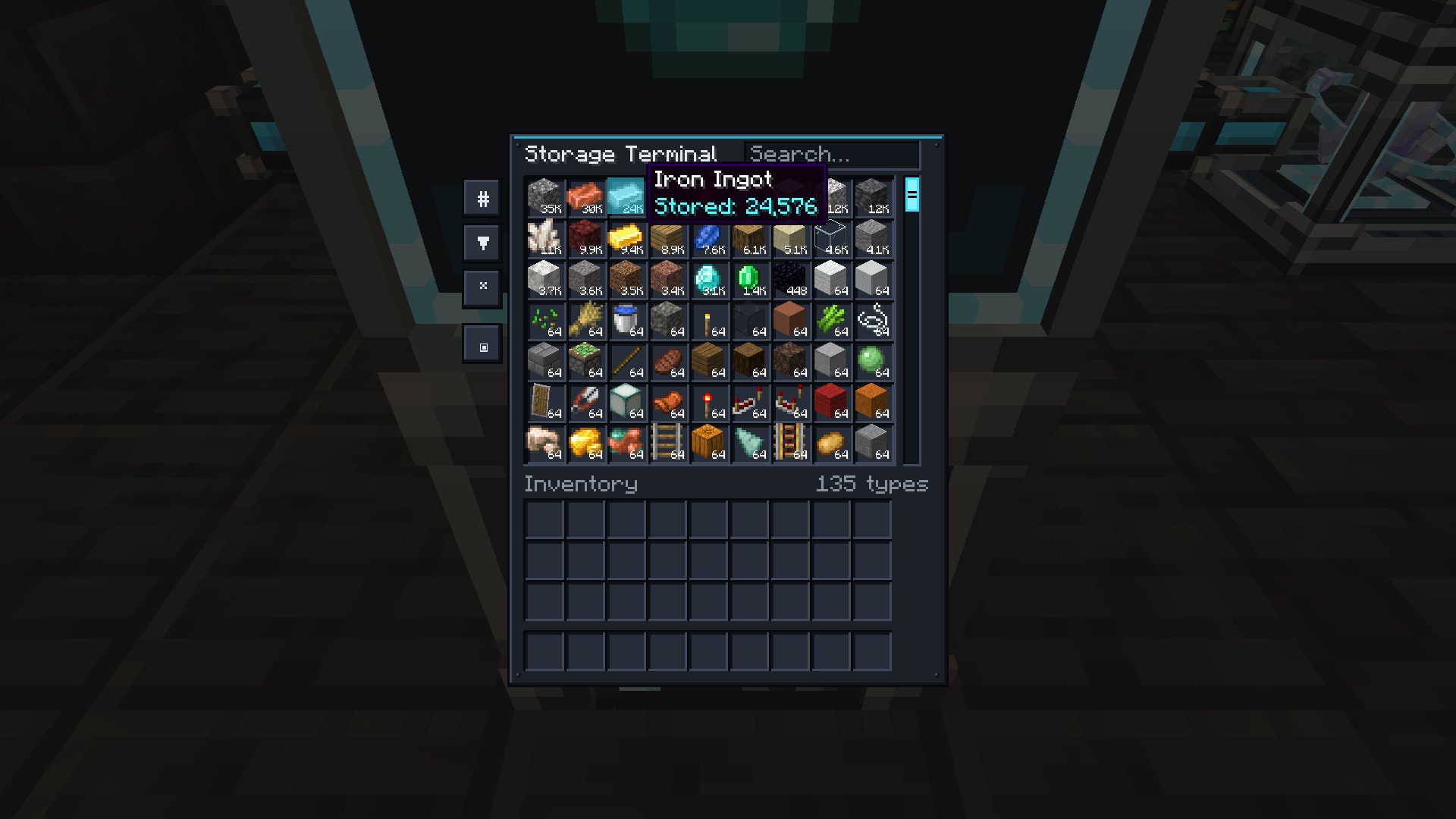
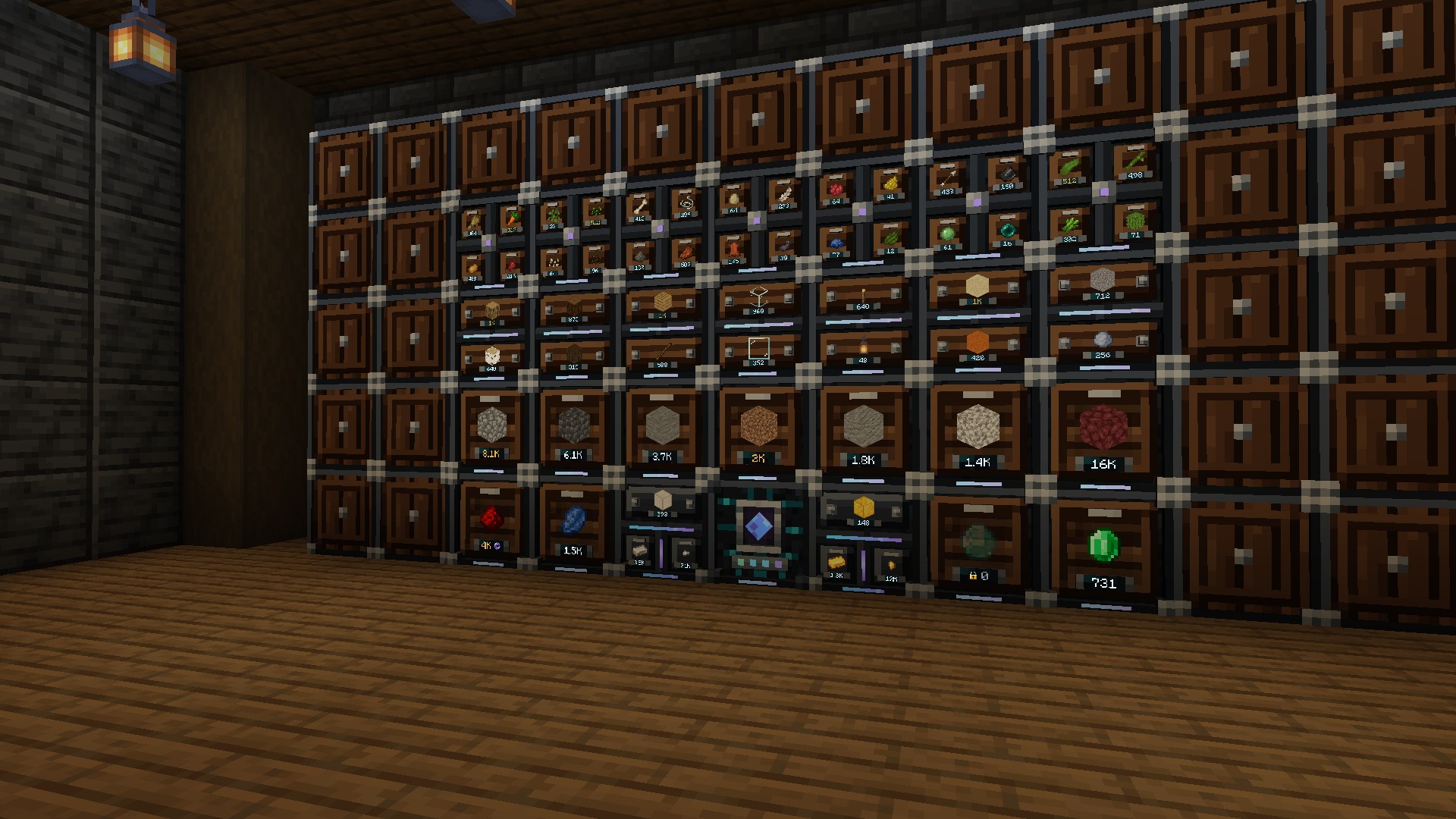
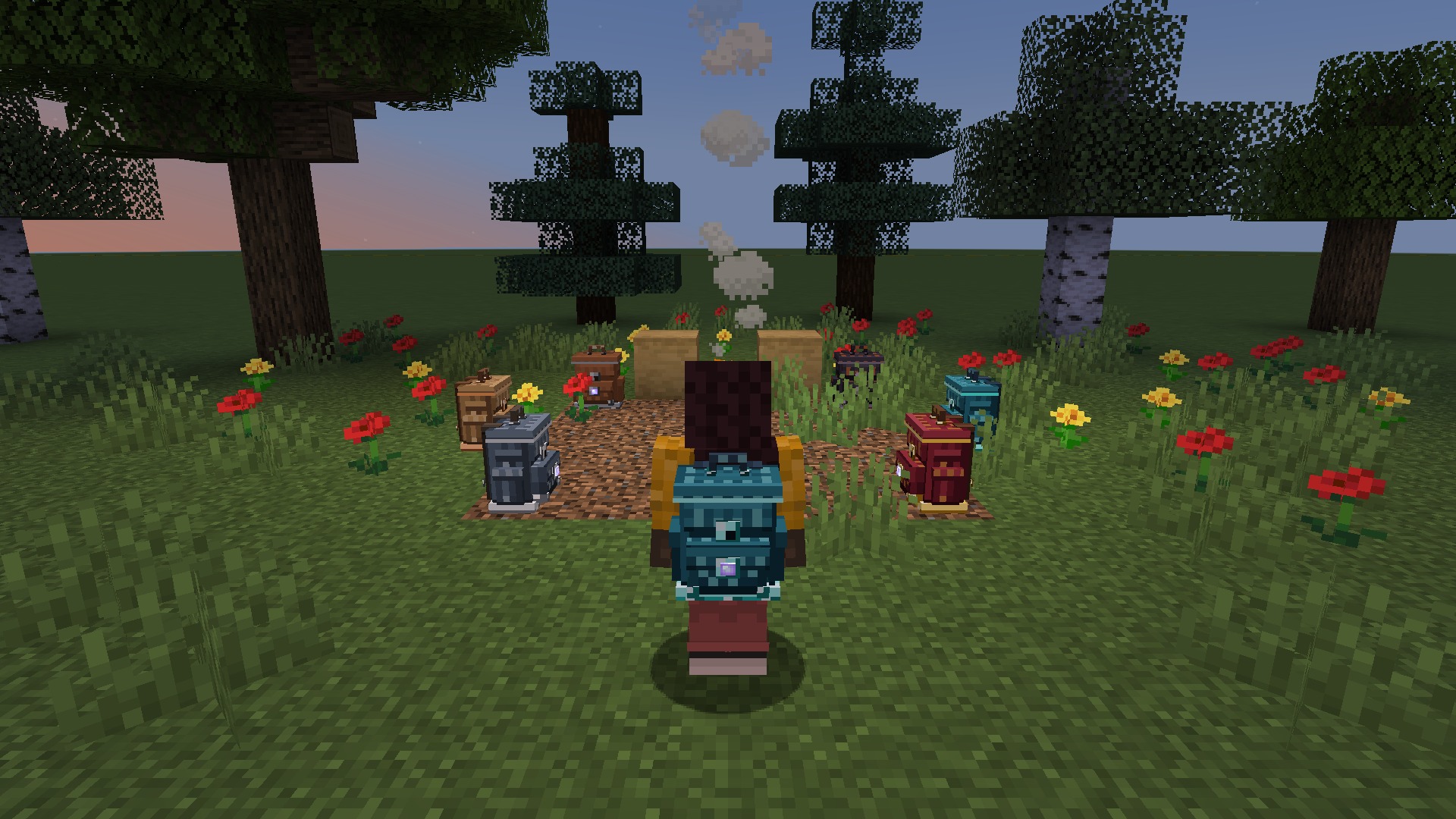
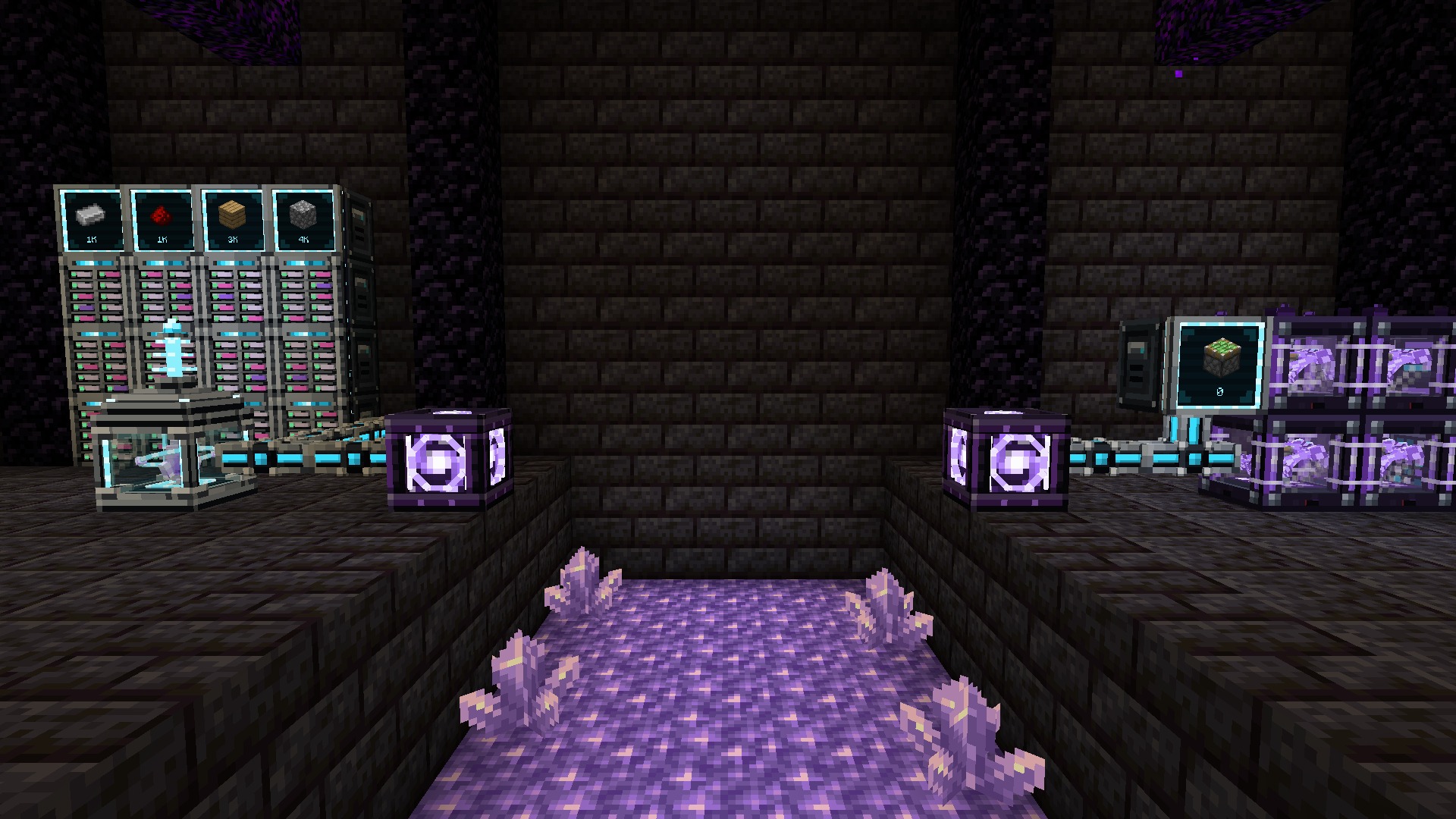
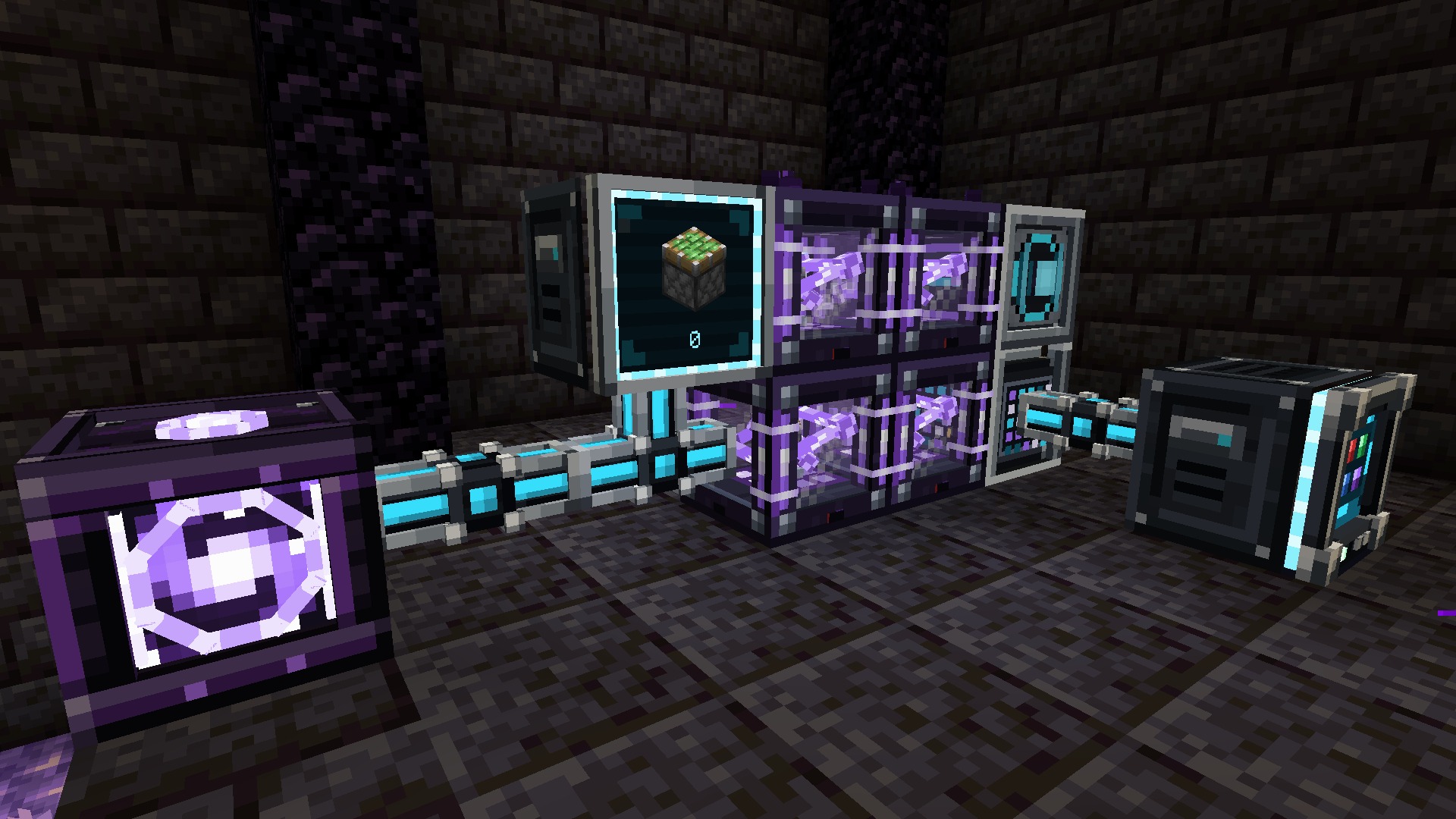

本页上的每张截图都是在游戏内捕获的单帧未编辑画面(Minecraft 1.21.1, NeoForge, 默认资源包, 无光影);其他版本和加载器显示相同的方块和界面。功能卡片将这些捕获画面与该模组项目的离线模型渲染器中渲染的模组自身模型相结合:包括单元格、设备、升级和工具系列、横幅中的单元格以及图标上的 Nexus Core。OmniVault 采用 Apache-2.0 许可证。本作品中使用的 Barlow Condensed 和 Inter 字体受 SIL Open Font License 1.1 许可。
入选于 Remnants: Ashen Legacy,NightBeam 的故事驱动型类魂 RPG 整合包。
NightBeam Studio 的其他作品
关注: YouTube · Instagram · X · Facebook
Docs · Discord · Source and issues
One mod for every storage need. Start on day one with a Storage Hub that joins every chest in the room into one
searchable terminal, built from vanilla materials. Grow into a channel-free digital network with Cell Drives,
storage cells, buses and full autocrafting, and finish with Singularity cells and Quantum Bridges that join your
network across dimensions. Along the way: six tiers of vaults, drawers with compacting and controllers, linked
vaults, and backpacks you can wear, place and upgrade. Every block is a hand-built 3D model.
Minecraft 1.20.1, 1.21.1, 26.2 and 26.3 · Forge, NeoForge and Fabric · install on server and client · JEI optional
Simple Terminals is now OmniVault. Version 2.0 turns the single Crafting Terminal into a complete storage mod.
Worlds that used Simple Terminals keep their Crafting Terminals: the old simple_terminals:crafting_terminal ID now
loads as OmniVault's Crafting Terminal.
- Early game: the Storage Hub and Inventory Cable network every chest and barrel they touch, from vanilla materials
- Storage network: Nexus Core, dyeable cables, Cell Drives, item and fluid cells from 4K to Singularity, terminals,
buses, Network Port, Destructor, Constructor, Signal Emitter, Storage Monitor, wireless terminals and Quantum Bridges
- Autocrafting: patterns, the Pattern Encoding Terminal, Pattern Providers, Assemblers, Quantum Assemblers and
Crafting Processors, with a planner and a live status screen
- Physical storage: six vault tiers with upgrade kits, drawers, compacting drawers and controllers, Linked Vaults and
Pouches, Trash Can and Relocators
- Backpacks: six tiers with nine upgrades
| Stage |
Made from |
What you build |
| Early |
Vanilla materials, no power |
Storage Hub and Inventory Cable, Storage and Crafting Terminals, Copper Vault, drawers, Leather Backpack, Trash Can |
| Mid |
Omnium (amethyst, nether quartz and redstone, mixed with iron and smelted) |
Nexus Core, Cell Drives and 4K–256K cells, buses, wireless terminals, autocrafting, Iron to Diamond Vaults and backpacks, compacting drawers, Linked Vaults, Relocator |
| Late |
Nether stars, echo shards, netherite |
1M, 16M and Singularity cells, Quantum Bridges, Quantum Assembler, Quantum Wireless Terminal, Netherite and Omnium Vaults, Netherite Backpack |
Place a Storage Hub, run Inventory Cable past your chests, barrels and drawers, and add a Storage Terminal:
every inventory the hub or the cable touches shows up as one storage, and double chests count once. A hub network
deliberately skips cells, autocrafting and wireless terminals. When you want those, replace the hub with a Nexus Core
and everything else keeps working.
One root per network, any number of devices, no channels. The Nexus Core is a reactor cage with a floating
omnium crystal that spins while the network is online; right-click it for an overview of devices, items stored and
capacity. Cables connect by themselves and can be dyed to keep parallel networks apart.
| Device |
What it does |
| Cell Drive |
Ten bays for item and fluid cells, each with an LED: green with room to spare, amber when nearly full, red when full |
| Storage / Crafting Terminal |
The whole network in a searchable, sortable grid; the Crafting Terminal adds a 3×3 grid that refills itself |
| Import / Export Bus |
Pull items and fluids out of an inventory, or push them in |
| Storage Bus |
Makes the inventory or tank it faces part of the network, with a filter, a priority and an access mode |
| Network Port |
The whole network as one inventory and tank, for hoppers and pipes |
| Destructor / Constructor |
Mine blocks into the network, or place blocks from it |
| Signal Emitter |
A redstone signal while the network holds at least (or fewer than) a set number of an item |
| Storage Monitor |
One item and its live count on a screen; right-click to store or take |
| Wireless Transmitter |
Extends wireless range; holds up to four Range Upgrades |
| Cell |
Items |
Fluid cell |
| 4K |
4,096 |
1,024 buckets |
| 16K |
16,384 |
4,096 buckets |
| 64K |
65,536 |
16,384 buckets |
| 256K |
262,144 |
65,536 buckets |
| 1M |
1,048,576 |
262,144 buckets |
| 16M |
16,777,216 |
4,194,304 buckets |
| Singularity |
2,147,483,648 |
536,870,912 buckets |
| Creative |
practically unlimited |
practically unlimited |
An item cell holds up to 128 different items and a fluid cell up to 32 fluids; a Singularity cell holds 1,024. A cell's
contents live in the world save, not on the item, so even a full 16M cell never bloats packets or chunk data. Cells are
a Cell Housing plus a Storage Matrix, and an empty cell comes apart again when you sneak-use it.
Wireless. Sneak-use a Wireless Terminal on a Nexus Core to link it. It works within 32 blocks of the core, or 64
blocks of a Wireless Transmitter plus 48 per Range Upgrade. Press G to open it without holding it. Upgrade it at a
smithing table with a Quantum Upgrade Template and a nether star for any distance in any dimension.
Upgrade cards: Speed (devices act twice as often per card, up to four), Stack (buses move twice as much per card, up
to four), Fuzzy (filters ignore damage and other data), Redstone (runs just with a signal) and Range. Storage with a
higher priority fills earliest and empties last; new items prefer storage that already holds them.
| Input |
What it does |
| Type in the search box |
Search by name; @mod filters by mod, #tag by item tag; combine terms with spaces |
| Left-click / right-click an item |
Take a stack / half a stack |
| Shift + right-click / shift + left-click |
Take one item / send a stack to your inventory |
| Click with an item on the cursor |
Store it (right-click stores one); shift-click anything in your inventory to store it |
| Bucket in the fluid view |
An empty bucket fills, a full one empties |
| Middle-click or Ctrl + click a craftable item |
Ask the network to craft it |
JEI + in a Crafting Terminal |
Moves a recipe into the grid, from the network, then your inventory |
Sort by count, name, mod or registry order, and show everything, just stored items or just craftable ones.
| Part |
Role |
| Pattern Encoding Terminal |
Encode crafting patterns (a 3×3 recipe) and processing patterns (up to 9 inputs → up to 3 outputs). With JEI, + on any recipe fills the editor: crafting recipes in crafting mode, furnace and machine recipes in processing mode |
| Pattern Provider |
Holds 9 patterns and pushes processing inputs into the furnace or machine it faces, from any mod |
| Assembler |
Carries out crafting steps; faster with up to four Speed Upgrades |
| Quantum Assembler |
Sixteen times the crafts per cycle of an Assembler, before Speed Upgrades |
| Crafting Processor |
Each one runs one crafting job; right-click it for the Crafting Status screen |
Middle-click a craftable item in any terminal, enter an amount and press Calculate: the plan lists what it will
take from storage, what it will craft and anything missing. It uses stored items before crafting, crafts just the shortfall,
batches repeated crafts and stops runaway loops. Start reserves the ingredients so nothing else can take them;
cancel from Crafting Status to get every reserved item back.
| Vault |
Slots |
Grid |
Notes |
| Copper |
45 |
9 × 5 |
|
| Iron |
54 |
9 × 6 |
|
| Gold |
81 |
9 × 9 |
|
| Diamond |
108 |
12 × 9 |
|
| Netherite |
135 |
15 × 9 |
Blast resistant |
| Omnium |
162 |
18 × 9 |
Blast resistant |
The lid opens on its hinge while anyone looks inside, Sort compacts and orders the contents in one click, and
comparators read how full a vault is. Vault Upgrade Kits raise a placed vault one tier and keep its contents, name
and facing; the Copper kit also turns a vanilla chest or barrel into a Copper Vault.
- Linked Vault: 27 slots shared by every Linked Vault on the same three colours, in any dimension. Dye the latches
to pick a channel; a diamond or the OmniTool makes it private. Bind a Linked Pouch to open it from anywhere.
- Trash Can: destroys what you put in, with an allow/deny filter for pipes and hoppers.
- Relocator: pick up a chest, furnace or another mod's machine with everything inside and set it down elsewhere.
16 uses; the Netherite Relocator never wears out.
| Drawer |
Compartments |
Each holds (base) |
| Drawer 1×1 |
1 |
32 stacks |
| Drawer 1×2 |
2 |
16 stacks |
| Drawer 2×2 |
4 |
8 stacks |
| Compacting Drawer |
3 linked tiers |
8 stacks of the most compressed form |
- Right-click the front to insert the held stack, and right-click again quickly to insert every matching item you
carry. Left-click takes a stack, sneak + left-click one item.
- Iron (×2), Gold (×4), Diamond (×8) and Netherite (×16) capacity upgrades add up; a Void Upgrade destroys
overflow. Sneak-right-click with an empty hand for the upgrade screen.
- The Compacting Drawer holds an item and its block and nugget forms as one amount.
- A Drawer Controller joins every drawer within 12 blocks (directly, through other drawers or through Drawer Trim);
hoppers and the network see them all through it.
- The Drawer Key locks a drawer to its items, so an empty compartment keeps a ghost of its item.
| Backpack |
Slots |
Upgrade slots |
| Leather (dyeable) |
27 |
1 |
| Copper |
36 |
2 |
| Iron |
54 |
3 |
| Gold |
81 |
4 |
| Diamond |
108 |
5 |
| Netherite (fire-proof) |
120 |
6 |
Right-click it to open it, or wear it in the chest slot and press B. Sneak-right-click a block to set it down; a
placed backpack works with hoppers and pipes. Surround a backpack with eight of the next material to upgrade it
(Diamond to Netherite at a smithing table); the contents and upgrades always come along.
| Upgrade |
What it does |
| Pickup |
Items you pick up go straight into the backpack |
| Magnet |
Pulls nearby items and experience to you, up to 8 blocks |
| Void |
Destroys filtered items, or just what the backpack can't hold |
| Feeding |
Eats from the backpack when you're hungry, skipping harmful food |
| Restock |
Tops up your hotbar stacks |
| Compacting |
Turns nine (or four) of an item into its block, using reversible recipes |
| Crafting |
A 3×3 crafting grid tab |
| Everlasting |
A dropped backpack never despawns and can't be destroyed |
| Deposit |
Sneak-right-click a container to empty matching items into it |
Every upgrade has a tab with a 9-slot allow/deny filter and an on/off switch. Placed backpacks keep running their
Magnet, Pickup, Void and Compacting upgrades.
- Quantum Bridge: use a Quantum Link Card on one bridge, then the other, and the network continues through the
pair across any distance and between dimensions while both are loaded: a Nether outpost on your main network, a
mining base wired to your vault. Each bridge takes 4 echo shards, 2 Quantum Processors, 2 Ender Chests, a Block of
Omnium and a nether star.
- Singularity cells: 2,147,483,648 items of up to 1,024 types, or 536,870,912 buckets of fluid.
- Quantum Assembler: sixteen times the crafts per cycle of an Assembler, from 4 Quantum Processors, 3 Omnium Ingots,
an Assembler and a nether star.
- Quantum Wireless Terminal: your network from any distance, in any dimension.
- Netherite and Omnium Vaults (135 and 162 blast-proof slots), the fire-proof Netherite Backpack, the
Netherite Relocator and netherite drawer upgrades.
OmniVault writes one commented config/omnivault-common.toml. Every value lists its default and allowed range; values
out of range are clamped and invalid ones fall back to the default with a warning. Set requireEnergy = true under
[network] and the Nexus Core runs on energy from any mod's cables: Forge Energy on Forge and NeoForge, Team Reborn
Energy on Fabric. Restart after editing.
| Minecraft |
Loader |
Java |
Also install |
| 26.3 |
NeoForge 26.3.0.100+ |
25 |
Nothing (JEI optional) |
| 26.3 |
Fabric Loader 0.20.1+ |
25 |
Fabric API (JEI optional) |
| 26.2 |
NeoForge 26.2.0.93+ |
25 |
Nothing (JEI optional) |
| 26.2 |
Fabric Loader 0.20.1+ |
25 |
Fabric API (JEI optional) |
| 1.21.1 |
NeoForge 21.1.80+ |
21 |
Nothing (JEI optional) |
| 1.21.1 |
Fabric Loader 0.16.14+ |
21 |
Fabric API (JEI optional) |
| 1.20.1 |
Forge 47.4.28+ |
17 |
Nothing (JEI optional) |
| 1.20.1 |
Fabric Loader 0.20.1+ |
17 |
Fabric API (JEI optional) |
- Install OmniVault on both the server and every client. Every version and loader gets the same content.
- Storage Buses, Inventory Cable, buses and Pattern Providers work with any mod's item and fluid storage: Forge and
NeoForge item and fluid handlers, or Fabric's Transfer API.
- Coming from Simple Terminals? Back up your world, then replace the jar: Crafting Terminals carry over, on 1.20.1 and
26.2 as on 1.21.1.
- Upgrading a world from 1.21.1 to 26.2 or 26.3? Cells, backpacks and linked vaults come along.
Do I need power? No. Energy is off by default; turn on requireEnergy if your pack wants it (Forge Energy on
Forge and NeoForge, Team Reborn Energy on Fabric).
Are there channels? No. One core runs any number of devices.
Can I start without the Nether? Yes. The Storage Hub, Inventory Cable, both terminals, the Copper Vault, drawers and
the Leather Backpack need just vanilla materials.
Will big cells or full backpacks lag my server? Cell and backpack contents are stored in the world save under their
own IDs, not on the item, so full items never bloat inventory data or network traffic.
Does it work with my other storage and machine mods? Anything that exposes item or fluid storage (NeoForge
handlers, Fabric's Transfer API) can be reached by a Storage Bus or Inventory Cable, fed by buses and driven by Pattern
Providers.
Is it needed on the server and the client? Both.
Where are the docs? Progression ·
Network ·
Autocrafting ·
Storage ·
Backpacks ·
Config
Every screenshot on this page is a single unedited frame captured in game (Minecraft 1.21.1, NeoForge, default
resources, no shaders); the other versions and loaders show the same blocks and screens. The feature cards combine those captures with renders of the mod's own models from the project's
offline model renderer: the cell, device, upgrade and tool lineups, the banner's cells and the Nexus Core on the icon.
OmniVault is licensed under Apache-2.0. The Barlow Condensed and Inter fonts used in this artwork are licensed under the
SIL Open Font License 1.1.
Featured in Remnants: Ashen Legacy, NightBeam's story-driven soulslike RPG modpack.
More from NightBeam Studio
Follow: YouTube · Instagram · X · Facebook


 模组

 模组

 模组

 模组
 模组

 模组
评论 0
登录后参与评分
还没有评论,来抢沙发吧