
最简单的功能性椅子
使用说明
创建一把椅子
在楼梯的两侧放置几个告示牌或架子,你就得到了一把完全可用的椅子。
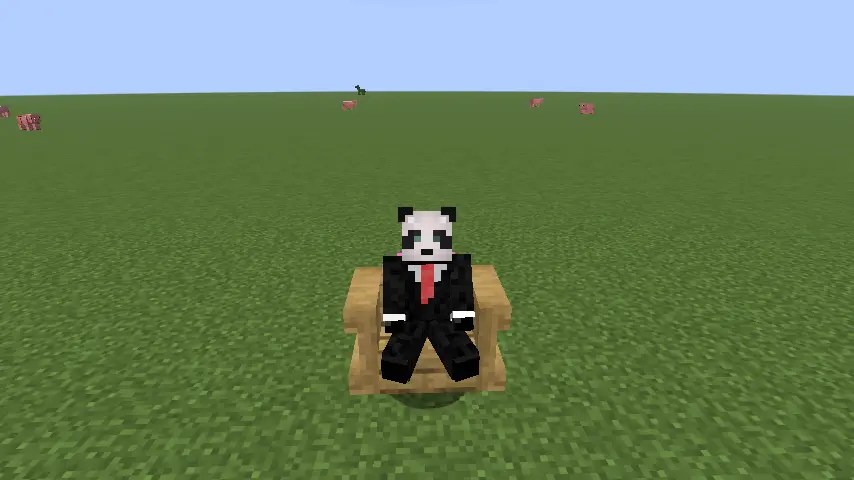
坐在椅子上
右键点击即可坐下。
移除椅子
潜行并左键点击以移除椅子。
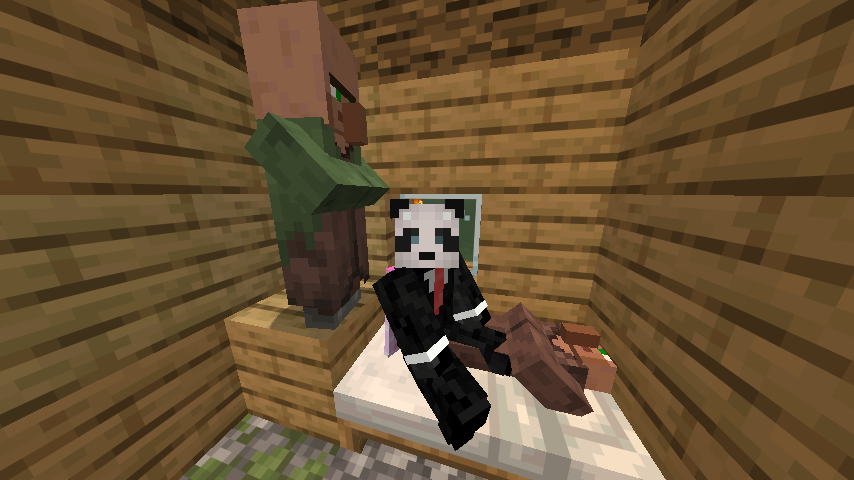
在任何地方坐下(类似 /sit 命令)
执行 /trigger sc.sit
从 1.0 版本更新数据包
移除旧的数据包并粘贴此数据包。下次你加入游戏或输入 /reload 时,数据库迁移将自动开始。
修复无响应的椅子
- 一次性修复。执行
/function simplechairs:repair/repair_nearby_chairs。它将修复半径 128 格内的所有椅子。 - 自动修复。执行
/function simplechairs:repair/start_auto_repair。它将每 3 秒修复一次半径 128 格内的所有椅子。使用/function simplechairs:repair/stop_auto_repair停止该操作。
卸载数据包
- 执行
/function simplechairs:uninstall/uninstall。这将清除所有椅子和所有数据,可能需要几秒或几分钟。 - 执行
/function simplechairs:uninstall/resume_uninstall。如果卸载过程意外中断但未完成,请使用此命令恢复。
Simplest functional chairs
INSTRUCTIONS
CREATE A CHAIR
Put a couple signs or shelves on the sides of a stair and you've got yourself a fully functional chair.
SIT IN A CHAIR
Right click to sit in a chair.
REMOVE A CHAIR
Sneak and left click to remove a chair.
SIT ANYWHERE (like a /sit command)
/trigger sc.sit
UPDATE DATAPACK FROM 1.0
Remove the previous datapack and paste this one. A database migration will start automatically next time you join or type /reload.
REPAIR UNRESPONSIVE CHAIRS
- ONCE. /function simplechairs:repair/repair_nearby_chairs. It will repair all chairs within a 128 radius.
- AUTOMATICALLY. /function simplechairs:repair/start_auto_repair. It will repair all chairs within a 128 radius every 3 seconds. Use /function simplechairs:repair/stop_auto_repair to stop it.
UNINSTALL DATAPACK
- /function simplechairs:uninstall/uninstall. It will erase all chairs and all data, it migth take seconds or minutes.
- /function simplechairs:uninstall/resume_uninstall. Use this if the uninstall somehow stopped without finishing.

下载 Simplest Chairs | 坐
需要联机服务器吗?
稳定流畅、一键部署,几分钟即可和朋友联机开服
最低仅需 8 元/月 即可畅快联机
下载 Simplest Chairs | 坐
下载 Simplest Chairs | 坐
需要联机服务器吗?
稳定流畅、一键部署,几分钟即可和朋友联机开服
最低仅需 8 元/月 即可畅快联机
下载 Simplest Chairs | 坐
下载 Simplest Chairs | 坐
需要联机服务器吗?
稳定流畅、一键部署,几分钟即可和朋友联机开服
最低仅需 8 元/月 即可畅快联机
下载 Simplest Chairs | 坐
- 更新至 26.3
新增功能
- 椅子可以用 1 个台阶 + 2 个架子制作。
- 使用命令
/trigger sc.sit可在任意位置坐下。 - 无响应的椅子可通过
/function simplechairs:repair/repair_nearby_chairs进行修复,该命令会修复半径 128 格内的所有椅子。 - 无响应的椅子也可通过
/function simplechairs:repair/start_auto_repair实现自动修复,该函数每 3 秒自动修复半径 128 格内的所有椅子。 - 数据库迁移:进入世界或输入
/reload后,将自动启动数据库迁移。此操作可修复旧椅子的部分问题,并确保/function simplechairs:uninstall/uninstall能正常工作。
错误修复
- 数据包现已正确支持 26.+ 版本。
- 已提高椅子的高度,使玩家能够自由旋转视角;此更改仅适用于新制作的椅子。
/function simplechairs:uninstall/uninstall已重构并修复。除非断开连接,否则不会再失败。若需继续卸载操作,可使用/function simplechairs:uninstall/resume_uninstall恢复。
关于这个资源的讨论、问题反馈与使用心得
还没有讨论,来发第一帖吧
你是这个资源的作者?登录后可认领此资源。
相似资源
 模组

可定制的鞘翅模组,支持装饰纹饰、旗帜图案等更多功能!
 模组

显示你正在注视的方块的信息。(适用于 Minecraft 1.16+ 的 Hwyla/Waila 分支)
 模组
在游戏画面角落显示附近世界地形、玩家、生物和实体的地图。可创建路径点,帮助你找到标记过的位置。
 模组

查看物品与配方
 模组
使用 JavaScript 编辑配方、添加自定义物品、编写世界事件!
 模组
AE2:一款流行的自动化与存储模组
评论 0
登录后参与评分
还没有评论,来抢沙发吧