
此数据包添加了一本《魔法命令书》,让你能够创建、修改和删除方块与物品显示实体,即使在生存模式下也可以!
Axiom 允许你在创造模式(拥有 OP 权限)下编辑显示实体,而本数据包则让你在任何游戏模式和任何权限等级下都能访问并编辑显示实体。
V2.0 版本已发布!
请使用内置按钮或执行 /trigger slothsdisplayeditor.modify set 999 来更新你的书籍!

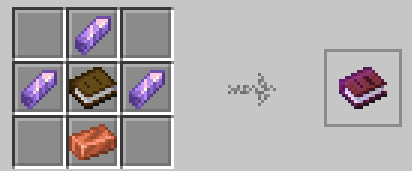
通过合成 3 个紫水晶碎片、一本书和一个铜锭,你将获得一本魔法命令书,它可以让您:
- 将副手物品栏中的任何物品或方块转换为方块或物品显示实体
- 将名牌转换为文本显示
- 使用书与笔在文本显示上书写文字
- 高亮显示最近的显示实体
- 删除最近的显示实体
- 移动最近的显示实体
- 缩放最近的显示实体
- 旋转最近的显示实体
- 编辑最近显示实体的方块属性
- 覆盖天空/方块光照
- 更改广告牌类型(固定、垂直、水平、居中)
- 更改墙壁/常规模式 [适用于火把和告示牌等方块]
- 设置视距范围
- 设置阴影强度
- 设置文本显示背景
- 设置文本显示透明度
- 更多功能!
锁定一个显示实体意味着命令书无法对其进行编辑/更新/移动等操作,直到你解锁它为止,此时唯一可用的功能是“高亮显示”。由于锁定的显示实体无法被编辑,高亮显示它会使其呈现黄色高亮,并且还会高亮显示最近的可编辑显示实体(即你的书实际上会进行编辑的实体[不包括解锁操作])。
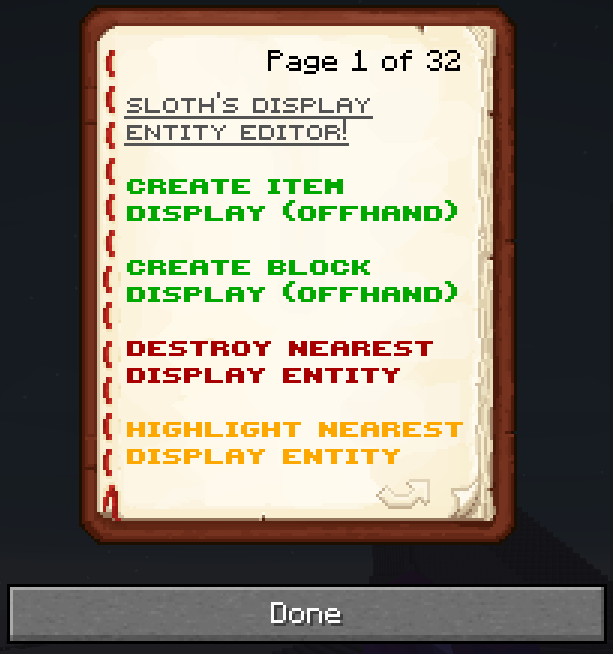
这本书内置了更新功能(在第 2 页,或者执行 /trigger slothsdisplayeditor.modify set 999),因此如果为了适应未来的新增内容和更新而改变了书本内容,你无需重新制作新本书!
虽然 Axiom 和其他模组可能允许你在创造模式下编辑显示实体,但本数据包允许你在保持平衡的前提下于生存模式中创建和修改显示实体。 要创建显示实体,请在副手持有物品,它会自动将其转换为方块或物品显示实体,同时消耗副手中的该物品数量 -1。当你删除该实体时,它会以物品的形式生成供你拾取!
这也适用于文本显示,但它们需要特定的名牌,并且在实体被销毁时会掉落该名牌。
还有一些隐藏的小彩蛋,例如 Flint & Steel(打火石)在转换为方块显示时会变成火焰。
活塞头是一个特殊情况,因此在手持活塞时必须使用其专属按钮来召唤。
利用 Eroxen 开发的 Quack 实现实体的旋转
兼容 CJDev 开发的 Declarative UI
代码与 Bug 报告 --
This Datapack adds a Magical Book Of Commands, that lets you create, modify, and delete both Block and Item displays, even in survival!
Whereas Axiom allows you to edit Display Entities in Creative (with op), this datapack gives you access to Display Entities & editing for Any gamemode and Any permission level.
Book V2.0 is released!
Update your books with the built in button or /trigger slothsdisplayeditor.modify set 999 !
By crafting 3 amethyst shards, a book, and a copper ingot, you gain access to a magical command book that lets you
- Turn whatever item or block is in your offhand into a block or item display entity
- Turn a nametag into a Text Display
- Use a book and quill to Write Text to the Text Display
- Highlight the nearest display entity
- Delete the nearest display entity
- Move the nearest display entity
- Scale the nearest display entity
- Rotate the nearest display entity
- Edit the block properties of the nearest display entity
- Override the sky/block lighting
- Change Billboard (Fixed, vertical, horizontal, center)
- Change wall/regular [for blocks like torches and signs]
- Set view range
- Set shadow strength
- Set text display background
- Set text display opacity
- Many more!
By locking a display, it means that the command book cannot edit/update/move/etc until you unlock it, with the only function available being highlighting. Because a locked display cannot be edited, Highlighting one will give it a yellow highlight, and also highlight the nearest editable display (the displays your book will ACTUALLY edit [except for unlocking])
The book has a built in update function, (On page 2, or /trigger slothsdisplayeditor.modify set 999) so should the book change to accomodate future additions and updates, you dont need to craft a new book!
Whilst Axiom and other mods may let you edit display entities in creative, this datapack allows you to create and modify display entities in survival mode, whilst still being balanced. To create a display entity, you hold an item in your offhand, and it will turn it into a block or item display, whilst removing 1 count of the item in your offhand. When you delete the entity, it summons itself as an item for you to pick back up!
This even works for text displays, however they require specifically a name tag, but will drop it once killed.
There are some secret things, such as Flint & Steel becoming fire when turned into a block display for example.
Piston heads are a special case so they have to be summoned with their own button while holding a piston.
Utilises Quack by Eroxen to rotate the entities
Compatible with Declarative UI by CJDev
Code & Bug reporting --

下载 Sloths Display Entity Editor
需要联机服务器吗?
稳定流畅、一键部署,几分钟即可和朋友联机开服
最低仅需 8 元/月 即可畅快联机
下载 Sloths Display Entity Editor
下载 Sloths Display Entity Editor
需要联机服务器吗?
稳定流畅、一键部署,几分钟即可和朋友联机开服
最低仅需 8 元/月 即可畅快联机
下载 Sloths Display Entity Editor
下载 Sloths Display Entity Editor
需要联机服务器吗?
稳定流畅、一键部署,几分钟即可和朋友联机开服
最低仅需 8 元/月 即可畅快联机
下载 Sloths Display Entity Editor
下载 Sloths Display Entity Editor
需要联机服务器吗?
稳定流畅、一键部署,几分钟即可和朋友联机开服
最低仅需 8 元/月 即可畅快联机
下载 Sloths Display Entity Editor
下载 Sloths Display Entity Editor
需要联机服务器吗?
稳定流畅、一键部署,几分钟即可和朋友联机开服
最低仅需 8 元/月 即可畅快联机
下载 Sloths Display Entity Editor
次要代码优化
优化代码,修复了错误
关于这个资源的讨论、问题反馈与使用心得
还没有讨论,来发第一帖吧
你是这个资源的作者?登录后可认领此资源。
相似资源
 模组

可定制的鞘翅模组,支持装饰纹饰、旗帜图案等更多功能!
 模组

显示你正在注视的方块的信息。(适用于 Minecraft 1.16+ 的 Hwyla/Waila 分支)
 模组
在游戏画面角落显示附近世界地形、玩家、生物和实体的地图。可创建路径点,帮助你找到标记过的位置。
 模组

查看物品与配方
 模组
使用 JavaScript 编辑配方、添加自定义物品、编写世界事件!
 模组
AE2:一款流行的自动化与存储模组
评论 0
登录后参与评分
还没有评论,来抢沙发吧