
因为打字太费劲了
? 简介
提供更好命令自动补全建议的客户端模组。
支持来自数据包或服务端插件的模组化与自定义命令,且无需在服务端安装即可生效。
? 用法
若要输入由多个单词组成的命令/参数,只需键入其单词的部分首字母。
例如,如果你想输入 /gamerule doDaylightCycle true,可以输入 /gr dc t。

⌨ 快捷键
除了 <Tab>,你还可以使用 <Ctrl>+<Space> 来接受建议,它会自动插入一个空格,以便你开始输入下一个参数。
此外,如果当前命令已知是不完整的(你的文本显示为红色),按下 <Enter> 将接受选中的建议(如果有),而不是尝试执行无效的命令。
默认情况下,使用 <Ctrl>+<Space> 接受建议或通过中键点击也会清除光标后的剩余文本,如果你决定稍后编辑前面的参数。此行为可以按按键/鼠标按钮进行配置。
? 区分建议
为了在建议之间进行区分,你可能需要为每个单词输入多个字母。
例如,要输入 fireDamage 而不是 fallDamage(在输入 fd 时首先出现),你可以输入 fid。
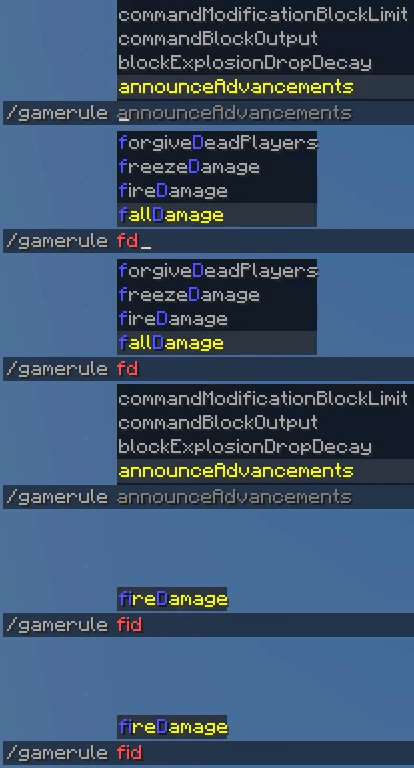
通常,多输入几个字母以获取你想要的建议排在列表前面,比使用箭头键或使用 <Tab> 循环选择要快得多,因为打字可以形成肌肉记忆。
随着时间的推移,你会习惯输入最少量的字母来打出你经常使用的命令,并且打起来会非常顺畅。
? 浏览建议
由于你输入的单词不需要位于你正在输入的名称的开头,与 Minecraft 建议通常的工作方式相比,你可能会发现更多有用的建议。
例如,如果你输入 /give @p wood,你将看到所有包含以 wood 开头的单词的物品建议(例如 oak_[wood]),而不仅仅是名称本身以 wood 开头的物品(例如 [wood]en_axe)。
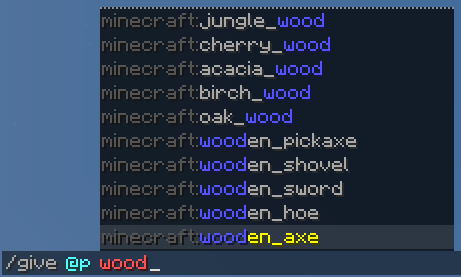
此外,如果你的查询不匹配建议的任何首字母,它还会在建议中的任意位置查找以提供模糊匹配,这些匹配列在智能匹配之后。当你不确定自己在寻找什么时,这很有帮助。
? 额外功能
该模组还默认反转建议的顺序,因此最相关的建议是离输入栏最近且你的眼睛已经看向的位置。
如果你觉得这太令人困惑,可以使用以下命令禁用它:
/smartcompletion invert_suggestion_order false
它还防止鼠标在选择出现在其下方的建议时进行选择,这是一个旧 bug,使得在小窗口中输入命令变得比实际需要更困难。
✨ 它是如何工作的?
对于你输入的每个命令,我们向服务器请求建议两次。一次省略你为最后一个参数输入的内容(盲查),另一次包括所有内容作为保证(知情查询)。大多数时候,只发送一个请求,因为我们还在你输入时缓存请求以减少延迟和建议列表的闪烁。
然后,我们假设服务器将回复盲查的所有可能建议,并在客户端对建议进行智能过滤和排序。
如果在知情列表中有任何未被我们过滤匹配的意外建议,它们也将以不同的颜色显示,这样你永远不会错过任何潜在复杂命令提供的智能建议。
为了过滤建议,我们使用两种方法:
- 查询片段与建议部分的 initials 之间的智能匹配(
gr匹配[g]ame[r]ule)(任何代码编辑器中的补全工作方式) - 在建议内对查询的每个部分进行弱搜索(
lock on匹配b(lock)Explosi(on)DropDecay)(当你不知道自己在寻找什么时很有用)
✂ 单词是如何分割的?
我们在任何非字母字符以及 camelCase 单词处分割单词。
此外,如果命令无法以这种方式分割,我们将假设它以 flatcase 书写,就像大多数 Minecraft 命令一样。
不幸的是,除非你有字典,否则系统地分解 flatcase 是不可能的。这就是为什么我们使用一个小词典,其中包含 Minecraft、Fabric、[Neo]Forge 和 WorldEdit 命令中使用的单词,试图将命令分解为单词。
这个词典可以通过资源包覆盖(参见 wiki),但请随时报告任何单词未正确分割的问题。
? 建议是如何排序的?
建议根据以下标准排序, whichever applies first:
-
靠近光标的建议首先显示(
/give @p chest建议[在minecart_chest之前) -
单词 initials 的匹配先于后备匹配显示(
[d]oWeather[C]ycle>sen[dC]ommandFeedback) -
超出某些阈值的显著匹配首先显示(
[app]le>[a]cacia_[p]ressure_[p]late) -
更多初始匹配的匹配首先显示(
[d]o[I]nsomnia>[di]sableRaids) -
某些 initials 可能匹配多于一个单词的匹配首先显示(
[d]o(D)aylight[C]ycle>[d]oWeather[C]ycle) -
单词更少的建议首先显示(
[d]o[I]nsomnia>[d]o[I]mmediateRespawn) -
更接近建议开头的匹配首先显示(
[g]ame[m]ode>default[g]ame[m]ode) -
较短的建议首先显示(
[t]p>[t]ell) -
否则,建议按照服务器提供的原始顺序显示(通常是字母顺序)(
[f]all[D]amage>[f]ire[D]amage)。
目前,无法自定义此顺序。如果您有任何改进建议,请告诉我。这些排序标准背后的逻辑是匹配自然预期,并通过直接输入更多首字母来实现冲突消歧。
? 自定义
建议会根据 style.json 文件中定义的样式进行高亮显示,这些样式可以被 资源包覆盖(参见 wiki)。
默认情况下,建议内的 匹配部分(如 [g]ame[r]ule)以 蓝色 高亮显示。
查询部分的 备选匹配(如 [d]o(D)aylight[C]ycle)、回退匹配(如 sen[dC]ommandFeedback)以及 意外的服务器建议 均以 深青色 高亮显示。
此外,如果建议以 词前缀 开头并 后跟冒号(即 资源位置命名空间),它将以 深灰色 高亮显示,除非被匹配到(如 {minecraft:}[g]olden_[ap]ple)。
❓ 帮助
本模组有一个 wiki,您可以前往查看。
另外,如果您遇到任何问题,或者只是想打个招呼,欢迎随时加入我们的 Discord Server。
? 支持本项目
如果您想支持本项目,请与您的朋友们分享!
Because typing is too much effort
? About
Client-side mod that provides better autocompletion suggestions for commands.
Supports modded and custom commands from datapacks or server plugins, and it's not required on the server to work.
? Usage
In order to type a command/argument made up of several words, type only a few initials of its words.
For example, if you want to type /gamerule doDaylightCycle true, you could type /gr dc t.
⌨ Keyboard Shortcuts
In addition of <Tab>, you may also use <Ctrl>+<Space> to accept suggestions, which automatically inserts a space so you can start typing the next argument.
Additionally, if the current command is known to be incomplete (your text is in red), pressing <Enter> will accept the selected suggestion, if any, rather than attempting to execute an invalid command.
By default, accepting a suggestion with <Ctrl>+<Space> or by using the middle button to click it will also erase the remaining text after the cursor, if you decide to edit an earlier argument at some point. This behavior can be configured per key/mouse button.
? Disambiguating Suggestions
To disambiguate between suggestions, you may need to type more than one letter per word.
For example, to type fireDamage instead of fallDamage, which appears first when typing fd, you may type fid.
In general, it's way faster to type a few more letters to get the suggestion you want in front of the list rather than using the arrows/cycling with <Tab> to select it, as typing can build muscle memory.
Over time you will become used to the minimum number of letters you need to type the commands you frequently use, and typing them will feel like a breeze.
? Browsing Suggestions
Since the words you type don't need to be at the start of the name you're typing, you may discover way more useful suggestions compared to how Minecraft suggestions usually work.
For example, if you type /give @p wood, you'll see suggestions for all items that contain a word that starts with wood (e.g., oak_[wood]), not just items whose name itself starts with wood (e.g., [wood]en_axe).
Additionally, if your query doesn't match any of the initials of a suggestion, it will also look anywhere within suggestions to provide fuzzy matches, which are listed after smart matches. This is helpful when you don't know exactly what you're looking for.
? Extra Features
This mod also inverts the order of suggestions by default, so the most relevant suggestion is the closest one to the input bar and where your eyes are already looking at.
If you find this too confusing, you may disable it with the following command:
/smartcompletion invert_suggestion_order false
It also prevents the mouse from selecting suggestions as they appear under it, an old bug that makes typing commands in small windows harder than it needs to be.
✨ How does it work?
For each command you type, we ask the server for suggestions twice. Once omitting whatever you've typed for your last argument (blind query), and another including everything as a guarantee (informed query). Most of the time, only one request is sent, since we also cache requests while you type to reduce latency and blinking of the suggestions list.
Then, we work under the assumption that the server will reply with all possible suggestions to the blind query, and perform a smart filtering and sorting of the suggestions in the client side.
If there are any unexpected suggestions in the informed list that were not matched by our filtering, they'll also be shown in a different color, so you never fail to see any suggestion from potential complex commands that provide their own smart suggestions.
To filter suggestions, we use two approaches:
- A smart match between segments of your query and the initials of parts of the suggestion (
grmatches[g]ame[r]ule) (how completion works in any code editor) - A weak search for each part of your query within the suggestion (
lock onmatchesb(lock)Explosi(on)DropDecay) (helpful when you don't know what you're looking for)
✂ How are words split?
We split words at any non-alphabetic character, as well as at camelCase words.
In addition, if a command cannot be split in this way, we will assume it's written in flatcase, like most Minecraft commands.
Unfortunately, unless you have a dictionary, breaking down flatcase systematically is impossible. That's why use a small dictionary of words used by Minecraft, Fabric, [Neo]Forge and WorldEdit commands to attempt to break down commands into words.
This dictionary can be overridden by resource packs (see wiki), but feel free to report any issues with words not being split correctly.
? How are suggestions sorted?
Suggestions are sorted according to the following criteria, whichever applies first:
-
Suggestions closer to the cursor are shown first (
/give @p chestsuggests[beforeminecart_chest) -
Matches of word initials are shown before fallback matches (
[d]oWeather[C]ycle>sen[dC]ommandFeedback) -
Significant matches beyond some thresholds are shown first (
[app]le>[a]cacia_[p]ressure_[p]late) -
Matches with more initial matches are shown first (
[d]o[I]nsomnia>[di]sableRaids) -
Matches where some initials could've matched more than one word are shown first (
[d]o(D)aylight[C]ycle>[d]oWeather[C]ycle) -
Suggestions with less words are shown first (
[d]o[I]nsomnia>[d]o[I]mmediateRespawn) -
Matches closer to the start of the suggestion are shown first (
[g]ame[m]ode>default[g]ame[m]ode) -
Shorter suggestions are shown first (
[t]p>[t]ell) -
Otherwise, the suggestions are shown in the original order provided by the server (usually alphabetic) (
[f]all[D]amage>[f]ire[D]amage).
Currently, there's no way to customize this order. If you have any suggestions to improve it, please let me hear them. The reasoning behind these criteria is matching natural expectations, and enabling conflict disambiguation by typing more initials right away.
? Customization
Suggestions are highlighted according to the styles defined in the style.json file, which can be overridden by resource packs (see wiki).
By default, matches inside a suggestion ([g]ame[r]ule) are highlighted in blue.
Alternative matches for a query part ([d]o(D)aylight[C]ycle), fallback matches (sen[dC]ommandFeedback) and unexpected server suggestions are all highlighted in dark aqua.
In addition, if a suggestion starts with a prefix of words, followed by a colon, (i.e., a resource location namespace), it will be highlighted in dark gray unless matched ({minecraft:}[g]olden_[ap]ple).
❓ Help
This mod has a wiki, which you may check out.
Also, if you're having any trouble, or maybe just want to say hello, feel free to drop by our Discord Server.
? Support this project
If you want to support this project, share it with your friends!

下载 Smart Completion
下载 Smart Completion
下载 Smart Completion
下载 Smart Completion
下载 Smart Completion
下载 Smart Completion
需要联机服务器吗?
稳定流畅、一键部署,几分钟即可和朋友联机开服
最低仅需 8 元/月 即可畅快联机
下载 Smart Completion
下载 Smart Completion
下载 Smart Completion
下载 Smart Completion
? 更新到 26.3
- 修复从 GLFW 迁移到 SDL 后键盘/鼠标输入的问题
关于这个资源的讨论、问题反馈与使用心得
还没有讨论,来发第一帖吧
你是这个资源的作者?登录后可认领此资源。
相似资源
 模组

显示你正在注视的方块的信息。(适用于 Minecraft 1.16+ 的 Hwyla/Waila 分支)
 模组

查看物品与配方
 模组
在游戏画面角落显示附近世界地形、玩家、生物和实体的地图。可创建路径点,帮助你找到标记过的位置。
 模组
使用 JavaScript 编辑配方、添加自定义物品、编写世界事件!
 模组
添加区块认领和玩家组队功能,并与 Xaero's Minimap 和 World Map 集成
 模组
添加全屏世界地图,显示你在世界中已探索的区域。与 Xaero's Minimap 搭配使用效果极佳。
评论 0
登录后参与评分
还没有评论,来抢沙发吧