

SortCraft
SortCraft 是一款无需红石的多箱子物品分类器。在箱子上放置如 [ores](矿石)或 [tools](工具)的告示牌,右键点击输入箱,物品便会自动分类。类别定义由你控制的简单 YAML 文件管理。
使用我们的配套网页应用 CategoryCraft 可视化和组织你的类别!你甚至可以加载模组 jar 文件来查看你的模组物品!
观看我们的快速入门视频,或跳至下方的「5分钟快速开始」章节获取简明说明。
? 工作原理
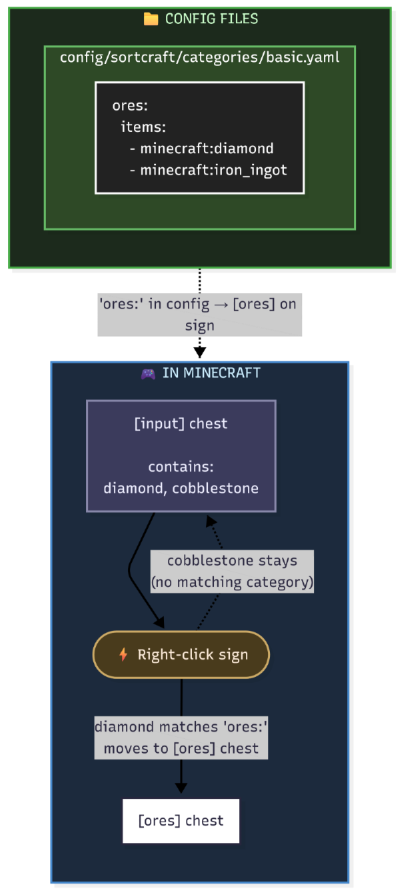
你在 YAML 配置文件中定义类别。告示牌文本必须与你的类别名称匹配。就这么简单!
游戏内外观
| 输入箱 | 目标箱 |
|---|---|
 |
 |
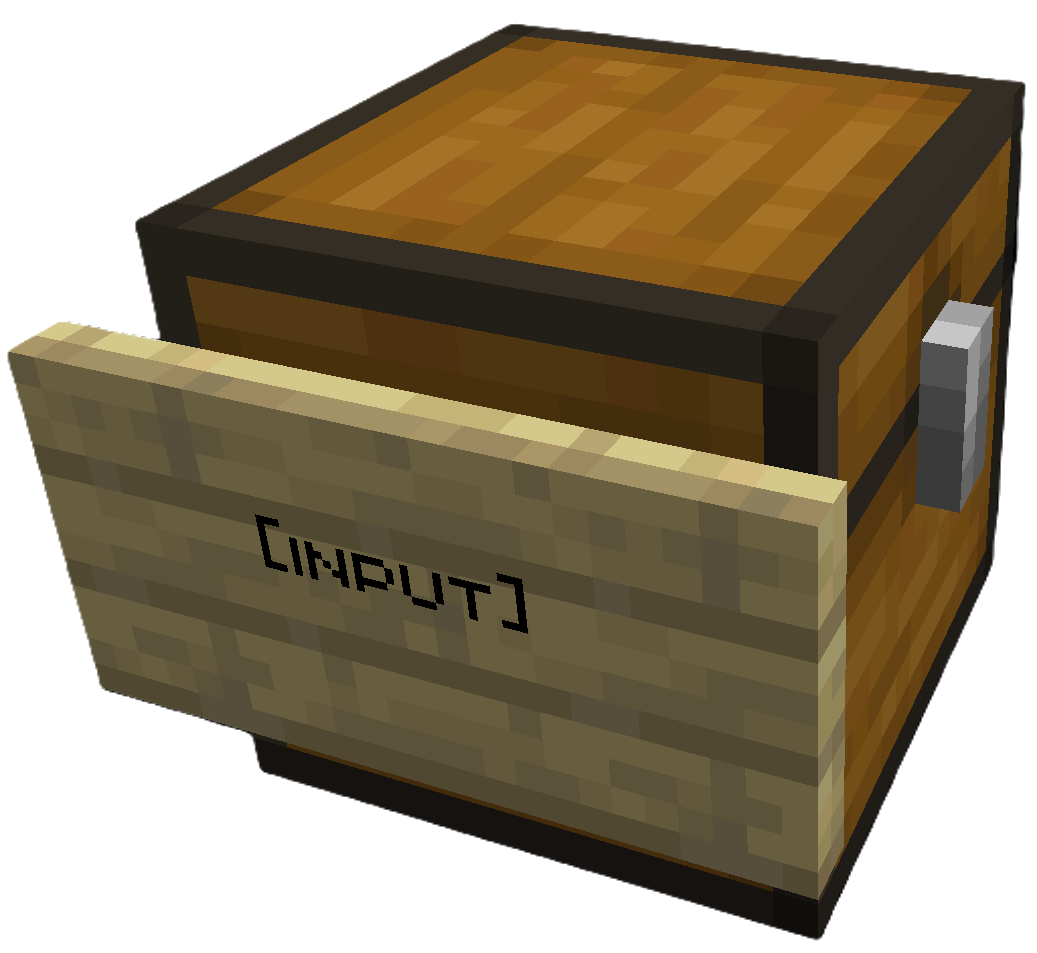
在你的源箱上放置 [input] 告示牌 |
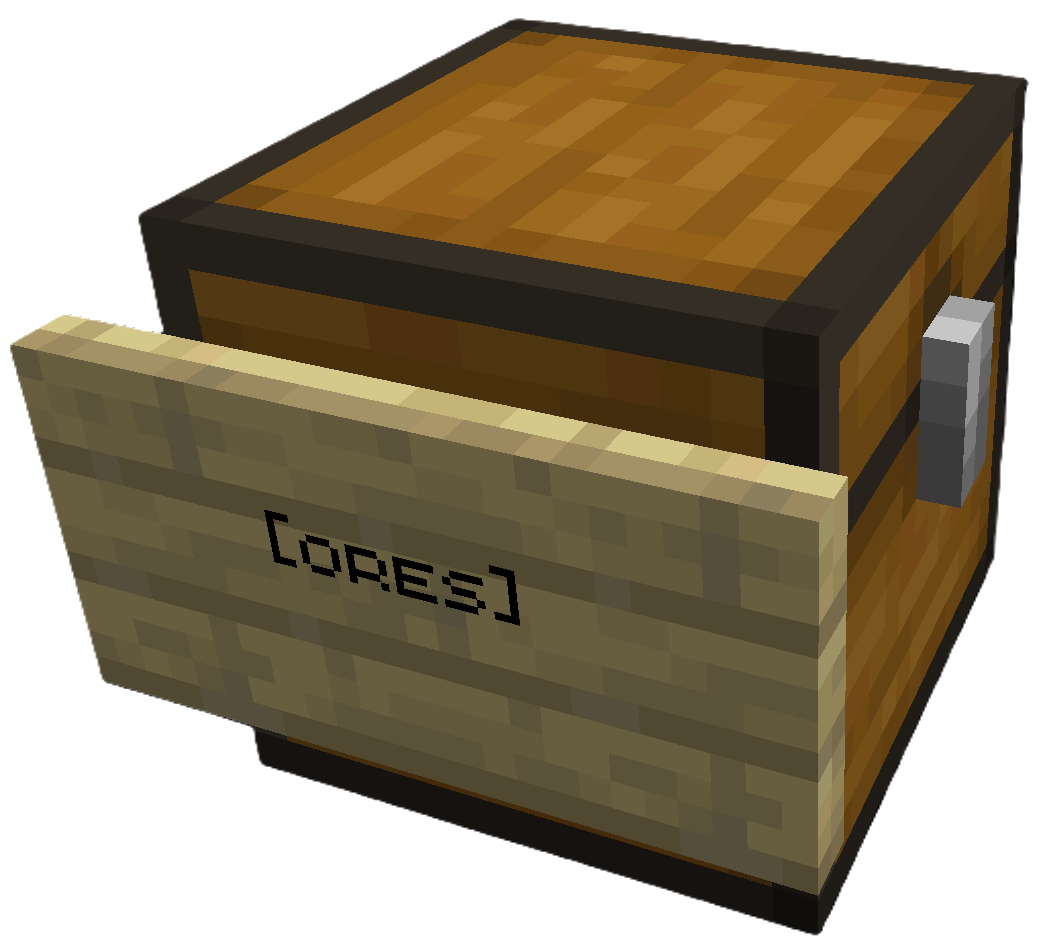
在目标箱上放置 [ores] 告示牌(或任意类别) |
右键点击 [input] 告示牌即可进行排序。所有目标箱必须在可配置的搜索半径内(默认为 64 格)。
模组存储: SortCraft 兼容 Storage Drawers 和 Sophisticated Storage 等模组存储方块。任何暴露了 Fabric Transfer API
Storage<ItemVariant>或 NeoForgeIItemHandler的方块均可用作源或目标。
共享配置: 在输入箱的告示牌上写入 CategoryCraft 分享 ID,以使用共享类别配置而非全局配置。请参阅 共享配置 了解如何获取分享 ID 并进行设置。
? 5分钟快速开始
1. 创建类别文件
创建 config/sortcraft/categories/basic.yaml:
ores:
  items:
    - minecraft:diamond
    - minecraft:iron_ingot
    - minecraft:gold_ingot
    - minecraft:copper_ingot
或者使用 CategoryCraft 可视化构建你的类别。
或者参考以下示例:
2. 搭建存储
- 放置一个箱子,并在任意一行附上带有
[input]的告示牌 - 放置另一个箱子,并在任意一行附上带有
[ores]的告示牌
3. 排序!
将钻石、铁锭、金锭或铜锭放入输入箱,然后右键点击 [input] 告示牌。符合你 ores: 类别的物品将移动到 [ores] 箱子中。
? 文档
| 指南 | 描述 |
|---|---|
| Commands | 所有 /sort 命令 |
| Configuration | YAML 语法、优先级、包含项、物品标签 |
| ↳ Concise Example | 快速参考 |
| ↳ Full Example | 我在服务器上使用的配置 |
| Filters | 按附魔、耐久度、自定义名称进行分类 |
| Regex Patterns | 使用模式匹配物品,如 /.*:.*_sword/ |
| Core Concepts | 优先级系统、类别继承、堆叠 |
| Troubleshooting | 常见问题及解决方案 |
| Audit Logging | 服务器管理员日志功能 |
SortCraft
SortCraft is a multi-chest item sorter without the redstone. Label chests with signs like [ores] or [tools], right-click your input chest, and items instantly sort themselves. Categories live in simple YAML files you control.
Visually build and organize your categories using our companion webapp CategoryCraft! You can even load mod jar files to see your modded items!
View our quickstart video or jump to the 5-Minute Quick Start section below for concise instructions.
? How It Works
You define categories in YAML config files. Sign text must match your category names. That's it!
What It Looks Like In-Game
| Input Chest | Destination Chest |
|---|---|
|
|
Place [input] sign on your source chest |
Place [ores] sign (or any category) on destination |
Right click the [input] sign to sort. All destination chests must be within a configurable search radius of the input chest (default 64 blocks).
Modded Storage: SortCraft works with modded storage blocks like Storage Drawers and Sophisticated Storage. Any block that exposes a Fabric Transfer API
Storage<ItemVariant>or NeoForgeIItemHandlercan be used as a source or destination.
Share Configs: Write a CategoryCraft share ID on the input sign to use a shared category configuration instead of the global one. See Share Configs for how to get a share ID and set it up.
? 5-Minute Quick Start
1. Create a category file
Create config/sortcraft/categories/basic.yaml:
ores:
  items:
    - minecraft:diamond
    - minecraft:iron_ingot
    - minecraft:gold_ingot
    - minecraft:copper_ingot
OR use CategoryCraft to build your categories visually.
OR look at the following examples:
2. Build your storage
- Place a chest and attach a sign with
[input]on any line - Place another chest and attach a sign with
[ores]on any line
3. Sort!
Put diamonds, iron, gold, or copper in the input chest, then right-click the [input] sign. Items matching your ores: category move to the [ores] chest.
? Documentation
| Guide | Description |
|---|---|
| Commands | All /sort commands |
| Configuration | YAML syntax, priorities, includes, item tags |
| ↳ Concise Example | Quick reference |
| ↳ Full Example | What I use on my server |
| Filters | Sort by enchantments, durability, custom names |
| Regex Patterns | Match items with patterns like /.*:.*_sword/ |
| Core Concepts | Priority system, category inheritance, stacking |
| Troubleshooting | Common issues and solutions |
| Audit Logging | Server admin logging features |

下载 SortCraft
下载 SortCraft
下载 SortCraft
下载 SortCraft
下载 SortCraft
下载 SortCraft
下载 SortCraft
下载 SortCraft
下载 SortCraft
下载 SortCraft
暂无更新日志
关于这个资源的讨论、问题反馈与使用心得
还没有讨论,来发第一帖吧
你是这个资源的作者?登录后可认领此资源。
相似资源
 模组

显示你正在注视的方块的信息。(适用于 Minecraft 1.16+ 的 Hwyla/Waila 分支)
 模组

查看物品与配方
 模组
在游戏画面角落显示附近世界地形、玩家、生物和实体的地图。可创建路径点,帮助你找到标记过的位置。
 模组
使用 JavaScript 编辑配方、添加自定义物品、编写世界事件!
 模组
添加区块认领和玩家组队功能,并与 Xaero's Minimap 和 World Map 集成
 模组
添加全屏世界地图,显示你在世界中已探索的区域。与 Xaero's Minimap 搭配使用效果极佳。
评论 0
登录后参与评分
还没有评论,来抢沙发吧