
一款客户端 Minecraft 模组,可将屏幕转化为沉浸式 3D 显示效果,并提供完全可配置的第一人称和第三人称模式。


功能特性
通用功能
- 可视化编辑器
- 针对每个屏幕的启用与禁用列表,用于模组兼容性设置
- 可选的背景世界模糊效果
- 屏幕投影阴影
- 可配置的 HUD 和快捷栏可见性
- 可调的 GUI 缩放、渲染缩放、屏幕透明度以及基于视场角(FOV)的缩放
- 屏幕打开动画
- FOV 覆盖
- 自动检测相机模式,根据视角切换相机模式
- 世界光影特效(仅支持 26.1.2+ 版本)
第一人称模式
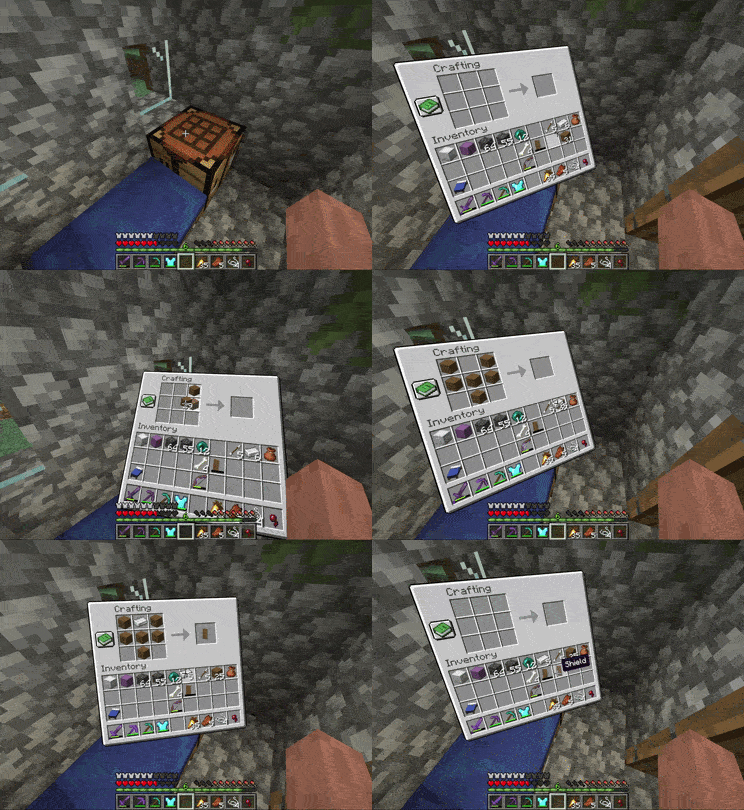
- 准星和鼠标模式
- 屏幕位置、距离、缩放和旋转均可配置
- 可配置的屏幕打开动画
- 曲面屏选项,特别适合搭配添加了大型 GUI 扩展的模组,例如 JEI
第三人称模式
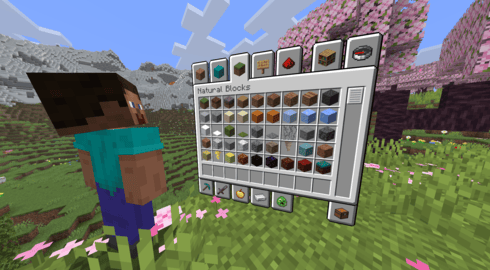
- 相机和屏幕的位置、距离、缩放和旋转均可配置
- 可配置的角色模型身体旋转
- 平滑的相机过渡和可配置的屏幕打开动画
- 当相机被阻挡时,可选地回退到第一人称模式
依赖项
| 加载器 |
模组 |
| 所有 |
YACL |
| Fabric |
Fabric API & Mod Menu |
配置
通过按键绑定(默认未绑定)、Mod Menu 或配置文件打开配置界面。
Spatial GUI 拥有众多选项,建议仔细浏览并根据个人喜好进行调整。
对于高级用户和整合包制作者,支持通过 config/spatial-gui/profiles.json5 文件使用按屏幕划分的配置档案。该文件中包含相关文档说明。
可视化编辑器
Spatial GUI 内置了一个可视化编辑器,允许你实时配置屏幕位置、缩放、旋转等更多参数。你还可以创建和管理不同屏幕的配置档案。在配置界面中点击按钮进入编辑器模式,或在控制设置中为其绑定快捷键。

档案选择器
你可以为特定屏幕分配不同的编辑器档案。当屏幕处于打开状态时,按下档案选择器快捷键(默认为反引号/波浪号键)来选择档案。
兼容性
Spatial GUI 是一款客户端模组,无需安装在服务器上。
然而,并不能保证与所有模组兼容。Spatial GUI 会修改 GUI 和相机渲染,这可能会与同样修改这些内容的模组发生冲突。
如果你发现了与其他模组的可复现不兼容问题,请在 GitHub 上报告,以便进行调查。提交问题有助于让这款模组变得更好!
Spatial GUI 与 Punchy! 及 Punchy! Moves 具有特殊兼容性。
警告:不支持 Lunar Client。 Lunar Client 以与 Spatial GUI 不兼容的方式修改了 Minecraft 的渲染机制。虽然它并非完全不兼容且在大多数情况下仍能正常运行,但对于因使用 Lunar Client 导致的问题,我们将不予处理。
常见问题
| 问题 |
回答 |
| Spatial GUI 是否支持多人游戏? |
是的。其他玩家和服务器无需安装 Spatial GUI。 |
| Spatial GUI 是否提供游戏优势? |
Spatial GUI 主要为视觉增强,不会添加或自动化任何游戏玩法机制。部分设置可能会改变摄像机行为,因此它是否在特定服务器上被允许,取决于该服务器的规则。 |
| Spatial GUI 是否与 _____ 兼容? |
很可能!不过,兼容性无法保证,尤其是对于那些修改界面、摄像机或渲染的模组。如果您遇到与特定模组的兼容性问题,欢迎在 GitHub 上报告。 |
| 为什么我的界面行为异常? |
可能是已安装的另一个模组不兼容。请尝试找出涉及的模组,然后检查现有的 GitHub 问题,或在复现问题的步骤基础上提交新问题。 |
| 为什么我的界面模糊? |
这通常是由其他模组或客户端引起的。请尝试确定是哪个模组导致了此问题,或者在您的客户端设置中查找诸如“模糊(blur)”和“背景(background)”之类的选项。 |
| 我可以在整合包中使用 Spatial GUI 吗? |
可以。我们欢迎在整合包中使用 Spatial GUI,无需额外许可。但不保证与其他模组的兼容性。 |
| Spatial GUI 纯粹是视觉层面的吗? |
几乎完全是。Spatial GUI 改变了现有屏幕和摄像机的呈现方式。其中一项设置有意允许您在关闭界面后保持旋转视角,这可能会让您的角色视角发生转动。 |
备注
- 欢迎在 GitHub 上提出功能建议或报告漏洞。
- 我们欢迎在整合包中使用 Spatial GUI,无需额外许可。请注意,与某些模组的兼容性可能因情况而异。
- 我有计划开发一个多人游戏插件……但目前还不能承诺什么,不要期望它会很快推出。
特别感谢:
vibing 为所有 GitHub 贡献
DevPunchyMan & Godku (Punchy Guys Studios) 在其模组中添加了 Spatial GUI 兼容性!
Dizabanik 提供了大量的代码修复和改进
BUILDLCS 提供了巴西葡萄牙语翻译
suheckii 提供了俄语翻译
22SSendo, jankeverse, 和 Talbone 提出了非常棒的功能建议
以及其他任何报告漏洞或提出功能建议的人 :)
A client-side Minecraft mod that turns screens into immersive 3D displays, with fully configurable first-person and third-person modes.
Features
General
- Visual editor
- Per-screen enable and disable lists for mod compatibility
- Optional world blur behind the screen
- Screen drop shadow
- Configurable HUD and hotbar visibility
- Adjustable GUI scale, render scale, screen opacity, and FOV-aware scaling
- Screen opening animation
- FOV override
- Auto-detect camera mode, switches the camera mode based on perspective
- World shader effects (26.1.2+ only)
First-person Mode
- Crosshair and mouse modes
- Screen position, distance, scale, and rotation are all configurable
- Configurable screen opening animation
- Curved screen option, especially good with mods that add large GUI extensions, such as JEI
Third-person Mode
- Camera and screen position, distance, scale, and rotation are all configurable
- Configurable avatar body rotation
- Smooth camera transition and configurable screen opening animation
- Optional fallback to first person when the camera is blocked
Dependencies
| Loader |
Mod |
| All |
YACL |
| Fabric |
Fabric API & Mod Menu |
Configuration
Open the config through the keybind (unbound by default), Mod Menu, or the config file.
Spatial GUI has many options, so it is worth looking through them to tailor the mod to your preferences.
For advanced users and modpack creators, per-screen configuration profiles are supported via config/spatial-gui/profiles.json5. This file contains documentation.
Visual Editor
Spatial GUI includes a built-in visual editor that lets you configure screen position, scale, rotation, and more in real-time. You can also create and manage profiles for different screens. Press the button in the config to enter editor mode, or bind it to a keybind in controls.
Profile Picker
You can assign different editor profiles to specific screens. Press the profile picker key (backtick/tilde by default) while a screen is open to select a profile.
Compatibility
Spatial GUI is a client-side mod and does not need to be installed on the server.
However, compatibility isn't guaranteed with every mod. Spatial GUI modifies GUI and camera rendering, which may conflict with mods that modify these as well.
If you find a reproducible incompatibility with another mod, please report it on GitHub so it can be investigated. Reporting an issue helps make the mod better for everyone!
Spatial GUI has special compatibility with Punchy! & Punchy! Moves!
Warning: Lunar Client is not supported. Lunar Client modifies Minecraft's rendering in ways that are incompatible with Spatial GUI. While it's not completely incompatible and still functions in most cases, issues caused by using Lunar Client will not be addressed.
FAQ
| Question |
Answer |
| Does Spatial GUI work in multiplayer? |
Yes. Other players and the server do not need to have Spatial GUI installed. |
| Does Spatial GUI give a gameplay advantage? |
Spatial GUI is primarily visual and does not add or automate gameplay mechanics. Some settings can change how the camera behaves, so whether it is allowed on a particular server is up to that server's rules. |
| Is Spatial GUI compatible with _____? |
Probably! However, compatibility isn't guaranteed, especially with mods that modify GUIs, cameras, or rendering. If you encounter an issue with a specific mod, feel free to report it on GitHub. |
| Why is my GUI behaving strangely? |
Another installed mod may be incompatible. Try to identify the mod involved, then check existing GitHub issues or open a new issue with steps to reproduce the problem. |
| Why is my GUI blurry? |
This is usually caused by another mod or a client. Try and figure out which mod is causing this, or look in your client settings for terms like 'blur' and 'background'. |
| Can I use Spatial GUI in a modpack? |
Yes. Spatial GUI is welcome in modpacks and no additional permission is required. Compatibility with other mods is not guaranteed. |
| Is Spatial GUI purely visual? |
Almost entirely. Spatial GUI changes how existing screens and the camera are presented. One setting intentionally allows your rotation to persist after closing a GUI, which can turn your character's view. |
Notes
- Feel free to suggest features or report bugs on the GitHub.
- Spatial GUI is welcome in modpacks, no additional permission required. Be aware that compatibility with some mods may vary.
- I have plans for a multiplayer addon... no promises yet though, don't expect it soon
Special thanks to:
vibing for all of their GitHub contributions
DevPunchyMan & Godku (Punchy Guys Studios) for adding Spatial GUI compatibility in their mods!
Dizabanik for tons of code fixes and improvements
BUILDLCS for the Brazilian Portuguese translation
suheckii for the Russian translation
22SSendo, jankeverse, and Talbone for particularly awesome feature suggestions
Anyone else who reported bugs or suggested features :)


 模组

 模组

 模组
 模组

 模组
 模组
评论 0
登录后参与评分
还没有评论,来抢沙发吧