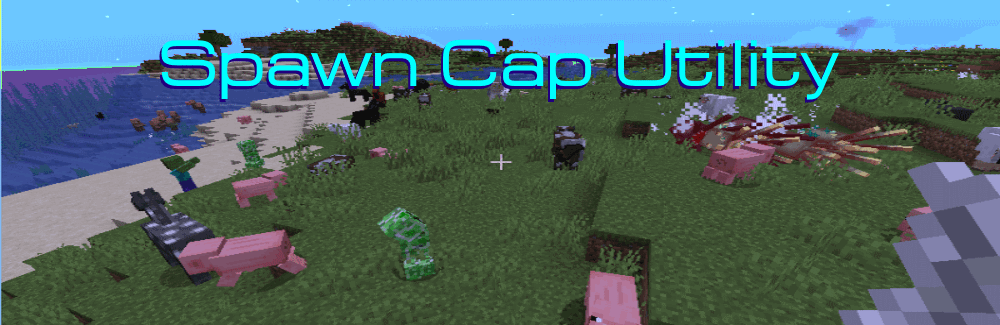
Spawncap Utility Control 是一款简单易用的模组,让你能够掌控刷怪上限(Spawncap)数值。
用途
想要体验“比简单模式稍容易一点”的游戏? 设置为简单模式,然后将怪物 的刷怪上限降低至 20。
想要与更多怪物战斗? 将怪物 的刷怪上限从 70 提升至 140,甚至 210!
想要在末日生存整合包中让动物更难觅食? 降低生物 和水环境生物 的数值。
想要为怪物生成节省一些处理性能? 降低地下水中生物(发光鱿鱼)和空中生物 (蝙蝠)的数值。
警告与注意事项
基本上没什么问题。 我已在独立机器上使用最大数值进行了测试,运行良好。 我认为这些数值的设定是因为当时的计算机性能较弱,且为了让夜晚具有一定的风险感。
在怪物刷怪上限设为最大值时,夜间奔跑是危险的——你会不断撞上成群的 mobs。
如果你将其设置得过高,导致你的“土豆机”性能极差,你可以调低数值,但默认参数对于非常弱的机器也是安全的。
我们以前在 Spigot 上使用过 178 个 mob,那很有趣。 我想再次找回那种感觉,所以……给你! 怪物数量设为 140 是个更好的比例。
哦——这*会*加速低效的 mob 农场。 但它不应加速高效的 mob 农场。
Forge 与 Fabric
在此模组页面中,旧版 Fabric 模组作为 Beta 版本存储,Forge 作为 Release 版本存储,因此两者都会显示。 使用新版客户端后,不再需要这样做,两者都可以是 Release 版本。
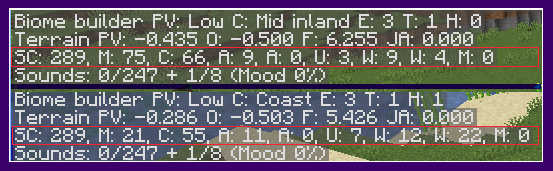
示例上方截图来自设置了额外 5 只怪物的配置。
下方截图来自仅设置 20 只怪物的配置。
命令(目前仅限 Forge 1.21.11)
/spawncapinfo
[ SpawncapControlInfo ]
[MONSTER] EnumMax=40 Count=40 ComputedCap=40
[CREATURE] EnumMax=10 Count=227 ComputedCap=10
[AMBIENT] EnumMax=11 Count=11 ComputedCap=11
[AXOLOTLS] EnumMax=12 Count=0 ComputedCap=12
[CHAT] [UNDERGROUND_WATER_CREATURE] EnumMax=11 Count=7 ComputedCap=11
[WATER_CREATURE] EnumMax=10 Count=0 ComputedCap=10
[WATER_AMBIENT] EnumMax=24 Count=0 ComputedCap=24
配置文件
配置文件名为 SpawncapControlUtility.common
在早期版本中,有五个硬编码的分类,其数值你可以更改。
在当前版本(目前仅限 1.19.X)中,有一个你可以更改的分类列表。 你还可以从其他模组中添加新的分类。 你可以使用 latest.log 文件来查找这些分类的名称。
日志文件条目(供整合包设计师使用)(目前仅限 Forge 和 Fabric 1.19.X)
如果你使用的模组拥有自己的 mob 分类,你可以自定义其数值。 在此日志部分中查找正确的名称和默认值。
[18:46:45] [Server thread/INFO]: SpawncapControlUtiity Startup
[18:46:45] [服务器线程/INFO]: 已配置新的生成类别数值
[18:46:45] [服务器线程/INFO]: SpawncapControlUtility:类别 MONSTER(怪物)的默认上限为 70。正在检查配置以查找覆盖上限值。
[18:46:45] [服务器线程/INFO]: SpawncapControlUtility:将类别 MONSTER 的最大值从 70 提升至 73
[18:46:45] [服务器线程/INFO]: SpawncapControlUtility:类别 CREATURE(生物)的默认上限为 10。正在检查配置以查找覆盖上限值。
[18:46:45] [服务器线程/INFO]: SpawncapControlUtility:类别 CREATURE 的配置最大值与默认值相同。未进行更改。
[18:46:45] [服务器线程/INFO]: SpawncapControlUtility:类别 AMBIENT(环境)的默认上限为 15。正在检查配置以查找覆盖上限值。
[18:46:45] [服务器线程/INFO]: SpawncapControlUtility:将类别 AMBIENT 的最大值从 15 降低至 14
[18:46:45] [服务器线程/INFO]: SpawncapControlUtility:类别 AXOLOTLS(美西螈)的默认上限为 5。正在检查配置以查找覆盖上限值。
[18:46:45] [服务器线程/INFO]: SpawncapControlUtility:类别 AXOLOTLS 的配置最大值与默认值相同。未进行更改。
[18:46:45] [服务器线程/INFO]: SpawncapControlUtility:类别 UNDERGROUND_WATER_CREATURE(地下水生生物)的默认上限为 5。正在检查配置以查找覆盖上限值。
[18:46:45] [服务器线程/INFO]: SpawncapControlUtility:类别 UNDERGROUND_WATER_CREATURE 的配置最大值与默认值相同。未进行更改。
[18:46:45] [服务器线程/INFO]: SpawncapControlUtility:类别 WATER_CREATURE(水生生物)的默认上限为 5。正在检查配置以查找覆盖上限值。
[18:46:45] [服务器线程/INFO]: SpawncapControlUtility:类别 WATER_CREATURE 的配置最大值与默认值相同。未进行更改。
[18:46:45] [服务器线程/INFO]: SpawncapControlUtility:类别 WATER_AMBIENT(水生环境)的默认上限为 20。正在检查配置以查找覆盖上限值。
[18:46:45] [服务器线程/INFO]: SpawncapControlUtility:类别 WATER_AMBIENT 的配置最大值与默认值相同。未进行更改。
[18:46:45] [服务器线程/INFO]: SpawncapControlUtility:类别 MISC(其他)不应被更改。
[18:46:45] [服务器线程/INFO]: SpawncapControlUtility:类别 HUNTERS(猎人)的默认上限为 10。正在检查配置以查找覆盖上限值。
[18:46:45] [服务器线程/INFO]: SpawncapControlUtility:类别 HUNTERS 没有配置的覆盖项。保持上限为 10
[18:46:45] [服务器线程/INFO]: SpawncapControlUtility:类别 BEASTS(野兽)的默认上限为 91。正在检查配置以查找覆盖上限值。
[18:46:45] [服务器线程/INFO]: SpawncapControlUtility:BEASTS 没有配置的覆盖项。保持上限为 91。
然后像这样将它们添加到配置文件中。
#生成类别 (MONSTER, CREATURE, ... 默认值..., 来自其他模组的自定义池)
spawnCategories = ["MONSTER,80", "CREATURE,19", "AMBIENT,23", "AXOLOTLS,12",
"UNDERGROUND_WATER_CREATURE,11", "WATER_CREATURE,10", "WATER_AMBIENT,24"]
之后日志将显示如下内容:
[18:46:45] [服务器线程/INFO]: SpawncapControlUtility:类别 HUNTER(猎人)的默认上限为 10。正在检查配置以查找覆盖上限值。
[18:46:45] [服务器线程/INFO]: SpawncapControlUtility:将类别 HUNTER 的最大值从 10 提升至 17
[18:46:45] [服务器线程/INFO]: SpawncapControlUtility:类别 BEASTS(野兽)的默认上限为 91。正在检查配置以查找覆盖上限值。
[18:46:45] [服务器线程/INFO]: SpawncapControlUtility:将类别 BEASTS 的最大值从 91 降低至 42
Discord
您可以在 Discord 上加入我们:

Patreon 赞助支持
您可以通过 Patreon 支持我们的工作。由于替代加载器不会像 Curseforge 那样与我们分享其广告收入,因此这将对我们有所帮助。
Spawncap Utility Control is a simple to use mod that gives you control over Spawncap values.
Uses
Want to play "Slightly easier than easy mode"? Set easy mode and then lower the spawncap values for Monsters to 20.
Want to play with more monsters?" Boost the spawncap values for Monsters from 70 to 140, or even 210!
Want to make food animals harder to find in a post apocalyptic pack? Lower the Creature and WaterAmbient values.
Want to free up a bit of processing power for monsters? Lower the UndergroundWaterCreature(Glow Squid) and Ambient (Bats) values.
Warnings and Caveats
None really. I've tested this on my standalone machines with the maximum values and it ran fine. I think these values were chosen when computers were weaker and to make night have a certain level of risk.
At the maximum values for monsters, it is dangerous to run at night- you are constantly running into groups of mobs.
If you set them too high for your Potato and performance is terrible, then you can set them to lower values but the default parameters are safe for very weak machines.
We used to use 178 mobs on Spigot and it was fun. I wanted to have that feeling again so... here you go! Monsters at 140 is a much better rate.
Oh-- and this *will* speed up inefficient mob farms. It should not speed up efficient mob farms tho.
Forge & Fabric
On this mod page, Older Fabric mods are stored as a Beta version and Forge is stored as a Release version so both will be visible. With the newer client, this isn't needed any more and both can be Release version.
ExampleThe top is from settings with 5 extra monsters.
The bottom is from settings with only 20 monsters.
Command ( Forge 1.21.11 only for now )
/spawncapinfo
[ SpawncapControlInfo ]
[MONSTER] EnumMax=40 Count=40 ComputedCap=40
[CREATURE] EnumMax=10 Count=227 ComputedCap=10
[AMBIENT] EnumMax=11 Count=11 ComputedCap=11
[AXOLOTLS] EnumMax=12 Count=0 ComputedCap=12
[CHAT] [UNDERGROUND_WATER_CREATURE] EnumMax=11 Count=7 ComputedCap=11
[WATER_CREATURE] EnumMax=10 Count=0 ComputedCap=10
[WATER_AMBIENT] EnumMax=24 Count=0 ComputedCap=24
Configuration file
The configuration file name is SpawncapControlUtility.common
In the earlier versions there are five hardcoded categories with a number you can change.
In the current version (1.19.X only for now), there is a list of categories you can change. You can also add new categories from Mods to it. You can use the latest.log file to find the names of those categories.
Log File Entries (For Mod Pack Designers) (Forge and Fabric 1.19.X only at this time)
If you are using a mod that has it's own mob categories you can customize the values. Look for the correct names and default in this section of the log file.
[18:46:45] [Server thread/INFO]: SpawncapControlUtiity Startup
[18:46:45] [Server thread/INFO]: Configured new Spawn Category Values
[18:46:45] [Server thread/INFO]: SpawncapControlUtility: Category MONSTER has a default maximum of 70. Checking configuration for override maximum values.
[18:46:45] [Server thread/INFO]: SpawncapControlUtility: Raised Category MONSTER Maximum Value from 70 to 73
[18:46:45] [Server thread/INFO]: SpawncapControlUtility: Category CREATURE has a default maximum of 10. Checking configuration for override maximum values.
[18:46:45] [Server thread/INFO]: SpawncapControlUtility: Category CREATURE configured maximum same as default value. No change made.
[18:46:45] [Server thread/INFO]: SpawncapControlUtility: Category AMBIENT has a default maximum of 15. Checking configuration for override maximum values.
[18:46:45] [Server thread/INFO]: SpawncapControlUtility: Lowered Category AMBIENT Maximum Value from 15 to 14
[18:46:45] [Server thread/INFO]: SpawncapControlUtility: Category AXOLOTLS has a default maximum of 5. Checking configuration for override maximum values.
[18:46:45] [Server thread/INFO]: SpawncapControlUtility: Category AXOLOTLS configured maximum same as default value. No change made.
[18:46:45] [Server thread/INFO]: SpawncapControlUtility: Category UNDERGROUND_WATER_CREATURE has a default maximum of 5. Checking configuration for override maximum values.
[18:46:45] [Server thread/INFO]: SpawncapControlUtility: Category UNDERGROUND_WATER_CREATURE configured maximum same as default value. No change made.
[18:46:45] [Server thread/INFO]: SpawncapControlUtility: Category WATER_CREATURE has a default maximum of 5. Checking configuration for override maximum values.
[18:46:45] [Server thread/INFO]: SpawncapControlUtility: Category WATER_CREATURE configured maximum same as default value. No change made.
[18:46:45] [Server thread/INFO]: SpawncapControlUtility: Category WATER_AMBIENT has a default maximum of 20. Checking configuration for override maximum values.
[18:46:45] [Server thread/INFO]: SpawncapControlUtility: Category WATER_AMBIENT configured maximum same as default value. No change made.
[18:46:45] [Server thread/INFO]: SpawncapControlUtility: Category MISC should not be changed.
[18:46:45] [Server thread/INFO]: SpawncapControlUtility: Category HUNTERS has a default maximum of 10. Checking configuration for override maximum values.
[18:46:45] [Server thread/INFO]: SpawncapControlUtility: Category HUNTERS had no configured overrides. Keeping maximum of 10
[18:46:45] [Server thread/INFO]: SpawncapControlUtility: Category BEASTS has a default maximum of 91. Checking configuration for override maximum values.
[18:46:45] [Server thread/INFO]: SpawncapControlUtility: BEASTS had no configured overrides. Keeping maximum of 91.
Then add them like this to the configuration file.
#spawn Categories(MONSTER, CREATURE, ... defaults..., custom pools from other mods
spawnCategories = ["MONSTER,80", "CREATURE,19", "AMBIENT,23", "AXOLOTLS,12",
"UNDERGROUND_WATER_CREATURE,11", "WATER_CREATURE,10", "WATER_AMBIENT,24"]
Afterwards the log will look like this..
[18:46:45] [Server thread/INFO]: SpawncapControlUtility: Category HUNTER has a default maximum of 10 Checking configuration for override maximum values.
[18:46:45] [Server thread/INFO]: SpawncapControlUtility: Raised Category HUNTER Maximum Value from 10 to 17
[18:46:45] [Server thread/INFO]: SpawncapControlUtility: Category BEASTS has a default maximum of 91. Checking configuration for override maximum values.
[18:46:45] [Server thread/INFO]: SpawncapControlUtility: Lowered Category BEASTS Maximum Value from 91 to 42
Discord
You can join us on Discord at
Patron Support
You can support our work with Patreon. This will help since alternative modloaders do not share a portion of their advertising income with us like Curseforge.

 模组
 模组
 模组

 模组
 模组

 模组

评论 0
登录后参与评分
还没有评论,来抢沙发吧