
功能说明
Spawn Commands Teleport 允许玩家传送回主出生点、自己的床、命名地点、共享的命名地点、指定坐标、其他玩家身边以及远距离位置。
[ 作者备注:Spawn Commands 是一款优秀的模组,运行良好,且只需在服务器端安装即可生效。您可能还想评估另一位作者开发的另一款非常出色的模组。它包含了本模组的大部分功能,甚至更多。提及此模组是因为它同样值得推荐。点击此处访问 ThutEssentials。]
[ 作者备注:如果您需要极其简单的传送体验,请尝试 Teleport X 模组 ]
在聊天中输入...
简单命令:(默认)
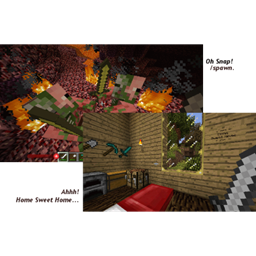
/spawn 将你传送至主世界出生点。
/spawn. 如果已设置,将你传送至你的床/家位置。注意 "/spawn" 末尾的点 "."。
/spawn! 将你的床/家位置设置为当前所在位置。
/spawn? 显示你、世界出生点以及你的床/家位置(如果已设置)的坐标。
高级命令:
/spawn+ mylavabase 在当前所在位置创建名为 "mylavabase" 的自定义地点。
/spawn mylavabase 带你前往名为 "mylavabase" 的自定义地点。
/spawns 显示按顺序排列的你的自定义地点列表。当前维度中的地点会被高亮显示。任何共享的地点名称会优先列出,并以 @ 符号开头。例如:@maincastle。聊天中列出的自定义地点均为可点击链接。
/spawn- henrysplace 从列表中移除你的自定义地点 "henrysplace"。
/spawn+ enable 在此服务器上启用高级命令。 默认情况下,此功能仅可由 OP(服务器管理员)启用或禁用。
/spawn+ disable 在此服务器上禁用高级命令的使用。有些人可能认为这些功能过于强大,可能只想要上面提到的 4 个简单命令(简单模式为默认配置)。你可以为每个命令设置权限。你可以完全禁用任意命令。你可以重命名任意命令。这些自定义及其他更多选项均在配置文件中。
/back 带你返回上次传送前的位置或上次死亡的位置。以最后发生的事件为准。
/away [<以方块为单位的近似距离>]
这会将你传送到远离当前位置的地方。无需指定任何参数,但如果你愿意,可以指定一个以方块为单位的近似距离。它会选择一个随机方向,并对你的距离稍作调整,然后把你放置在那里。等待世界加载完成。如果你的加载速度较慢,Minecraft 可能会将你生成在地面以下。通常你可以快速挖掘使头部周围出现空气,然后再挖到地表,但大多数情况下你其实没什么问题。这与 /rtp 类似。
/spawn+ @tradecenter 创建一个名为 "@tradecenter" 的共享位置(即你所在的位置),前提你是服务器管理员(op)。所有共享位置名称都会列在每个人的位置列表开头。
/up 将你传送到上方下一个可站立的位置。(仅限管理员,除非配置为所有人可用)
/dn 与 up 相反的是 down。(仅限管理员,除非配置为所有人可用)
/top 它会将你传送到上方最高的可站立位置。(仅限管理员,除非配置为所有人可用)
/spawn+ bobislost -123 65 42 在你指定的坐标处创建一个命名位置,然后立即将你传送至该处。想象一下你的朋友 Bob。他迷路了,需要你的帮助,于是告诉了你他的坐标……(仅限管理员,除非配置为所有人可用)
对于那些习惯使用 /home 和 /sethome 命令的人来说:
/home 命令过去有两种形式。一种是仅使用 home 将床的位置设为家,另一种是在 home 后加上名称以设置命名地点。本模组支持这两种方式,并通过配置选项进行切换。该选项为 杂项配置文件 中的 "HomeWithNamedLocations"。如果你通过 配置文件 将 "spawn-" 命令重命名为 "delhome",则可以使用旧版的 /delhome 命令。
/home 通常会将你传送至床/家所在的位置。如果 misc 配置项 homewithnamedlocations 设置为 true,则会显示你已命名的出生点列表。
/sethome 始终将你的床/家位置设置为当前位置。
/home henrys-castle 如果 misc 配置项 homewithnamedlocations 设置为 true,则会将你传送至名为 "henrys-castle" 的位置。
/sethome niceview 如果 misc 配置项 homewithnamedlocations 设置为 true,则会创建一个名为 "niceview" 的位置。使用 /spawn- niceview 会从列表中移除该名称。
/ta 是 Teleport Ask(传送询问)的缩写。
向其他玩家礼貌地发起传送请求的一种方式。
/ta 命令尚未添加至 mc1.7.10 及以下版本。 其功能类似于其他地方的 /tpa。
简单示例:(传送 需请求)
Andy 想要传送到 Bob 身边。
Andy 输入 /ta 并加一个空格,然后反复按下 Tab 键,直到自动补全为 Bob 的名字。接着按下回车键,或者直接输入 /ta Bob。
Bob 会在游戏内的聊天栏看到一条消息,并输入 /ok。
Andy 看到自己的请求已被批准,并按照游戏内聊天栏的提示,仅输入 /ta 。
砰!Andy 成功传送到 Bob 身边。
当安迪想要返回时,如果该命令已启用,他可以输入 /back。
另一个简单的例子:(传送 邀请) (“过来看看我做了什么”命令)
安迪想让鲍勃过来看看他刚建好的东西。
安迪输入 /ti 并加一个空格。然后反复按下 Tab 键,直到自动补全名字 Bob。接着按下回车键,或者直接输入 /ti Bob。
鲍勃只需按照游戏内聊天栏的提示输入 /ta。
砰!鲍勃就被传送到了安迪身边。
当鲍勃想要返回时,如果该命令已启用,他可以输入 /back。
详细说明:
/ta 玩家名称 请求传送到某位玩家。一旦你的请求被接受,再次仅使用 /ta 即可传送到该玩家处。
/ti 玩家名称 这是 Teleport Invite(传送邀请)或“过来看看我做了什么”命令。
/ok 接受传送请求,有效期为 45 秒。 等同于 /ta ok
/ta yes|accept|ok 接受传送请求,有效期为 45 秒。
/ta no|deny 拒绝他人向你发起的传送请求。
/ta allow|deny all 允许或拒绝所有请求,有效期为 45 秒。此功能可用于在一段时间内允许一群朋友同时向你传送。示例:/ta allow all
spawnblockdata 显示你当前站立的方块、脚踩方块以及头部所在方块的信息。此命令旨在供 管理员 (ops) 查找可以安全生成生物的方块名称,例如新藤蔓或高草等。随后可将这些方块名称添加到配置文件中以供使用。
/ta help 将始终显示 /ta 命令的快速参考。
/spawn help 显示游戏内所有生成相关命令的快速参考。/spawnhelp 同样有效。
配置文件:
点击此处查看详情
旧版 Minecraft 论坛页面链接:
注意事项
支持 单人及多人游戏
仅在多人服务器的服务端需要安装。
处理跨维度传送。
具备传送安全检查,防止生成在方块内、坠落以及脚下是岩浆等危险情况。
你可以使用简单命令,也可以发挥创意使用全部功能。
配置文件允许进行高度自定义,包括禁用命令、重命名、权限设置等更多选项。
源代码包含在模组的 jar 文件中。
这是一个 Forge 模组。无需 Bukkit。
它会保留你的视角朝向,使你始终面朝与创建该命名地点时相同的方向到达。
我的其他项目链接。
WHAT DOES IT DO
Spawn Commands Teleport allows players to teleport back to the main spawn, to their bed, to named locations, to shared named locations, to coordinates, to other players, and far away.
[ note from the author: Spawn Commands is a good mod that works well and Spawn Commands only needs to be on the server side to work. You may also want to evaluate another very good mod by another author. It contains much of what this mod has and more. I mention this because this other mod is worthy. Click this link for ThutEssentials. ]
[ note from the Author: for extremely simple teleporting try the Teleport X mod ]
In chat type...
SIMPLE COMMANDS: (default)
/spawn Teleports you to the main world spawn point.
/spawn. Teleports you to your bed/home location if it is set. Note the point "." on the end of "/spawn."
/spawn! Set the location of your bed/home to your current location.
/spawn? Displays coordinates of you, the world spawn point, and your bed/home location if set.
ADVANCED COMMANDS:
/spawn+ mylavabase Creates your named location "mylavabase" at your current location.
/spawn mylavabase Takes you to your named location "mylavabase".
/spawns Displays a sorted list of your named locations. The ones in this dimension are highlighted. Any shared location names are listed first and begin with an at sign. Example: @maincastle. The named locations listed in chat are clickable links.
/spawn- henrysplace Removes your named location "henrysplace" from the list.
/spawn+ enable Enables advanced commands on this server. By default this feature can only be enabled or disabled by an op (server operator).
/spawn+ disable Disables the use of advanced commands on this server. Some may consider these features too over powered and might want just the 4 simple commands at the top above (simple is the default configuration). You may set permissions for every command. You may fully disable any command. You may rename any command. These customizations and more are in the config files.
/back Takes you back to where you last teleported from or where you last died. Which ever event happened last.
/away [<approximate distance away in blocks>]
This sends you far away from where you are. You do not need to specify any parameters but you may specify an approximate distance measured in blocks if you wish. It will pick a random direction and vary your distance a little then drop you there. Wait for the world to load. If you have slow load times the game Minecraft may drop you inside the ground. Usually you can just quickly dig to make air around your head then dig out to the top but most of the time you are just fine. This is similar to /rtp.
/spawn+ @tradecenter Creates a shared location named "@tradecenter" where you are, if you are an op (server operator). All shared location names will be listed at the beginning of everyone's list of locations.
/up It sends you to the next location you can stand on going up. (op only unless configured for all)
/dn The opposite of up is down. (op only unless configured for all)
/top Well it sends you to the highest place you can stand above you. (op only unless configured for all)
/spawn+ bobislost -123 65 42 Creates a named location at the coordinates you specify, then you are immediately teleported there. Imagine your friend Bob. He is very lost and needs your help so he tells you his coordinates... (op only unless configured for all)
And for those who are used to a /home and /sethome command:
The /home command used to come in two flavors. One was just with home as your bed location and the other was using home with a name after it for named locations. This mod supports both ways with a config option to switch between them. The option is "HomeWithNamedLocations" in the miscellaneous config file. The old command /delhome could be used if you rename the "spawn-" command to "delhome" using the configs.
/home Normally this takes you to your bed/home location. If the misc config option homewithnamedlocations is set to true then this dislays a list if your named spawn locations.
/sethome Normally and always sets your bed/home location to where you are now.
/home henrys-castle Takes you to your location named "henrys-castle" if the misc config option homewithnamedlocations is set to true.
/sethome niceview Creates a location named "niceview" if the misc config option homewithnamedlocations is set to true. Using /spawn- niceview would remove the name from the list.
/ta means Teleport Ask.
A Polite way to teleport to other players
/ta has not been added for versions below mc1.7.10. This is similar to /tpa elsewhere.
Easy example: (teleport ask)
Andy wants to teleport to Bob.
Andy types /ta and a space. Then hits the tab key repeatedly till it automatically fills in the name Bob. Then hits then enter key, or just types /ta Bob
Bob sees a message on his in-game chat and types /ok
Andy sees he is approved and types just /ta as his in-game chat suggests.
Poof! Andy is teleported to Bob.
When Andy wants to go back he can type /back if that command is enabled.
Another easy example: (teleport invite) (the "come see what I did" command)
Andy wants Bob to come see what he just finished building.
Andy types /ti and a space. Then hits the tab key repeatedly till it automatically fills in the name Bob. Then hits then enter key, or just types /ti Bob
Bob just types /ta as his in-game chat suggests
Poof! Bob is teleported to Andy.
When Bob wants to go back he can type /back if that command is enabled.
details:
/ta PlayerName Asks permission to teleport to a player. Once your request is accepted then try again with just /ta to teleport to that player.
/ti PlayerName This is Teleport Invite or the "Come see what I did" command.
/ok Accepts a request to teleport for 45 seconds. Same as /ta ok
/ta yes|accept|ok Accepts a request to teleport for 45 seconds.
/ta no|deny Denies a request to teleport to you.
/ta allow|deny all Allows or denies all requests for 45 seconds. Useful to allow a group of friends to teleport to you all at once within that time. example: /ta allow all
spawnblockdata Displays information about the block you are standing on and the block at your feet and the one at your head. This is intended for ops to find the name of blocks that it is ok to spawn into such as a new vine or tall grass etc. Then those block names may be added to a config file for use.
/ta help will always display the quick reference of /ta commands.
/spawn help Displays a quick reference of all spawn commands in game. /spawnhelp also works.
CONFIGURATION FILES:
click here for details
Link to the old Minecraft Forum page:
NOTES
Both Single and Multi player
Only needed on server side for multiplayer servers.
Handles cross dimension teleports.
Has teleport safety checks for spawning inside blocks, falling down, and lava below your feet.
You can use the simple commands or get fancy and use it all.
Config files allow very advanced configuration including command disabling, renaming, permissions, and more.
Source code is included in the mod's jar file.
This is a Forge mod. No Bukkit is needed.
It keeps your angle of view so you always arrive looking the same way as when you created the named location.
A link to my other projects.

 模组
 模组

 模组

 模组

 模组

 模组
评论 0
登录后参与评分
还没有评论,来抢沙发吧