
Minecraft 中的动态摇头聚光灯!
StageFX 为 Minecraft 加入了真实的动态摇头聚光灯!你可以打造电影级演出、演唱会或舞台布景。这不仅仅是装饰:这些是完全可控制的动态摇头聚光灯。
✨ 包含内容
摇头灯 (Moving Head)
一种可放置的灯具,投射出彩色光束。可以将其安装在地板、天花板或墙壁上。指向任意方向。更改其颜色、亮度、变焦等属性。
桁架 (Truss)
用于搭建顶部支架和安装结构的金属网格方块。外观与真实舞台桁架完全一致。
照明扳手 (Lighting Wrench)
一种在游戏中快速重新配置灯具的工具。 右键点击:更改安装方向 Shift + 右键点击:更改机身旋转角度 左键点击:通过单击打开游戏内控制 UI
?️ 可控功能
每个聚光灯都拥有一整套可调节的属性:
- 水平旋转 & 俯仰 (Pan & Tilt):在 3D 空间中指向任意方向(水平 360°,垂直 180°)
- 颜色:你想要的任何 RGB 颜色,从深红到冷蓝
- 亮度:从关闭到全强度的完整调光
- 光束长度与宽度:从紧密的窄束光到宽广的泛光(1–64 格长)
- 核心 (Core):切换明亮的内部锥体,以获得更逼真的光束效果
- 机身旋转 (Body Rotation):以 90° 为增量旋转灯具外壳
- 平滑移动 (Smooth Movement):设置手动移动的过渡时间(0–200 刻)
- 玩家追踪 (Player Tracking):让选定的聚光灯自动跟随任何玩家或实体
- 目标定位 (Targeting):将光束指向特定的单个点
?️ 内置网页仪表盘
服务器:打开浏览器并访问 http://{YOUR_SERVER_IP}:8173(你可能需要转发端口 8173)。输入来自 config/stagefx/dashboard-token.txt 的身份验证令牌
单人游戏:打开浏览器并访问 http://127.0.0.1:8173。输入来自你的 Minecraft 实例中 config/stagefx/dashboard-token.txt 的身份验证令牌(在 Windows 上:Modrinth 为 C:\Users\{username}\AppData\Roaming\ModrinthApp\profiles\{profile},默认启动器为 C:\Users\{username}\AppData\Roaming\.minecraft)
- 实时更新:更改在游戏内和浏览器中即时同步
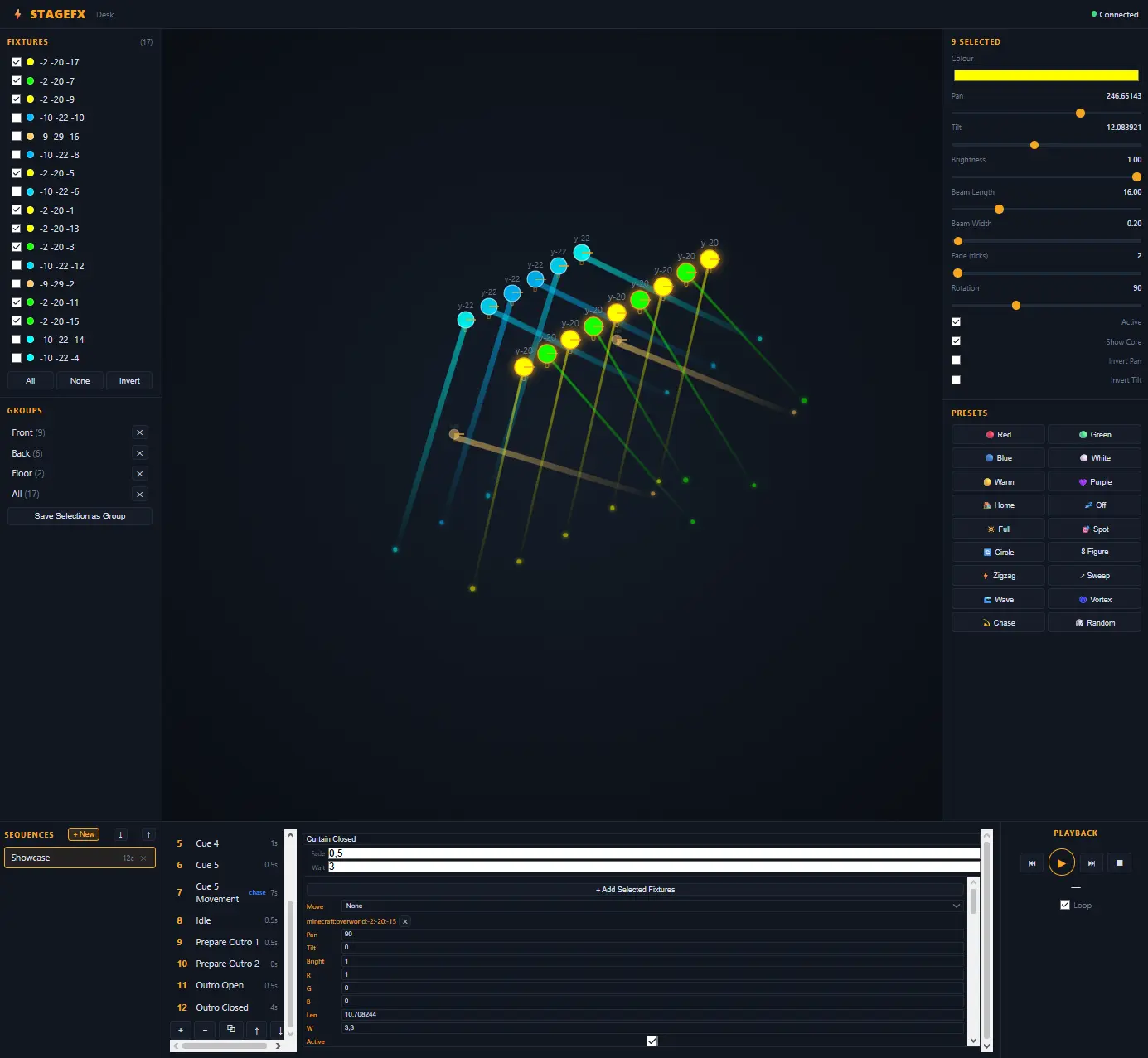
- 实时等轴测舞台地图:在实时 3D 概览中查看所有灯具及其光束
- 多灯具控制:选择多个灯具并一次性调整它们
- 18 种预设:快速应用颜色和运动模式(红色、蓝色、圆形、追逐、波浪、漩涡等)
- 序列与提示编辑器:构建带有定时提示、淡入淡出和运动动画的灯光秀
- 分组 (Groups):按名称保存和调用灯具选择(在所有玩家和仪表板之间同步)
? 使用方法
- 从“StageFX Spotlights”创造模式标签页获取物品(聚光灯、桁架、扳手)
- 在你的建筑中放置聚光灯,它们会自动附着在你点击的面上
- 使用命令 (
/mh rotate 45 -30) 瞄准,或右键点击以切换光束开关 - 使用扳手更改安装方向或打开游戏内控制面板
- 在浏览器中打开灯光控制台以获得完整体验
- 使用序列、提示和预设制作演出
⌨️ 命令
通过聊天栏使用 /movinghead 命令(或简写 /mh)控制一切:
/mh select选择你注视的灯具(或使用选项all、nearby <radius>或<x> <y> <z>)/mh create在你注视的位置放置一个聚光灯/mh rotate <pan> <tilt>瞄准光束/mh color <r> <g> <b>设置颜色(每通道 0–255)/mh brightness <0.0-1.0>设置强度/mh beam <length> <width>塑造光束形状/mh target <x> <y> <z>自动瞄准任意点/mh track <player>跟随一名玩家/mh untrack停止所有追踪/mh group create <name>保存一组灯具- 以及更多...
? 工作原理
StageFX 使用自定义渲染管线,将聚光灯的臂、头和光束绘制为真实的 3D 几何图形,而不仅仅是彩色粒子或发光效果。光束是一个光线锥,它实际上会在世界中放置光源方块,从而真正照亮周围的区域。
移动是平滑的:当你设置新的水平旋转或俯仰角度时,灯具会从当前位置平滑过渡到目标位置。玩家追踪每秒更新,因此光束会实时跟随其目标。
灯光控制台是一个自包含的 Web 应用程序,直接在 Minecraft 服务器内运行;无需安装,无外部依赖。只需打开浏览器并开始设计即可。
? 要求
- Minecraft 1.21.11
- Fabric Loader 0.19+
- Fabric API 0.141.5+1.21.11
- (可选)Iris + 光影 以获得最佳视觉效果
? 计划中的功能
- DMX 控制系统
- 与红石或外部系统的集成
- 更多预设
? 适用场景
- 创建舞台、剧院或电视演播室的建筑师
- 制作电影镜头的内容创作者
- 举办活动或演出的服务器
- 所有喜欢 Minecraft 的灯光爱好者
- 任何希望在 Minecraft 中获得交互式灯光的人
Working moving head spotlights for Minecraft!
StageFX adds real moving head spotlights to Minecraft! Create cinematic shows, concerts, or theater sets. Not just decorative: These are fully controllable moving head spotlights
✨ What's included
Moving Head
A placeable light fixture that projects a colored beam. Mount it on floors, ceilings, or walls. Aim it anywhere. Change its color, brightness, zoom, and more.
Truss
A metal lattice block for building overhead rigs and mounting structures. Looks exactly like real stage trussing.
Lighting Wrench
A tool for quickly reconfiguring fixtures in-game. Right-click: Change the mount direction Shift + Right-click: Change the body rotation Left-click: Open the ingame control UI with a click
?️ What You Can Control
Every spotlight has a full set of adjustable properties:
- Pan & Tilt: Aim the beam anywhere in 3D space (360° horizontal, 180° vertical)
- Color: Any RGB color you want, from deep reds to cool blues
- Brightness: Full dimming from off to full intensity
- Beam Length & Width: From a tight narrow spot to a wide flood (1–64 blocks long)
- Core: Toggle the bright inner cone for a more realistic beam look
- Body Rotation: Rotate the fixture housing in 90° increments
- Smooth Movement: Set transition times for manual moves (0–200 ticks)
- Player Tracking: Make selected spotlights follow any player or entity automatically
- Targeting: Point the beams to one specific point
?️ Built-In Web Dashboard
Server: Open your browser and go to http://{YOUR_SERVER_IP}:8173 (you probably need to forward the port 8173). Enter the auth token from config/stagefx/dashboard-token.txt
Singleplayer: Open your browser and go to http://127.0.0.1:8173. Enter the auth token from config/stagefx/dashboard-token.txt in your Minecraft Instance (On Windows: C:\Users\{username}\AppData\Roaming\ModrinthApp\profiles\{profile} for Modrinth or C:\Users\{username}\AppData\Roaming\.minecraft for default Minecraft Launcher)
- Real-Time Updates: Changes sync instantly in-game and in the browser
- Live Isometric Stage Map: See all your fixtures and their beams in a real-time 3D overview
- Multi-Fixture Control: Select multiple fixtures and adjust them all at once
- 18 Presets: Quick-apply colors and movement patterns (Red, Blue, Circle, Chase, Wave, Vortex, and more)
- Sequence & Cue Editor: Build lighting shows with timed cues, fades, and movement animations
- Groups: Save and recall fixture selections by name (synced between all players and dashboards)
? How to Use
- Get the items from the "StageFX Spotlights" creative tab (spotlight, truss, wrench)
- Place spotlights on your build, they auto-attach to the face you click
- Aim with commands (
/mh rotate 45 -30) or right-click to toggle the beam on/off - Use the wrench to change the mount direction or open the in-game control panel
- Open the lighting desk in your browser for the full experience
- Build a show with sequences, cues, and presets
⌨️ Commands
Control everything from the chat with the /movinghead command (or /mh for short):
/mh selectSelect the fixture you look at (or use optionsall,nearby <radius>or<x> <y> <z>/mh createPlace a spotlight where you're looking/mh rotate <pan> <tilt>Aim the beam/mh color <r> <g> <b>Set the color (0–255 per channel)/mh brightness <0.0-1.0>Set the intensity/mh beam <length> <width>Shape the beam/mh target <x> <y> <z>Auto-aim at any point/mh track <player>Follow a player around/mh untrackStop all tracking/mh group create <name>Save a group of fixtures- And many more...
? How It Works
StageFX uses a custom rendering pipeline to draw the spotlight's arm, head, and light beam as real 3D geometry, not just a colored particle or a glow effect. The beam is a cone of light that actually places light blocks in the world, so it genuinely illuminates the area around it.
Movement is smooth: when you set a new pan or tilt angle, the fixture transitions smoothly from its current position to the target. Player tracking updates every tick, so the beam follows its target in real-time.
The lighting desk is a self-contained web app that runs directly inside the Minecraft server; no installation, no external dependencies. Just open your browser and start designing.
? Requirements
- Minecraft 1.21.11
- Fabric Loader 0.19+
- Fabric API 0.141.5+1.21.11
- (Optional) Iris + shaders for best visuals
? Planned Features
- DMX control system
- Integration with redstone or external systems
- More Presets
? Perfect For
- Builders creating stages, theaters or TV studios
- Content creators making cinematics
- Servers hosting events or shows
- All Lighting Enthusiasts who like Minecraft
- Anyone who wants interactive lighting in Minecraft

下载 StageFX
下载 StageFX
下载 StageFX
下载 StageFX
下载 StageFX
下载 StageFX
下载 StageFX
下载 StageFX
下载 StageFX
下载 StageFX
暂无更新日志
关于这个资源的讨论、问题反馈与使用心得
还没有讨论,来发第一帖吧
你是这个资源的作者?登录后可认领此资源。
相似资源
 模组

一个用于收集生物掉落物的多区块模组。
 模组

可定制的鞘翅模组,支持装饰纹饰、旗帜图案等更多功能!
 模组

显示你正在注视的方块的信息。(适用于 Minecraft 1.16+ 的 Hwyla/Waila 分支)
 模组

查看物品与配方
 模组
在游戏画面角落显示附近世界地形、玩家、生物和实体的地图。可创建路径点,帮助你找到标记过的位置。
 模组
使用 JavaScript 编辑配方、添加自定义物品、编写世界事件!
评论 0
登录后参与评分
还没有评论,来抢沙发吧