结构探索器
此模组为玩家提供了动力,去尝试发现世界中所有的结构!
我曾想创建一个服务器,激励玩家探索世界的各个角落。随着每隔几个月就会添加更多结构,但我找不到任何能够追踪已发现结构的模组。很多年前我尝试为自己制作一个但失败了,现在我又试了一次,并在两天内完成了它。
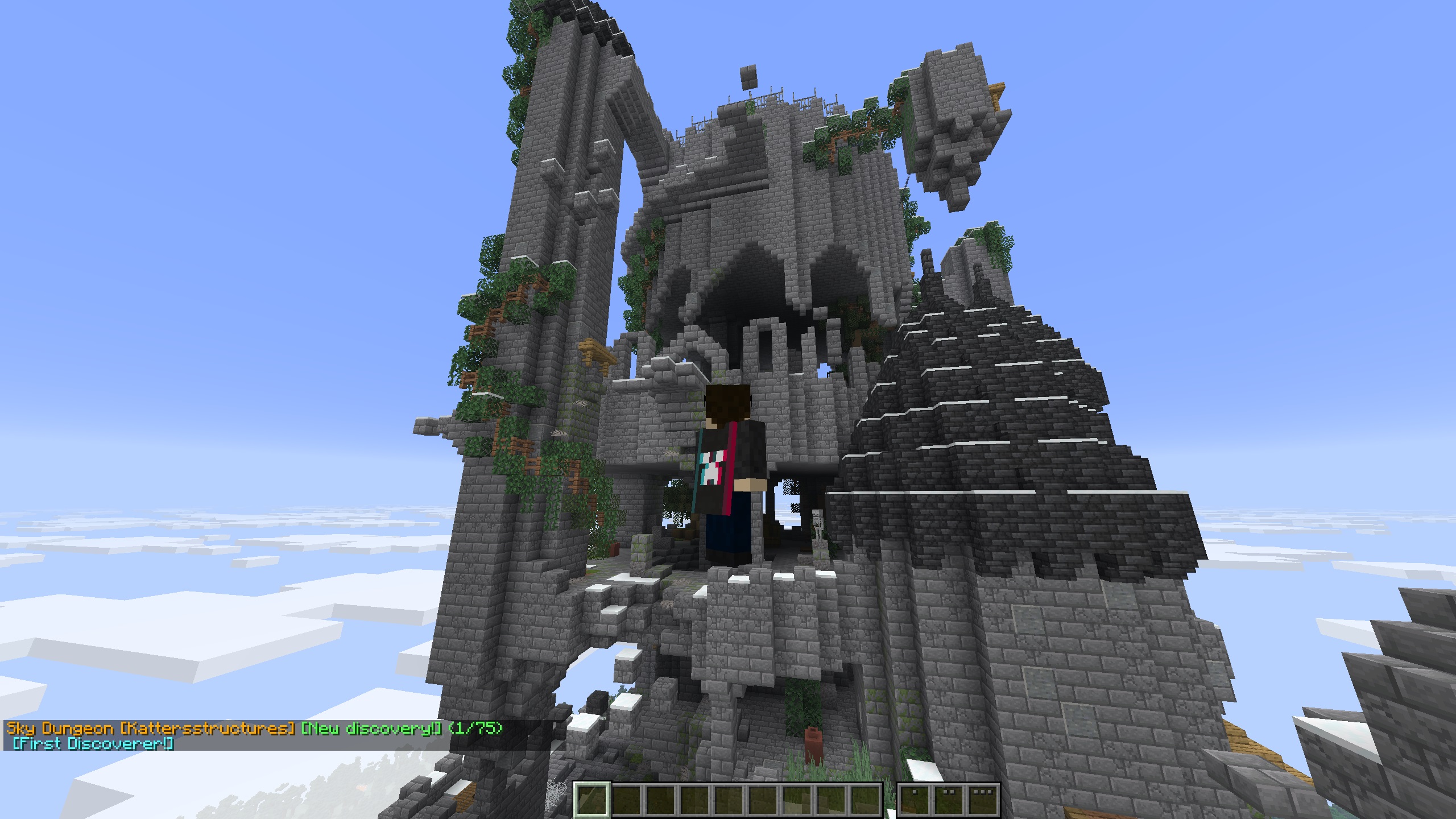
它的工作原理是:默认每 5 秒自动检查所有移动中的玩家,判断他们是否处于某个结构内,并将该结构添加到该玩家的已发现结构列表中。
⌨ 命令
主要命令:/explorer - 别名:/discoveries
| 命令 |
描述 |
/explorer page? <n> |
查看你已发现的結構。页码为可选参数 |
/explorer player <name> page? <n> |
查看其他玩家的发现记录。页码为可选参数 |
/explorer structure <id> |
查看谁发现了特定结构 |
/explorer instances <id> page? <n> |
查看你记录的特定结构实例。页码为可选参数 |
/explorer here |
显示你当前所处结构的详细信息面板 |
/explorer leaderboard page? <n> |
按发现数量排名的顶级玩家列表。页码为可选参数 |
/explorer playerinstances <player> <id> |
[OP] 查看任意玩家的实例记录 |
/explorer reload |
[OP] 重新加载配置和翻译文件 |
? 配置文件 - structure_explorer.json
位置:config/structure_explorer/structure_explorer.json
| 键 (Key) |
默认值 |
描述 |
checkIntervalMs |
5000 |
模组检查玩家是否进入结构的频率(毫秒)。数值越低 = 响应越快,但会略微增加服务器负载。 |
showNthDiscoverer |
true |
是否在聊天通知中显示发现者徽章,例如 [首次发现者!] 或 [第 3 位发现者]。 |
useMonthDayYear |
false |
时间戳格式。false = DD/MM/YYYY HH:MM:SS - true = MM/DD/YYYY HH:MM:SS |
trackInstances |
true |
是否记录每次访问的结构实例的坐标和时间戳。当设为 false 时,仅追踪哪些结构类型已被发现。 |
sounds.newDiscoverySound |
true |
播放新发现结构的音效。 |
sounds.newInstanceSound |
true |
播放新发现实例的音效。 |
? 面向模组开发者
Structure Explorer 可以通过两种方式获取结构名称——请选择适合您的一种方式。
选项 1 - 语言文件 (最简单)
如果您的模组已经有语言文件,Structure Explorer 会自动读取它。只需使用以下键格式添加条目:
"structure.<namespace>.<path>": "显示名称"
在 assets/mymod/lang/en_us.json 中的示例:
{
  "structure.mymod.cool_dungeon": "Cool Dungeon"
}
无需额外文件——名称会自动被识别(具体显示方式见下文场景说明)。
注意: 这仅适用于直接打包在模组 JAR 内的语言文件(assets/<namespace>/lang/en_us.json)。Structure Explorer 在服务端运行,无法读取资源包的语言文件——这些文件仅存在于客户端,服务端永远不可见。如果您的语言条目位于单独的资源包中而非模组的 JAR 内,请使用下面的选项 2。
选项 2 - translations.json (完全控制)
如需对前缀、后缀、颜色和确切名称拥有完全控制权,请在您的模组 JAR 内的 data/<your_modid>/structure_explorer/translations.json 处捆绑一个文件,使用与服务端管理员配置相同的翻译文件格式。它会在 config/translations/ 文件之前加载,因此服务端管理员始终可以覆盖它。
两者的交互方式
假设 Katter's Structures 在其语言文件中包含 "structure.kattersstructures.sky_dungeo": "Sky Dungeon"。以下是最终显示名称的确定方式:
场景 1 - 不存在语言条目也不存在翻译条目
例如 kattersstructures:ancient_ruins 且任何地方都未定义
结果:Ancient Ruins [Kattersstructures]
结构路径和命名空间均会被自动美化(下划线转为空格,每个单词首字母大写)并组合在一起——这是原始的回退方案。
场景 2 - 存在语言名称,但在任何地方(模组内置或服务器配置)都没有针对该命名空间的翻译条目
结果:Sky Dungeon [Kattersstructures]
由于没有自定义内容,命名空间会被自动美化并以方括号形式追加。
场景 3 - 翻译条目覆盖了此特定结构的名称
{
  "translations": {
    "kattersstructures": {
      "suffix": " [Katter's Structures]",
      "suffix_color": "gray",
      "structures": { "sky_dungeo": "Big Sky Fortress" }
    }
  }
}
结果:Big Sky Fortress [Katter's Structures]
使用覆盖后的名称,应用样式,且自动方括号消失。
场景 4 - 翻译条目设置了命名空间的样式但未覆盖此结构
{
  "translations": {
    "kattersstructures": {
      "prefix": "Katter's: ",
      "prefix_color": "red"
    }
  }
}
结果:Katter's: Sky Dungeon
sky_dungeo 没有覆盖项,因此使用语言文件中的名称作为基础——应用样式,且无自动方括号。
如果有人希望为其他模组制作非官方支持,数据包也可以工作——捆绑一个 data/<your_namespace>/structure_explorer/translations.json,就像上面的选项 2 一样。这些文件会在 config/translations/ 文件之前加载,因此服务端管理员始终可以覆盖它们。
? 翻译
原版结构名称默认已翻译——例如 minecraft:fortress ➡ 下要塞。若要自定义任何命名空间的名称,请将 JSON 文件放置在:
config/structure_explorer/translations/ - 文件可以任意命名(例如 minecraft.json、custom.json),并在内置翻译和模组捆绑翻译之后加载,因此它们始终具有最高优先级。可随时使用 /explorer reload 重新加载(需要 OP 权限)。
翻译文件格式
{
  "replace": false,
  "translations": {
    "namespace": {
      "prefix": "",
      "prefix_color": "",
      "suffix": "",
      "suffix_color": "",
      "name_color": "",
      "structures": {
        "structure_path": "Display Name"
      }
    }
  }
}
以下是一个示例,使用了 Minecraft Vanilla Locations
| 键 |
默认值 |
描述 |
replace |
false |
false 表示与现有翻译合并(新文件在冲突时胜出,前缀/后缀/颜色仅在非空时覆盖)。true 会丢弃该命名空间的所有内置/先前翻译——仅保留你在此处定义的内容。 |
prefix / suffix |
"" |
显示在结构名称之前/之后的文本,例如 "prefix": "Minecraft: " → Minecraft: Stronghold |
prefix_color / suffix_color / name_color |
(金色) |
分别应用于各部分的颜色。详见 Colors。 |
structures |
(无) |
结构路径 → 显示名称的映射。路径是结构 ID 中冒号之后的部分——例如 minecraft:stronghold → 路径为 stronghold |
颜色
命名颜色(不区分大小写):black dark_blue dark_green dark_aqua dark_red dark_purple gold gray dark_gray blue green aqua red light_purple yellow white
十六进制颜色(CSS 风格,以 # 开头):"#FF5500" "#00AAFF" "#FFFFFF"
免责声明:本模组的某些部分使用了 AI 辅助生成。
如果没有修改和学习 TelepathicGrunt 的 WITS mod,我就不可能开始制作此模组。
Structure Explorer
This mod adds incentive to players to try and discover all the structures there are in the world!
I wanted to make a server that incentivized exploring all areas of the world, and with more structures being added every few months, but I couldn't find any mod that tracked the discovered structures. I tried making it for myself many moons ago and failed, but tried again and got it done in just two days.
It works by automatically checking every 5s (by default), any moving players, to see if they are within a structure, and adds that to a list of discovered structures for that player.
⌨ Commands
Primary command: /explorer - Alias: /discoveries
| Command |
Description |
/explorer page? <n> |
Your discovered structures. Page is optional |
/explorer player <name> page? <n> |
View another player's discoveries. Page is optional |
/explorer structure <id> |
Who has discovered a specific structure |
/explorer instances <id> page? <n> |
Your recorded instances of a specific structure. Page is optional |
/explorer here |
Show the info panel for the structure you are currently standing in |
/explorer leaderboard page? <n> |
Top players ranked by discovery count. Page is optional |
/explorer playerinstances <player> <id> |
[OP] View any player's instances |
/explorer reload |
[OP] Reload config and translations |
? Config File - structure_explorer.json
Located at: config/structure_explorer/structure_explorer.json
| Key |
Default |
Description |
checkIntervalMs |
5000 |
How often (in ms) the mod checks if a player has entered a structure. Lower = more responsive, slightly more server load. |
showNthDiscoverer |
true |
Whether to show discoverer badges in chat notifications, e.g. [First Discoverer!] or [3rd Discoverer]. |
useMonthDayYear |
false |
Timestamp format. false = DD/MM/YYYY HH:MM:SS - true = MM/DD/YYYY HH:MM:SS |
trackInstances |
true |
Whether to record coordinates and timestamps for each structure instance visited. When false, only which structure types have been discovered is tracked. |
sounds.newDiscoverySound |
true |
Plays sound effect for a new Discovery found. |
sounds.newInstanceSound |
true |
Plays sound effect for a new Instance found. |
? For Mod Makers
Structure Explorer can pick up structure names two ways - pick whichever suits you.
Option 1 - Lang file (simplest)
If your mod already has a lang file, Structure Explorer reads it automatically. Just add entries using this key format:
"structure.<namespace>.<path>": "Display Name"
Example in assets/mymod/lang/en_us.json:
{
  "structure.mymod.cool_dungeon": "Cool Dungeon"
}
No extra files needed - names are picked up automatically (see scenarios below for exactly how they're displayed).
Note: This only works for lang files bundled directly inside a mod's JAR (assets/<namespace>/lang/en_us.json). Structure Explorer runs server-side and cannot read resource pack lang files - those only exist on the client and are never visible to the server. If your lang entries live in a separate resource pack rather than your mod's JAR, use Option 2 below instead.
Option 2 - translations.json (full control)
For full control over prefix, suffix, colors, and exact names, bundle a file inside your mod jar at data/<your_modid>/structure_explorer/translations.json, using the same translation file format as the server admin config. It loads before config/translations/ files, so server admins can always override it.
How the two interact
Say Katter's Structures has "structure.kattersstructures.sky_dungeo": "Sky Dungeon" in its lang file. Here's how the final display name is decided:
Scenario 1 - No lang entry and no translation entry exist at all
e.g. for kattersstructures:ancient_ruins with nothing defined anywhere
Result: Ancient Ruins [Kattersstructures]
Both the structure path and the namespace are auto-prettified (underscores → spaces, each word capitalized) and combined - this is the raw fallback.
Scenario 2 - Lang name exists, no translation entry for the namespace anywhere (mod-bundled or server config)
Result: Sky Dungeon [Kattersstructures]
The namespace gets auto-prettified and appended in brackets since nothing customizes it.
Scenario 3 - A translation entry overrides this specific structure's name
{
  "translations": {
    "kattersstructures": {
      "suffix": " [Katter's Structures]",
      "suffix_color": "gray",
      "structures": { "sky_dungeo": "Big Sky Fortress" }
    }
  }
}
Result: Big Sky Fortress [Katter's Structures]
The override name is used, styling is applied, and the auto-bracket disappears.
Scenario 4 - A translation entry styles the namespace but doesn't override this structure
{
  "translations": {
    "kattersstructures": {
      "prefix": "Katter's: ",
      "prefix_color": "red"
    }
  }
}
Result: Katter's: Sky Dungeon
No override exists for sky_dungeo, so the lang name is used as the base - styled, with no auto-bracket.
If anyone wants to make unofficial support for other mods, data packs work - bundle a data/<your_namespace>/structure_explorer/translations.json, just like Option 2 above. These load before config/translations/ files, so server admins can always override them.
? Translations
Vanilla structure names are translated by default - e.g. minecraft:fortress ➡ Nether Fortress. To customize names for any namespace, place JSON files in:
config/structure_explorer/translations/ - files can be named anything (e.g. minecraft.json, custom.json) and are loaded after built-in and mod-bundled translations, so they always win. Reload at any time with /explorer reload (requires OP).
Translation File Format
{
  "replace": false,
  "translations": {
    "namespace": {
      "prefix": "",
      "prefix_color": "",
      "suffix": "",
      "suffix_color": "",
      "name_color": "",
      "structures": {
        "structure_path": "Display Name"
      }
    }
  }
}
Here is an example, using the Minecraft Vanilla Locations
| Key |
Default |
Description |
replace |
false |
false merges with existing translations (new file wins on conflict, prefix/suffix/colors override only if non-empty). true discards all built-in/prior translations for that namespace - only what you define here will exist. |
prefix / suffix |
"" |
Text shown before/after the structure name, e.g. "prefix": "Minecraft: " → Minecraft: Stronghold |
prefix_color / suffix_color / name_color |
(gold) |
Color applied to each part independently. See Colors. |
structures |
(none) |
Map of structure path → display name. The path is the part after the colon in the structure ID - e.g. minecraft:stronghold → path is stronghold |
Colors
Named colors (case-insensitive): black dark_blue dark_green dark_aqua dark_red dark_purple gold gray dark_gray blue green aqua red light_purple yellow white
Hex colors (CSS-style, prefix with #): "#FF5500" "#00AAFF" "#FFFFFF"
Disclaimer: AI was used for varying parts of this mod.
I couldn't have started making this mod without modifying and learning from the WITS mod by TelepathicGrunt


 模组

 模组

 模组
 模组
 模组
 模组
评论 0
登录后参与评分
还没有评论,来抢沙发吧