Sulker

Sulker 是一款适用于 Minecraft Fabric 的客户端模组,用于管理命名潜影盒模板。
命名潜影盒可作为可重复使用的物品栏布局。潜影盒的自定义名称即为模板键,因此多个同名的潜影盒会共享相同的布局。
模板保存在本地,且跨世界通用。只需设置一次布局,然后通过给潜影盒起相同的名字即可在任何地方复用。
用法
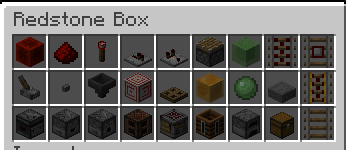
在铁砧中为潜影盒命名,打开它并排列好物品,然后执行 /sulker save。
所有同名潜影盒都会显示相同的布局。预期为空的槽位会显示半透明的“幽灵”物品图标,悬停在幽灵物品上时会显示该物品正常的提示框。
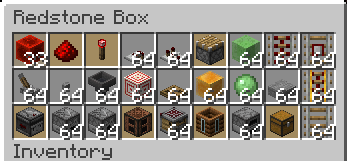
Sulker 会用红色背景标记错误的物品,并用琥珀色背景标记数量不足的物品,让你一眼就能看出何时需要补货。数量不足的警告可以在任何缺失物品、75%、50%、25% 时触发,也可以关闭。
保存的模板会保留物品的组件信息以对应特定槽位,因此带有组件的物品(如药水、地图、旗帜和重命名的物品)可以显示并匹配其保存的状态。
/sulker save counts 命令会将记住的堆叠大小保存为目标数量。
/sulker itemcount 或 /sulker setitem 命令可以在不重建整个潜影盒的情况下调整目标数量。
命令反馈会包含模板名称,且最近打开过的潜影盒记忆会在 60 秒后过期。
/sulker rename 和 /sulker copy 命令有助于在潜影盒名称发生变化时复用布局。
命令反馈会包含模板名称,系统会建议已保存的模板名称作为模板参数,且最近打开过的潜影盒记忆会在 60 秒后过期。
选项
配置文件控制着幽灵物品、幽灵提示框、错误物品着色、低数量警告级别以及最近关闭的潜影盒记忆等功能。
当安装了 Mod Menu 时,Sulker 会在 Mod Menu 的配置界面中暴露相同的选项。Mod Menu 是可选的。
命令
作用于潜影盒的命令默认使用最近打开的命名潜影盒,除非提供了模板名称。
/sulker save
将最近打开的潜影盒内容保存为该潜影盒名称的模板。空槽位会被忽略。
/sulker save counts
保存布局并将每个非空堆叠的大小存储为该槽位的目标数量。一个保存了 8 个鸡蛋的槽位期望至少要有 8 个鸡蛋,而不是满堆。
/sulker list
/sulker give <template name>
创建一个按已保存模板填充的命名潜影盒,并将其放入空闲的物品栏槽位中。需要创造模式。输入时会自动建议已保存的模板名称。
/sulker rename <old> <new>
重命名一个已保存的模板。对于包含空格的名字请使用引号,例如 /sulker rename "Redstone Kit" "Travel Kit"。
/sulker copy <from> <to>
将一个已保存的模板复制到一个新名称下。对于包含空格的名字请使用引号,例如 /sulker copy "Redstone Kit" "Backup Kit"。
按字母顺序列出已保存的模板名称。
/sulker delete [name]
删除最近打开的潜影盒模板,或在提供 name 时删除指定名称的模板。
/sulker itemcount <slot> <count> [template name]
为一个预期槽位设置目标数量。如果省略 template name,Sulker 会使用最近打开的命名潜影盒。槽位编号从 0 到 26,从左到右,从上到下。数量不能超过物品的正常最大堆叠数。
/sulker itemcount <slot> clear [template name]
移除单个槽位的自定义目标数量。该槽位将恢复为该物品的正常满堆目标。
/sulker setitem <slot> <item> <count> [template name]
直接使用物品 ID(如 minecraft:egg)设置单个模板槽位。如果省略 template name,Sulker 会使用最近打开的命名潜影盒。
/sulker setitem <item> <slot> <count> [template name]
上述直接编辑槽位命令的物品优先别名。
简短别名:
/sulkersave
/sulkerlist
/sulkerdelete [name]
Sulker
Sulker is a client-side Minecraft Fabric mod for named shulker box templates.
Named shulker boxes act as reusable inventory layouts. A shulker's custom name is the template key, so multiple shulkers with the same name intentionally share the same layout.
Templates are saved locally and work across worlds. Set up your layouts once, then reuse them anywhere by naming shulker boxes the same way.
Usage
Name a shulker box in an anvil, open it, arrange the items, then run /sulker save.
Every shulker with the same name shows the same layout. Empty expected slots show ghost items, and hovering a ghost item shows the expected item's normal tooltip.
Sulker marks wrong items with a red background and shows low count items with an amber background so you can see when to restock at a glance. Low-count warnings can start at any missing item, 75%, 50%, 25%, or be turned off.
Saved templates preserve item components for exact slots, so component-bearing items such as potions, maps, banners, and renamed items can show and match their saved variant.
/sulker save counts saves the remembered stack sizes as target counts.
/sulker itemcount or /sulker setitem can adjust count targets without rebuilding the whole shulker.
Command feedback includes the template name, and the recently opened shulker memory expires after 60 seconds.
/sulker rename and /sulker copy help reuse layouts when shulker names change.
Command feedback includes the template name, saved template names are suggested for template arguments, and the recently opened shulker memory expires after 60 seconds.
Options
The config controls ghost items, ghost tooltips, wrong-item tint, low-count warning level, and recently closed shulker memory.
When Mod Menu is installed, Sulker exposes the same options from Mod Menu's configure screen. Mod Menu is optional.
Commands
Commands that act on a shulker use the recently opened named shulker unless a template name is supplied.
/sulker save
Saves the recently opened shulker contents as the template for that shulker name. Empty slots are ignored.
/sulker save counts
Saves the layout and stores each non-empty stack size as that slot's target count. A slot saved with 8 eggs expects at least 8 eggs, not a full stack.
/sulker list
/sulker give <template name>
Creates a named shulker box filled from the saved template and puts it into a free inventory slot. Requires creative mode. Saved template names are suggested while typing.
/sulker rename <old> <new>
Renames a saved template. Quote names with spaces, such as /sulker rename "Redstone Kit" "Travel Kit".
/sulker copy <from> <to>
Copies a saved template to a new name. Quote names with spaces, such as /sulker copy "Redstone Kit" "Backup Kit".
Lists saved template names in alphabetical order.
/sulker delete [name]
Deletes the recently opened shulker template, or a named template when name is supplied.
/sulker itemcount <slot> <count> [template name]
Sets a target count for one expected slot. If template name is omitted, Sulker uses the recently opened named shulker. Slots are numbered 0 to 26, left to right, top to bottom. Counts cannot exceed the item's normal max stack size.
/sulker itemcount <slot> clear [template name]
Removes a custom target count from one slot. The slot goes back to the normal full-stack target for that item.
/sulker setitem <slot> <item> <count> [template name]
Sets one template slot directly, using an item id such as minecraft:egg. If template name is omitted, Sulker uses the recently opened named shulker.
/sulker setitem <item> <slot> <count> [template name]
Item-first alias for the same direct slot edit.
Short aliases:
/sulkersave
/sulkerlist
/sulkerdelete [name]


 模组

 模组

 模组
 模组

 模组
 模组
评论 0
登录后参与评分
还没有评论,来抢沙发吧