
SVM JoJo 是一个数据包,旨在带来准确的带有替身能力的游戏体验以及与 Boss 战斗的体验。该数据包还添加了装饰、进度系统和自定义成就!
常见问题解答
Q - 如何获得替身? - 制作并使用替身箭或使用替身唱片
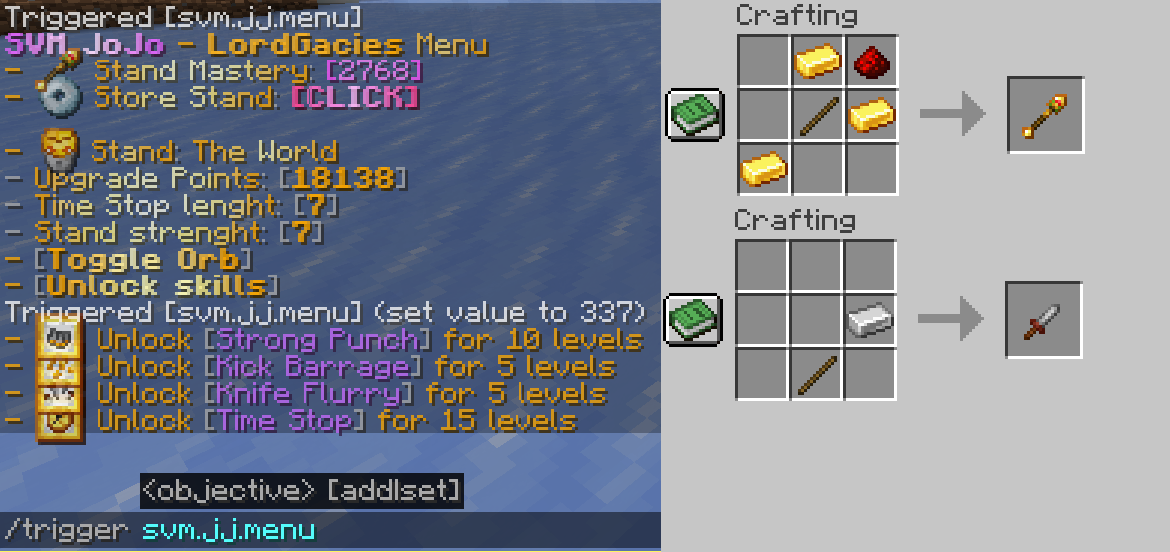
Q - 如何使用能力? - 使用 /trigger svm.jj.menu 命令并点击“解锁技能”,然后解锁你的技能,要检查激活状态,请查看替身的成就选项卡
Q - 如何获得替身点数? - 完成新的成就并击杀生物
Q - 如何移除替身? - 使用 /trigger svm.jj.menu 命令并点击“存储替身 [点击]”
Q - 这支持多人游戏吗? - 是的,你可以用白金之星打你朋友的脸 :)
Q - 有哪些替身? - 目前有 6 个:白金之星、世界、绯红之王、杀手皇后和天气预报以及白蛇,不过杀手皇后可以获得流浪猫和咬住灰尘
最新更新时间视频
安装方法
数据包
下载数据包的最新版完整文件
对于新世界
在“单人游戏”中,点击“创建新世界”,然后进入“更多”并点击“数据包”,然后点击“打开包文件夹”,数据包文件夹将会打开,然后将下载的文件拖拽/复制粘贴到打开的文件夹中,然后在游戏内点击数据包使其从“可用”变为“已选中”。
对于已有世界
在“单人游戏”中,选择你要安装该模组的世界,点击“编辑”,然后“打开世界文件夹”,然后进入“datapacks”文件夹并将下载的文件拖拽/复制粘贴到打开的文件夹中。
资源包
在“选项”中,点击“资源包...”,然后点击“打开包文件夹”,现在只需将数据包拖放进去,返回 Minecraft 并前往“选项”,然后“资源包”,点击 SVM JoJo 资源包并点击“完成”,这样应该就能加载你的资源了 (简而言之,资产位于数据包文件中,因此只需将其复制粘贴到资源包文件夹中)
模组
模组版本不需要其他操作,只需将下载的文件放入 .minecraft/mods 文件夹即可
如何使用 Modrinth 应用安装模组和数据包
SVM JoJo is a datapack that aims to bring accurate experience of gameplay with stand abilities as well as fighting against bosses, the datapacks also adds cosmetics, progression and custom advancements!
FAQ
Q - How to get stands? - Craft and use stand arrow or use a disc of a stand
Q - How do I use abilities? - Use /trigger svm.jj.menu command and click "Unlock Moves" then unlock your moves, to check the activation, check out advancements tab of the stand
Q - How do I get Stand Points? - Complete new advancements and kill mobs
Q - How do I get rid of a stand? - Use /trigger svm.jj.menu command and click "Store Stand [CLICK]"
Q - Is this multiplayer friendly? - Yes, you can bash your friends head with Star Platinum :)
Q - What stands are there? - 6 as for now, Star Platinum, The World, King Crimson, Killer Queen and Weather Report and Whitesnake, however Killer Queen can obtain Stray Cat and Bites The Dust
Latest update video
Installation
Datapack
Download newest full version of the datapack
For new world
In "Singleplayer", click "Create New World", then go into ""More" and click "Data Packs", then click "Open Pack Folder" and datapack folder will open, then just drag/copy-paste the downloaded file to the opened folder, then click on the datapack in-game so it's in "Selected" instead of "Available".
For existing world
In "Singleplayer", select your world where you want to install the pack, click "Edit" and then "Open World Folder", then go into "datapacks" folder and drag/copy-paste the downloaded file to the opened folder.
Resourcepack
In "Options", click "Resource Packs..." and click "Open Pack Folder", now just drag-drop the datapack, go back to Minecraft and go to "Options", then "Resource Packs", click the SVM JoJo Pack and click "Done" and that should load your resources (In short, assets are inside of the Datapack file, so just copy-paste it in the resourcepack folder)
Mod
Mod version doesn't require anything besides putting the downloaded file to .minecraft/mods folder
How to install mods & datapacks with the Modrinth App

下载 JoJo Stands
需要联机服务器吗?
稳定流畅、一键部署,几分钟即可和朋友联机开服
最低仅需 8 元/月 即可畅快联机
下载 JoJo Stands
需要联机服务器吗?
稳定流畅、一键部署,几分钟即可和朋友联机开服
最低仅需 8 元/月 即可畅快联机
下载 JoJo Stands
下载 JoJo Stands
需要联机服务器吗?
稳定流畅、一键部署,几分钟即可和朋友联机开服
最低仅需 8 元/月 即可畅快联机
下载 JoJo Stands
下载 JoJo Stands
需要联机服务器吗?
稳定流畅、一键部署,几分钟即可和朋友联机开服
最低仅需 8 元/月 即可畅快联机
下载 JoJo Stands
下载 JoJo Stands
需要联机服务器吗?
稳定流畅、一键部署,几分钟即可和朋友联机开服
最低仅需 8 元/月 即可畅快联机
下载 JoJo Stands
下载 JoJo Stands
暂无更新日志
关于这个资源的讨论、问题反馈与使用心得
还没有讨论,来发第一帖吧
你是这个资源的作者?登录后可认领此资源。
相似资源
 模组

可定制的鞘翅模组,支持装饰纹饰、旗帜图案等更多功能!
 模组

显示你正在注视的方块的信息。(适用于 Minecraft 1.16+ 的 Hwyla/Waila 分支)
 模组
在游戏画面角落显示附近世界地形、玩家、生物和实体的地图。可创建路径点,帮助你找到标记过的位置。
 模组
使用 JavaScript 编辑配方、添加自定义物品、编写世界事件!
 模组

查看物品与配方
 模组
AE2:一款流行的自动化与存储模组
评论 0
登录后参与评分
还没有评论,来抢沙发吧