⚔️ SwordSight:穿透杂乱环境的服务器权威判定
SwordSight 是一款旨在增强战斗体验的模组,它防止高草、花朵和其他非实体杂物阻挡武器的视线,让你能够无缝击中它们身后的敌人。
除了原有的服务器权威配置系统外,SwordSight 现在还附带了一个完整的游戏内配置菜单 —— 一个类似 JEI/REI 的双列表选择器,用于精确选择忽略哪些方块,并针对生长阶段的作物提供了专门的处理逻辑,你可以决定完全成熟的植物是否仍能被你的武器收割。
? 联系我 & 支持信息
? 主要支持渠道(推荐)
所有常规问题、功能请求和非紧急 bug 报告都应发布在我们的 Discord 服务器 的相关频道中。 我们会积极监控服务器并尽快回复。这确保了整个社区都能从讨论和解决方案中受益。
? 紧急私信 (PM) 政策
虽然我们倾向于首先通过 Discord 服务器处理所有问题,但在特定紧急情况下,欢迎你直接私信我:
- 允许的原因: 你的服务器正在崩溃或出现与我的某个模组/插件直接相关的严重、破坏游戏平衡的错误。
- 要求: 你必须是该服务器的所有者。
- 时区: 我处于 (CET/CEST) 时区。
- 私信时间: 请仅在 上午 10:00 至晚上 10:00(布鲁塞尔时间) 之间发送私信。
我会尽力尽快回复你的私信以提供帮助,并看看我能做些什么来解决你的紧急问题。但是,请理解不能保证立即回复,而且私信是一种职业礼仪,而非一种权利。 感谢你的理解与合作!
? 功能特性
?️ 游戏内配置菜单(快捷键:M)
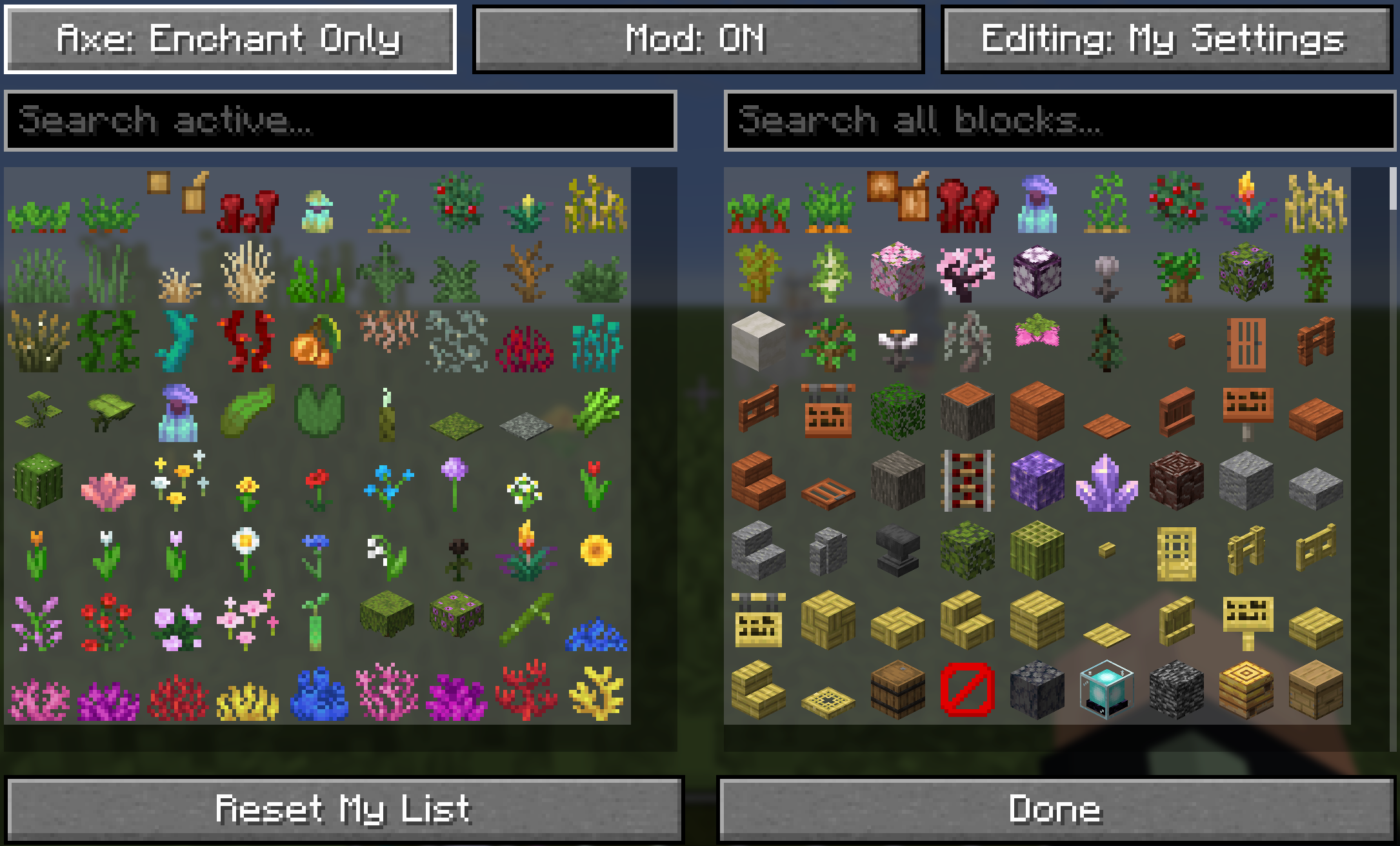
按下 M(默认值,可在 控制设置 中完全重新绑定)或运行 /swordsight//swords 直接打开 SwordSight 的配置菜单 —— 无需再使用聊天命令来查看当前生效的内容。
- 双列表选择器:左侧为 已启用 列表(当前被忽略的方块),右侧为 所有方块 列表(其他一切你可以启用的方块),类似于 JEI/REI 的物品浏览器。点击任意一侧的条目即可将其移至另一侧。
- 智能排序:已启用列表遵循经过精心策划的、对农业友好的顺序 —— 草类(短草、高草、干草、海草)→ 其他绿植 → 花朵(先短花,后高花)→ 树苗 → 珊瑚扇 → 珊瑚 → 其余部分按照原版创造模式物品栏的顺序排列。所有方块列表优先显示植物物质(包括模组添加的植物),将原木和其他实体方块排在后面。
- 两种编辑配置文件:我的设置 始终由你编辑,个人且独立于任何服务器。编辑:服务器 仅在单人游戏中可用,或在多人游戏中拥有真实服务器验证权限的玩家可用 —— 按钮始终可见,但如果没有相应权限,它不会切换模式。服务器编辑模式会将列表染成黄色,以便你随时知道正在操作哪个配置文件。
- 正确处理的生长阶段作物:小麦、胡萝卜、马铃薯、甜菜根、可可豆、下界疣、火把花、葫芦藤和甜浆果灌木各有两个专用条目 —— 倒数第二阶段 和 完全成熟 —— 渲染时使用其真实的游戏中生长纹理,而不是通用的种子图标。切换它们可以精确控制每种作物的行为:
- 倒数第二阶段激活:你的武器会穿过每一个更早的生长阶段,但完全成熟的植物仍然阻挡命中 —— 因此它仍可被收割。
- 完全成熟阶段也激活:植物在所有阶段都受到保护,包括完全成熟时。
- 整洁的图标:缺少或损坏纹理的条目会自动过滤掉,非原版/自定义头颅方块被排除在外,成对的方块如火把/墙上的火把或生物头颅及其墙壁变体合并为单个条目,这样你就永远不会看到重复项。
- 重置我的列表 可随时将你的个人配置文件恢复为随附的默认设置。
? 服务器权威配置
- 多人一致性:当安装在专用服务器上时,服务器自身的方块列表作为什么是 可用 的真理来源 —— 普通玩家只能看到并使用服务器当前允许的方块,使每个玩家的体验与服务器意图保持一致。
- 你的设置,视服务器许可而定:你自己的已启用/未启用选择始终属于你 —— 服务器不会覆盖你的个人选择。相反,它定义了可能的边界:任何超出服务器允许列表的东西都不会起作用或出现,无论你自己的偏好如何。
- 服务器操作员:拥有服务器权限的玩家可以在菜单中切换到 编辑:服务器(或使用等效的聊天命令)来更改服务器上每个玩家都必须遵守的列表。
- 原版服务器回退:连接到未安装 SwordSight 的服务器时,会自动回退到一个捆绑的、精心策划的“安全”方块列表,因此基本的穿透命中功能无需任何服务器端设置即可立即生效。
- 单人游戏:作为一个完全本地化的独立模组运作 —— 你的个人设置就是唯一重要的因素,无需担心服务器边界。
? 默认忽略的方块
随附的默认配置包含一个全面的非实体植物和杂物方块列表,涵盖草类、作物、花朵、藤蔓、珊瑚等。
? 默认方块列表
// --- 草、蕨类、灌木 ---
"minecraft:short_grass",
"minecraft:tall_grass",
"minecraft:dead_bush",
"minecraft:fern",
"minecraft:large_fern",
"minecraft:short_dry_grass",
"minecraft:tall_dry_grass",
"minecraft:bush",
"minecraft:firefly_bush",

// --- 作物与可生长植物(具有专用的生长阶段处理 — 请参阅游戏内配置菜单)---
"minecraft:sugar_cane",
"minecraft:wheat",
"minecraft:carrots",
"minecraft:potatoes",
"minecraft:beetroots",
"minecraft:cocoa",
"minecraft:nether_wart",
"minecraft:torchflower_crop",
"minecraft:pitcher_crop",
"minecraft:sweet_berry_bush",
"minecraft:bamboo",
"minecraft:bamboo_sapling",
"minecraft:cactus",
"minecraft:cactus_flower",

// --- 花朵(矮株与高株)---
"minecraft:poppy",
"minecraft:dandelion",
"minecraft:allium",
"minecraft:azure_bluet",
"minecraft:red_tulip",
"minecraft:orange_tulip",
"minecraft:white_tulip",
"minecraft:pink_tulip",
"minecraft:oxeye_daisy",
"minecraft:cornflower",
"minecraft:lily_of_the_valley",
"minecraft:wither_rose",
"minecraft:blue_orchid",
"minecraft:torchflower",
"minecraft:sunflower",
"minecraft:lilac",
"minecraft:rose_bush",
"minecraft:peony",
"minecraft:pink_petals",
"minecraft:wildflowers",

// --- 藤蔓、根系、叶片 ---
"minecraft:vine",
"minecraft:twisting_vines",
"minecraft:twisting_vines_plant",
"minecraft:weeping_vines",
"minecraft:weeping_vines_plant",
"minecraft:cave_vines",
"minecraft:cave_vines_plant",
"minecraft:hanging_roots",
"minecraft:glow_lichen",
"minecraft:mangrove_propagule",
"minecraft:mushroom_stem",
"minecraft:crimson_roots",
"minecraft:warped_roots",
"minecraft:azalea",
"minecraft:flowering_azalea",
"minecraft:small_dripleaf",
"minecraft:big_dripleaf", // 其茎段会自动跟随
"minecraft:pitcher_plant",

// --- 水生植物/珊瑚 ---
"minecraft:seagrass",
"minecraft:tall_seagrass",
"minecraft:kelp",
"minecraft:kelp_plant",
"minecraft:lily_pad",
"minecraft:tube_coral",
"minecraft:brain_coral",
"minecraft:bubble_coral",
"minecraft:fire_coral",
"minecraft:horn_coral",
"minecraft:tube_coral_fan",
"minecraft:brain_coral_fan",
"minecraft:bubble_coral_fan",
"minecraft:fire_coral_fan",
"minecraft:horn_coral_fan",
"minecraft:sea_pickle",
"minecraft:moss_carpet",
"minecraft:pale_moss_carpet"
穿透遮挡视线的方块
- 投射线覆盖:该模组拦截游戏的投射线检查,并强制使配置文件中定义的非固体杂乱方块返回空碰撞箱,从而使武器的视线能够穿过它们。
- 性能缓存:内部缓存将已解析的
Block 对象作为被忽略的方块进行存储,确保游戏过程中的查找速度极快,且单次命中无性能损耗。
可配置的武器适用性
穿透功能严格受武器类型控制:
- 自动适用:对 剑(通过
#minecraft:swords 物品标签)、三叉戟 和 锤 自动生效。
- 斧头支持(可切换):可通过游戏内菜单或命令
/swordsight axe 和 /swordsight axe enchant 在 禁用 → 仅附魔 → 始终启用 之间循环切换斧头的行为。
- 仅附魔 模式下,斧头必须附带战斗附魔(锋利、亡灵杀手、节肢杀手或火焰附加)才能触发穿透效果。
⚙️ 游戏内命令
可使用 /swordsight 或其别名 /swords 访问命令,现在除了常规聊天输出外,还会直接打开游戏内配置菜单。
| 命令 |
描述 |
上下文 |
/swordsight |
显示命令列表和链接,并打开配置菜单。 |
所有上下文 |
/swordsight reload |
从磁盘重新加载配置文件并更新方块缓存。 |
单人游戏 / 服务器操作员 |
/swordsight list |
显示当前所有被忽略的方块。 |
所有上下文 |
/swordsight list <item_id> |
切换忽略列表中的物品/方块。 |
单人游戏 / 服务器操作员 |
/swordsight axe |
在禁用 / 仅附魔 / 始终启用 之间循环切换斧头穿透功能。 |
单人游戏 / 服务器操作员 |
/swordsight axe enchant |
切换斧头的附魔要求。 |
单人游戏 / 服务器操作员 |
在多人游戏中,没有服务器权限的玩家仍可以通过游戏内菜单查看当前配置并自由管理自己的个人配置文件 —— 只有更改 服务器 共享列表才需要操作员权限。
整合包政策
- 你 可以 将此模组包含在任何整合包中。
- 请勿直接修改模组的 JAR 文件。
- 整合包本身,或在整合包中访问此模组的方式, 不得出售。
⚔️ SwordSight: Server-Authoritative Hit Through the Clutter
SwordSight is a mod designed to enhance combat by preventing blocks like tall grass, flowers, and other non-solid clutter from blocking your weapon's line of sight, allowing you to hit enemies behind them seamlessly.
Alongside the original server-authoritative configuration system, SwordSight now ships with a full in-game configuration menu — a JEI/REI-style dual-list picker for choosing exactly which blocks are ignored, with dedicated handling for growth-stage crops so you can decide whether a fully-grown plant should still be farmable with your weapon.
? Contact Me & Support Information
? Primary Support Channel (Preferred)
All general questions, feature requests, and non-urgent bug reports should be posted in the appropriate channels on our Discord Server. We actively monitor the server and will respond as soon as possible. This ensures that the whole community can benefit from the discussion and solutions.
? Urgent Private Messaging (PM) Policy
While we prefer all issues to be handled via the Discord server first, you are welcome to PM me directly under specific urgent circumstances:
- Allowed Reason: Your server is crashing or experiencing critical, game-breaking errors directly related to one of my mods/plugins.
- Requirement: You must be the owner of the server.
- Time Zone: I am operating in the (CET/CEST) Time Zone.
- PM Hours: Please only send private messages between 10:00 AM and 10:00 PM (Brussels Time).
I will endeavor to answer your PM as soon as I can to be helpful and see what I can do to resolve your urgent issue. However, please understand that immediate responses are not guaranteed, and private messaging is a professional courtesy, not an entitlement. Thank you for your understanding and cooperation!
? Features
?️ In-Game Configuration Menu (Keybind: M)
Press M (default, fully rebindable in Controls) or run /swordsight//swords to open SwordSight's config menu directly — no more chat commands needed to see what's active.
- Two-list picker: an Active list on the left (blocks currently ignored) and an All Blocks list on the right (everything else you can enable), just like a JEI/REI item browser. Click an entry on either side to move it across.
- Smart sorting: the Active list follows a curated, farming-friendly order — grasses (short, tall, dry, sea) → other greens → flowers (short, then tall) → saplings → coral fans → coral → everything else in the same order as the vanilla creative inventory. The All Blocks list surfaces plant matter first (including modded flora), pushing logs and other solid blocks further down.
- Two editing profiles: My Settings is always yours to edit, personal and independent of any server. Editing: Server is available only in single-player, or to players with genuine server-verified permission in multiplayer — the button is always visible, but simply won't switch modes without the right access. Server-editing mode tints the list yellow so you always know which profile you're touching.
- Growth-stage crops, done properly: wheat, carrots, potatoes, beetroots, cocoa, nether wart, torchflower, pitcher plant, and sweet berry bush each get two dedicated entries — second-to-last stage and fully grown — rendered with their real in-game growth textures rather than a generic seed icon. Toggling them controls exactly how each crop behaves:
- Second-to-last stage active: your weapon passes through every earlier growth stage, but the fully-grown plant still blocks hits — so it stays farmable.
- Fully-grown stage also active: the plant is protected at every stage, including once it's fully grown.
- Clean icons: entries with a missing or broken texture are automatically filtered out, non-vanilla/custom skull blocks are excluded, and paired blocks like torch/wall-torch or a mob skull and its wall variant are merged into a single entry so you never see duplicates.
- Reset My List restores your personal profile back to the shipped defaults at any time.
? Server-Authoritative Configuration
- Multiplayer Consistency: when installed on a dedicated server, the server's own block list acts as the source of truth for what's available at all — regular players only ever see and use blocks the server currently permits, keeping every player's experience consistent with server intent.
- Your Settings, Server Permitting: your own Active/Inactive choices always remain yours — the server doesn't overwrite your personal picks. Instead, it defines the boundary of what's possible: anything outside the server's allowed list simply won't function or appear, no matter your own preferences.
- Server Operators: players with server permission can switch to Editing: Server in the menu (or use the equivalent chat commands) to change the list every player on the server is bound by.
- Vanilla Server Fallback: connecting to a server that doesn't have SwordSight installed automatically falls back to a bundled, curated "safe" block list, so basic hit-through functionality still works immediately without any server-side setup.
- Single-Player: acts as a fully local, self-contained mod — your personal settings are all that matter, with no server boundary to worry about.
? Default Ignored Blocks
The shipped default configuration includes a comprehensive list of non-solid plant and clutter blocks, covering grasses, crops, flowers, vines, corals, and more.
? Default Block List
// --- GRASSES, FERNS, BUSHES ---
"minecraft:short_grass",
"minecraft:tall_grass",
"minecraft:dead_bush",
"minecraft:fern",
"minecraft:large_fern",
"minecraft:short_dry_grass",
"minecraft:tall_dry_grass",
"minecraft:bush",
"minecraft:firefly_bush",

// --- CROPS & GROWABLES (with dedicated growth-stage handling — see In-Game Configuration Menu) ---
"minecraft:sugar_cane",
"minecraft:wheat",
"minecraft:carrots",
"minecraft:potatoes",
"minecraft:beetroots",
"minecraft:cocoa",
"minecraft:nether_wart",
"minecraft:torchflower_crop",
"minecraft:pitcher_crop",
"minecraft:sweet_berry_bush",
"minecraft:bamboo",
"minecraft:bamboo_sapling",
"minecraft:cactus",
"minecraft:cactus_flower",

// --- FLOWERS (Short & Tall) ---
"minecraft:poppy",
"minecraft:dandelion",
"minecraft:allium",
"minecraft:azure_bluet",
"minecraft:red_tulip",
"minecraft:orange_tulip",
"minecraft:white_tulip",
"minecraft:pink_tulip",
"minecraft:oxeye_daisy",
"minecraft:cornflower",
"minecraft:lily_of_the_valley",
"minecraft:wither_rose",
"minecraft:blue_orchid",
"minecraft:torchflower",
"minecraft:sunflower",
"minecraft:lilac",
"minecraft:rose_bush",
"minecraft:peony",
"minecraft:pink_petals",
"minecraft:wildflowers",

// --- VINES, ROOTS, FOLIAGE ---
"minecraft:vine",
"minecraft:twisting_vines",
"minecraft:twisting_vines_plant",
"minecraft:weeping_vines",
"minecraft:weeping_vines_plant",
"minecraft:cave_vines",
"minecraft:cave_vines_plant",
"minecraft:hanging_roots",
"minecraft:glow_lichen",
"minecraft:mangrove_propagule",
"minecraft:mushroom_stem",
"minecraft:crimson_roots",
"minecraft:warped_roots",
"minecraft:azalea",
"minecraft:flowering_azalea",
"minecraft:small_dripleaf",
"minecraft:big_dripleaf", // its stem segment always follows automatically
"minecraft:pitcher_plant",

// --- WATER PLANTS/CORALS ---
"minecraft:seagrass",
"minecraft:tall_seagrass",
"minecraft:kelp",
"minecraft:kelp_plant",
"minecraft:lily_pad",
"minecraft:tube_coral",
"minecraft:brain_coral",
"minecraft:bubble_coral",
"minecraft:fire_coral",
"minecraft:horn_coral",
"minecraft:tube_coral_fan",
"minecraft:brain_coral_fan",
"minecraft:bubble_coral_fan",
"minecraft:fire_coral_fan",
"minecraft:horn_coral_fan",
"minecraft:sea_pickle",
"minecraft:moss_carpet",
"minecraft:pale_moss_carpet"
Bypass Vision-Obscuring Blocks
- Raycast Override: the mod intercepts the game's raycast check and forces non-solid clutter blocks defined in the active config to return an empty hitbox, allowing your weapon's line-of-sight to pass through them.
- Performance Cache: an internal cache of ignored blocks as resolved
Block objects keeps lookups fast during gameplay, with no per-hit performance cost.
Configurable Weapon Eligibility
The hit-through functionality is strictly controlled by weapon type:
- Automatic Eligibility: works automatically with Swords (via the
#minecraft:swords item tag), Tridents, and Maces.
- Axe Support (Toggleable): cycle axe behavior between Disabled → Enchant Only → Always Enabled from the in-game menu or via
/swordsight axe and /swordsight axe enchant.
- Enchant Only requires the axe to carry a combat enchantment (Sharpness, Smite, Bane of Arthropods, or Fire Aspect) before hit-through kicks in.
⚙️ In-Game Commands
Commands are accessible using either /swordsight or the alias /swords, and now open the in-game configuration menu directly in addition to their usual chat output.
| Command |
Description |
Context |
/swordsight |
Displays the command list and links, and opens the configuration menu. |
All contexts |
/swordsight reload |
Reloads the config from disk and updates the block cache. |
Single-player / Server operators |
/swordsight list |
Shows all currently ignored blocks. |
All contexts |
/swordsight list <item_id> |
Toggles an item/block in the ignored list. |
Single-player / Server operators |
/swordsight axe |
Cycles Axe Hit-Through between Disabled / Enchant Only / Always Enabled. |
Single-player / Server operators |
/swordsight axe enchant |
Toggles the enchantment requirement for axes. |
Single-player / Server operators |
In multiplayer, players without server permission can still view the current configuration and freely manage their own personal profile through the in-game menu — only changes to the server's shared list require operator permission.
Modpack Policy
- You ARE PERMITTED to include this mod in any modpack.
- Please do not modify the mod's JAR file directly.
- The modpack itself, or access to this mod within the modpack, must not be sold.


 模组

 模组

 模组

 模组

 模组

 模组

评论 0
登录后参与评分
还没有评论,来抢沙发吧