
第三届 96 小时模组制作马拉松 ModJam 的(个人组)优胜者。
本模组 loosely based on CorridorDigital 制作的同步网络剧集《Sync》。
Sync 提供克隆体,或者用我们喜欢的方式称呼它们为“外壳”(shells)。这些外壳基本上是一个全新的个体,拥有独立的物品栏、经验等级甚至游戏模式。
然而,它们缺乏一个能控制它们的意识。这时玩家便登场了。每个外壳都通过生物特征与用于创建它的样本所属的玩家绑定,并允许玩家将意识“同步”到该外壳上,从而实质上创建多个玩家实例。
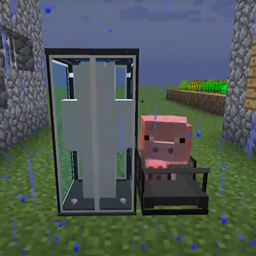
放置一个外壳制造器(shell constructor),右键点击它并提供一份样本(警告:这会很痛!)。外壳制造器需要电力才能工作,因此在其旁边放置一台跑步机,并将猪或狼引诱至跑步机中心以产生 Piggawatts 电量。使用拴绳会有所帮助(你会拿回拴绳)。随后,外壳制造器将开始构建一个外壳。
构建好外壳后,你需要放置一个外壳存储单元并为其提供红石电源。指示灯变为绿色后,你可以走进该存储单元以激活它。此时会弹出一个径向菜单,显示可用外壳及其位置列表。选择构造器中的外壳(标有“完成”指示),然后看着你同步进入新的外壳。
外壳同步也支持跨维度!通过外壳前往下界并返回!不过,由于……技术难题,你无法在末地进出外壳。
默认情况下,外壳为玩家提供一条“额外生命”。当你使用的外壳被摧毁时,你会立即同步到最近可用的外壳。你可以用床右键点击某个存储单元,将其标记为偏好外壳,并标注为主存储单元。你也可以使用命名牌为存储单元命名。这项“额外生命”功能在困难模式下同样生效,因此如果你有一个活跃的外壳备份,就不会被迫放弃困难模式世界,而是可以同步到另一个外壳。
物品
Sync Core:(在困难模式下用信标替代末影珍珠)
Shell Constructor:
Shell Storage:
Treadmill:
Winner (Individual) of the third 96 hour modding marathon, ModJam.
Loosely based on the Sync Webseries by CorridorDigital.
Sync provides clones, or as we like to call it, "shells". These shells are basically a new individual, with their own inventory, experience level, and even gamemode.
However, what they lack, is a mind to control them. That’s where the player comes in. Each shell is biometrically tied to the player who’s sample is used to create it, and will allow the player to “sync” their mind to the other shell, essentially creating multiple player instances.
Place a shell constructor down and right click it to provide a sample (warning, this hurts!). The shell constructor cannot work without power, so put a treadmill down next to it and lure a Pig or a Wolf to the center of the treadmill to generate Piggawatts. A lead will help out out with this (you will get it back). The shell constructor will begin building a shell.
Once the shell is constructed, you need to place down a shell storage unit and supply redstone power to it. The indicator will switch to green and you can walk into the storage unit to activate it. You will see a radial menu pop up with the list of available shells and their positions. Select the shell in the constructor (labelled with the “Done” indicator) and watch as you are synced into the new shell.
Shell syncing works cross dimensional too! Get to the nether and back through a shell! However, you cannot enter or leave shells in The End due to…. technical difficulties.
By default, shells provide an “extra life” to the player. When the shell you are using dies, you will immediately resync to the nearest shell available. You can mark a preference shell by right clicking a storage unit with a bed, labelling it as a home storage unit. You can also name storage units with a name tag. This “extra life” feature works in Hardcore mode, so if you have an active backup shell you will not be forced to abandon a hardcore world, but instead resync to another shell.
Items
Sync Core: (Replace Ender Pearl with Beacon for Hard Mode)
Shell Constructor:
Shell Storage:
Treadmill:
下载 Sync
需要联机服务器吗?
稳定流畅、一键部署,几分钟即可和朋友联机开服
最低仅需 8 元/月 即可畅快联机
下载 Sync
需要联机服务器吗?
稳定流畅、一键部署,几分钟即可和朋友联机开服
最低仅需 8 元/月 即可畅快联机
下载 Sync
需要联机服务器吗?
稳定流畅、一键部署,几分钟即可和朋友联机开服
最低仅需 8 元/月 即可畅快联机
下载 Sync
需要联机服务器吗?
稳定流畅、一键部署,几分钟即可和朋友联机开服
最低仅需 8 元/月 即可畅快联机
下载 Sync
下载 Sync
下载 Sync
下载 Sync
下载 Sync
下载 Sync
7.1.0 - 由 ichttt 修复:
- 修复等级与同步导致的物品复制漏洞。
- 在构造器中正确渲染玩家纹理。
- 改进了皮肤下载和缓存系统。
- 添加了配置选项,以迁移因模组在 PlayerCloneEvent 事件中复制整个背包而引发的问题。
- 在构造器和存储单元上渲染破坏进度。
- 修复当玩家未登录时,构造器和存储无法获取玩家纹理的问题。
- 修复当存储上半部分先被摧毁时,下半部分外壳未被销毁的问题。
- 用户名到 UUID 的迁移。
- 代码清理。
关于这个资源的讨论、问题反馈与使用心得
还没有讨论,来发第一帖吧
你是这个资源的作者?登录后可认领此资源。
相似资源
 模组

一个用于收集生物掉落物的多区块模组。
 模组

原版世界生成优化模组
 模组
在游戏画面角落显示附近世界地形、玩家、生物和实体的地图。可创建路径点,帮助你找到标记过的位置。
 模组
添加全屏世界地图,显示你在世界中已探索的区域。与 Xaero's Minimap 搭配使用效果极佳。
 模组

让你能够在世界中的任何位置定位结构。
 模组

对 Minecraft 的沙漠神殿进行了全面重新设计!
评论 0
登录后参与评分
还没有评论,来抢沙发吧