Sync Reborn 是一款科幻克隆模组。
创建被称为“外壳”(Shells)的替代躯体,将它们储存在未来风格的克隆舱中,并在需要备用身体时同步进入其中。每个外壳都可以保存玩家数据,例如物品栏、经验值、生命值和游戏模式,让每一个外壳都仿佛是一个独立的个体。
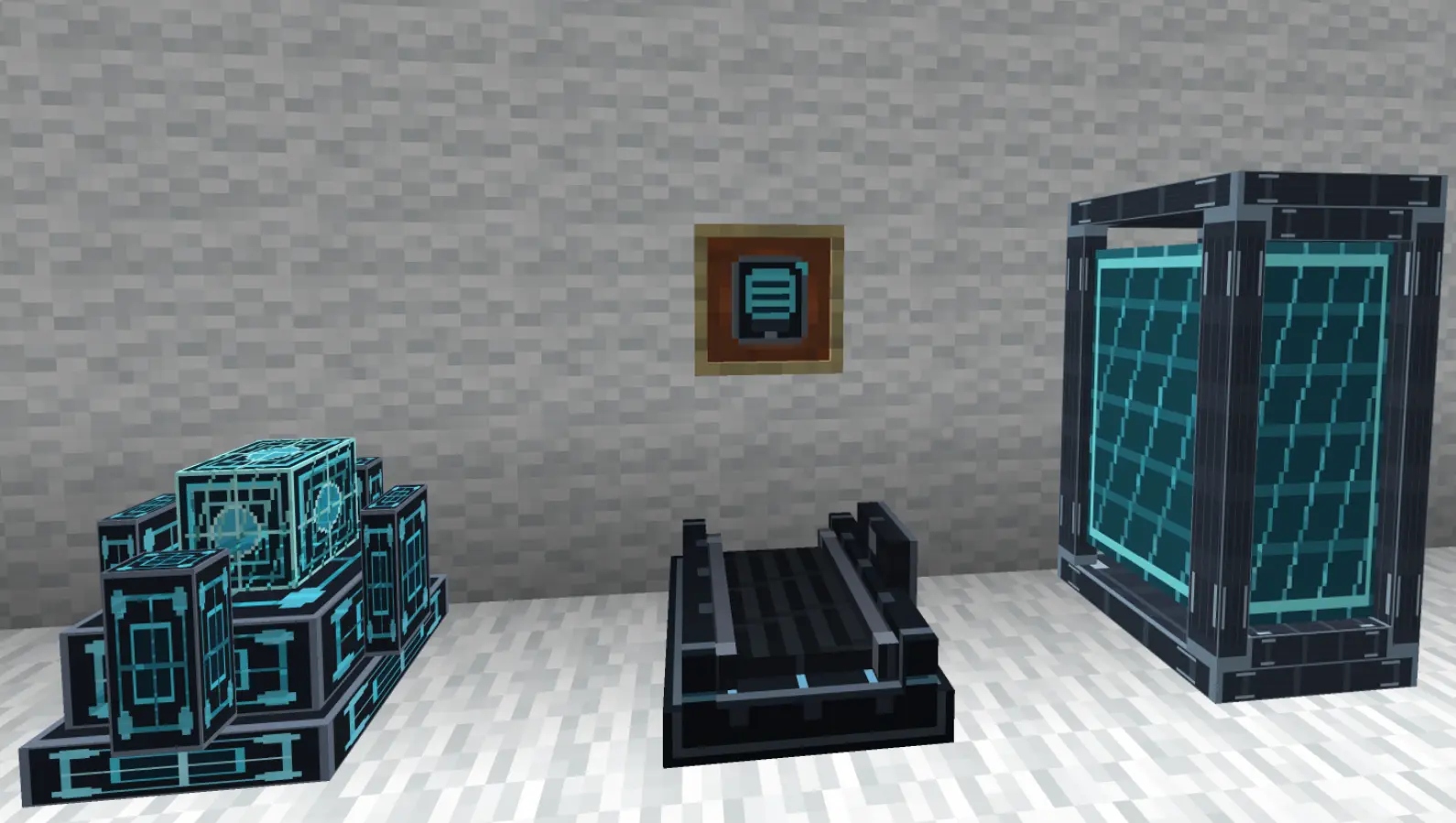
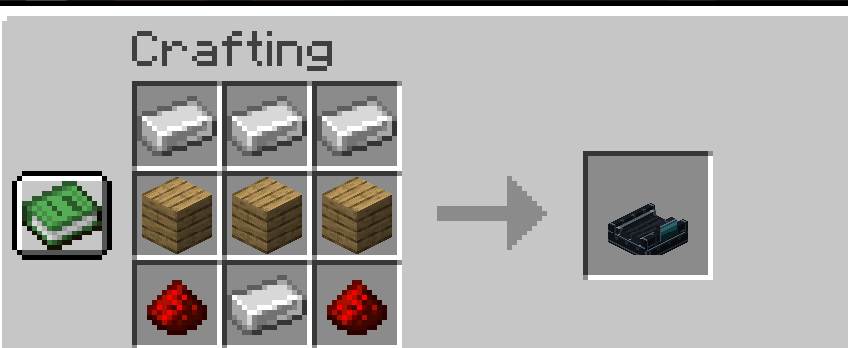
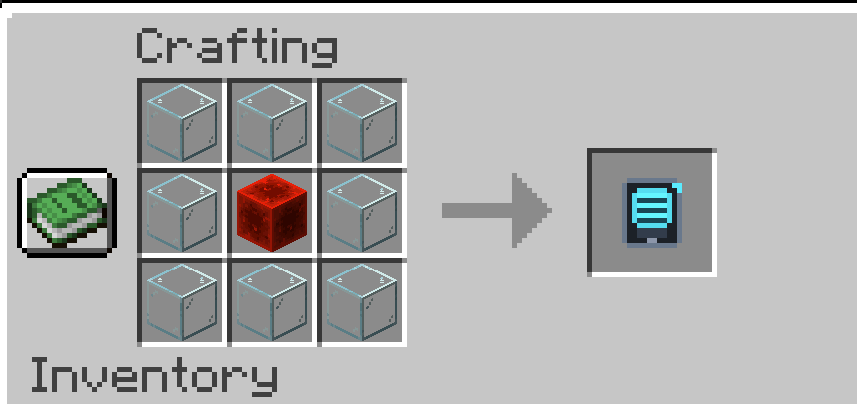
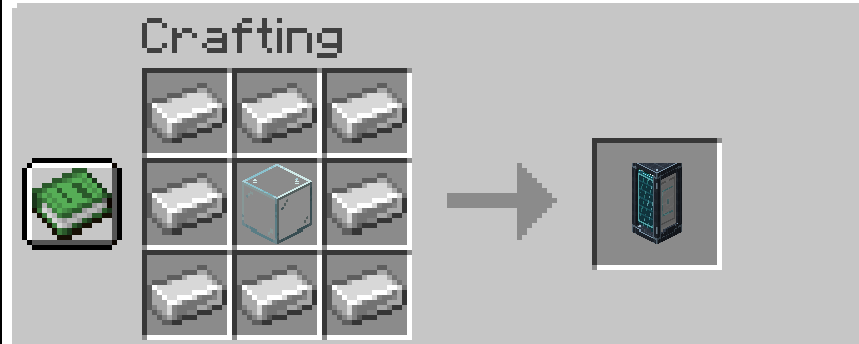
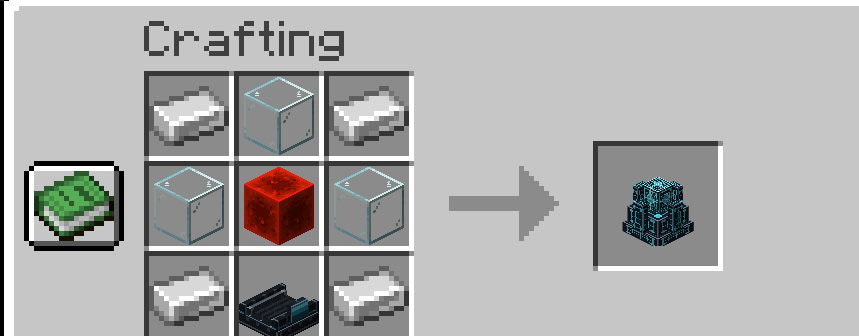
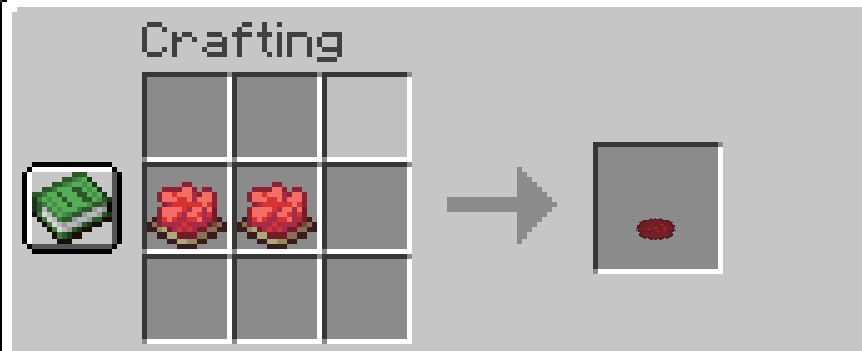
要开始使用,请使用跑步机(Treadmills)、外壳制造器(Shell Constructor)、外壳存储舱(Shell Storage Pods)和外壳平板(Shell Tablet)构建一个克隆设置。跑步机为机器提供所需的动力,而外壳制造器可以创建生物识别外壳,并将其放入存储设备中。一旦存储完成,就可以使用外壳平板来选择这些外壳。
如果你死亡,Sync Reborn 可以将你转移到一个已存储的外壳中,只要你的系统准备就绪,你就有机会获得第二次生命。
功能
受 iChun 的 Sync 启发的科幻克隆系统
创建生物识别玩家外壳
将外壳存储在未来的外壳存储舱中
使用外壳平板查看并选择已存储的外壳
外壳可以保存物品栏、经验值、生命值和游戏模式
死亡回退系统:死亡后可进入已存储的外壳
由跑步机驱动的机器
可以使用怪物或玩家来驱动跑步机
外壳颜色着色和可视化外壳预览
自定义方块、物品、音效、粒子效果和合成配方
- 简短教程:如何使用 Sync Reborn
-
- 构建基础设置
- 将这些方块相邻放置:
- 跑步机 → 外壳制造器 → 外壳存储
- 跑步机提供动力。在上面放置一个怪物或玩家,以便机器能够运作。
-
- 创建生物识别外壳
- 右键点击外壳制造器,手持以下物品:
- 空手 = 普通外壳
- 染料 = 彩色外壳
- 制造器会启动一段科幻风格的动画。
- 动画完成后,再次右键点击制造器,并从槽位中取出生物识别外壳。
-
- 存储外壳
- 放置一个外壳存储舱。
- 右键点击存储舱,将生物识别外壳放入其槽位中。
- 此时外壳已安装完毕,可以使用了。
-
- 使用外壳平板
- 合成或获取外壳平板。
- 右键点击以打开外壳列表。
- 选择一个已存储的外壳并同步进入其中。
-
- 死亡回退
- 当你死亡时,该模组会将你传输到一个已存储的外壳中,而不是正常重生。
- 因此,基本循环如下:
- 用跑步机提供动力
- → 在制造器中创建外壳
- → 将外壳放入存储舱
- → 用平板选择外壳
- → 将其用作备用身体
Sync Reborn is a sci-fi cloning mod.
Create alternate bodies called Shells,
store them inside futuristic cloning pods, and sync into them whenever you need a backup body. Each shell can preserve player data such as inventory, experience, health, and gamemode, making every shell feel like its own separate body.
To get started, build a cloning setup using Treadmills, a Shell Constructor, Shell Storage Pods, and the Shell Tablet. Treadmills provide the power your machines need, while the Shell Constructor creates biometric shells that can be placed into storage. Once stored, shells can be selected using the Shell Tablet.
If you die, Sync Reborn can transfer you into one of your available stored shells, giving you a second chance as long as your system is prepared.
Features
Sci-fi cloning system inspired by Sync by iChun
Create biometric player shells
Store shells inside futuristic Shell Storage Pods
Use the Shell Tablet to view and select stored shells
Shells can save inventory, XP, health, and gamemode
Death fallback system into stored shells
Treadmill-powered machines
Mobs can be used to power treadmills
Shell color tinting and visual shell previews
Custom blocks, items, sounds, particles, and crafting recipes
- Short Tutorial: How to Use Sync Reborn
-
- Build the basic setup
- Place these blocks near each other:
- Treadmill → Shell Constructor → Shell Storage
- The Treadmill provides power. Put a mob or player on it so the machines can work.
-
- Create a Biometric Shell
- Right-click the Shell Constructor with:
- empty hand = normal shell
- dye = colored shell
- The Constructor starts a sci-fi animation.
- When it is finished, right-click the Constructor again and take the Biometric Shell from the slot.
-
- Store the Shell
- Place a Shell Storage pod.
- Right-click the Storage and put the Biometric Shell into its slot.
- The shell is now installed and can be used.
-
- Use the Shell Tablet
- Craft or get the Shell Tablet.
- Right-click with the tablet to open the shell list.
- Choose a stored shell and sync into it.
-
- Death fallback
- When you die, the mod can transfer you into one of your stored shells instead of normal respawning.
- So the simple loop is:
- Power with Treadmill
- → Create Shell in Constructor
- → Put Shell into Storage
- → Select Shell with Tablet
- → Use it as backup body


评论 0
登录后参与评分
还没有评论,来抢沙发吧