
Tables & Chairs 2
可能是外观最美观、稳定性最佳且性能最优的桌椅数据包。最初基于 Axel 的 Tables and Chairs,由我从头重写。它使用了所有最新的数据包特性,为你带来扎实的类似模组体验!
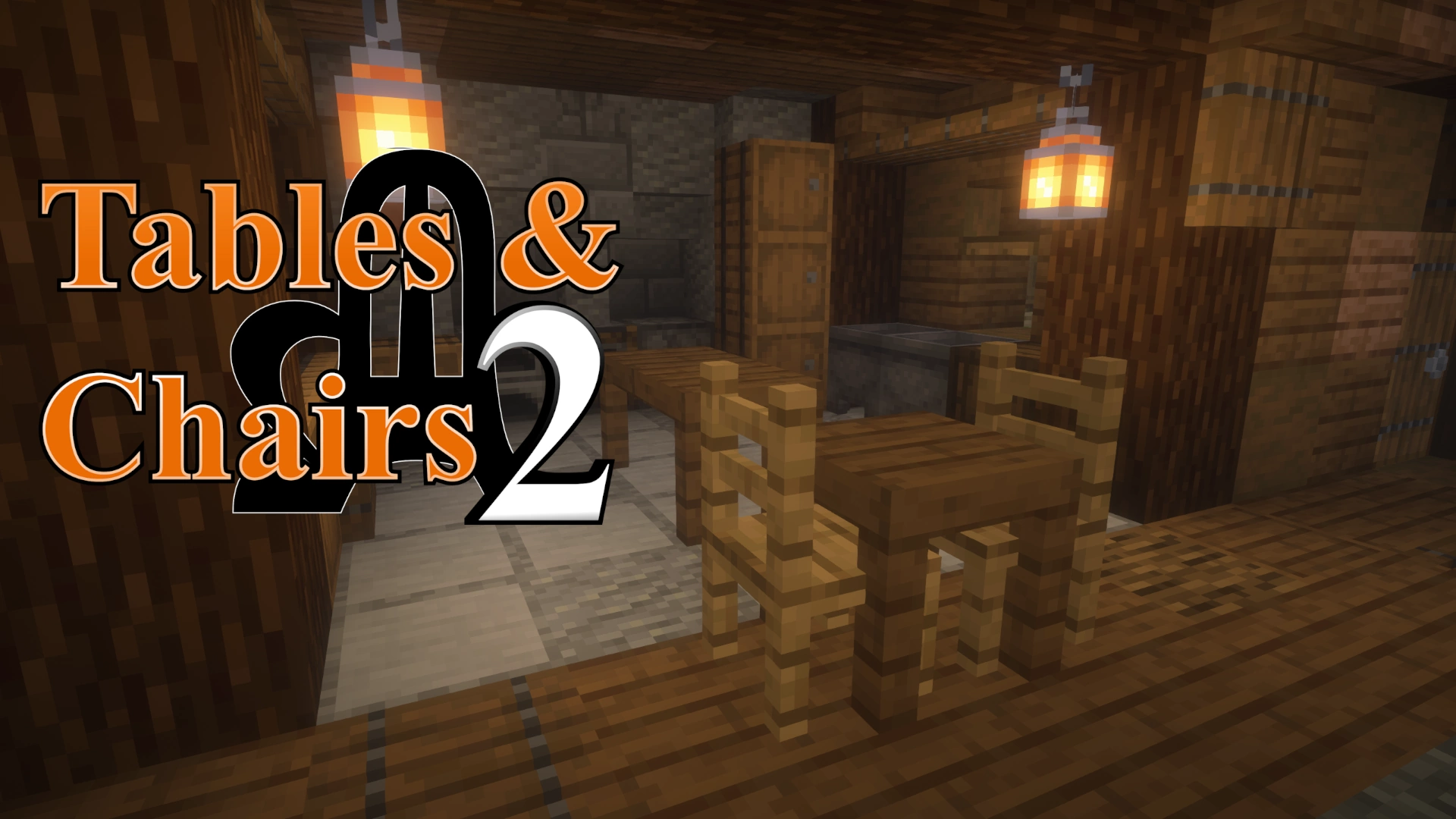
截图作者:Joel Duggan @ twitch.tv/joelduggan
需要资源包(除非以模组形式安装)
椅子
右键: 坐在椅子上
左键(双击): 摧毁椅子
Shift + 右键: 旋转椅子
Shift + 左键: 移动椅子
用地毯右键点击椅子可添加自定义地毯层。要移除它,再次用剪刀右键点击或直接完全破坏椅子即可。
桌子
一种自定义方块,按预期方式工作。
将桌子彼此相邻放置会自动将它们连接在一起。按住 Shift 放置可防止连接。要销毁桌子,请使用合适的工具在桌面上持续左键点击直到其破碎。
提示:用物品左键点击它会短暂进入“编辑”模式。在此模式下按住 Shift 放置方块和物品,就像对待普通方块一样将其放置在桌子上方。
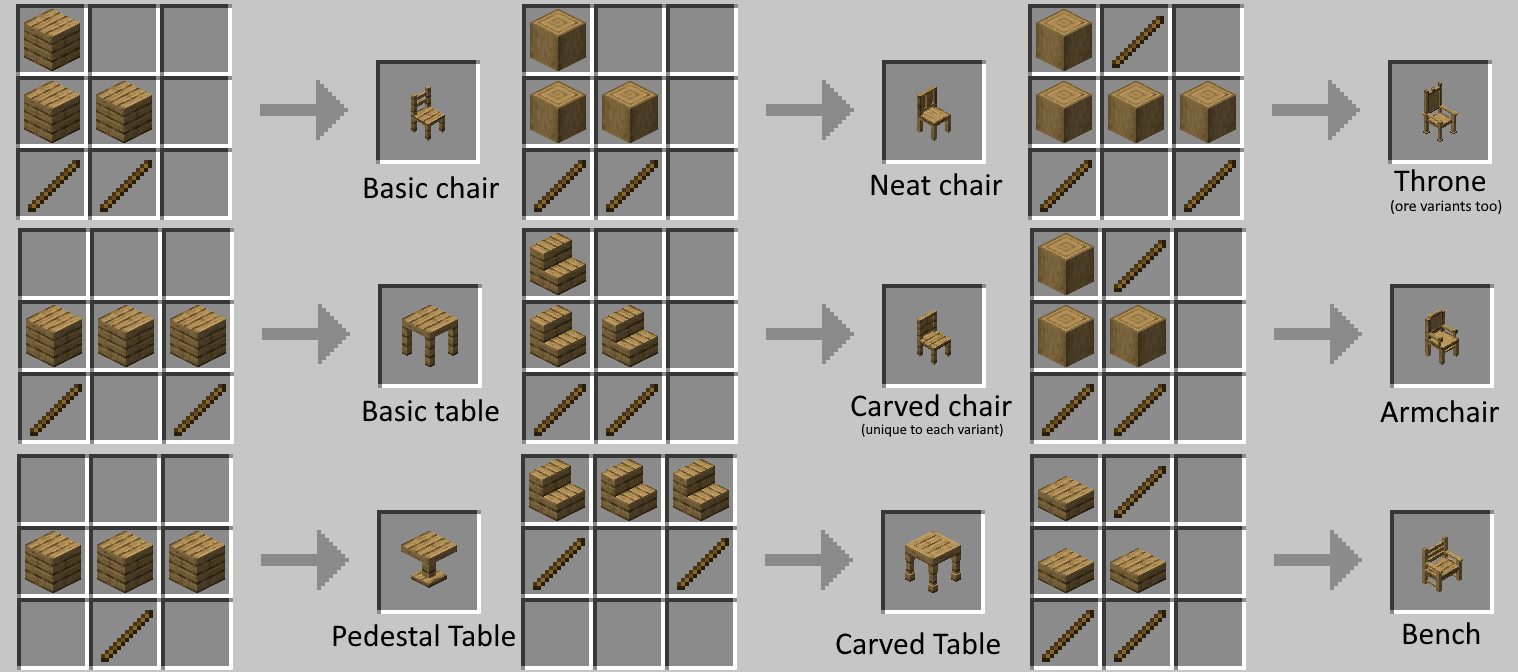
合成配方
提供多种可定制的家具,支持所有标准木材类型(包括王座所需的矿石类型),每种均可搭配 16 种颜色的地毯覆盖物。雕刻版(Carved variant)为每种木材材质提供了独特的 3D 模型。
在创造模式中,玩家可以使用 /function tac:give 命令快速浏览并获取家具物品,该命令语法与标准的 /give 命令一致。
所有自定义模型均由 Axel // Chuckchuck 设计!
Axel's Tables & Chairs 是该资源包的原始版本。这是一个更新后的移植版本,充分利用了近期版本中提供的技术。它的性能更好,且不使用任何 ticking 函数。仅使用一个每 15 秒运行一次的函数来检查已损坏的家具放置情况。
随着开发进展,我希望你能通过 Discord 服务器或 GitHub 页面提交反馈。--- Discord ---- Github ---
为什么要做成数据包?
与传统模组不同,只要启用资源包,这些元素将在你的世界中持久存在,跨越所有未来的更新和发布版本。这通过使用无法被覆盖的原版特性实现,使其可以安全地添加到主生存世界,并确保你未来的建筑成果。但如果出现任何问题,也有相应的解决方案(见下文)。
移除与升级
你可以将现有家具转换为基于方块的等效物品(例如:椅子 > 楼梯,桌子 > 木板),或者彻底清除它们。你甚至可以将旧的 Axel's Tables & Chairs 内容转换为 Tables & Chairs 2。操作既安全又简单。
只需输入以下命令并按照说明操作即可。
/function tac:config
对于旧版本,命令可能为 /function tac:xxx/,你需要手动浏览它们。
可用的转换模式
-
升级
- 将所有 T&C1 家具升级为 T&C2。
-
替换
- 将所有家具替换为基于方块的等效物品。
-
清除
- 移除区域内所有家具。
警告: 所有更改均为永久性的,无法撤销。建议在备份中进行测试。请谨慎操作。
Tables & Chairs 2
Probably the nicest looking, stable feeling and performant table and chair datapack. Originally based on Axel's Tables and Chairs, rewritten from the ground up by me. It uses all the latest datapack features to bring you a solid mod-like experience!
screenshot by Joel Duggan @ twitch.tv/joelduggan
RESOURCE PACK REQUIRED (unless installed as a mod)
Chairs
Right click: sit on chair
Left click (2x): destroy chair
Shift right click: rotate chair
Shift left click: move chair
Right click with a carpet to add a custom carpet layer. To take it off, right click again with shears or break the chair entirely.
Tables
A custom block that should work as expected.
Placing tables next to each other will automatically connect them together. Shift-placing prevents connections. To destroy, hold left click on the table-top with a proper tool until it breaks.
TIP: Left clicking it with an item will put it into an 'edit' mode briefly. Use this mode while shifting to place blocks and items on top of it as if it were a regular block.
Crafting recipes
A wide variety of customisable furnitures are available to craft across all standard wood types (including ore types for the Throne), each compatible with 16 colours of carpet overlays. The Carved variant features a unique 3D model for each wood material.
In creative mode players can quickly browse and obtain furniture items using the /function tac:give command, which mirrors the standard /give syntax.
All custom models were designed by Axel // Chuckchuck!
Axel's Tables & Chairs was the original version of this pack. This is an updated port that takes full advantage of the technologies provided to us in recent versions. It's much more performant and uses no ticking functions. It only uses one that runs every 15 seconds that checks for broken furniture placements.
As we go along, I would like you to send me feedback on the discord server, or an Issue on Github page. --- Discord ---- Github ---
Why make this a datapack?
Unlike traditional mods, these elements will persist within your world across all future updates and releases while the resource pack is enabled. This works through the use of vanilla features that cannot be overwritten, making it safe to add into your main survival worlds and ensure your builds for the future. However if anything bad happens then there are solutions for any case (continued below).
Removing and Upgrading
Either convert your existing furniture into block-based equivalents (ex. chair > stair, table > planks) or clear them entirely. You can even convert old Axel's Tables & Chairs content into Tables & Chairs 2. It's safe and easy.
Simply enter the command below and follow the instructions.
/function tac:config
For older versions, this may be /function tac:xxx/, and you'll have to browse them manually.
Available Conversion Modes
-
Upgrade
- Upgrades all T&C1 furniture into T&C2.
-
Replace
- Replaces all furniture with block-based equivalents.
-
Clear
- Removes all furniture from the area.
WARNING: All changes are permanent and cannot be undone. Testing in backups is recommended. Proceed with caution.

下载 Tables & Chairs 2
需要联机服务器吗?
稳定流畅、一键部署,几分钟即可和朋友联机开服
最低仅需 8 元/月 即可畅快联机
下载 Tables & Chairs 2
下载 Tables & Chairs 2
需要联机服务器吗?
稳定流畅、一键部署,几分钟即可和朋友联机开服
最低仅需 8 元/月 即可畅快联机
下载 Tables & Chairs 2
需要联机服务器吗?
稳定流畅、一键部署,几分钟即可和朋友联机开服
最低仅需 8 元/月 即可畅快联机
下载 Tables & Chairs 2
下载 Tables & Chairs 2
需要联机服务器吗?
稳定流畅、一键部署,几分钟即可和朋友联机开服
最低仅需 8 元/月 即可畅快联机
下载 Tables & Chairs 2
下载 Tables & Chairs 2
需要联机服务器吗?
稳定流畅、一键部署,几分钟即可和朋友联机开服
最低仅需 8 元/月 即可畅快联机
下载 Tables & Chairs 2
下载 Tables & Chairs 2
需要联机服务器吗?
稳定流畅、一键部署,几分钟即可和朋友联机开服
最低仅需 8 元/月 即可畅快联机
已更新至 26.3,但尚未加入杨树变种。我会尽快在有空时完成这项工作。谢谢!
- 新增雕刻桌
- 配方:在两侧各放置 2 根木棍,上方放置 3 个木台阶
- 更新至 v26.2,感谢 @Typraeurion 的贡献(谢谢!)
- 新增_波兰语_翻译(感谢 Discord 上的 @vicky.wikia)
- 修复 3x3 桌子中心方块模型缺失的问题
- 修复工作台重复生成的边缘情况
- 你可能需要替换储物箱中现有的工作台
- 0.6b 紧急修复: 修复了纹理目标定位问题(感谢 @zhinjio)
- 0.6b: 支持 LOLCAT、海盗语和倒置英语
v0.6b 仅针对资源包的更新。对于非模组下载,只需获取家具资源 v0.6b 即可。
关于这个资源的讨论、问题反馈与使用心得
还没有讨论,来发第一帖吧
你是这个资源的作者?登录后可认领此资源。
相似资源
 模组

可定制的鞘翅模组,支持装饰纹饰、旗帜图案等更多功能!
 模组

显示你正在注视的方块的信息。(适用于 Minecraft 1.16+ 的 Hwyla/Waila 分支)
 模组
在游戏画面角落显示附近世界地形、玩家、生物和实体的地图。可创建路径点,帮助你找到标记过的位置。
 模组

查看物品与配方
 模组
使用 JavaScript 编辑配方、添加自定义物品、编写世界事件!
 模组
AE2:一款流行的自动化与存储模组
评论 0
登录后参与评分
还没有评论,来抢沙发吧