TabManager
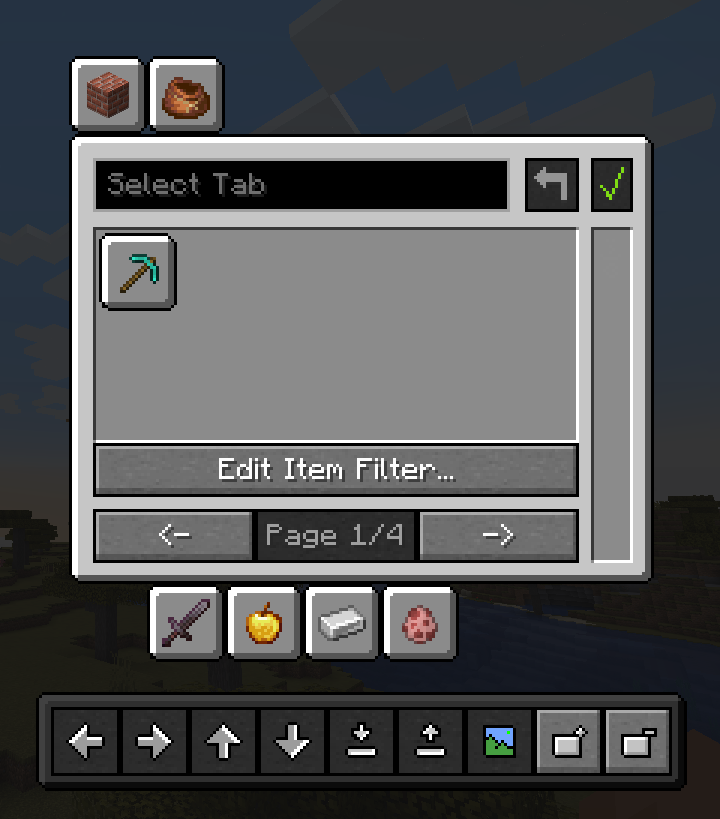
TabManager 让你完全掌控创造模式的物品栏,通过简单易懂的图形用户界面(GUI)随心整理。不需要某个特定的标签页?隐藏它!想让某个标签页单独占一页?移动它!对杂乱无章的物品感到不满?把它们移开!
简而言之,TabManager 赋予你对以下内容的控制权:
- 通过移动和隐藏图标来重新组织创造模式物品栏
- 为创造模式物品栏添加新页面
- 自定义标签页的图标
- 使用通配符或正则表达式过滤标签页中的物品
- 保存多种不同的创造模式物品栏配置
- 即时加载已保存的配置
依赖项
本模组需要 OwoLib 才能运行,该库封装了 Minecraft 的原版 GUI 小部件,并为模组开发者提供了额外的功能。此依赖项遵循 MIT 许可证,因此可自由获取。
安装方法
- 确保你已安装 Minecraft 和 Fabric 加载器。
- 从 发布页面 下载最新版本的 Tab Manager。
- 将下载的
.jar 文件放入位于 Minecraft 目录下的 mods 文件夹中。
- 下载与当前版本匹配的 OwoLib:Modrinth 或 CurseForge 或 GitHub
- 将 OwoLib 的
.jar 文件也放入你的 mods 文件夹中。
- 使用 Fabric 配置文件启动 Minecraft。
使用方法
GitHub 页面上有一份 基础文档,应该能帮你很好地了解如何操作此模组。你需要重点关注的主要部分是物品过滤器和托盘,因为这两部分可能稍显复杂。
许可与署名
本项目遵循 LGPL-3.0 许可证。
面向开发者(代码使用)
如果你在您的模组中使用了本项目的部分内容(代码、逻辑或素材),请在您的 README 或“关于”部分包含以下内容:
TabManager by SnackBag Studios ()
- 原始来源:
- 原作者: Tobiazsh ()
- 授权协议: LGPL-3.0
本模组的部分代码源自 TabManager。
面向整合包制作者
您可以自由地将此模组包含在任何整合包中!虽然许可证并未严格要求在主页面列出所有模组,但我们很感激您能链接回我们的项目:
TabManager by SnackBag Studios ([Modrinth/GitHub Link])
免责声明
本项目实际上归属于 SnackBag Studios,尽管目前所有者正在设置组织账号期间,我已暂时在我的 Modrinth 个人资料上接管了该项目。我是本项目的原作者和开发者。TabManager 未来可能会转移至 SnackBag Studios。
TabManager
TabManager gives you total control over your creative inventory to organise it however you want with a simple and easy-to-understand GUI. Don't need a specific tab? Hide it! Want the tab on a separate page? Move it! Unhappy with items cluttering your tab? Simply get them out of your way!
In short, TabManager gives you control of the following things:
- reorganise your creative inventory by moving and hiding icons
- add pages to your creative inventory
- customise the icons of the tabs
- filter out items from tabs with either glob or regex
- save multiple different configurations of your creative inventory
- load saved configurations on the fly
Dependencies
The mod requires OwoLib to function, which wraps vanilla GUI widgets from
Minecraft and provides additional functionality for mod developers. The dependency is licensed under the MIT License
and therefore freely available.
Installation
- Make sure you have Minecraft and Fabric Loader installed.
- Download the latest version of Tab Manager from the releases page
- Place the downloaded .jar file into your
mods folder located in your Minecraft directory.
- Download OwoLib for the matching version: Modrinth or CurseForge or GitHub
- Place the OwoLib .jar file into your
mods folder as well.
- Launch Minecraft with the Fabric profile.
How to use
There is a basic documentation on the GitHub Page that should give you a good idea of how to work with this mod. The parts you mainly want to focus on is the item filter and the tray as those two might be a little complex.
License & Attribution
This project is licensed under the LGPL-3.0 License.
For Developers (Code Usage)
If you use parts of this project (code, logic, or assets) in your own mod, please include the following in your README or "About" section:
TabManager by SnackBag Studios ()
- Original Source:
- Original Author: Tobiazsh ()
- Licensed under: LGPL-3.0
Portions of this mod use code from TabManager.
For Modpack Creators
You are free to include this mod in any modpack! While not strictly required by the license to list every mod on your main page, we appreciate a link back to our project:
TabManager by SnackBag Studios ([Modrinth/GitHub Link])
Disclaimer
This project actually belongs to SnackBag Studios, although I have currently taken control of it on my Modrinth profile while the owner is setting up the organisation. I am the original author and developer of the project. TabManager may move to SnackBag Studios in the future.


 模组

 模组

 模组
 模组
 模组
 模组
评论 0
登录后参与评分
还没有评论,来抢沙发吧