
文字转语音
这是一个为 Simple Voice Chat 提供的插件,允许那些无法或不愿使用麦克风的玩家通过文本转语音(TTS)功能进行聊天。
如果你正在服务器上游戏,希望有一种替代在全局聊天框打字或手动向玩家耳语的方式,或者你希望与其他模组(如 Phonos)互动,这个插件将非常有用。
该模组允许用户在窗口中输入想要说的话,然后由计算机化语音通过 Simple Voice Chat 朗读出来。
注意:Linux/macOS 的支持目前处于实验阶段,可能无法正常工作。请在 GitHub 仓库中报告任何问题。
图形用户界面 (GUI)
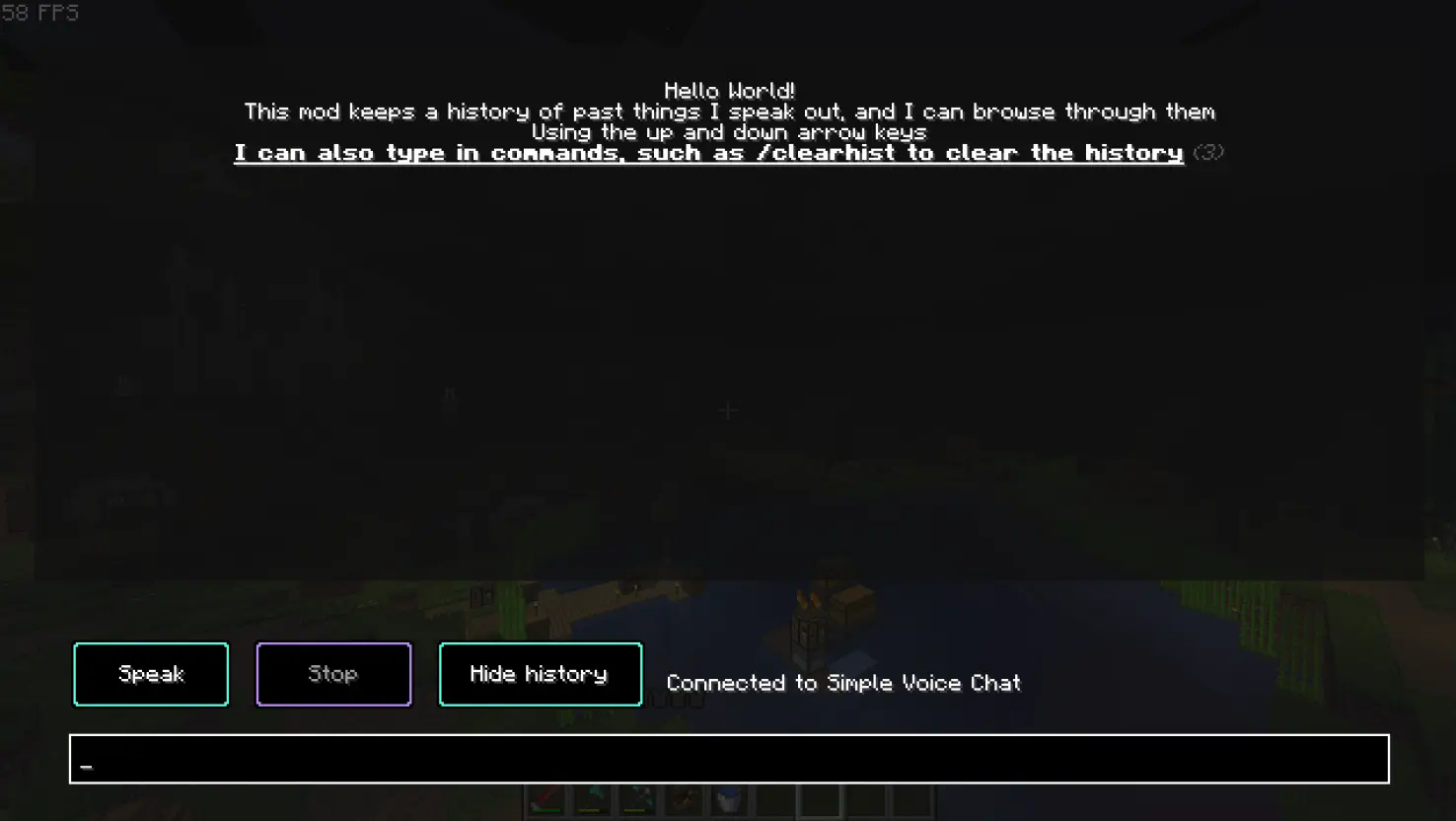
要使用该模组,首先你需要按下按钮以打开菜单 _(默认快捷键是 ~ (位于 'escape' 键下方),但你可以在控制设置中更改此按键)。
在底部的输入栏中输入你想要说的话,输入完成后按下 "Speak"(说话)按钮或回车键。你也可以在句子中途按下 "Stop"(停止)按钮来中断说话。
在 GUI 的顶部,所有你说过的句子都会保存在历史记录部分。这样你就可以重新调出以前说过的内容,而无需再次输入。要导航此部分,请使用方向键。
你也可以使用 /clearhist 命令清除历史记录(有关更多信息,请参阅关于命令的 wiki 页面)。
命令输入
为了提供另一种使用该模组的方式,而不必强制使用图形界面,你也可以使用命令。

主要有两个命令:
注意:这两个命令都是别名,原始命令位于 /ttvoice 下。
/speak <在此输入你想说的话>
此命令允许你自由说话,无需进入图形用户界面(GUI)。
/stopSpeaking
此命令会立即停止你正在进行的对话。
Figura 集成
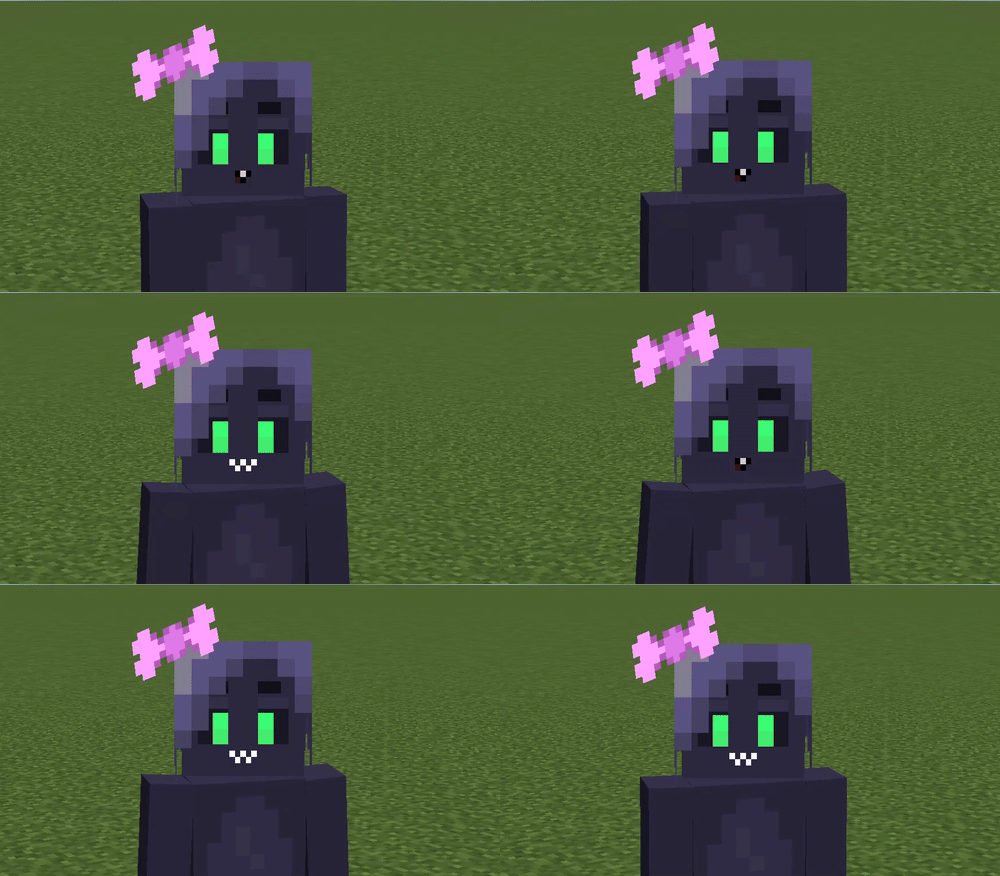
本模组还集成了 Figura,允许你通过文本转语音音频为头像添加面部表情。
有关在头像中使用 Text To Voice 的更多信息,请参阅 Wiki。
贡献
如果遇到任何错误,请在 Github 上报告。
如果遇到问题,还可以查看 故障排除页面。
依赖项
这是 Simple Voice Chat 的附加模组,必须安装它才能使本模组按预期工作。
本模组还依赖于 Fabric Language Kotlin 和 Fabric API。
鸣谢
@FlooferLand - 编程
感谢 Samuel Yager 提供图标!
所有许可信息请参阅 此处。
Text to Voice
An addon for Simple Voice Chat that allows people who can't or don't wish to use their microphone another way to chat, using text to speech.
This can be helpful if you're playing on a server and want an alternative to typing in global chat or manually whispering to players, or if you wish to interact with other mods such as Phonos.
This mod allows the user to type the text they wish to say into a window, and a computerized voice will say it out loud through Simple Voice Chat for them.
NOTE: Linux/macOS support is experimental and may not work properly, please report any problems on the GitHub repo.
The GUI
To use the mod you first need to press the button to open the menu (the default keybind is ~ (located beneath the 'escape' key), though you can change this in the controls screen).
Type the text you want to speak out in the bar at the bottom, and once you have finished typing press the "Speak" button or press enter. You can also choose to stop talking in the middle of a sentence by pressing the "Stop" button.
At the top of the GUI, all of the sentences you have said will be saved in your history section. This is so you can bring back old things you've said without typing it out once again. To navigate this section, use the arrow keys.
You may also clear the history using /clearhist (see the wiki page on commands for more information)
Command Input
To give an alternative way to use the mod, instead of being forced to use the GUI, you can also use commands.
There are 2 main commands:
Note: Both of these commands are aliases, the original commands reside under /ttvoice
/speak <insert what you wish to say here>
This command allow you to speak freely without needing to go into the GUI.
/stopSpeaking
This command will stop you speaking mid-sentence.
Figura integration
This mod also has an integration with Figura, allowing you to add facial expressions to your avatar driven by text-to-speech audio.
For more information about using Text To Voice in your avatar, please refer to the Wiki.
Contribute
If you encounter any bugs, please report anything on the Github.
If you do have some problems, also see the troubleshooting page.
Dependencies
This is an addon for Simple Voice Chat, you must install it in order for this mod to work as intended.
This mod is also depends on Fabric Language Kotlin, and Fabric API.
Credits
@FlooferLand - Programming
Thank you to Samuel Yager for the icon!
See here for all of the licensing information.

下载 Text to Voice
下载 Text to Voice
需要联机服务器吗?
稳定流畅、一键部署,几分钟即可和朋友联机开服
最低仅需 8 元/月 即可畅快联机
下载 Text to Voice
需要联机服务器吗?
稳定流畅、一键部署,几分钟即可和朋友联机开服
最低仅需 8 元/月 即可畅快联机
下载 Text to Voice
下载 Text to Voice
下载 Text to Voice
需要联机服务器吗?
稳定流畅、一键部署,几分钟即可和朋友联机开服
最低仅需 8 元/月 即可畅快联机
下载 Text to Voice
需要联机服务器吗?
稳定流畅、一键部署,几分钟即可和朋友联机开服
最低仅需 8 元/月 即可畅快联机
下载 Text to Voice
需要联机服务器吗?
稳定流畅、一键部署,几分钟即可和朋友联机开服
最低仅需 8 元/月 即可畅快联机
下载 Text to Voice
下载 Text to Voice
需要联机服务器吗?
稳定流畅、一键部署,几分钟即可和朋友联机开服
最低仅需 8 元/月 即可畅快联机
- 更新了依赖项
- 新增对 1.21.11 的完整支持
- 修复了部分音频卡顿的情况
- 修复了录制导致 SVC 崩溃的问题
- 将语音界面设为非暂停界面
关于这个资源的讨论、问题反馈与使用心得
还没有讨论,来发第一帖吧
你是这个资源的作者?登录后可认领此资源。
相似资源
 模组

一个用于收集生物掉落物的多区块模组。
 模组

显示你正在注视的方块的信息。(适用于 Minecraft 1.16+ 的 Hwyla/Waila 分支)
 模组
在游戏画面角落显示附近世界地形、玩家、生物和实体的地图。可创建路径点,帮助你找到标记过的位置。
 模组

查看物品与配方
 模组
使用 JavaScript 编辑配方、添加自定义物品、编写世界事件!
 模组
AE2:一款流行的自动化与存储模组
评论 0
登录后参与评分
还没有评论,来抢沙发吧