
此模组为 Minecraft 添加了动态电梯。目前支持最多 64 层楼,每层可设置多个控制器,只要它们彼此直接相邻即可。
适用于 MC 1.8.9+ 的版本需要 ThutCore,可在以下地址获取:
对于 OpenComputers 版本,Open Computers 中提供以下方法:
- callFloor(floor:number) -- 召唤电梯前往指定楼层
- callYValue(yValue:number) -- 召唤电梯前往指定 Y 坐标
- callXValue(xValue:number) -- 召唤电梯前往指定 X 坐标
- callZValue(zValue:number) -- 召唤电梯前往指定 Z 坐标
- setFloor(floor:number) -- 设置与控制器关联的楼层
- getYValue() -- 返回电梯当前的 Y 坐标值
- getXValue() -- 返回电梯当前的 X 坐标值
- getZValue() -- 返回电梯当前的 Z 坐标值
- getFloor() -- 返回分配给控制器的楼层
- getFloorYValue(floor:number) -- 返回指定楼层的 Y 坐标值
- isReady() -- 如果电梯当前未被召唤至任何楼层则返回 true
要将控制器的面板面朝上,请使用木棍或设备链接器右键点击它。要更改控制器面板的页面,请使用链接器右键点击。
要设置楼层,请按住 Shift 键并使用链接器右键点击。物理上接触的控制块会自动链接为同一楼层,这允许你构建更大的控制面板。
要移除电梯,请使用原版木棍或其他模组的扳手按住 Shift 键右键点击它。
对于 2.0 及更高版本,电梯已更改为仅需建造底部基座。墙壁和屋顶不再必需。
旧版说明(不适用于 1.8.9+ 版本)
以下说明已过时,现在只需底层
如果你破坏了铁轨,它将开始快速旋转,因此要么重新放置铁轨,要么如前所述移除。
关于建造和使用说明,请参阅 Elevator Instructions
关于其他尺寸,请参阅 Elevator Instructions 2
你可以在 Discord 上联系我:
如果你有托管服务器的兴趣,请点击下方的图片!
Thut's Elevators 已与 BisectHosting 合作!
BisectHosting 提供快速、简单且优质的解决方案。购买后,服务器已配置完毕并准备就绪。使用代码 "Thutmose" 作为新客户在其任何游戏服务器上可获得首月 25% 的折扣。
This mod adds dynamic elevators to minecraft. It currently has support for up to 64 floors, with many controllers per floor, so long as they are directly touching each other.
Versions for MC 1.8.9+ require ThutCore which can be found here:
For oc version, the following methods are available in open computers:
- callFloor(floor:number) -- Calls the Lift to the specified Floor
- callYValue(yValue:number) -- Calls the Lift to the specified Y level
- callXValue(xValue:number) -- Calls the Lift to the specified X location
- callZValue(zValue:number) -- Calls the Lift to the specified Z location
- setFloor(floor:number) -- Sets the floor assosiated to the Controller
- getYValue() -- returns the current Y value of the lift
- getXValue() -- returns the current X value of the lift
- getZValue() -- returns the current Z value of the lift
- getFloor() -- returns the Floor assigned to the Controller
- getFloorYValue(floor:number) -- returns the y value of the specified floor
- isReady() -- returns if the elevator is not currently called to a floor
To set the Controller block face on, right click it with a stick or device linker. to change the page of the controller face, right click with a linker.
to set the floor, shift right click with the linker. Physically touching controller blocks will automatically link together as the same floor, this allows you to make larger control panels.
To remove an elevator, shift right click it with a vanilla stick or a wrench from another mod
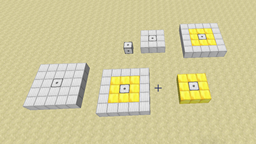
for version 2.0 and later, the lifts have been changed to only require the base to be built. the walls and roof are no longer required.
Old instructions (do not apply to 1.8.9+ builds)
The following instructions are a bit outdated, only the bottom layer is needed now
If you break the rails it will start rotating rapidly, so either re-place the rail, or remove as mentioned.
For build and usage instructions, see Elevator Instructions
For other sizes, see Elevator Instructions 2
You can contact me here on Discord:
If you're interested in hosting a server, click the image below!
Thut's Elevators is partnered with BisectHosting!
BisectHosting offers a quick, simple and quality solution. After your purchase, the server is already configured and ready to use. Use the code "Thutmose" to get 25% off your first month as a new client for any of their gaming servers.
下载 Thut's Elevators
需要联机服务器吗?
稳定流畅、一键部署,几分钟即可和朋友联机开服
最低仅需 8 元/月 即可畅快联机
下载 Thut's Elevators
需要联机服务器吗?
稳定流畅、一键部署,几分钟即可和朋友联机开服
最低仅需 8 元/月 即可畅快联机
下载 Thut's Elevators
需要联机服务器吗?
稳定流畅、一键部署,几分钟即可和朋友联机开服
最低仅需 8 元/月 即可畅快联机
下载 Thut's Elevators
需要联机服务器吗?
稳定流畅、一键部署,几分钟即可和朋友联机开服
最低仅需 8 元/月 即可畅快联机
下载 Thut's Elevators
需要联机服务器吗?
稳定流畅、一键部署,几分钟即可和朋友联机开服
最低仅需 8 元/月 即可畅快联机
下载 Thut's Elevators
需要联机服务器吗?
稳定流畅、一键部署,几分钟即可和朋友联机开服
最低仅需 8 元/月 即可畅快联机
下载 Thut's Elevators
需要联机服务器吗?
稳定流畅、一键部署,几分钟即可和朋友联机开服
最低仅需 8 元/月 即可畅快联机
下载 Thut's Elevators
需要联机服务器吗?
稳定流畅、一键部署,几分钟即可和朋友联机开服
最低仅需 8 元/月 即可畅快联机
下载 Thut's Elevators
需要联机服务器吗?
稳定流畅、一键部署,几分钟即可和朋友联机开服
最低仅需 8 元/月 即可畅快联机
下载 Thut's Elevators
需要联机服务器吗?
稳定流畅、一键部署,几分钟即可和朋友联机开服
最低仅需 8 元/月 即可畅快联机
thut.api 新版本的更新
关于这个资源的讨论、问题反馈与使用心得
还没有讨论,来发第一帖吧
你是这个资源的作者?登录后可认领此资源。
相似资源
 模组
在游戏画面角落显示附近世界地形、玩家、生物和实体的地图。可创建路径点,帮助你找到标记过的位置。
 模组
添加全屏世界地图,显示你在世界中已探索的区域。与 Xaero's Minimap 搭配使用效果极佳。
 模组
Xaero's Minimap 模组的公平竞技版本,专为与不使用小地图的玩家进行公平 PVP 而设计。
 模组

FlightAssistant 是一款客户端 Minecraft 模组,添加了飞行风格 HUD(类似于你在飞行模拟器中看到的)、自动驾驶系统、飞行保护等功能。
 模组

生生不息,繁荣昌盛,阿斯特拉!
 模组

使 Carry On 能够正确支持带有动画效果的 EMF 玩家模型。
评论 0
登录后参与评分
还没有评论,来抢沙发吧