

Tiers,
PvPTiers 的官方层级显示模组。同时也支持其他层级列表:MCTiers 和 Subtiers。
模组展示:
可切换的 PvPTiers、MCTiers 及旧版图标与颜色
自动检测模式:按 'Y' 键自动检测当前游戏模式
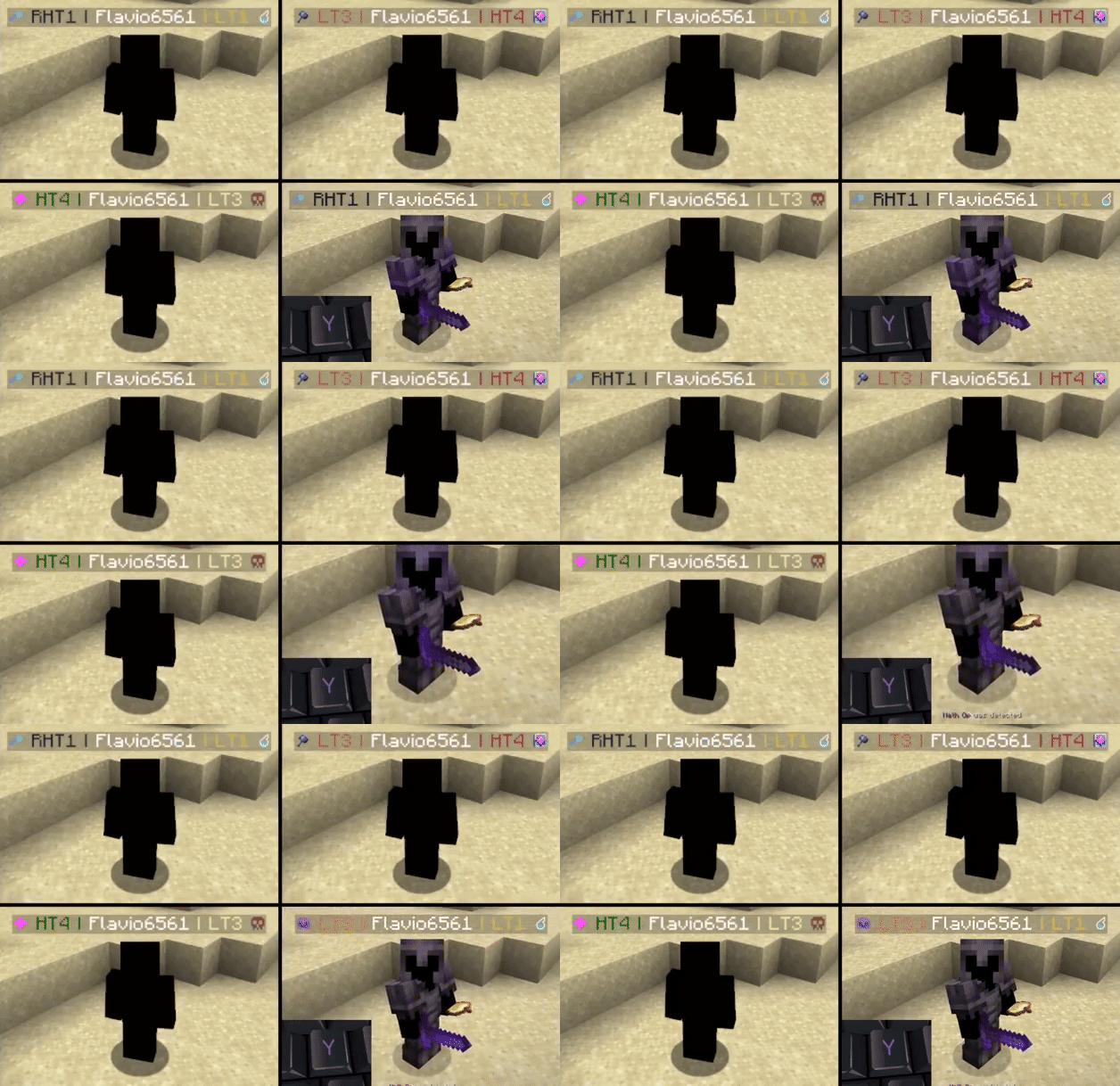
带有 PvPTiers 图标的个人资料搜索结果界面,适用于不同的 GUI 缩放比例

Tiers 仍处于测试阶段。报告问题
模组功能:
自动检测模式:按 Y(可编辑)自动检测你正在游玩的游戏模式,以便轻松切换并查看该模式下对手的层级查看最近玩家状态:按 H(可编辑)打开最近玩家的搜索结果界面搜索界面:使用 /tiers name 查看所有层级、峰值、地区、积分、全球排名以及皮肤更改游戏模式及其位置:为每个排名站点选择一个游戏模式,并决定将其显示在左侧还是右侧循环切换快捷键:按 U 和 I(可编辑)轻松在右侧和左侧显示的游戏模式之间切换更改预设样式:你可以在配置界面中更改图标和颜色的预设显示游戏模式:选择显示选定模式、自适应最高层级或绝对最高层级
屏幕配置(ModMenu 或 /tiers -config):
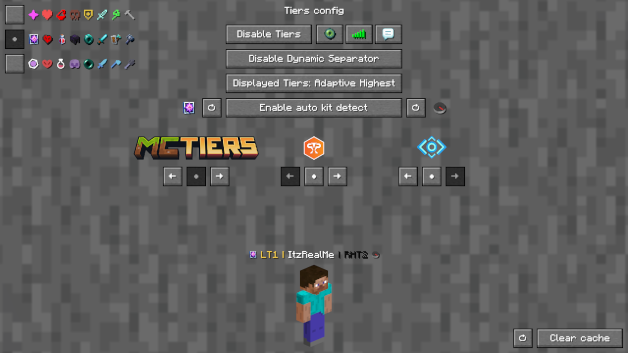
切换层级开启或关闭层级显示切换图标开启或关闭层级旁边的图标切换标签页在标签页列表中开启或关闭层级显示切换聊天在聊天栏中开启或关闭层级显示切换动态分隔符决定分隔符 | 是否与层级同色或是灰色显示的层级决定是显示选定模式、自适应最高层级还是绝对最高层级预览切换器决定是否预览默认资料(ItzRealMe)或你的角色左右游戏模式切换器在所选提供商的游戏模式之间切换位置设置决定特定提供商的游戏模式显示在右侧、左侧还是不显示图标和颜色预设:可以在经典风格、PvPTiers 风格和 MCTiers 风格的图标之间切换
在不同 GUI 缩放比例下的配置界面
其他:
你可以自定义游戏模式的图标和文本颜色,以及选择在哪里显示何种游戏模式;想要手动修改图标或层级颜色?请在你的资源包文件夹中编辑并添加 默认资源包
设置将保存在你的配置文件夹中,并在运行时更新
此模组仅适用于客户端(可在多人游戏中使用)
链接:
Tiers,
Official tier display mod for PvPTiers. Also Supports other tierlists: MCTiers and Subtiers
Mod showcase:
Switchable PvPTiers, MCTiers, and legacy icons and colors
Auto detect kit: press 'Y' to autodetect the current gamemode
The profile search result screen with PvPTiers icons on different GUI scales
Tiers is still in beta. Report an issue
Mod features:
Auto detect kit:press Y (editable) to auto-detect the gamemode you are playing to easily switch and see opponent tiers in that gamemodeSee nearest player stats:press H (editable) to open the closest player search result screenSearch screen:see all tiers, peaks, regions, points, global rankings and skin with /tiers nameChange gamemodes and their position:choose a gamemode for each ranking site and decide whether to display it on the left or rightCycle keybinds:press U and I (editable) to easily cycle between the right and left displayed gamemodesChange preset styles:you can change icons and colors presets in the config screenDisplay gamemodes:whether to display selected mode, adaptive highest or absolute highest
Screen config (ModMenu or /tiers -config):
Toggle Tierstoggles TiersToggle Iconstoggles the icons next to the tiersToggle Tabtoggles Tiers on the tablistToggle Chattoggles Tiers in chatToggle Dynamic Separatordecides if the separator | is the same color as the tier or grayDisplayed Tierdecides whether to display selected mode, adaptive highest or absolute highestPreview Switcherdecides whether to preview the default profile (ItzRealMe) or your characterLeft and Right gamemode switcherswitches between gamemodes of the selected providerPosition Settingsdecides if the specific provider gamemodes are displayer on the right, left or neitherIcon and color presets:you can switch between classic, PvPTiers and MCTiers styled icons
The config screen on 3 GUI scale
Other:
You can customize gamemodes icons and text colors, as well as choosing where and what gamemode to display; want to manually modify the icons or tiers colors? Edit and add in your pack folder the default texture pack
Settings will be saved in your config folder and updated at runtime
The mod is client side (works on multiplayer)
Links:

下载 Tiers
下载 Tiers
下载 Tiers
下载 Tiers
下载 Tiers
下载 Tiers
下载 Tiers
下载 Tiers
下载 Tiers
下载 Tiers
关于这个资源的讨论、问题反馈与使用心得
还没有讨论,来发第一帖吧
你是这个资源的作者?登录后可认领此资源。
相似资源
 模组

可定制的鞘翅模组,支持装饰纹饰、旗帜图案等更多功能!
 模组

显示你正在注视的方块的信息。(适用于 Minecraft 1.16+ 的 Hwyla/Waila 分支)
 模组
使用 JavaScript 编辑配方、添加自定义物品、编写世界事件!
 模组

查看物品与配方
 模组
在游戏画面角落显示附近世界地形、玩家、生物和实体的地图。可创建路径点,帮助你找到标记过的位置。
 模组
AE2:一款流行的自动化与存储模组
评论 0
登录后参与评分
还没有评论,来抢沙发吧