Tiny
也在 Curseforge 上提供
一款简单、轻量的客户端模组,用于调整你的身高。
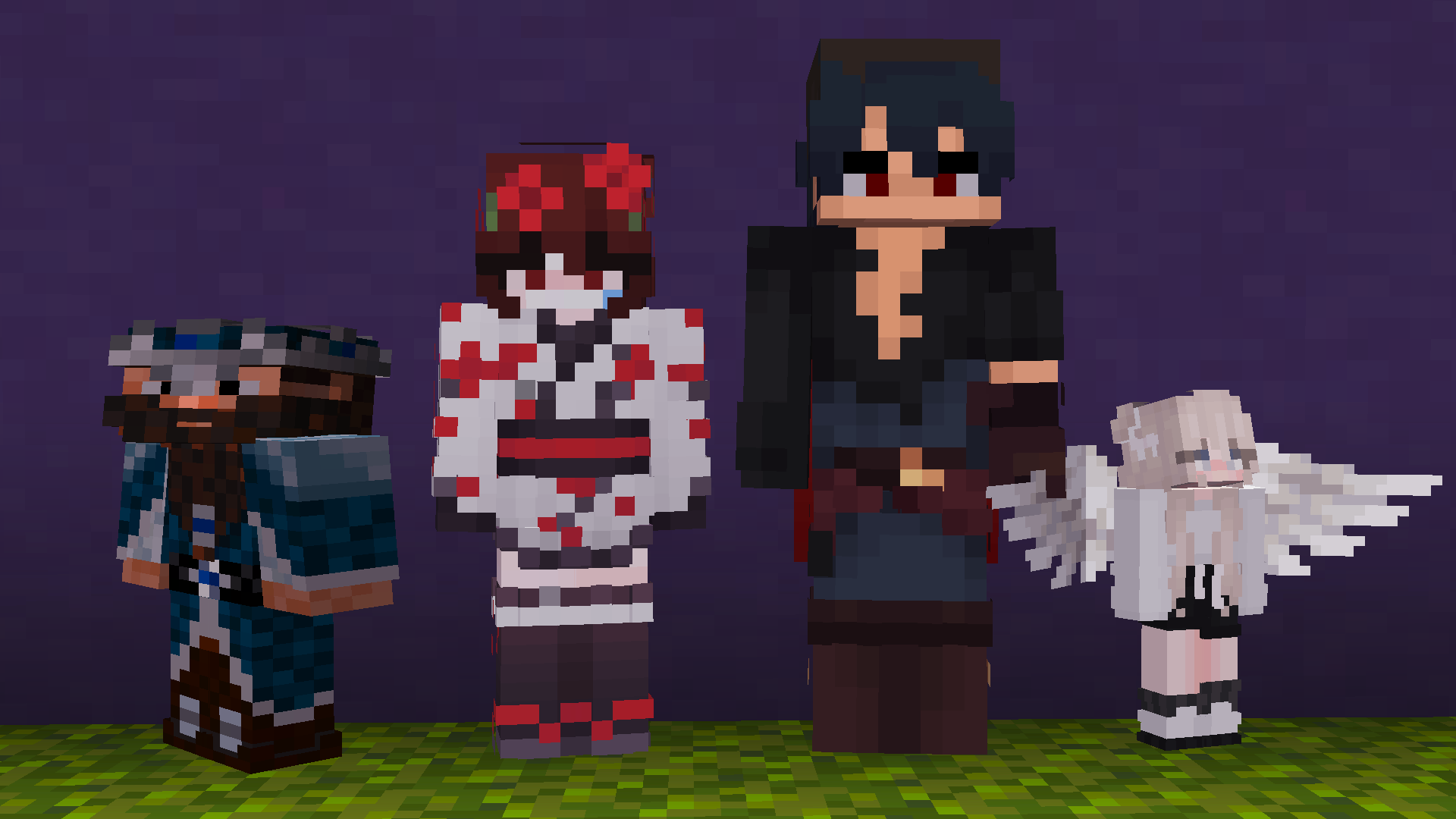
Tiny 允许你放大或缩小自己的玩家模型,并可为你在游戏中看到的任何其他玩家设置自定义高度——仅客户端生效,无需服务器插件。
功能
- 高度滑块 — 将自身缩放比例从 0.5x 到 2x。
- 矮人模式 — 仅压缩高度(Y轴),保持正常宽度而非均匀缩小。
- 按玩家设置高度 — 为任何可见玩家设置不同的高度,支持在配置界面中通过列表搜索。
- ModMenu 支持 — 如果安装了 ModMenu,则提供完整的配置界面。
- 聊天命令 — 支持 GUI 中的所有操作,方便在不打开菜单的情况下快速更改设置。
命令
| 命令 |
效果 |
/tiny 或 /tiny config |
打开配置界面 |
/tiny height <0.5-2.0> [player] |
设置你自己的高度,或某个可见玩家的高度 |
/tiny dwarf <true|false> [player] |
切换你自己或某个可见玩家的矮人模式 |
/tiny connect / /tiny disconnect |
选择加入/退出共享服务器(见下文) |
/tiny fetch |
手动从共享服务器拉取最新的高度数据 |
可选的共享服务器
部分 Tiny 版本附带一个可选的共享高度目录,这样你的高度会在不同会话和服务器之间保留,而不是每次重新连接时重置。除非构建版本包含此功能,否则默认关闭。该功能需要正版 Minecraft 账户,且完全可选——使用 /tiny connect 开启,使用 /tiny disconnect 关闭。开启后,其他玩家的高度来自共享目录,无法在本地编辑;你自己的高度完全由你控制,并在保存时同步。
注意事项
- 仅限客户端 — 核心高度功能无需安装服务端组件。
- 高度变化仅为视觉效果,在你的客户端渲染:模型缩放、名称标签位置以及你自己的眼睛高度都会相应调整。碰撞箱不受影响。
许可证
MIT
Tiny
Also available on Curseforge
A simple, lightweight client-side mod for changing your height.

Tiny lets you scale your own player model up or down, and lets you set a custom height for anyone else you can see in-game — client-side only, no server plugin required.
Features
- Height slider — scale yourself from 0.5x to 2x.
- Dwarf Mode — squashes height only (Y-axis), keeps your normal width instead of shrinking uniformly.
- Per-player heights — set a different height for any player you see, searchable list, right from the config screen.
- ModMenu support — full config screen if you have ModMenu installed.
- Chat commands for everything the GUI does, useful for quick changes without opening a menu.
Commands
| Command |
Effect |
/tiny or /tiny config |
Opens the config screen |
/tiny height <0.5-2.0> [player] |
Set your own height, or a visible player's height |
/tiny dwarf <true|false> [player] |
Toggle Dwarf Mode for yourself or a visible player |
/tiny connect / /tiny disconnect |
Opt in/out of the shared server (see below) |
/tiny fetch |
Manually pull the latest heights from the shared server |
Optional shared server
Some builds of Tiny ship with an opt-in shared height directory, so your height follows you between sessions and servers instead of resetting each time you reconnect. It's off by default unless the build includes it, requires a premium Minecraft account, and is fully optional — turn it on with /tiny connect, off with /tiny disconnect. When it's on, other players' heights come from the shared directory and can't be edited locally; your own height stays fully in your control and syncs up when you save.
Notes
- Client-side only — no server-side installation needed for the core height feature.
- Height changes are visual, rendered on your end: model scale, nametag position, and your own eye height adjust to match. Hitboxes are unaffected.
License
MIT
评论 0
登录后参与评分
还没有评论,来抢沙发吧