
此模组是一款专为生存模式设计的建筑辅助工具。
本模组移除了复杂的图形用户界面(GUI),改为使用 Ctrl + 鼠标滚轮来切换模式,旨在优先实现直观且快节奏的建筑体验。
由于这一设计理念,它并不适用于大型建筑工程或大规模的地形编辑。然而,它允许你在无需频繁打开菜单或 GUI 的情况下流畅地进行建造。
每种工具并非简单地是其他工具的强化或弱化版本。每种工具都拥有其独特的功能,让你能够在不中断建造节奏的情况下自然地切换使用它们。
注意:我是日本人,这是我制作的第一款 Minecraft 模组。大部分代码是基于 CodeX 创建的。作为一名编程新手,如果经验丰富的模组制作者能关照这个项目,我将不胜感激。另外,抱歉我的英语不够完美。
共享模式
平面模式 (Flat Mode)
使用 Tonkachi(木槌)点击方块时,会沿着所选方块的平面方向放置方块。 放置范围取决于所使用的工具。
垂直模式 (Vertical Mode)
使用 Tonkachi(木槌)点击方块时,会向相反方向直线延伸放置方块。 可放置的最大方块数量取决于该工具。
楼梯模式 (Stairs Mode)
自动以阶梯图案放置方块。 方块的朝向也会正确对齐,使楼梯的放置变得快速简便。 可放置的最大方块数量取决于该工具。
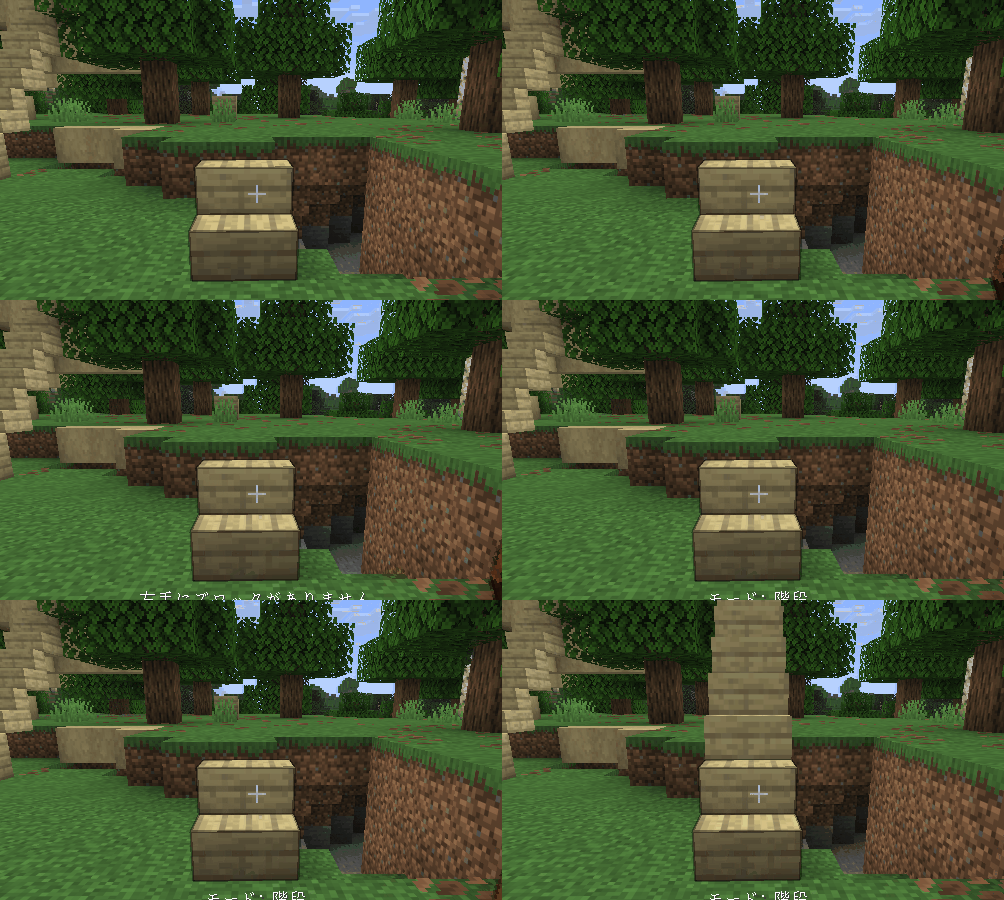
延伸模式 (Extend Mode)
只要方块与相邻方块相连,即可在空中放置方块。 再也不用在尝试于边缘放置方块时尴尬地潜行了!
在此模式下,你必须将想要放置的方块拿在主手以外的副手中。
合成配方

独特模式
石质 Tonkachi
拥有特殊的方块旋转模式。
- 旋转 (Rotate) — 水平改变方块朝向(前/后/左/右)。
- 倒置 (Upside Down) — 垂直改变方块朝向(上/下)。
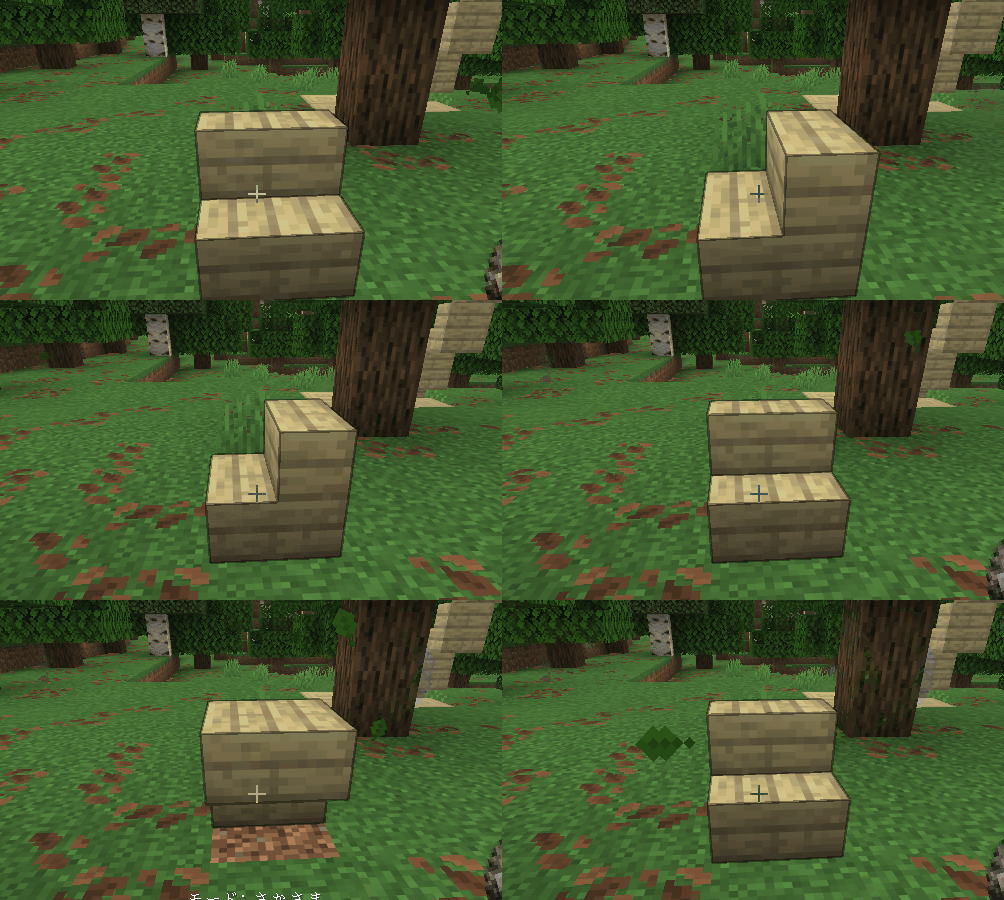
铁质 Tonkachi
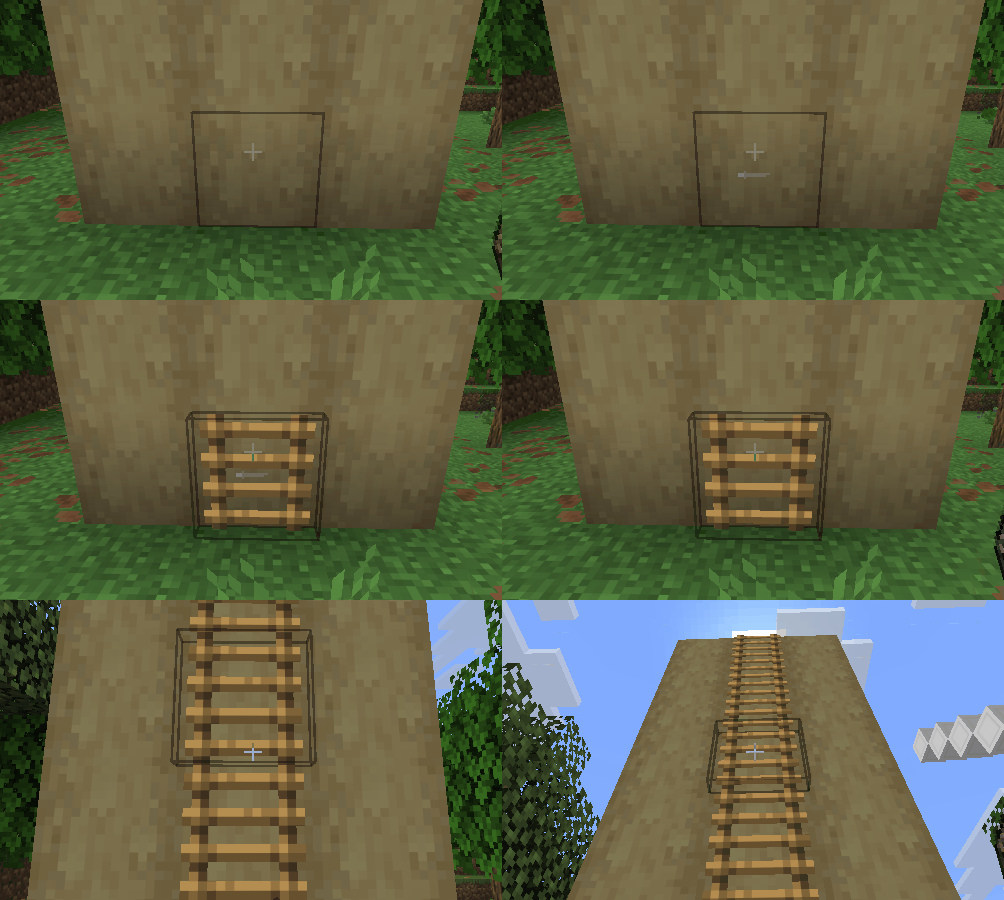
拥有进阶版的垂直模式变体。
- 垂直向上 (Vertical Up) — 向上放置方块。
- 垂直向下 (Vertical Down) — 向下放置方块。
当你只需要单一方向的移动时,这些模式比普通的垂直模式更容易控制。
钻石 Tonkachi
拥有空气放置模式 (Air Place Mode)。
与延伸模式不同,此模式允许在没有相邻方块支撑的情况下自由地在空中放置方块。
与延伸模式一样,你需要将待放置的方块拿在副手中。
木质 Tonkachi
耐久度较低,且没有特殊能力。
它的射程极其有限,且无法使用平面模式。 不过,由于模式较少,在这些模式之间切换更简单、更快。
适合小型建筑,且非常廉价,因为可以使用原木作为修复材料进行修理。
关于名称
“Tonkachi”(木槌)是日语中对木匠常用的小锤子的称呼。
模组名称源自日语拟声词“ton-ten-kan-ten”,模拟了木工工作中敲击的声音。
This mod is a building assistance tool designed for use in survival mode.
This mod removes complex GUIs and instead uses Ctrl + Mouse Wheel to switch modes, prioritizing intuitive and fast-paced building.
Because of this design, it is not intended for massive construction projects or large-scale terrain editing. However, it allows you to build smoothly without constantly opening menus or GUIs.
Each tool is not simply a stronger or weaker version of another. Every tool has its own unique functionality, allowing you to switch between them naturally without interrupting the flow of building.
Note: I am Japanese, and this is my very first Minecraft mod. Most of it was created using CodeX. I am still a beginner programmer, so I would appreciate it if experienced modders could kindly watch over this project. Also, sorry for my imperfect English.
Shared Modes
Flat Mode
By clicking a block with a Tonkachi, blocks will be placed along the flat surface direction of the selected block. The placement range depends on the tool being used.
Vertical Mode
By clicking a block with a Tonkachi, blocks will extend straight outward in the opposite direction. The maximum number of blocks that can be placed depends on the tool.
Stairs Mode
Automatically places blocks in a staircase pattern. The block orientation is also aligned correctly, making stair placement quick and easy. The maximum number of blocks that can be placed depends on the tool.
Extend Mode
Blocks can be placed in midair as long as they are connected to an adjacent block. No more awkward sneaking while trying to place blocks at the edge!
In this mode, you must hold the block you want to place in your off-hand.
Recipe
Unique Modes
Stone Tonkachi
Has a special block rotation mode.
- Rotate — Changes block orientation horizontally (front/back/left/right).
- Upside Down — Changes block orientation vertically (up/down).
Iron Tonkachi
Has advanced variants of Vertical Mode.
- Vertical (Up) — Places blocks upward.
- Vertical (Down) — Places blocks downward.
These modes are easier to control than normal Vertical Mode when you only want movement in one direction.
Diamond Tonkachi
Has an Air Place Mode.
Unlike Extension Mode, this allows blocks to be placed freely in the air even without adjacent blocks.
Just like Extension Mode, you must hold the block to place in your off-hand.
Wooden Tonkachi
Has low durability and no special abilities.
Its range is extremely limited, and it cannot use Flat Mode. However, because it has fewer modes, switching between them is simpler and faster.
Useful for smaller builds, and very cheap to repair since it uses logs as the repair material.
About the Name
“Tonkachi” is a Japanese word for a small hammer commonly used by carpenters.
The mod name comes from the Japanese onomatopoeia “ton-ten-kan-ten,” which imitates the sound of hammering during carpentry work.

下载 Tonten
下载 Tonten
下载 Tonten
需要联机服务器吗?
稳定流畅、一键部署,几分钟即可和朋友联机开服
最低仅需 8 元/月 即可畅快联机
下载 Tonten
下载 Tonten
下载 Tonten
下载 Tonten
需要联机服务器吗?
稳定流畅、一键部署,几分钟即可和朋友联机开服
最低仅需 8 元/月 即可畅快联机
下载 Tonten
下载 Tonten
下载 Tonten
新增了对 Minecraft 1.21.1 的兼容性
关于这个资源的讨论、问题反馈与使用心得
还没有讨论,来发第一帖吧
你是这个资源的作者?登录后可认领此资源。
相似资源
 模组

可定制的鞘翅模组,支持装饰纹饰、旗帜图案等更多功能!
 模组

适用于 MC 1.18+ 的 Effekseer 加载器
 模组

新增 50+ 个独特生物群系,为你的世界增添新树木、花卉等更多元素!
 模组

基于 GTCEu 1.12.2 的现代 GregTech
 模组

添加睡袋和吊床,分别用于便携性和昼夜转换,同时不会设置新的出生点。共有16种颜色可选!
 模组

为你的终界增添新生物群系、神秘仪式和全新生物
评论 0
登录后参与评分
还没有评论,来抢沙发吧