
JoeFly 的 Tool Trims 数据包 的 Fabric 移植版。请查阅项目页面以获取更多详情。
将其制作成模组带来了以下改进:
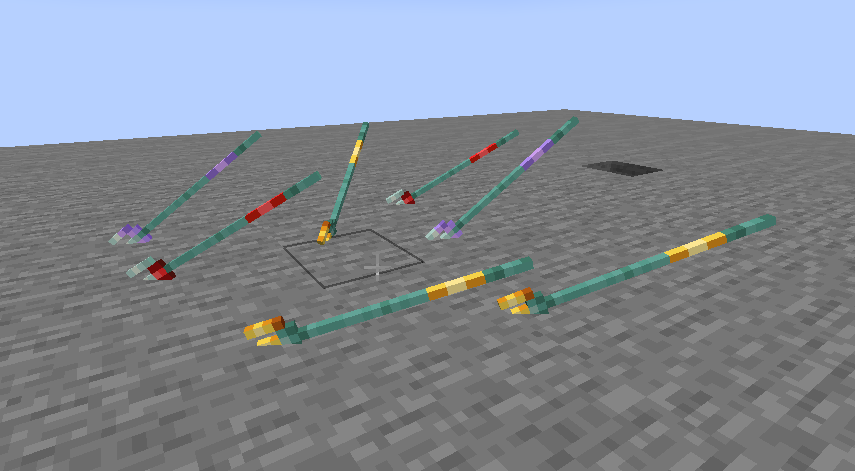
- Trident(三叉戟)上的装饰会在投掷时显示
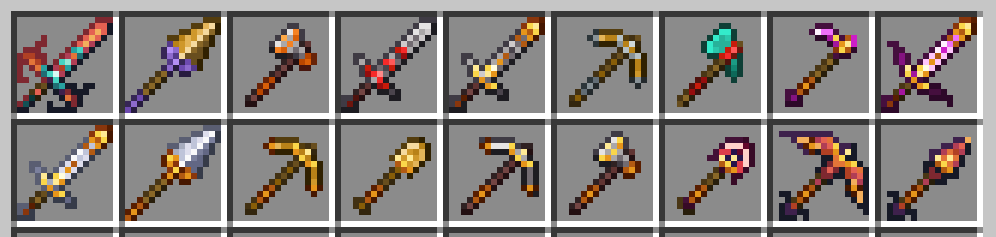
- 装饰可以应用于模组工具
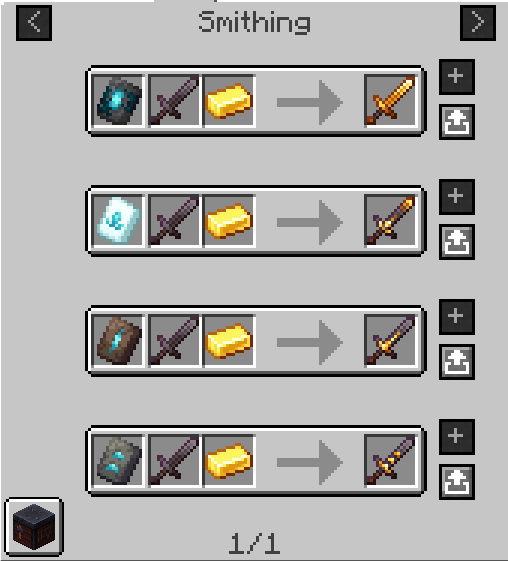
- 装饰模板会正确出现在创造模式物品的对应位置,并在 RRV 等配方查看器中正确显示
- 战利品表是注入而非覆盖
⚠️ 注意:本页面仅适用于模组版本 2.x.x。请展开底部的下拉菜单以查看适用于模组版本 1.x.x 的旧版说明。
从数据包迁移
该模组包含用于数据包的向后兼容机制。已装饰的工具无需迁移,因为它们都使用相同的原版装饰系统。然而,模板需要迁移,且在迁移之前无法在锻造台中使用。
- 进行备份。养成备份的好习惯总是没错的。
- 如果您是从数据包 2.x.x 版本迁移而来,您必须首先使用数据包 3.x.x 来迁移您的已装饰工具和模板。这些物品必须在您的物品栏中或由鼠标光标拾取才能进行迁移。
- 接下来,您应该安装该模组,然后移除数据包。(确保不要在未安装两者的情况下运行世界。)
- 使用命令
/tooltrims migrate来迁移您当前手持的模板。
从模组迁出
如果您想恢复使用数据包,请在安装模组的同时安装数据包(忽略警告消息),并使用命令 /tooltrims demigrate 来迁出所有模板。一旦您迁出了所有物品,卸载该模组并安装正常的 Tool Trims 资源包即可。
兼容性
目前与 ModernFix 中的动态资源优化功能不兼容,该功能在某些整合包(如 Adrenaline)中默认启用。
如需请求对模组装饰材质的兼容支持,请在此问题下留言。大多数形状不符合原版工具形状的模组工具将不会获得官方兼容支持,但可以通过资源包添加。
现在可以通过资源包添加对模组装饰图案、装饰材质和装饰形状的兼容支持,详情请参阅维基。
注意:这仅适用于 2.0.0 及以上版本,该版本仅在 Minecraft 26.1+ 及以上版本可用。
致谢
所有纹理均由 JoeFly 创建或拥有,并已获准使用。
支持
目前我支持 26.1.2、Minecraft 的最新版本(当前为 26.3)及其对应的热修复版本(26.1, 26.1.1)。其他所有版本均不受支持。针对不受支持版本的所有问题可能都不会得到处理。
请在我的仓库报告问题,而不是联系 JoeFly。
1.x.x 说明
从数据包迁移
该模组包含用于数据包的向后兼容机制。
首先,您应该移除数据包,因为模组和数据包不建议同时使用(无论先移除数据包还是后安装模组都没关系)。
如果检测到之前使用过数据包,它将启用 tooltrims_deleteToolsmithingTable 游戏规则,这会销毁玩家 6 格内的锻造台并掉落其材料(2 个铜锭和 4 个木板)。可以使用 /gamerule tooltrims_deleteToolsmithingTable false 来撤销此操作。您还可以启用遗留资源包,这在升级或删除之前能让模板和锻造台看起来正常。
您可以使用命令 /tooltrims migrate 来迁移您当前手持的工具或模板,使其使用模组的装饰系统而非数据包的装饰系统。来自数据包的模板在升级之前无法在锻造台中使用。对于工具而言,区别仅在于查看 NBT/组件数据或尝试重新装饰工具时才会显现,在这种情况下,旧的和新的装饰都会显示在工具提示中。
从模组迁出
如果您想恢复使用数据包,请在安装模组的同时安装数据包(忽略警告消息),启用遗留资源包,并使用命令 /tooltrims demigrate 来迁出您的工具或模板。一旦您迁出了所有物品,卸载该模组并安装正常的 Tool Trims 资源包即可。
兼容性
与 EMI(装饰配方会显示)和 Enchancement(弩的纹理正常工作)兼容。目前与 Trimmable Tools 不兼容。
致谢
Enchancement 兼容纹理由 doctor4t 和 cybercat5555 为模组 Enchancement 创建,并经编辑后获准使用。
其他所有纹理均由 JoeFly 创建或拥有,并已获准使用。
A fabric port of JoeFly's Tool Trims datapack. Check the project page for more details.
Making it a mod allows a few improvements:
- Trident trims display on thrown tridents
- Trims can be applied to modded tools
- The trim templates show up in the proper location in the creative inventory and are displayed correctly in recipe viewers like RRV
- Loot tables are injected into instead of overwritten
⚠️ Note this page only applies to mod version 2.x.x. Open the dropdown at the bottom for the old description that applies to mod version 1.x.x.
Migrating from the Datapack
The mod contains backwards compatability mechanics for the datapack. Trimmed tools do not need to be migrated, as they both use the same vanilla trimming system. Templates, however, require migration and cannot be used in the smithing table until migrated.
- Make a backup. It's always good practice to make a backup.
- If you are coming from datapack 2.x.x, you must use datapack 3.x.x to migrate your trimmed tools and templates first. The items must be in your inventory or picked up by your cursor to be migrated.
- Next, you should install the mod and then remove the datapack. (Make sure you don't run the world with neither installed.)
- Use the command
/tooltrims migrateto migrate the template you are holding.
Demigrating from the mod
If you want to revert back to using the datapack, install the datapack at the same time as the mod (ignoring the warning message) and use the command /tooltrims demigrate to demigrate all your templates. Once you have demigrated all your items, uninstall the mod and install the normal tool trims resourcepack.
Compatibility
Currently incompatible with the Dynamic Resources optimization from ModernFix, which is enabled by default in certain modpacks such as Adrenaline.
To request compat with a modded trim material, add a comment to this issue. Most modded tools that do not match a vanilla tool shape will not receive official compat, but they can be added through resourcepack.
Compatibility with modded trim patterns, trim materials, and trim shapes can now be added via resourcepack, see the wiki for details.
Note this only applies to 2.0.0 and above, which is only available on Minecraft 26.1+ and above.
Credits
All textures are created or otherwise owned by JoeFly and used with permission.
Support
For now I support 26.1.2, the latest version of Minecraft (currently 26.3), and their corresponding hotfix versions (26.1, 26.1.1). All other versions are unsupported. All issues pertaining to unsupported versions will likely not be addressed.
Please report issues on my repository and not to JoeFly.
1.x.x Description
Migrating from the Datapack
The mod contains backwards compatability mechanics for the datapack.
First, you should remove the datapack, as the mod and datapack are not intended to be used in tandem (It doesn't matter if you remove the datapack before or after installing the mod).
If it detects the datapack was previously used, it will enable the tooltrims_deleteToolsmithingTable gamerule, which destroys smithing tables within 6 blocks of players and drops its ingredients (2 copper and 4 planks). This can be reversed using /gamerule tooltrims_deleteToolsmithingTable false. You can also enable the legacy resource pack, which makes templates and toolsmithing tables look right before they are upgraded or deleted.
You can use the command /tooltrims migrate to migrate the tool or template you are holding so it uses the modded trim system instead of the datapack trim system. Templates from the datapack cannot be used in the smithing table until you upgrade them. For tools, the difference is only noticeable if you look at the NBT/component data or if you try to re-trim the tool, in which case both the old and new trims will show up in the tooltip.
Demigrating from the mod
If you want to revert back to using the datapack, install the datapack at the same time as the mod (ignoring the warning message), enable the legacy resource pack, and use the command /tooltrims demigrate to demigrate your tool or template. Once you have demigrated all your items, uninstall the mod and install the normal tool trims resourcepack.
Compatability
Compatible with EMI (trimming recipes show up) and Enchancement (crossbow texture works correctly). Currently incompatible with Trimmable Tools.
Credits
The Enchancement compat textures were created by doctor4t and cybercat5555 for the mod Enchancement, and were edited and used with permission.
All other textures were created or otherwise owned by JoeFly and used with permission.

下载 Tool Trims Mod
需要联机服务器吗?
稳定流畅、一键部署,几分钟即可和朋友联机开服
最低仅需 8 元/月 即可畅快联机
下载 Tool Trims Mod
需要联机服务器吗?
稳定流畅、一键部署,几分钟即可和朋友联机开服
最低仅需 8 元/月 即可畅快联机
下载 Tool Trims Mod
需要联机服务器吗?
稳定流畅、一键部署,几分钟即可和朋友联机开服
最低仅需 8 元/月 即可畅快联机
下载 Tool Trims Mod
需要联机服务器吗?
稳定流畅、一键部署,几分钟即可和朋友联机开服
最低仅需 8 元/月 即可畅快联机
下载 Tool Trims Mod
需要联机服务器吗?
稳定流畅、一键部署,几分钟即可和朋友联机开服
最低仅需 8 元/月 即可畅快联机
下载 Tool Trims Mod
需要联机服务器吗?
稳定流畅、一键部署,几分钟即可和朋友联机开服
最低仅需 8 元/月 即可畅快联机
下载 Tool Trims Mod
需要联机服务器吗?
稳定流畅、一键部署,几分钟即可和朋友联机开服
最低仅需 8 元/月 即可畅快联机
下载 Tool Trims Mod
需要联机服务器吗?
稳定流畅、一键部署,几分钟即可和朋友联机开服
最低仅需 8 元/月 即可畅快联机
下载 Tool Trims Mod
需要联机服务器吗?
稳定流畅、一键部署,几分钟即可和朋友联机开服
最低仅需 8 元/月 即可畅快联机
下载 Tool Trims Mod
需要联机服务器吗?
稳定流畅、一键部署,几分钟即可和朋友联机开服
最低仅需 8 元/月 即可畅快联机
- 修复未安装数据包时迁移失败的问题
- 从数据包的上游更新语言
- [26.3] 由于服务器崩溃问题已修复,切换回 LootInj
- 内部清理与优化
- 通过 Sinytra Launchpad 支持 NeoForge
- 与往常一样,在使用 Launchpad 发布的版本中,仅在 NeoForge 上需要 Launchpad 和 FFAPI,而仅在 Fabric 上需要 FAPI
- Datapatched 不再由 JiJ 提供,请根据你的加载器安装对应版本
关于这个资源的讨论、问题反馈与使用心得
还没有讨论,来发第一帖吧
你是这个资源的作者?登录后可认领此资源。
相似资源
 模组

可定制的鞘翅模组,支持装饰纹饰、旗帜图案等更多功能!
 模组

适用于 MC 1.18+ 的 Effekseer 加载器
 模组

新增 50+ 个独特生物群系,为你的世界增添新树木、花卉等更多元素!
 模组

基于 GTCEu 1.12.2 的现代 GregTech
 模组

让你能够在世界中的任何位置定位结构。
 模组

添加睡袋和吊床,分别用于便携性和昼夜转换,同时不会设置新的出生点。共有16种颜色可选!
评论 0
登录后参与评分
还没有评论,来抢沙发吧