ToroChess
使用 ToroChess 在 Minecraft 中下国际象棋!ToroChess 模组以充满 Minecraft 风格的方式添加了国际象棋玩法,在创造模式和生存模式中都非常有趣。棋子由标准的 Minecraft 实体构成,其移动和攻击方式如同普通生物一般。棋盘可以被破坏并重新创建,玩家可以根据喜好将其融入自己的建筑作品中。棋子的控制通过提供的八根国际象棋控制法杖实现,每方各四根。
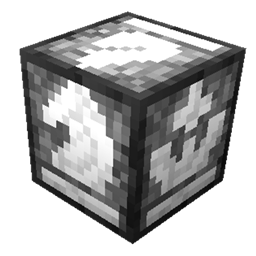
国际象棋控制方块
国际象棋控制方块是这场棋局的“大脑”。棋盘上的方块本身没有任何特殊之处。棋盘方块可以被破坏并替换为玩家喜欢的任意方块。
当你首次放置控制方块时,会生成一个新的棋盘。生成后,棋盘会被石英块和石英楼梯包围,当然这些也可以被移除。棋子会在生成后自动出现在正确的起始位置。控制法杖以及简短的使用说明书会生成在棋盘两侧的箱子中。
若要重置或清空棋盘,玩家需要接触到国际象棋控制方块。控制方块在放置时不会被消耗,而是作为棋盘构建的核心。玩家可以通过挖掘棋盘下方的区域找到它。右键点击控制方块将显示一个图形用户界面(GUI),允许玩家重置或清空棋盘。控制方块可以被开采并放置在附近更 convenient 的位置。但再次放置控制方块时不会再生成新的棋盘。
所有国际象棋游戏的信息都存储在控制方块中。若要移除棋盘和国际象棋游戏,玩家只需开采控制方块和棋盘即可。
染色玻璃配方示例
白色和黑色方块允许的方块类型
- 黑曜石
- 木板和原木
- 玻璃
- 黏土
- 羊毛
- 泥土
- 石英
- 石头、石砖和圆石
- 骨块
- 煤块
- 下界砖
- 西瓜
- 砂岩
仅仅因为某种方块不在支持的配方列表中,并不意味着不能用它来制作棋盘。如果你想要用金块和铁块制作棋盘,你可以随意替换方块。只要保持在相同的位置即可。为了使游戏正常运行,方块必须是实心的,以便棋子可以行走其上。
游戏玩法
每方有四根控制法杖,可用于控制该方的棋子。如果玩家希望完全掌控自己的一方,可以拿走所有法杖。玩家也可以与队友分享。无论如何,请确保不要丢失它们,因为如果不制作新的国际象棋控制方块,就无法替代这些法杖。
使用方法:在主手持有法杖的情况下,右键点击己方棋子以选中一枚棋子。然后右键点击目标格子或敌方棋子进行移动。法杖支持远程操作,允许玩家在生存模式下搭建平台以获得鸟瞰视角,或在创造模式下边飞边玩。
执行王车易位时,先选中国王,然后按住 Shift 键右键点击想要与之易位的车。只有当国王和车都未移动过、两者之间没有其他棋子、且国王经过的所有格子都不处于被将军状态时,王车易位才会成功。
兵到达对方底线时会自动升变为皇后。
限制
- 不支持吃过路兵,所以你的兵暂时更安全一些……目前是这样。
- 兵只能升变为皇后,不能选择其他棋子。
未来计划
- 支持吃过路兵
- 简单的国际象棋 AI(仅简单模式)
- 移动计时器
- 跳棋模式
ToroChess
Play chess in Minecraft with ToroChess! The ToroChess mod adds chess in a minecrafty way that is fun to play in both creative and survival mode. The chess pieces are made out of standard Minecraft entities which move and attack like normal mobs. The chess board can be destroyed and recreated however the player would like, allowing it to become part of the player's builds. The chess pieces are controlled with eight provided chess control wands, four for each side.
The Chess Control Block
The chess control block is the "brain" of the chess game. There is nothing special with the blocks of the board. The board blocks can be destroyed and replaced with whatever blocks the player would like.
A new chess board will be created when you place the control block for the first time. When created the board is surrounded by quartz blocks and quartz stairs which, of course, can be removed. The pieces will spawn and move to their correct starting locations just after creation. The control wands are found in the chests that spawn on the sides of the board along with a short instruction manual.
To reset or clear the board the player will need to gain access to the chess control block. The control block is not consumed when placed, instead the board is constructed around it. The control can be found under the center of the board by digging under the board. Right clicking the control block will display a GUI allowing players to reset or clear the board. The control block can be mined and placed in a more convenient nearby location. The control block will not regenerate a board when placed subsequent times.
All chess game information is stored in the control block. To remove the board and chess game, all the player needs to do is mine the control block and board.
Recipe example using stained glass
Allowed block types for the white and black blocks
- Obsidian
- Wood Planks and Logs
- Glass
- Clay
- Wool
- Dirt
- Quartz
- Stone, Sone Bricks and Cobblestone
- Bone Block
- Coal Block
- Nether Brick
- Melon
- Sandstone
Just because a block is not supported in the recipe doesn't mean you can't have a chessboard made out of it. If you want a chessboard made out of gold and iron blocks you can simply replace the blocks however you wish. The blocks must be replaced in the same spot. For the game to function correctly the blocks also need to be solid so that the chess pieces can walk over it.
Gameplay
Each side has four control wands that can be used to control the pieces for that side. If the player wants sole control over their side, they can take them all. The player could also share with friends on their team. Either way, make sure not to lose them as they cannot be replaced without crafting a new chess control block.
To use a wand, right click a piece while holding the wand in your main hand to select one of your pieces. Then right click on a square or enemy piece to move to. The wands work from far away allowing players to build platforms to gain a birds-eye-view in survival or fly around while playing in creative.
To perform a castle move, select the king then shift right click the rook you want to castle with. Castling will only work when the king and rook have not moved, no pieces are between them and the king will not be in check in any squares it moves through.
Pawns will automatically be promoted to queens when reaching the opposing side of the board.
Limitations
- En passant is not supported, so your pawns are a little safer ... for now.
- Pawns only promote to queen when reaching the opposite side.
Future Plans
- En passant support
- Simplistic Chess AI (easy mode only)
- Move timers
- Checkers Mode

 模组
 模组

 模组

 模组

 模组

 模组

评论 0
登录后参与评分
还没有评论,来抢沙发吧