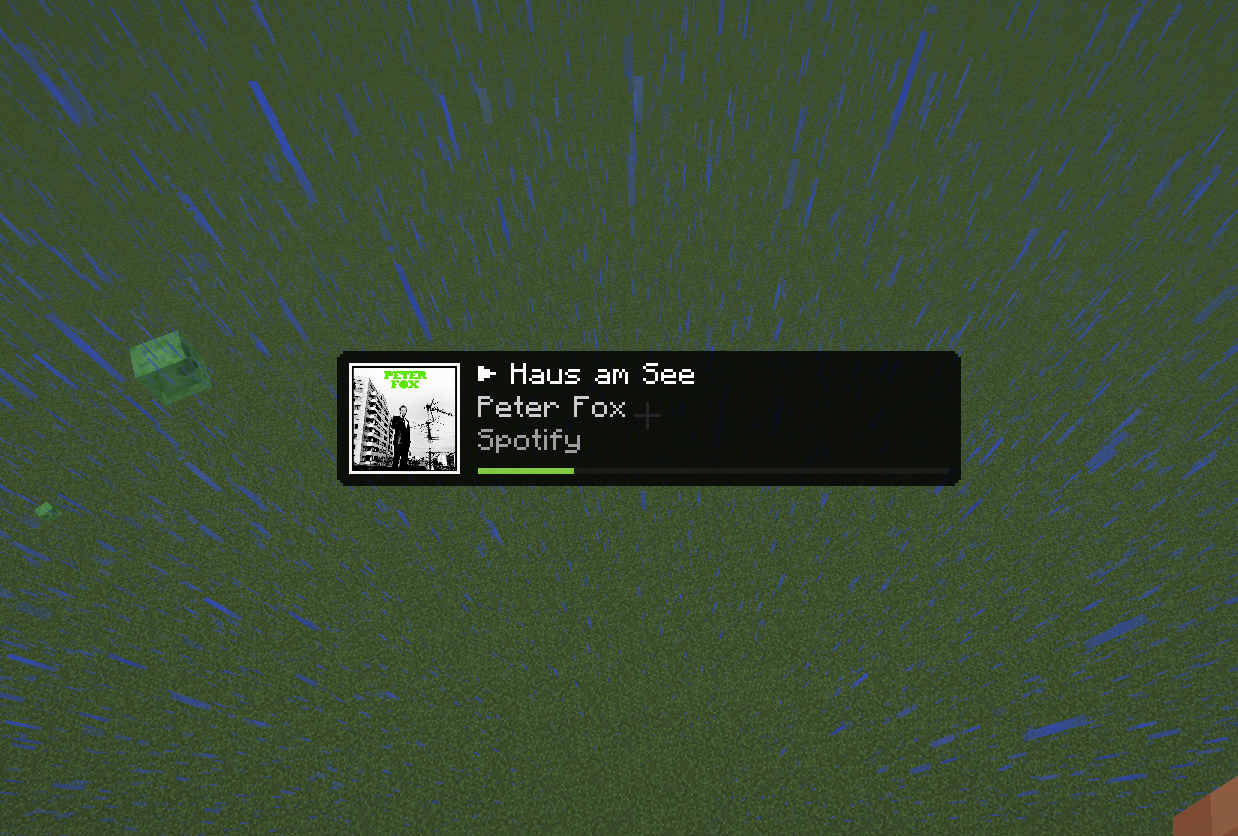
TrackView 是一款简洁精致的 Cactus 附加组件(addon),专为 Minecraft 客户端设计。它添加了一个具有原生质感的 正在播放 (Now Playing) HUD 元素,用于显示来自操作系统的媒体信息,包括 Spotify、浏览器媒体会话以及其他支持的媒体提供商。
与简单的覆盖层模组不同,TrackView 是作为 Cactus HUD 元素直接构建的。这意味着你可以像配置其他 HUD 组件一样,在 Cactus HUD 编辑器中对其位置、大小和调整进行设置。
TrackView 专注于做好一件事:在不干扰游戏的情况下展示当前正在播放的内容。


? 安装指南
TrackView 需要 Fabric Loader 和 Cactus。
在安装好 Fabric Loader 后,请安装 Cactus 并将 TrackView 的 .jar 文件放入你的 mods 文件夹中,就像安装其他 Fabric 模组一样。
启动 Minecraft 后,打开 Cactus HUD 编辑器,将 Track View 元素添加到你的 HUD 中。
如果模组安装正确,Track View 将作为可用的 HUD 元素出现在 Cactus 中。
✨ 功能
TrackView 添加了一个可配置的媒体 HUD,支持以下功能:
- 当前曲目标题
- 艺术家名称
- 来源应用程序
- 播放状态指示器
- 专辑封面或媒体缩略图
- 可选的进度条
- 可调整的 HUD 布局
- 可调节的图片大小
- 紧凑模式
- 无媒体会话时的备用显示
专辑封面和缩略图采用异步解码并缓存,有助于在媒体信息变化时保持 HUD 流畅运行。
⚙️ 配置
TrackView 可以直接通过 Cactus HUD 编辑器进行配置。
可用选项包括:
-
显示缩略图 (Show Thumbnail)
显示或隐藏专辑封面和媒体缩略图。
-
图片大小 (Image Size)
更改缩略图的大小。
-
显示来源应用 (Show Source App)
显示提供媒体会话的应用程序。
-
显示进度条 (Show Progress Bar)
当同时具备总时长和当前位置信息时,显示播放进度。
-
无媒体时隐藏 (Hide Without Media)
当没有活动的媒体会话时,隐藏该 HUD 元素。
-
紧凑模式 (Compact Mode)
在 HUD 空间有限时使用更小的布局。
大多数用户无需手动进行任何配置。默认布局旨在为正常游戏提供良好的体验。
✅ 兼容性
TrackView 是一个客户端侧的 Cactus 附加组件。
它不会改变游戏玩法,不会影响多人游戏行为,也不会提供任何竞争优势。它仅显示你本地系统上已可用的媒体会话信息。
TrackView 适用于:
- Minecraft
- Fabric Loader
- Java
- Cactus
确切支持的版本请参阅版本页面。
媒体信息取决于你的操作系统和你使用的媒体播放器。某些播放器、浏览器标签页或网站可能无法提供完整的元数据、 artwork、时长或播放进度。
? 隐私
TrackView 从你的操作系统读取本地可用的媒体会话信息。
TrackView 不会将曲目数据、媒体元数据、artwork 或使用信息上传到任何外部服务器。
? 如何报告问题
请使用页面顶部链接的问题跟踪器来报告错误、崩溃或不正确的行为。
报告问题时,请包含以下信息:
- Minecraft 版本
- Fabric Loader 版本
- Cactus 版本
- TrackView 版本
- 操作系统
- 使用的媒体播放器或浏览器
- 相关的崩溃报告或日志文件
这将有助于重现和解决问题。
❓ 注意事项
TrackView 依赖于你的操作系统提供的媒体会话集成。
这意味着行为可能在 Windows、Linux、macOS、桌面环境、浏览器和媒体播放器之间有所不同。某些应用程序可能会提供完整的元数据,而另一些可能仅提供部分信息甚至不提供任何信息。
如果缺少 artwork 或进度条,很可能是媒体播放器未通过系统媒体会话提供这些信息。
法律声明
TrackView 是一个独立附加组件,与 Modrinth、Mojang、Microsoft、Spotify、Fabric 或 Cactus 均无关联。
Minecraft 是 Mojang Studios 的商标。其他提及的名称和商标属于其各自的所有者。
TrackView is a clean and polished Cactus addon for the Minecraft client. It adds a native-feeling Now Playing HUD element that displays media information from your operating system, including Spotify, browser media sessions, and other supported media providers.
Unlike simple overlay mods, TrackView is built directly as a Cactus HUD element. This means it can be positioned, resized, and configured inside the Cactus HUD editor like your other HUD components.
TrackView focuses on doing one thing well: showing what is currently playing without getting in the way of the game.
? Installation Guide
TrackView requires Fabric Loader and Cactus.
Once you have installed Fabric Loader, install Cactus and place the TrackView .jar file into your mods folder like any other Fabric mod.
After launching Minecraft, open the Cactus HUD editor and add the Track View element to your HUD.
If the mod is installed correctly, Track View will appear as an available HUD element in Cactus.
✨ Features
TrackView adds a configurable media HUD with support for:
- Current track title
- Artist name
- Source application
- Playback state indicator
- Album art or media thumbnail
- Optional progress bar
- Resizable HUD layout
- Adjustable image size
- Compact mode
- Fallback display when no media session is active
Album art and thumbnails are decoded asynchronously and cached, helping the HUD stay smooth while media information changes.
⚙️ Configuration
TrackView can be configured directly through the Cactus HUD editor.
Available options include:
-
Show Thumbnail
Shows or hides album art and media thumbnails.
-
Image Size
Changes the size of the thumbnail.
-
Show Source App
Shows the application providing the media session.
-
Show Progress Bar
Displays playback progress when both duration and position are available.
-
Hide Without Media
Hides the HUD element when no active media session exists.
-
Compact Mode
Uses a smaller layout for limited HUD space.
Most users should not need to configure anything manually. The default layout is designed to work well for normal gameplay.
✅ Compatibility
TrackView is a client-side Cactus addon.
It does not change gameplay, does not affect multiplayer behavior, and does not provide any competitive advantage. It only displays media-session information that is already available locally on your system.
TrackView is intended for use with:
- Minecraft
- Fabric Loader
- Java
- Cactus
Exact supported versions are listed on the version page.
Media information depends on your operating system and the media player you are using. Some players, browser tabs, or websites may not expose full metadata, artwork, duration, or playback progress.
? Privacy
TrackView reads locally available media-session information from your operating system.
TrackView does not upload track data, media metadata, artwork, or usage information to any external server.
? How to Report Issues
Please use the issue tracker linked at the top of the page to report bugs, crashes, or incorrect behavior.
When reporting an issue, include:
- Minecraft version
- Fabric Loader version
- Cactus version
- TrackView version
- Operating system
- Media player or browser being used
- Relevant crash reports or log files
This makes it easier to reproduce and fix the problem.
❓ Notes
TrackView depends on media-session integration provided by your operating system.
This means that behavior may vary between Windows, Linux, macOS, desktop environments, browsers, and media players. Some applications may expose complete metadata, while others may only expose partial information or none at all.
If artwork or progress is missing, the media player most likely does not provide that information through the system media session.
Legal
TrackView is an independent addon and is not affiliated with Modrinth, Mojang, Microsoft, Spotify, Fabric, or Cactus.
Minecraft is a trademark of Mojang Studios. Other mentioned names and trademarks belong to their respective owners.


 模组

 模组

 模组

 模组
 模组
 模组

评论 0
登录后参与评分
还没有评论,来抢沙发吧