
简介
你是否注意到很多人会玩带有小地图模组的 Minecraft,或者经常使用 F3 屏幕查看坐标,尽管原版游戏里已经有地图和指南针了?这是因为这些物品在原版中并不太实用。这个模组添加了一个“阿特拉斯”(Atlas)物品来让你的地图更整洁,并增强了指南针的功能。
我制作这个模组是为了在尽可能贴近原版体验的前提下提升 Minecraft 的探索乐趣。目标是让游戏中已有的物品真正变得有用(Mojang,如果你看到了这段文字,我希望你能把这些改动加入游戏中)。
阿特拉斯(Atlas)
阿特拉斯是一个可以容纳已填充地图的新物品,它会显示离你当前位置最近的那张地图。合成配方如下:
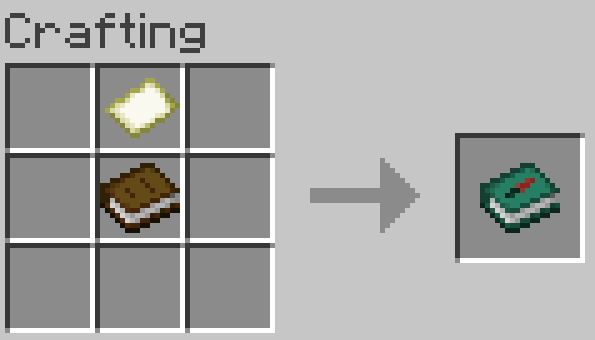
它的用法类似于收纳袋:选中它然后点击地图物品即可将地图放入阿特拉斯。你也可以先选中地图,再点击阿特拉斯将其放入。要取出地图,可以在未选中任何物品时右键点击阿特拉斯的空槽位,或者直接右键点击阿特拉斯本身。
只有相同比例和维度的地图才能放入同一个阿特拉斯。例如,如果阿特拉斯中包含来自主世界的地图,它将无法接受来自下界的地图。
如果阿特拉斯中已经包含了一张地图,当你手持它时,它会显示离你位置最近的那张地图。
如果你的物品栏中有空白地图,且当前位置在阿特拉斯中没有对应的地图,右键点击会生成一张新地图并将其添加到阿特拉斯中。如果生成的新地图需要调整比例(因为阿特拉斯中的其他地图有特定比例),则需要消耗纸张:每提升一个比例等级需消耗一张纸。
指南针增强
当你的物品栏中有指南针时,它会显示当前坐标以及面对的方向(N/E/S/W)。
除非你处于创造模式(从模组版本 0.1.4 开始),否则 F3 屏幕不会显示坐标(在模组版本 0.1.3 之前则是开启作弊功能后才显示),这让你有了实际使用指南针的理由。
已知问题
对于模组版本早于 0.1.4 的情况,由于原版 Minecraft 的一个漏洞(据我所知),你在重载游戏后可能会把来自错误维度的地图放入阿特拉斯中。请避免这种情况,否则会造成混乱。
看看我的其他模组
TWISB-Enchanting 允许以符合原版风格的方式选择附魔,鼓励玩家进行探索。它还增强了铁砧的功能。
TWISB-Combat 调整了生命恢复、药水和三叉戟的效果,使战斗更加有趣。
Summary
Noticed how many people play with minimap mods, or often use the F3 screen for coordinates even though the vanilla game has maps and compasses? Thats because those items are not that usefull in vanilla. This mod adds an Atlas item to keep your maps tidy and buffs compasses.
I created this mod to improve Minecraft exploration while keeping it as close to Vanilla as possible. The goal is to take what is already in the game and make it actually useful (Mojang, if you read this, I would love if you added these changes to the game).
The Atlas
The Atlas is a new item which can contain filled maps and shows the closest one to your current position. Here is the recipe:
It works like a bundle: select it and click on map items to place them in the Atlas. You can alternatively select the map and click it into the Atlas instead. To extract maps right click the Atlas onto an empty slot or right click the Atlas without any item selected.
Only maps of the same scale and dimension can be placed in an Atlas. For example, if the Atlas contain maps from the overworld it will not take maps from the nether.
If the Atlas contains a map, when you hold it, it will show the one closest to your location.
If you right click while having empty maps in your inventory and the current location does not have a map in the Atlas, a new map will be made and added to the Atlas. If a new map made this way needs to be scaled (because other maps in the Atlas are scaled) paper will be required: one paper is used for each scale-up required.
Compass buff
Having an compass in your inventory will show coordinates and faced direction (N/E/S/W).
The F3 screen does not show coordinates unless you're in creative mode (from mod version 0.1.4) or cheats are enabled (before mod version 0.1.3) giving you an actual reason to have a compass.
Known bugs
For mod versions before 0.1.4 due to a vanilla Minecraft bug (afaik) you are able to place a map from the wrong dimension into an Atlas after reloading the game. Avoid doing that or it gets confusing.
Check out my other mods
TWISB-Enchanting Allows selecting enchantments in a vanilla-friendly way that promotes exploration. It also buffs anvils.
TWISB-Combat Tweaks health regeneration, potions and tridents to make combat more interesting.

下载 TWISB-Exploration
下载 TWISB-Exploration
下载 TWISB-Exploration
下载 TWISB-Exploration
下载 TWISB-Exploration
下载 TWISB-Exploration
下载 TWISB-Exploration
没有新增重大功能,不过一些与该模组互动的原版元素发生了较大变化,因此也需要进行更新。
- 现在的画布行为类似于当前的捆绑物品,而非实验版本中的那些
- 除非玩家处于创造模式或持有指南针,否则坐标在可定制的 F3 界面中会被隐藏
- 允许将错误维度的地图放入画布并在重新登录时生效的 bug 似乎已经自行修复。
关于这个资源的讨论、问题反馈与使用心得
还没有讨论,来发第一帖吧
你是这个资源的作者?登录后可认领此资源。
相似资源
 模组

可定制的鞘翅模组,支持装饰纹饰、旗帜图案等更多功能!
 模组

显示你正在注视的方块的信息。(适用于 Minecraft 1.16+ 的 Hwyla/Waila 分支)
 模组
在游戏画面角落显示附近世界地形、玩家、生物和实体的地图。可创建路径点,帮助你找到标记过的位置。
 模组

查看物品与配方
 模组
使用 JavaScript 编辑配方、添加自定义物品、编写世界事件!
 模组
AE2:一款流行的自动化与存储模组
评论 0
登录后参与评分
还没有评论,来抢沙发吧