
Underlay 是一款 Minecraft 模组,允许你在下方有空间的任意方块(例如箱子、床、告示牌、火把等)上放置地毯(或其他任何物品)!
只需右键点击要放置的方块面(例如倒置楼梯的底部),即可完成放置!再次右键点击其他物品可快速替换,左键点击则可移除。在生存模式下同样可用!
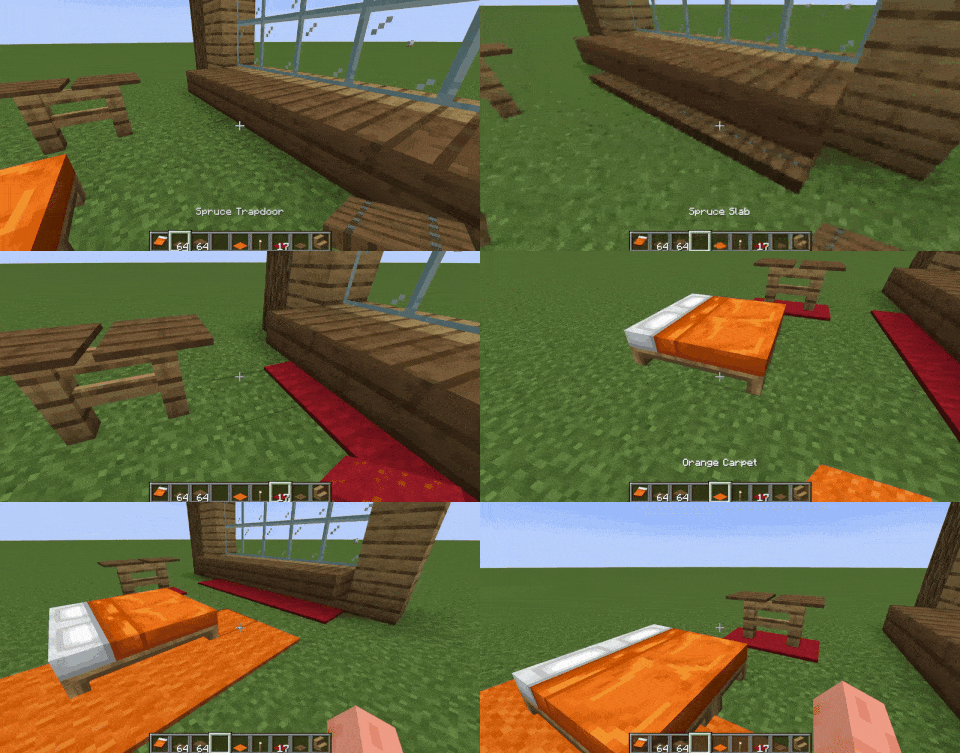
默认情况下,你可以将以下方块作为覆盖物放置:地毯、陷阱门、按钮、铁轨、台阶和压力板。若要扩展支持其他方块(例如草),请参阅“如何添加对更多方块的支持(或排除某些方块)”。
加入 Discord 服务器,抢先体验即将推出的更新!
它是如何工作的?
它们不是实体方块!
Underlay 添加了这些被称为“覆盖物”的东西 但实际上更像是下层物 xd,本质上它们是你要放置物品的虚假版本——这使得你可以在同一个方块空间内放置两样东西!
如何添加对更多方块的支持(或排除某些方块)
在你的 Minecraft 文件夹中,可以找到 config/Underlay/underlay.json。使用 overlay_blocks 添加支持的方块,使用 exclude_blocks 排除它们,若不希望在某些方块上放置覆盖物,请使用 target_exclude_blocks,如下所示:
{
  "overlay_blocks": [
    "minecraft:short_grass",
    "mymod:shiny_block"
  ],
  "exclude_blocks": [
    "minecraft:oak_button",
    "minecraft:rail"
  ],
  "target_exclude_blocks": [
    "minecraft:oak_door",
    "minecraft:spruce_door"
  ]
}
模组集成
Underlay is a Minecraft mod that lets you place carpets (and anything else) under any block with space beneath it (e.g. chests, beds, signs, torches, etc.)!
Just right click a block face with a block to place it, (for example, under an upside-down stair), and you're done! Right click again with another item to replace it quickly, or left click it to remove it. Works in Survival too!
By default, you can place the following blocks as overlays: carpets, trapdoors, buttons, rails, slabs and pressure plates. To expand this to other blocks, such as grass, see "How to add support for more blocks (or exclude some)".
Join the Discord server for sneak peeks on upcoming updates!
How does this work?
They are not block entities!
Underlay adds these things called "overlays" but they're really more like underlays xd, essentially they are fake versions of the item you place - which lets you place two things in the same block space!
How to add support for more blocks (or exclude some)
In your Minecraft folder you can find config/Underlay/underlay.json. Use overlay_blocks to add blocks, exclude_blocks to exclude them, and to not allow overlays to be placed on certain blocks use target_exclude_blocks, like this:
{
  "overlay_blocks": [
    "minecraft:short_grass",
    "mymod:shiny_block"
  ],
  "exclude_blocks": [
    "minecraft:oak_button",
    "minecraft:rail"
  ],
  "target_exclude_blocks": [
    "minecraft:oak_door",
    "minecraft:spruce_door"
  ]
}
Mod Integration
Some versions of Underlay include integration with Create, Jade and Flashback.

下载 Underlay
下载 Underlay
需要联机服务器吗?
稳定流畅、一键部署,几分钟即可和朋友联机开服
最低仅需 8 元/月 即可畅快联机
下载 Underlay
下载 Underlay
下载 Underlay
下载 Underlay
下载 Underlay
需要联机服务器吗?
稳定流畅、一键部署,几分钟即可和朋友联机开服
最低仅需 8 元/月 即可畅快联机
下载 Underlay
下载 Underlay
下载 Underlay
- 修复了与其他模组可能存在的冲突
- 修复了结构中的叠加层问题
- 为 Underlay 配置添加了标签支持
- 修复了一些 Z 轴冲突(Z-fighting)问题
- 在 NeoForge 1.21.1 上添加了 Sable 支持
关于这个资源的讨论、问题反馈与使用心得
还没有讨论,来发第一帖吧
你是这个资源的作者?登录后可认领此资源。
相似资源
 模组

可定制的鞘翅模组,支持装饰纹饰、旗帜图案等更多功能!
 模组

显示你正在注视的方块的信息。(适用于 Minecraft 1.16+ 的 Hwyla/Waila 分支)
 模组

查看物品与配方
 模组
在游戏画面角落显示附近世界地形、玩家、生物和实体的地图。可创建路径点,帮助你找到标记过的位置。
 模组
使用 JavaScript 编辑配方、添加自定义物品、编写世界事件!
 模组

适用于 MC 1.18+ 的 Effekseer 加载器
评论 0
登录后参与评分
还没有评论,来抢沙发吧