
Unidye
Unidye 允许你混合任意染料(类似于皮革盔甲染色),从而获得自定义的混合色!制作你自己的染料,并用它们来染羊毛、陶瓦、制作烟花、旗帜等。Minecraft 中的染料数量不再有限!
欢迎将此模组整合进整合包中!
如需在 Forge 上使用,请搭配 Sinytra Connector!
入门指南
首先,强烈建议使用 Polymorph 以避免原版染料配方的冲突。如果你没有安装 Polymorph,在使用原版染料制作自定义染料时,需要额外添加一根木棍作为合成材料。
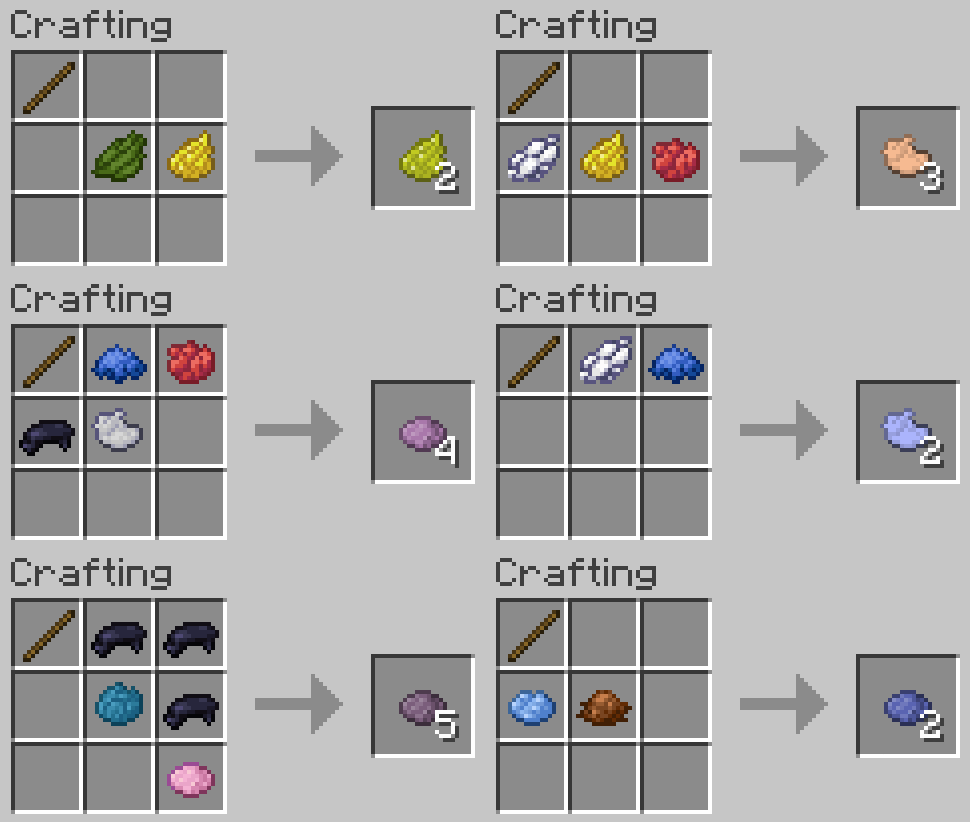
使用原版染料制作自定义染料(未安装 Polymorph):
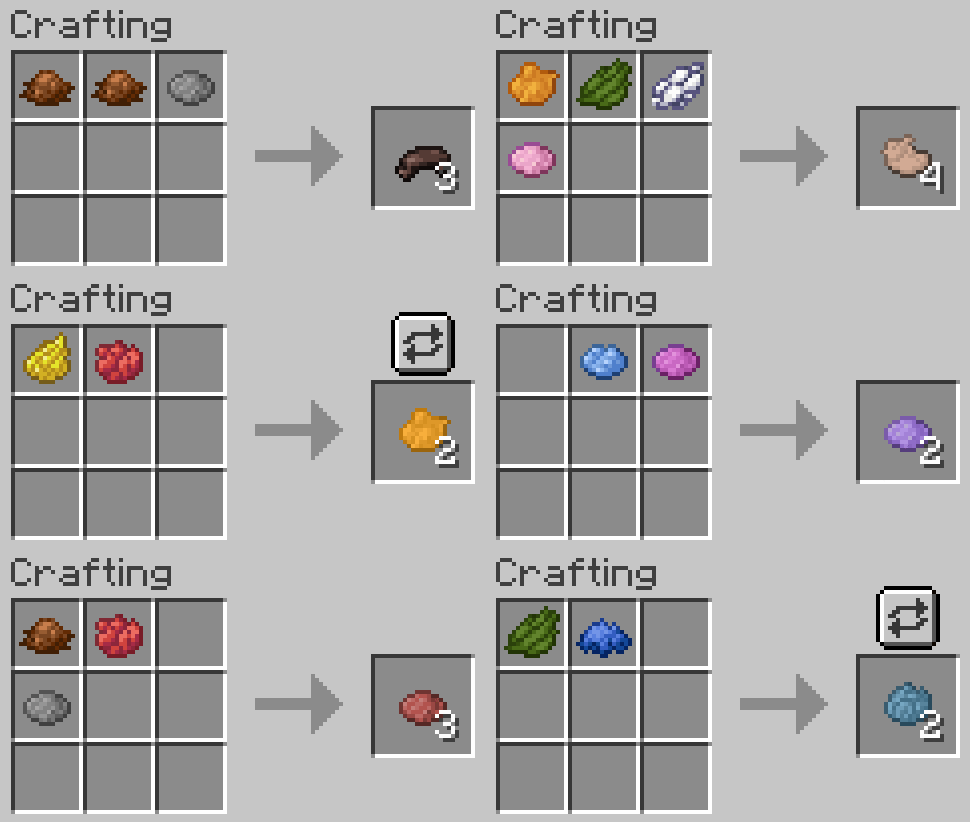
使用原版染料制作自定义染料(已安装 Polymorph):
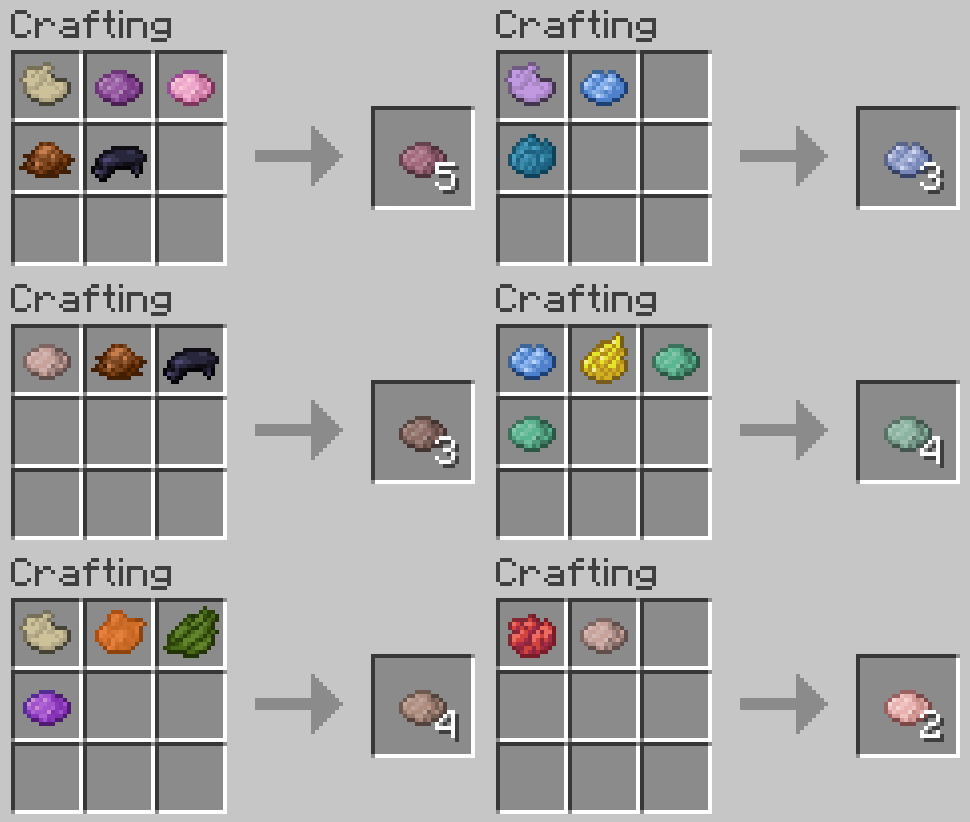
使用其他自定义染料制作新的自定义染料:
你也可以在混合新的自定义染料时使用已有的自定义染料!在这种情况下,无论是否安装了 Polymorph,都不需要添加木棍。
使用自定义染料
仔细观察你的自定义染料
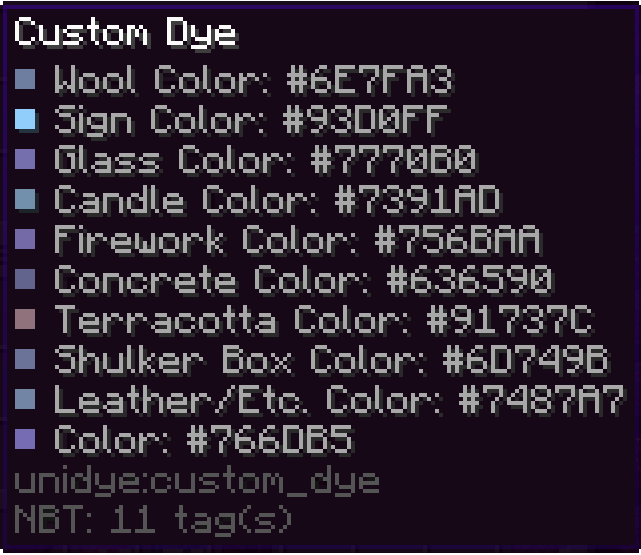
当你查看自定义染料时,你会发现它的颜色会根据用途而有所不同。这反映了原版染料在不同用途下颜色不一致的特性(例如,所有陶瓦的颜色都比对应的混凝土更柔和)。这意味着,例如,对陶瓦进行染色将得到一块具有相应颜色的自定义陶瓦。
制作自定义颜色的方块
你可以使用自定义染料来制作染色陶瓦、混凝土粉末、玻璃等。
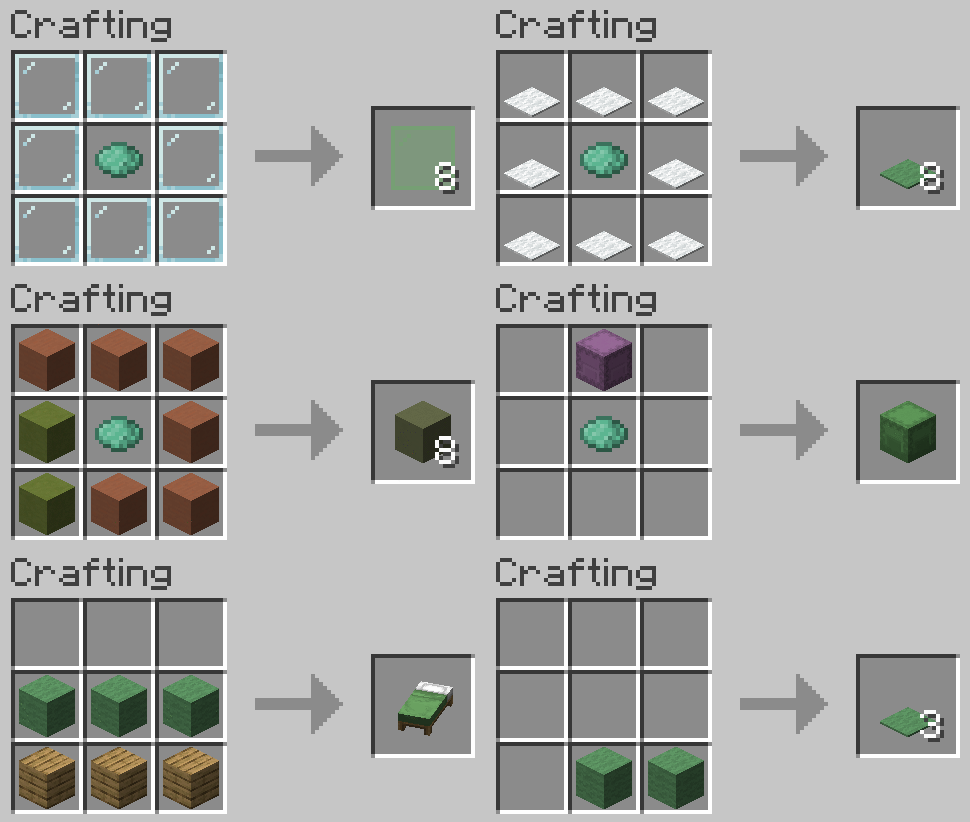
重新着色自定义颜色的方块
你可以像重新给皮革盔甲染色一样,重新给已经染色的自定义方块上色。最终方块的颜色将是所施加的染料与自定义方块原有颜色的混合色。
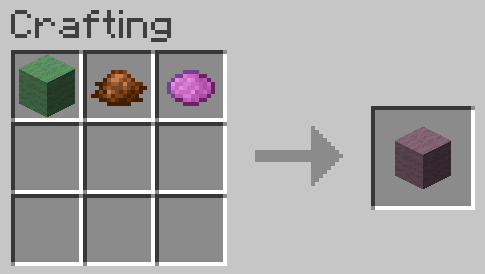
其他用途
给你的宠物项圈、绵羊羊毛染色,制作自定义颜色的烟花,染色信标光束,以及进行所有其他与染色相关的操作!(参见画廊)
要清除任何自定义或原版染色的物品,只需右键点击一个盛水的炼药锅即可。
你可以使用以下命令给自己赋予任意颜色的自定义方块(其中颜色值为十进制数)
适用于 Minecraft 1.20-1.20.4
/give @p unidye:custom_concrete{display:{color: }}

适用于 Minecraft 1.20.5+
/give @p unidye:custom_concrete[minecraft:dyed_color= ]
移植与兼容性
由于我不熟悉这些加载器,Forge/Neoforge 版本近期不会推出,但也许未来某一天会实现。
计划支持的 Minecraft 版本: 目前暂不计划支持 1.21.1 以上的版本,因为新的发布系统导致更新过于频繁。
兼容性: 像 Dye Depot 这样添加新基础染料的模组目前仅部分支持,但我正在努力完善全面兼容。对于为原版染料添加新用法的模组,我将按自己的节奏逐步兼容,因为我无法涵盖所有添加新用法的模组。如果你是开发者,并希望与 Unidye 及其模组合作开发兼容性,你可以在 GitHub 上留下功能建议。
看看我的其他项目!
模组:


材质包:

Unidye
Unidye adds an ability to mix any dyes (alike leather armor dyeing) to get custom blends! Craft your own dyes and use them to dye wool, terracotta, make fireworks, banners, etc. The amount of minecraft dyes isn't finite anymore!
Feel free to include this project in modpacks!
Use with Sinytra Connector for Forge Compatibility!
Getting Started
First of all, I heavily recommend using Polymorph to avoid vanilla dye recipe conflicts. If you do not use Polymorph, you will need to use a stick as an additional item when crafting custom dyes from vanilla dyes only.
Crafting custom dyes from vanilla dyes (without Polymorph installed):
Crafting custom dyes from vanilla dyes (with Polymorph installed):
Crafting custom dyes from other custom dyes:
You can also use custom dyes when mixing new custom dyes! In this case you will not need a stick regardless of Polymorph being installed or not.
Using Custom Dyes
Looking closer at your custom dye
If you look at your custom dye, you can see that it has different colors depending on its use. This reflects the way that vanilla dyes have inconsistent colors depending on the way we use them (e.g. all terracottas are more muted than their concrete counterpart). This means that, for example, dyeing terracotta will result in a custom terracotta with a corresponding color.
Crafting custom-colored blocks
You can use custom dyes to make dyed terracotta, concrete powder, glass, etc.
Recoloring custom-colored blocks
You can redye already dyed custom blocks, just like you can redye leather armor. The resulting block will have a color that is a mix between applied dyes and the color of the custom block.
Other uses
Dye your pets collars, your sheep's wool, craft custom colored fireworks, dye beacon beams, and do all other sorts of dye related things with custom dyes! (see gallery)
To clean any custom or vanilla dyed items just right-click a water cauldron.
You can use the following command to give yourself custom block with any color you want (where the color is in decimals)
For minecraft 1.20-1.20.4
/give @p unidye:custom_concrete{display:{color: }}

For minecraft 1.20.5+
/give @p unidye:custom_concrete[minecraft:dyed_color= ]
Porting and Compatibility
Forge/Neoforge ports are not coming in near times due to my lack of knowledge of these loaders, but maybe someday it will happen.
Planned Minecraft Versions: Currently no versions above 1.21.1 are planned with the new drop system pushing updates that frequently
Compatibility: Mods like Dye Depot that add new base dyes are semi-supported at the moment, but I will work on making a full compat. Mods that add their own uses to vanilla dyes are going to be compatted with at my own pace, since I cannot account for all the mods that add new uses. If you are a developer, and you would like to work on compatibility with Unidye and your mod, you can leave a feature suggestion at GitHub.
Check out my other projects!
Mods:
Texture packs:

下载 Unidye
需要联机服务器吗?
稳定流畅、一键部署,几分钟即可和朋友联机开服
最低仅需 8 元/月 即可畅快联机
下载 Unidye
需要联机服务器吗?
稳定流畅、一键部署,几分钟即可和朋友联机开服
最低仅需 8 元/月 即可畅快联机
下载 Unidye
下载 Unidye
下载 Unidye
下载 Unidye
下载 Unidye
下载 Unidye
下载 Unidye
下载 Unidye
暂无更新日志
关于这个资源的讨论、问题反馈与使用心得
还没有讨论,来发第一帖吧
你是这个资源的作者?登录后可认领此资源。
相似资源
 模组

可定制的鞘翅模组,支持装饰纹饰、旗帜图案等更多功能!
 模组

显示你正在注视的方块的信息。(适用于 Minecraft 1.16+ 的 Hwyla/Waila 分支)
 模组
在游戏画面角落显示附近世界地形、玩家、生物和实体的地图。可创建路径点,帮助你找到标记过的位置。
 模组

查看物品与配方
 模组
使用 JavaScript 编辑配方、添加自定义物品、编写世界事件!
 模组
AE2:一款流行的自动化与存储模组
评论 0
登录后参与评分
还没有评论,来抢沙发吧